
Top Three CMMS Platforms Right Now
If you’re shopping for CMMS software, narrowing the field to three solid contenders makes the decision a lot easier. These top three CMMS platforms each bring different strengths to the table. Which one you pick depends on whether you prioritize depth of features, ease of use, or speed of adoption. Let’s walk through what each does best, who it’s best for, and the pricing highlights you’ll want to know. #1: MPulse CMMS MPulse positions itself as a mature CMMS for teams that need comprehensive preventive maintenance scheduling, detailed work-order workflows, inventory and vendor tracking, and strong reporting. Additionally, the product emphasizes adaptability across devices and offers tiered packages that scale from small teams to enterprise setups. MPulse also highlights a long track record and thousands of customers using its platform. On pricing, MPulse publishes a Professional edition price point intended for small to midsized organizations. Their published per-concurrent-user figure is intended as a baseline though enterprise needs. MPulse provides implementation and training services designed to streamline and accelerate the rollout process. If you have complex equipment hierarchies, compliance reporting needs, or want deeper labor and vendor controls, MPulse is built for that flexibility. Who Should Consider MPulse MPulse is a great choice for facilities or manufacturing teams that need tried-and-true CMMS capabilities and good software support. Customers are typically ready to invest in configuration, training, and reporting to squeeze operational gains. #2: Limble Limble focuses on making maintenance simple and fast for teams that want mobile apps, dashboards, and asset histories. Limble often touts itself as highly rated for ease of use and places emphasis on unlimited assets and user-friendly work order management. These features can help small to medium teams adopt quickly and get measurable uptime wins. Pricing for Limble includes tiered plans (including a Standard plan in the low-to-mid tens of dollars per user per month and higher tiers for expanded inventory, analytics, and advanced features). They also provide a calculator to estimate pricing based on user counts and required modules. #3: MaintainX MaintainX is built around the frontline user: quick work-order creation from mobile devices, checklists and SOPs for technicians, QR/barcode scanning for assets, and simple inventory controls. Lately MaintainX has emphasized AI-driven suggestions to help reduce unplanned downtime, alongside a limited freemium model that lets small teams start for free and upgrade as needs grow. MaintainX’s pricing structure includes a free/basic tier and paid plans that add preventive maintenance scheduling, condition-based triggers, and expanded parts and permissions features. That makes it suitable for smaller sites, multi-location franchises, or operations teams that want a modern interface and lower friction to get started. The Right CMMS for Your Team The right CMMS depends on factors such as your team size, the complexity of your assets, your available budget, and how quickly you need to see results. A small maintenance crew managing a handful of critical machines will have very different priorities than a multi-site operation with thousands of assets and a dedicated reliability team. To make the evaluation process manageable, start by identifying your top three “must-have” capabilities. These should be the features that directly impact your day-to-day operations. For example, the ability to set preventive maintenance schedules, track and control spare-parts inventory, or ensure technicians can access work orders offline when connectivity is limited. Once those priorities are clear, schedule short demos with each vendor and keep the focus tightly on those use cases. This approach helps you see how the system performs in the areas that matter most. Have questions? We can help. Contact us.
7 Must-Have CMMS Features for Facility Maintenance

Facility maintenance managers have a lot on their plates with keeping buildings safe, systems running smoothly, and budgets under control. The tools used for maintenance have changed over the years. However, so has the technology behind them. That’s why more and more facility maintenance professionals are turning to cloud-based CMMS to simplify their daily tasks and gain better control over their operations. Cloud-Based CMMS for Facility Maintenance Cloud-based CMMS gives maintenance teams the ability to manage every aspect of their operations in one centralized platform. With a cloud CMMS, teams can create, assign, and track work orders, monitor asset performance, and access real-time maintenance data from any location. That means your team can stay up to date whether they’re in the office, on the production floor, or out in the field. This connectivity makes it easier to stay organized, respond quickly to issues, and make data-driven decisions that improve efficiency. Unlike older desktop systems that require manual updates and limit access to a single device, cloud CMMS software is faster, more flexible, and far more reliable. Users can log in from any internet-connected device, ensuring everyone always has the most current information. Modern facility maintenance software streamlines daily maintenance tasks, reduces downtime, and helps extend the lifespan of valuable assets. The result is a more productive team, lower operating costs, and a maintenance operation that runs smoothly and efficiently. Best of all, all your maintenance data is backed by the cloud. CMMS Features for Facility Maintenance If you’re thinking about upgrading, look for these seven must-have CMMS features for facility maintenance. 1. Mobile Work Order Management Paper work orders and clipboards are a thing of the past. With mobile maintenance tools, technicians can receive, update, and close work orders directly from their smartphones or tablets. A good cloud CMMS should allow your team to: Mobile work order management helps keep everyone on the same page, no matter where they are in the facility. It also cuts down on errors caused by lost paperwork or outdated information. 2. Asset Tracking & Barcode Scanning Keeping track of every piece of equipment across multiple buildings can be challenging. That’s where asset tracking comes in. Modern CMMS platforms include tools that let you record and monitor every asset, from HVAC systems to lighting controls and elevators. Barcode or QR code scanning makes this even easier. By scanning a code with a mobile device, technicians can instantly pull up the asset’s full history, including past repairs, manuals, and warranty details. This instant access to maintenance data saves time and reduces mistakes. With accurate asset tracking, facility managers can make better decisions about when to repair or replace equipment, helping extend asset life and reduce costs. 3. Preventive Maintenance Scheduling One of the biggest advantages of a CMMS is scheduling preventive maintenance to stop problems before they happen. A strong preventive maintenance feature automatically schedules inspections, filter changes, lubrication, and other routine tasks based on time, usage, or meter readings. Preventive maintenance ensures nothing slips through the cracks and helps avoid costly breakdowns. It also keeps facilities in compliance with safety and quality standards. With cloud CMMS, all this scheduling happens automatically, and reminders are sent to technicians through mobile alerts. That means less guesswork and fewer unexpected failures. 4. IoT and Software Integration Today’s facilities are becoming smarter thanks to the Internet of Things (IoT) and software integration tools. When your CMMS can connect to these systems, it unlocks powerful capabilities. For example, sensors can send real-time data to CMMS, such temperature, humidity, or vibration readings. The software can then generate alerts or even create work orders automatically when equipment is operating outside of normal conditions. This integration allows facility teams to move from reactive to predictive maintenance, reducing downtime and extending the life of equipment. It also helps optimize energy use and supports sustainability goals. 5. Reporting and Dashboards Data is only valuable when you can see and understand it. Modern facility maintenance software includes reporting tools and dashboards that turn maintenance data into actionable insights. With customizable dashboards, you can monitor key performance indicators (KPIs) such as: These reports help facility managers identify trends, measure team performance, and justify budgets with solid data. In a cloud CMMS, dashboards update in real time, so you always know what’s happening in your buildings. 6. Offline Access and Data Sync Facilities don’t always have perfect Wi-Fi or cell service, particularly in remote sites. That’s why offline access is a critical CMMS feature. The best cloud CMMS solutions allow technicians to keep working even when they’re offline. Your team can update work orders, record notes, and capture photos while disconnected. Once the device reconnects to the internet, all data syncs automatically. Offline functionality ensures maintenance work never stops, no matter where your team is or what the network conditions are like. 7. Scalability and Security Finally, your CMMS should be built to grow with your organization. Whether you manage one building or a portfolio of properties, scalability ensures your system can handle more users, assets, and data without slowing down. At the same time, security must be top priority. Look for a provider that offers encrypted data storage, secure user logins, and regular system backups. Cloud vendors typically provide stronger security than most on-site servers, along with automatic software updates and uptime guarantees. By choosing a cloud CMMS that’s both scalable and secure, you protect your investment and ensure your system stays reliable for years to come. Smart CMMS Features for Facility Maintenance Managers Upgrading to a modern cloud CMMS is one of the smartest moves a facility maintenance manager can make. The right CMMS features can transform how your maintenance team operates. With the right system in place, you’ll reduce downtime, extend asset life, and make data-driven decisions that keep your facilities running efficiently. Ready to explore a cloud CMMS for your facility management needs? Start by listing the features that matter most to your team and look for a platform that helps you grow,
Top 5 Industries That Need CMMS Software

If your organization produces goods or provides a service, or if it operates out of a building, managing maintenance should be one of your top priorities. CMMS software provides tools that help many different types of industries keep everything working properly. Whether it’s machines, equipment, vehicles, buildings, or multiple facilities, CMMS software helps companies organize, plan, and keep track of all their maintenance work. CMMS can save companies time, cut down on costs, and prevent unexpected breakdowns that can cause problems. These five industries rank at the top for CMMS software benefits. Industry #1: Manufacturing In manufacturing, every minute of downtime can translate into thousands of dollars lost. To keep production on schedule and operations efficient, machines must be maintained in peak condition. Strategic maintenance planning not only prevents unexpected breakdowns but also extends the lifespan of equipment, reducing costly repairs and replacements. Quick responses to emerging issues help avoid delays that could disrupt delivery timelines, while well-trained staff ensure safety and consistency on the factory floor. CMMS helps manufacturers with the following. With strong maintenance practices in place, manufacturers can protect their bottom line while ensuring smooth, reliable production. Industry #2: Construction In construction, heavy equipment is the backbone of progress, moving between job sites and powering each phase of a project. But without a solid maintenance strategy, tracking repairs manually can become chaotic and expensive. Scheduled upkeep and regular inspections help prevent equipment failures, ensure safety compliance, and keep timelines intact. Detailed service records support smarter budgeting and repair planning, while well-maintained machinery improves worker safety and reduces costly delays. CMMS also helps with the following. By organizing maintenance across all vehicles and machines, construction teams can reduce downtime, control costs, and keep every job site running smoothly. Industry #3: Healthcare Hospitals and healthcare facilities depend on a wide range of complex equipment to deliver safe, timely, and effective care. When systems fail, whether medical devices or building infrastructure, the consequences can include treatment delays, safety risks, and compliance issues. Regular maintenance ensures reliability, supports regulatory inspections, and helps prevent infections. Fast work order assignment and mobile access to maintenance data allow staff to respond quickly and stay informed across departments and locations. CMMS also helps healthcare organizations with the following. By proactively managing maintenance, healthcare organizations create safer environments and maintain the continuity and quality of patient care. Industry #4: Education Educational institutions from K-12 schools to sprawling university campuses are responsible for maintaining a wide range of facilities, including classrooms, labs, dormitories, and athletic centers. Without a reliable system in place, keeping everything running smoothly can be a major challenge. Regularly scheduled maintenance for HVAC, lighting, and other infrastructure helps prevent unexpected breakdowns. Fast issue reporting enables facility teams to resolve problems before they escalate, while centralized management tools streamline operations across multiple buildings. Maintenance reports also support smarter budgeting and long-term planning. CMMS also helps educational institutions with the following. By staying organized with maintenance, schools and universities can reduce downtime, control costs, and focus more fully on delivering quality education and student support. Industry #5: Government and Public Works Government agencies oversee a wide range of public assets from roads and parks to utilities and buildings, which makes maintenance a complex and critical responsibility. Relying on paper records can slow down operations and create confusion, especially when coordinating across departments. Digital tools in CMMS software streamline the process by enabling clear documentation of repairs, faster response to emergencies, and better visibility into ongoing maintenance. These systems also support transparency, improve budgeting decisions, and help agencies maintain safe, functional public spaces. By adopting modern maintenance systems, public agencies can reduce costs, prevent equipment failures, and deliver more reliable services to the communities they serve. Every Industry Needs CMMS Software Across every industry, good maintenance management helps teams stay organized, work efficiently, and be proactive. It replaces paper logs and spreadsheets with a digital system that tracks assets, schedules tasks, and sends alerts in real time. Whether managing construction equipment, maintaining school buildings, or ensuring hospital safety, good maintenance routines are essential. They help reduce costs, prevent delays, and keep operations running smoothly. Effective maintenance management software isn’t just a tool; it’s a smart solution that makes managing maintenance easier and better for every industry. Have questions? We have answers. Contact us.
How to Choose the Right Work Order Management Software for Your Business
If your business relies on equipment, facilities, or other assets that need maintenance, it’s essential to keep them running smoothly. When machines break down or jobs fall through the cracks, it can cost time, money, and trust. That’s where work order management software can help. CMMS helps track maintenance tasks, manage assets, schedule work, and keep detailed records in one place. But with so many options on the market, how do you choose the right one for your business? This simple guide will help you make a smart, confident choice. What Work Order Management Software Does Work order management software is designed to help you plan, track, and complete maintenance tasks efficiently. Whether you’re managing a manufacturing line, a fleet of vehicles, or a public facility, work order management software ensures that nothing slips through the cracks. A good CMMS platform goes beyond tracking work orders. It also keeps a full history of repairs, tracks spare parts, manages schedules, and even generates reports that help you spot problems early. Instead of relying on paper forms or spreadsheets, everything is stored digitally. As a result, your team can find and update data easily. Seven Steps to Choose the Right Work Order Management Software Step 1: Identify Your Biggest Challenges Before shopping for software, think about your current pain points. Ask yourself: The right CMMS should solve your specific problems. For example, if downtime is your biggest issue, look for a system with strong preventive maintenance tools and automated reminders. If communication is a problem, find one with mobile access and real-time updates. Step 2: Look for the Must-Have Features Not every CMMS offers the same tools. When comparing options, make sure the work order management software includes the following key features: Step 3: Think About Ease of Use Even the most powerful CMMS won’t help if your team finds it confusing. Look for a system with a clean, intuitive interface. Many vendors offer free demos or trials. Take advantage of them. During your trial, test how easy it is to: If your technicians and managers can learn the basics quickly, that’s a great sign. Step 4: Consider Scalability and Support Your needs today may not be the same in a year or two. Choose a CMMS that can grow with your business. Scalable software should allow you to add more users, assets, or sites without major costs or downtime. Also, make sure the vendor offers strong customer support and training resources. Look for flexible help options, online tutorials, and quick response times. Good support can make a huge difference during setup and beyond. Step 5: Compare Pricing and Value Pricing for work order management software can vary widely. Some systems charge per user per month, while others charge a flat fee for unlimited users. There may also be extra costs for setup, training, or advanced features. When comparing prices, don’t just look for the cheapest option. Instead, think about value. How much time, money, and effort will the system save in the long run? A slightly higher cost may be worth it if it improves uptime, reduces waste, and helps your team work smarter. Step 6: Read Reviews and Ask for References Before making a final decision, read user reviews and ask the software vendor for customer references. Find out how other companies in your industry are using the system and what results they’ve seen. Reviews can reveal useful details about real-world performance, such as how reliable the mobile app is or how fast customer support responds. Step 7: Start Small, Then Expand Once you’ve chosen your CMMS, start with a pilot program. Test it in one department or location before rolling it out company-wide. This implementation process helps identify any issues early and gives your team time to adjust. Gather feedback from your technicians, managers, and administrators. Use what you learn to fine-tune your setup before expanding. Choose the Work Order Management Software that Fits Your Business Choosing the right work order management software is an investment in your business’s efficiency and reliability. A well-chosen CMMS can help you prevent breakdowns, lower costs, and keep your operations running smoothly. By taking time to understand your needs, compare features, and test your options, you’ll find a solution that fits your business perfectly. As a result, you can keep your equipment working, your team organized, and your customers happy. Get started today. Contact us.
Best CMMS Software in 2025
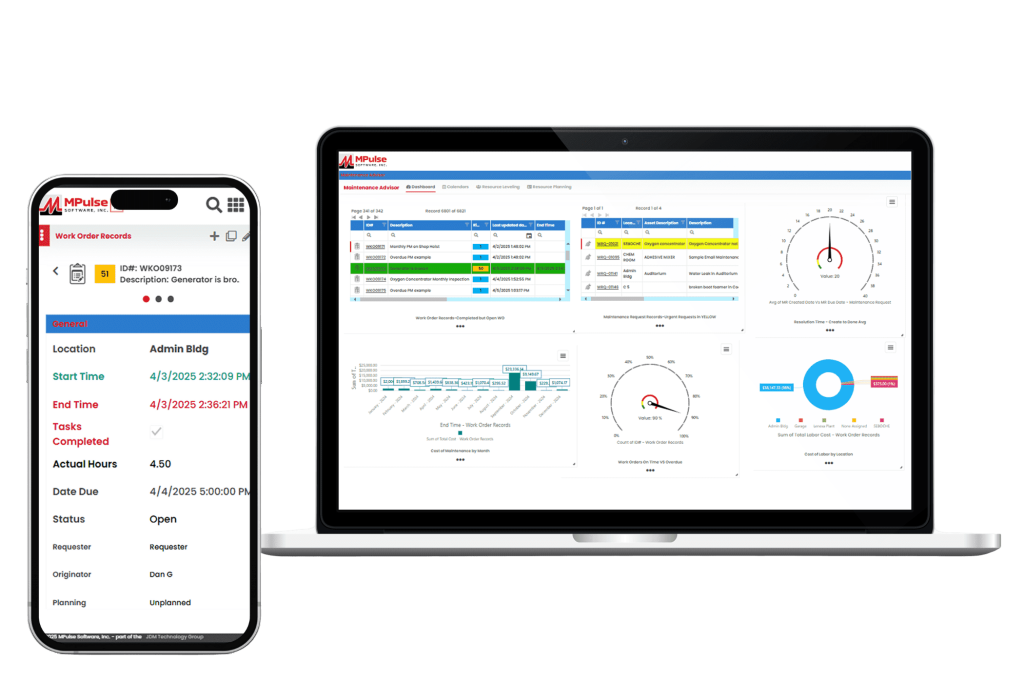
CMMS helps maintenance teams plan, track, and improve their operations. It handles everything from preventive maintenance scheduling and work orders to inventory tracking and performance reporting. As a result, your maintenance operations can get tasks done efficiently and easily measure the results. Most quality CMMS platforms include core features like work order management, maintenance scheduling, asset tracking, inventory control, reporting, and mobile access. These tools help teams prevent breakdowns, eliminate backlogs, manage parts, and control costs. The ultimate goal is to streamline operations and reduce downtime. Whether you’re transitioning from spreadsheets or replacing your current system, this in-depth comparison will help you choose the right solution. 1. MPulse CMMS Top Features Biggest Benefits MPulse CMMS is designed to help organizations of all sizes streamline their maintenance operations, improve asset reliability, and reduce downtime. What Do Users Like About MPulse? Users highlight MPulse’s balance between functionality and user-friendliness. The system’s adaptability to different industries and strong reporting tools make it a favorite for organizations seeking both flexibility and depth in their CMMS solution. Many recommend purchasing one of MPulse’s affordable implementation services to streamline the process even further. “MPulse has been instrumental in helping us transition from reactive maintenance to a proactive approach. The scheduling and tracking tools are excellent, and the reporting gives us clear visibility into our maintenance costs.” – James K. on Capterra “What I appreciate most is that MPulse can grow with your organization. It’s easy to start small and add modules or integrations as your needs expand. The support team is also responsive and knowledgeable.” – Verified User in Manufacturing on G2 “MPulse makes it easy to organize maintenance work and asset data. The ability to customize fields and workflows means we can tailor the software to fit how we operate instead of the other way around.” – Sarah M. on G2 Pricing MPulse offers flexible pricing tiers depending on deployment type (cloud or on-premises), number of users, and selected modules. Plans generally start around $49 per user per month, with additional costs for advanced features like predictive maintenance, API access, and enterprise reporting. A free demo and custom quote are available upon request. 2. Limble CMMS Limble CMMS is a cloud-based platform that helps organizations manage and improve their maintenance operations. With an solid interface and a range of practical features, it supports teams across industries in organizing workflows, reducing downtime, and maintaining asset performance. Top Features Why Users Like Limble CMMS Companies like G2, Capterra, Reddit, Software Advice, and more make it easy to hear from software users about their experience. Here are some of the most useful reviews. What Do Users Dislike About Limble CMMS? 3. Fiix CMMS Fiix CMMS is a cloud-based maintenance management platform that integrates AI and machine learning for maintenance efficiency and asset performance. Its interface and scalable design make it a strong choice for small to mid-sized businesses with distributed assets. Top Features What Do Users Like About Fiix? Users report that overall, Fiix is a useful tool for helping organize and execute maintenance and equipment servicing. They also report a good relationship with customer service and overall improved work order coordination across teams. What Do Users Dislike About Fiix? Reviewers note that there is room for improvement in the way the system facilitates communications with work requestors who don’t have user licenses. They also comment on the lack of customizability for some features. Pricing Fiix CMMS uses a tiered pricing structure, beginning with a free plan that covers essential maintenance functions, then expanding to paid tiers with more advanced capabilities. The Basic plan costs $45 per user per month, and the Professional plan is $75, both adding tools such as advanced scheduling, analytics, and reporting. For larger organizations with specialized needs, the Enterprise plan provides customized solutions with pricing available upon request. 4. UpKeep UpKeep positions itself as a mobile-first CMMS built to simplify maintenance and operations management for businesses of all sizes. Its interface and features enable users to manage work orders, track assets, and streamline maintenance activities from both mobile devices and desktops. Top Features What Do Users Like About UpKeep? UpKeep customers report it to be a significant upgrade from paper and manual processes, especially for the cost. They also appreciate its useability and visual appeal. What Do Users Dislike About UpKeep? While UpKeep is rated highly overall, some users report a lack of customizability, bugginess, and technical difficulties with some features. Pricing UpKeep offers a tiered pricing structure based on the number of users and the level of features needed. They do not offer a long-term free plan but do provide a 14-day free trial. Plans range from a “lite” level that includes basic maintenance management tools at $20 per user per month. Advanced options that include predictive maintenance, reporting analytics, and integrations can cost as much as $120 with additional products and add-ons like IoT connectivity for additional fees. 5. MaintainX MaintainX is a mobile-first CMMS that emphasizes the advantages of managing maintenance through its mobile app. It offers an interface and tools for handling work orders, performing inspections, and tracking assets from smartphones or tablets. The platform is geared toward organizations with distributed teams and frontline workers who need real-time access to information and tasks while on the move. Top Features What Do Users Like About MaintainX? MaintainX delivers the basics for its users, including an intuitive interface, real-time communication, and efficient work order management. Many report having a more organized and more mobile operation as a result of using the system. What Do Users Dislike About MaintainX? Smaller teams or startups may find that MaintainX’s pricing is higher for the features offered than some other solutions. Some users report occasional bugs or limited options for customization and integration with other tools. Pricing MaintainX provides four pricing tiers, starting with a free basic plan that includes unlimited work orders and messaging. The Essential plan, priced at $16 per user per month, adds features like recurring work orders and reporting. The Premium plan costs $49 per
Maintenance Work Order Software: What It Is and Why It Matters

When something breaks in a building, maintenance techs need to figure out what needs fixing, where to find it, and when to repair it. Today, many businesses, schools, hospitals, and property managers use maintenance work order software to make this process easier, faster, and more reliable. Let’s explore what maintenance work order software is, how it works, and why it’s such an important tool. What Is a Work Order? A work order is a job request that explains what needs to be done, like… In the past, people wrote work orders on paper. A manager would write the request, hand it to a technician, and then wait for the job to be finished. The problem? Teams misplace paper, skip details, and find it hard to track completed work. That’s why more organizations now use CMMS to create maintenance work orders. How Maintenance Work Order Software Works Maintenance work order software is a computer program or app that organizes repair and upkeep tasks in one place. Instead of using sticky notes, phone calls, or spreadsheets, everything is logged into the system. Here’s how it works: Maintenance work order software turns a confusing pile of papers into a neat, digital list that everyone can see and use. Why Is Maintenance Work Order Software Helpful? Maintenance work order software saves time, money, and stress. Some of the biggest benefits include: Features to Look for in Maintenance Work Order Software If an organization is thinking about getting maintenance work order software, here are some features that are especially useful: Together, these tools make maintenance smarter, not harder. They also reduce downtime, save money, and extend the life of buildings and equipment. Why Maintenance Matters More Than Ever At the end of the day, maintenance isn’t just about fixing things. It’s also about keeping spaces safe, comfortable, and functional for the people who use them. Whether it’s a student in a classroom, a patient in a hospital, or a family in an apartment, maintenance work order software helps make sure everything runs smoothly behind the scenes. As buildings and machines become more advanced, keeping track of maintenance tasks by hand is almost impossible. However, work order software takes away the guesswork and helps teams stay on top of everything. By moving away from paper and embracing CMMS tools, organizations can stay organized, fix problems faster, and even prevent them before they happen. In today’s world, where time and money matter, that victory means a lot. Have questions? MPulse can help. Contact us.
Smart Ways to Schedule Maintenance with CMMS

When people schedule maintenance, they often imagine a simple calendar alert that tells you it’s time to change a filter or test the fire alarms. But in large buildings and facilities, scheduled maintenance requires a lot more than just a date on a calendar. Scheduling maintenance isn’t just about remembering to do something. It’s a smart way to keep buildings and equipment safe, working well, and running smoothly. Why Calendars Aren’t Enough In large buildings with lots of systems (like heating, cooling, lighting, and machines), a calendar isn’t enough. You can easily miss tasks or forget what happened and when. And if you don’t catch problems early, they can turn into big, expensive repairs. That’s why many building managers use CMMS. Why Scheduled Maintenance Really Matters Maintenance work order software helps teams track everything and make sure nothing is left out. Scheduled maintenance means checking, cleaning, or fixing equipment before it breaks. Here’s why it’s so important: How CMMS Helps You Schedule Maintenance Today, many building managers use CMMS software to plan and manage maintenance. This software does more than just send reminders. It can: Many CMMS tools also work on phones or tablets, so workers can get information and update jobs while they’re out in the field. Scheduled Maintenance Needs More Than a Calendar Reminder Good maintenance isn’t just about tools. It’s about teamwork. Everyone needs to understand why it matters. When building owners, managers, and workers all care about regular maintenance, buildings work better, last longer, and stay safer. Scheduled maintenance isn’t just a date on the calendar. It’s a smart way to keep buildings working properly. It saves money, prevents big problems, and helps everyone stay safe. Using software like a CMMS makes it easier to plan, track, and complete maintenance tasks the right way. Whether you’re running a school, office, or factory, staying ahead with scheduled maintenance is always the best choice. Instead of waiting for things to break, fix them before they do. Your building (and your budget) will thank you. MPulse can help you get started today. Contact us.
What Does CMMS Stand For? Here’s Why It Matters for Your Maintenance Team
If you’ve ever worked in facilities maintenance or manufacturing, chances are you’ve come across the acronym CMMS. But what exactly does it mean? CMMS Stands for Computerized Maintenance Management System In simple terms, CMMS is software that helps organizations keep track of their maintenance operations. That includes everything from scheduling routine tasks to tracking inventory, managing work orders, and analyzing performance metrics. A good CMMS acts like a hub for maintenance teams, centralizing information and streamlining communication. What Does a CMMS Do? CMMS can serve as your team’s digital toolbox. Modern CMMS platforms like MPulse are often cloud-based, mobile-friendly, and integrated with other systems like purchasing or asset management. Instead of relying on spreadsheets, paper checklists, or memory, you can use CMMS to: With everything in one place, your team saves time, avoids costly surprises, and keeps equipment running longer. Who Uses a CMMS? Nearly every industry uses CMMS software: manufacturing plants, hospitals, universities, hotels, property management companies, utilities, and local governments, just to name a few. Each of these sectors depends on complex systems and equipment that require regular maintenance to run efficiently and safely. For example, a hospital uses a CMMS to schedule inspections of life-saving medical devices and HVAC systems that control air quality. A university might rely on it to track maintenance across dozens of academic buildings, dormitories, and athletic facilities. Whether you’re overseeing a single location or managing a portfolio of properties spread across multiple cities, a CMMS brings organization, automation, and visibility to your operations. It helps small teams handle large workloads by streamlining requests, prioritizing tasks, and preventing issues before they turn into costly repairs. As a result, you can do more with fewer resources and less stress. CMMS is a Smarter Way to Manage Maintenance CMMS isn’t just software. It’s a smarter way to manage maintenance. If your team is juggling requests, dealing with frequent breakdowns, or struggling to get ahead of the backlog, implementing a CMMS could be a game-changer. And now that you know what CMMS stands for, you’re one step closer to understanding how it can work for you. Get started today. Contact us.
Stay on Top of Building Maintenance with Mobile CMMS

Mobile CMMS tools are changing the game for building maintenance. With mobile access to maintenance data, work orders, and asset histories, facility managers and technicians can respond faster, stay organized, and keep operations running smoothly, no matter where they are. Staying on top of building maintenance is no small task—especially when you’re juggling multiple properties, teams, and unexpected repairs. That’s where mobile CMMS helps, one tap at a time. Goodbye Clipboards, Hello Smartphones Let’s face it—paper checklists and scribbled notes don’t cut it anymore. With a mobile CMMS, your maintenance team trades clipboards for smartphones or tablets, giving them everything they need in the palm of their hands. Work orders, asset histories, photos, manuals—it’s all just a few taps away. Real-Time Updates, Right Where You Are Got a leak on the fifth floor? Your technician can receive an alert, head to the site, log the issue, take a photo, and then update the work order in real time. No detours to the office. No paperwork left behind. Everyone stays in the loop—from facilities managers to technicians to tenants—without playing phone tag. Offline Access Keeps the Work Flowing No Wi-Fi? No problem. Many mobile CMMS platforms let users work offline and sync updates once they’re back online. So whether your team is in the boiler room, a basement, or a far corner of a sprawling campus, maintenance doesn’t have to stop just because the internet did. Smart Scheduling and Smarter Workflows A mobile CMMS isn’t just about emergency fixes—it shines when it comes to preventive maintenance. Teams get scheduled task reminders right on their devices, along with step-by-step instructions and safety checklists. It cuts down on missed inspections and makes sure things are done right the first time. Track, Report, and Use Your Data Every job logged on the app adds to a growing pool of data that helps your team spot patterns, plan budgets, and make informed decisions. Plus, those before-and-after photos and timestamps? Great for showing clients, tenants, or upper management that your team’s on top of it. Stay Top of Building Maintenance with Mobile CMMS In the world of building maintenance, timing is everything. Whether it’s a busted pipe, a finicky HVAC unit, or an elevator acting up right before a big event, delays can cost you—both in dollars and reputation. Mobile CMMS isn’t just a trend—it’s quickly becoming the standard for efficient, effective building maintenance. It keeps your team connected, your tasks on track, and your building running like a well-oiled machine. Because in maintenance, being mobile doesn’t just mean moving fast—it means staying ready. Give your crew the tools to get the job done. Contact us to get started today.