
Asset QR Codes: Scan an Asset, Report the Problem
Put a QR code on every asset and connect the physical equipment to its digital record. With MPACT CMMS by MPulse Software, a scan opens a maintenance request. No typing and no login required for requesters.
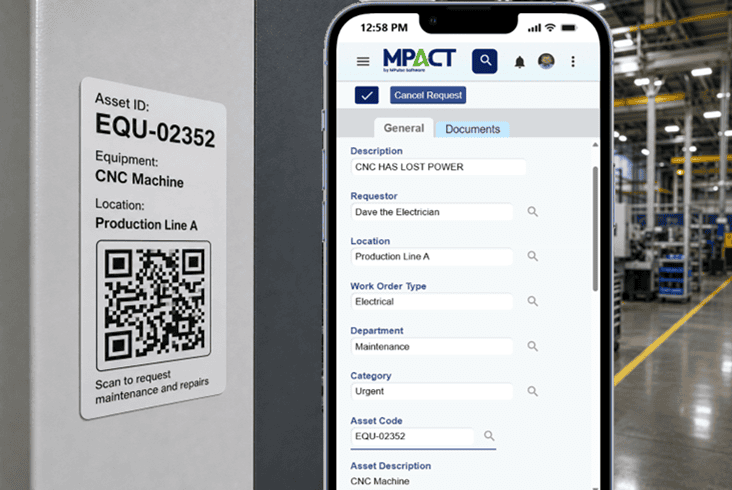
How Asset QR Codes Work in MPACT
MPACT generates QR code tags for your assets. Print them, attach them to equipment, rooms, and vehicles, and every scan resolves to that asset’s record in the system. Anyone with a phone camera can report an issue against the right asset, and licensed users can use the Asset ID to to locate the history, documents, and open work connected to it.
Three Things a Scan Can Do
Report a problem in seconds
A forklift operator spots a leak, scans the tag on the machine, and submits a request from their phone. No app install, no login, no guessing which asset it was. The request lands in MPACT already attached to the right equipment, and the requester gets automated status updates.
Pull up the record where you stand
Technicians enter the ID to open the asset in MPACT: maintenance history, documents, meters, open work orders, and associated parts. The five minutes spent searching becomes one ID entry.
Tag your assets without a side project
Generate QR tags from the asset records you already have in MPACT. Tag high-priority equipment first and expand as you go; every tag you add makes reporting and lookups faster..
Why Scanning Beats Typing
Manual data entry is where maintenance data goes wrong: the wrong asset ID, the misremembered location, the request that names a machine that does not exist. Scanning removes the transcription step. The record is identified by the tag, not by memory, so histories stay clean and reports stay trustworthy.
Connected to the Rest of Your Maintenance Work
Scanning is an entry point, not a separate system. A scanned request converts to a live work order without leaving the screen. Asset lookups show the parts associated with the equipment. And everything a scan touches lands in the same records your dashboards and reports draw from.
Frequently Asked Questions About Asset Scanning
Do requesters need a license or login to scan and report?
No. Requester accounts are free and unlimited in MPACT, and the QR request flow works without signing in. Anyone in the building can report a problem against the right asset from their phone.
How do I create QR tags for my assets?
MPACT generates QR codes from your asset records. Print and attach them; each tag links back to its asset, so scans resolve to the correct record automatically.
Does scanning work for parts as well as assets?
Asset tags connect equipment, rooms, and vehicles to maintenance requests, and parts are associated with assets and work orders inside MPACT. For parts-specific workflows, see parts inventory management.
What happens after someone scans and submits a request?
The request appears in MPACT with the asset attached. Your team reviews it, adds people and parts, and converts it to a live work order without leaving the screen. The requester receives automated updates as the work moves forward.
Put a Tag on It
See the scan-to-request workflows live, on your own asset list if you like.