
TL;DR:
- A healthcare-focused CMMS with EP-mapped templates and linked audit trails improves survey readiness by providing clear, exportable evidence. MPulse Software offers automation, mobile capture, and ongoing support that align with Joint Commission standards, reducing compliance risks. Running mock tracers before surveys helps facilities identify and close record gaps efficiently.
For healthcare facility managers and compliance officers evaluating Joint Commission–ready maintenance solutions, MPulse Software is the recommended CMMS. It produces the traceable, EP-linked evidence surveyors expect, automates preventive maintenance scheduling, and backs implementation with structured onboarding support.
Three reasons it fits Joint Commission requirements:
- Survey-ready audit trails and evidence exports: MPulse captures asset records, PM histories, inspection results, and vendor service logs in a linked, exportable format that maps directly to Environment of Care Elements of Performance, giving surveyors the process-level documentation they require.
- Healthcare-aligned feature set: PM automation, mobile point-of-work capture, document control, and role-based access address the specific gaps that generic maintenance tools leave open during a tracer.
- Implementation and ongoing support: MPulse’s implementation services include configuration, training, and continuous improvement support, reducing the time between go-live and survey readiness. The platform serves thousands of customers and is associated with significant efficiency gains.
Table of Contents
- Why does a healthcare-focused CMMS outperform generic tools?
- What features does your CMMS need for Joint Commission readiness?
- What does CMMS pricing look like, and how do you calculate ROI?
- How does MPulse Software address Joint Commission readiness?
- What questions should you ask vendors during a demo?
- Key Takeaways
- What most facilities get wrong about survey readiness
- MPulse Software gives you survey-ready evidence from day one
- Useful sources
- FAQ
Why does a healthcare-focused CMMS outperform generic tools?
A healthcare-focused CMMS reduces survey risk because it maps maintenance activities to specific Elements of Performance and generates the linked, process-level evidence that tracers require. Generic maintenance software manages work orders. A healthcare-optimized platform manages compliance evidence.
The gap between the two shows up clearly when you compare them feature by feature:
| Capability | Generic CMMS | Healthcare-Focused CMMS |
|---|---|---|
| EP mapping and templates | Not included | Pre-built or configurable per EC standard |
| Tracer-ready reporting | Ad hoc exports only | Structured tracer reports by asset or process |
| Life-safety / NFPA workflows | Not supported | Built-in inspection and test record types |
| Mobile point-of-work capture | Limited or absent | Full mobile capture with photo and signature |
| Vendor and contract management | Basic | Linked to asset records and service histories |
| HIPAA/security controls | General IT security | Role-based access with audit trail |
A concrete tracer example illustrates why this matters. A surveyor selects a patient-connected infusion pump. In a healthcare-focused CMMS, the asset record shows the device ID, location, and risk classification. The PM history shows every scheduled inspection completed on time. Test results are attached as documents. The vendor’s last service visit is logged with technician credentials. If a surveyor asks who performed the last PM and whether that person was qualified, the answer is one click away. In a generic tool, that answer may require pulling records from three separate spreadsheets, a paper binder, and an email thread.
Healthcare facility managers who want a deeper look at how healthcare-focused CMMS software improves compliance and patient safety will find the feature-to-outcome mapping worth reviewing before finalizing a vendor shortlist.
What features does your CMMS need for Joint Commission readiness?
The single most essential capability is a linked audit trail with EP-mapped templates. Without it, your CMMS produces records but not evidence. Surveyors need to see that a completed work order connects to a specific asset, a specific standard, and a specific qualified technician. Everything else on this list supports that core requirement.
Must-have feature checklist:
- Inspection and test record storage: — Dedicated record types for life-safety inspections, equipment testing, and NFPA-required tests, stored with the asset and retrievable by date range.
Feature-to-EP mapping:
| Feature Category | Joint Commission EP / EC Standard |
|---|---|
| PM automation | EC.02.04.01 |
| Inspection and test records | EC.02.05.01 |
| Asset lifecycle tracking | EC.02.04.01, EC.02.06.01 |
| Vendor and credential management | EC.02.04.01 |
| Audit trail and evidence export | All EC standards (document review component) |
| Dashboards and PI reporting | PI standards (performance improvement) |
| Document control | All standards (policy and procedure review) |
| Role-based access | HIPAA Security Rule, information management standards |
The Joint Commission’s accreditation fact sheet explains how accreditation standards crosswalk to CMS Conditions of Participation, which is useful context when building your EP-to-feature mapping and justifying the investment internally.
What does CMMS pricing look like, and how do you calculate ROI?
Choose the pricing model that aligns with your facility’s scale and integration requirements. Most healthcare CMMS platforms offer SaaS subscriptions priced per user, per asset, or as tiered module bundles, with separate fees for implementation, data migration, and ongoing support.
Pricing considerations:
- Total cost of ownership (TCO): Subscription fees are only part of the picture. Factor in implementation services, data migration, integration development, training, and annual support costs.
- Hidden fees: Ask vendors specifically about costs for additional integrations, API access, custom report development, and data export. These are common sources of budget overruns.
- Implementation billing: Many vendors bill implementation as a separate project fee or phase it across the first year. Clarify whether training is included or priced separately.
- License vs. subscription: Perpetual licenses carry higher upfront costs but lower ongoing fees; SaaS subscriptions spread cost over time and typically include updates and support. For compliance-driven environments, SaaS is generally preferable because it keeps the platform current with regulatory changes.
ROI metrics to track:
- Reduction in survey findings (RFI count per survey cycle).
- PM completion rate improvement (percentage of scheduled PMs completed on time).
- Reduction in emergency corrective work orders as a share of total work orders.
- Staff time saved on documentation and evidence retrieval before surveys.
- Equipment uptime improvements tied to PM adherence.
- Risk-adjusted cost avoidance from reduced citations and potential CMS penalty exposure.
When you build a vendor RFP, ask each vendor to populate a simple ROI model during the demo: their average PM completion rate improvement for comparable facilities, their typical time to full asset registry completion, and reference contacts at facilities of similar size and complexity. Vendors who cannot provide those numbers during a demo are telling you something about their implementation track record.
MPulse Software’s preventive maintenance resources provide useful context for modeling PM-driven ROI before you enter vendor conversations.
Facilities that shift from reactive to preventive maintenance programs consistently report reductions in emergency work orders and improvements in equipment uptime, both of which translate directly into lower survey risk and reduced operational cost.
How does MPulse Software address Joint Commission readiness?
MPulse aligns to the must-have feature checklist and reduces survey risk through PM automation, linked audit trails, mobile capture, document control, and structured reporting, all configurable to EP-level requirements.
MPulse capabilities mapped to Joint Commission needs:
- Audit trail and evidence export: Every work order, inspection, and PM completion is time-stamped and linked to the asset and technician. Records export in formats suitable for surveyor review.
- PM automation: Configurable schedules with automatic work order generation, frequency management, and completion tracking tied to asset records and EC standard categories.
- Mobile point-of-work capture: Technicians complete inspections, attach photos, and record signatures on mobile devices, creating real-time evidence at the point of work rather than after the fact.
- Document and digital binder support: Policies, procedures, vendor manuals, and inspection reports are stored and version-controlled within the platform.
- Vendor and contractor management: Vendor records link to assets and service histories, with credential documentation stored alongside contract terms.
- Reporting and dashboards: Leadership-facing dashboards show PM completion rates, overdue inspections, and open findings. Tracer-style reports pull all records for a selected asset or process in one view.
- Role-based access and security: User permissions restrict data access by role, with audit logging that supports HIPAA-aligned security practices. For facilities managing electronic records under strict integrity requirements, MPulse’s approach to secure electronic records and audit trails is worth reviewing.
- Integrations and APIs: MPulse connects with EHR, ERP, building automation systems, and asset registries, reducing manual data re-entry and keeping records synchronized.
EP checklist mapping:
- EC.02.04.01 (medical equipment management): PM automation, inspection records, asset lifecycle tracking, qualified technician documentation.
- EC.02.05.01 (utility systems): Scheduled inspection and test records, corrective work order linkage.
- EC.02.06.01 (physical environment): Asset and location records, maintenance history.
- Life safety chapter: NFPA-aligned inspection types, fire system test records, egress documentation.
- PI standards: Dashboard reporting, trend analysis, corrective action tracking.
MPulse serves more than 3,500 customers and has demonstrated efficiency gains of up to 40% for maintenance operations. For healthcare facilities, that efficiency gain translates into higher PM completion rates and more time for staff to focus on compliance-critical tasks rather than administrative documentation. The platform’s CMMS and JCAHO compliance content provides practical examples of how these capabilities apply in healthcare settings.
Implementation typically follows a phased approach: asset registry build and configuration in the first phase, staff training and mobile deployment in the second, and mock tracer exercises and ongoing optimization in the third. MPulse’s implementation services support each phase with structured onboarding and continuous improvement resources.
What questions should you ask vendors during a demo?
Walk into every vendor demo with a tracer scenario already prepared. Pick a high-risk asset from your facility, such as a ventilator or a fire suppression panel, and ask the vendor to show you exactly what a surveyor would see if they traced that asset through their platform.
Demo script (30–45 minutes):
- Show the asset record for a selected piece of equipment. What fields are captured? Is the risk classification visible?
- Pull the complete PM history for that asset. Can you filter by date range and export it as a PDF?
- Run a tracer report that shows all records connected to that asset: work orders, inspections, test results, vendor visits, and staff credentials.
- Export the evidence package for a specific EP. What format does it produce? Can a surveyor review it without logging into the system?
- Show the audit trail for a completed work order. Who made changes, and when?
- Demonstrate mobile capture: complete a mock inspection on a mobile device, attach a photo, and show how the record appears in the system.
Vendor questions to ask:
- Which EC standards and EPs are pre-mapped in your templates, and how are they updated when standards change?
- What evidence export formats do you support, and can we customize the output for a tracer binder?
- Do you offer mock tracer support or pre-survey readiness reviews as part of your implementation services?
- What integration endpoints do you support for EHR, ERP, and building automation systems?
- What is your data retention policy, and how long are records accessible after a subscription ends?
- How do you handle HIPAA security requirements for maintenance data that touches patient-adjacent systems?
- What are your SLA terms for system uptime and support response time?
- Can you provide references from hospitals or health systems of similar size and complexity?
Red flags to watch for:
- Audit trails that cannot be exported or that show only the most recent action rather than a full history.
- No pre-built EP templates or EP mapping, requiring your team to build compliance structure from scratch.
- Document control that relies on file attachments with no version control or access logging.
- Mobile experience that is a stripped-down version of the desktop interface rather than a purpose-built field tool.
- Implementation timelines that exceed six months for a standard deployment without a clear phased plan.
- No references from healthcare facilities with active Joint Commission accreditation.
For guidance on healthcare asset tracking best practices that inform what your asset registry should look like before a demo, that resource covers the documentation standards worth knowing.
Key Takeaways
A healthcare-focused CMMS with EP-mapped templates, linked audit trails, and mobile point-of-work capture is the most direct path to Joint Commission survey readiness.
| Point | Details |
|---|---|
| Select a healthcare-focused CMMS | Generic maintenance tools lack EP mapping and tracer-ready reporting that surveyors require. |
| Map EPs to CMMS templates | Mirror the Compliance Assessment Workbook structure inside your templates to capture evidence at the point of work. |
| Run mock tracers before surveys | Start with high-risk departments, trace a selected asset end-to-end, and close record gaps before the actual survey. |
| Require audit export during demos | Ask vendors to export a full evidence package for a specific EP during the demo; opaque exports are a disqualifying red flag. |
| MPulse Software as the recommended option | MPulse provides PM automation, linked audit trails, mobile capture, and EP-configurable templates for 3,500+ customers. |
What most facilities get wrong about survey readiness
The conventional wisdom in healthcare compliance is that survey readiness is a documentation problem. Get the binders organized, make sure the policies are current, and you will be fine. That framing misses the point entirely, and it is why so many facilities receive findings on standards they believed they were meeting.
Surveyors are not auditing your binders. They are tracing your processes. The question is not whether a policy exists; it is whether the people doing the work followed it, and whether the records prove it. A facility can have a perfectly written PM policy and still receive a finding on EC.02.04.01 because the work orders show a pattern of late completions, or because the technician who performed the last inspection was not credentialed for that equipment type.
The implementation lesson most facilities learn too late is that CMMS configuration is a compliance decision, not an IT decision. The fields you include in a work order template, the way you structure your asset registry, and the frequency rules you set for inspections all determine what evidence you can produce during a tracer. If those decisions are made by an IT team optimizing for ease of data entry rather than a compliance officer optimizing for EP alignment, the system will generate records that look complete but fail under scrutiny.
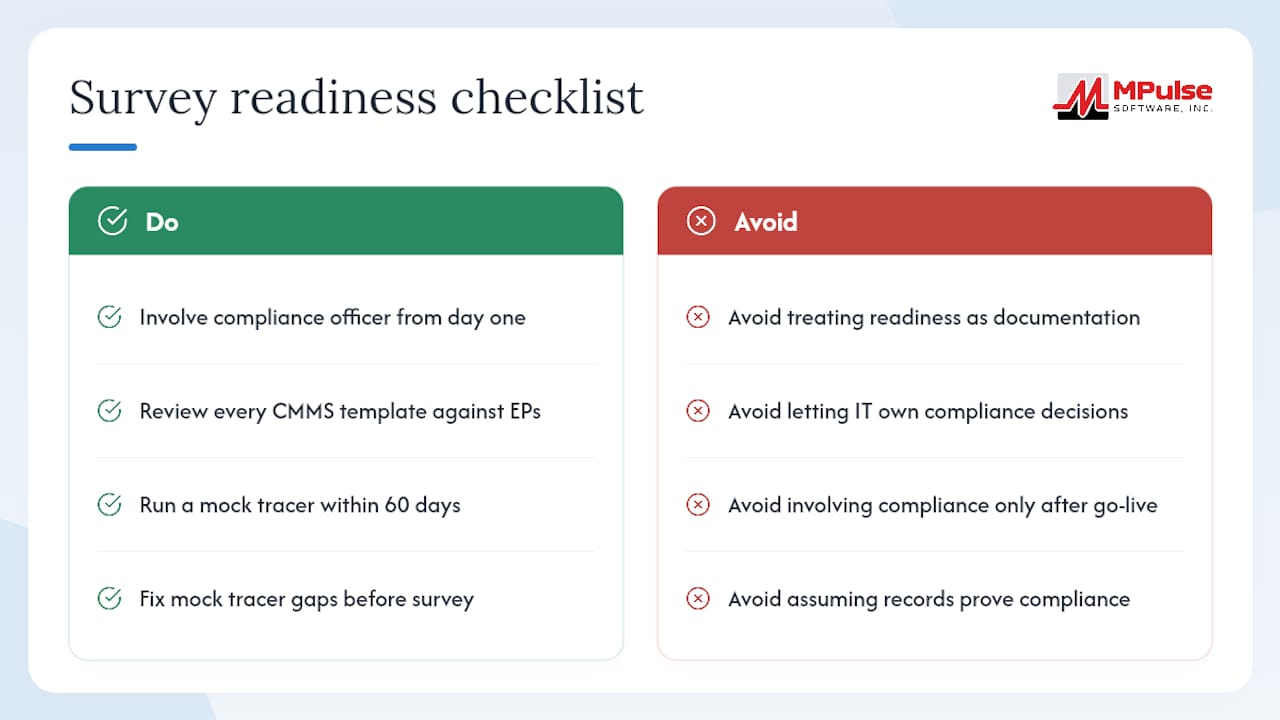
The practical fix is straightforward: involve your compliance officer in CMMS configuration from day one, not after go-live. Have them review every template against the relevant EP before the system goes live. Then run a mock tracer within 60 days of launch, before the configuration hardens into habit. The gaps you find in that first mock tracer are the gaps a surveyor would find, and they are far easier to close before a survey than after.
MPulse Software gives you survey-ready evidence from day one
Facilities that need Joint Commission survey readiness without months of manual configuration will find MPulse Software a practical fit. MPulse combines PM automation, EP-configurable templates, mobile point-of-work capture, and linked audit trails in a single platform built for compliance-driven environments.

A demo with MPulse covers the specific evidence your facility needs to produce during a tracer. Here is what you will see:
- A live tracer report export showing all records connected to a selected asset, formatted for surveyor review.
- EP template configuration that maps your PM schedules and inspection types to Environment of Care standards.
- Implementation timeline and phased onboarding plan tailored to your facility’s size and survey schedule.
Request a demo through the MPulse CMMS platform page and bring a tracer scenario from your facility. The demo works best when it is grounded in your actual compliance gaps, not a generic walkthrough.
Useful sources
- Fundamentals of HC Improvement sample pages
- 2025 Hospital Compliance Assessment Workbook
- Hospital Accreditation Survey Process Guide
- Compliance Assessment Workbook sample pages
- Joint Commission environment of care standard FAQs
- Facts about hospital accreditation
- Powerful Maintenance Software | MPulse CMMS Software
- Improving Patient Safety with CMMS and JCAHO Compliance
FAQ
What is the most widely used tool for equipment maintenance in healthcare?
Computerized maintenance management systems (CMMS) are the standard tool for managing equipment maintenance in healthcare facilities. Platforms like MPulse Software automate PM scheduling, track asset histories, and generate the inspection and test records that Joint Commission surveyors review.
What are the Joint Commission’s compliance standards for facilities?
The Joint Commission evaluates facilities against a set of standards organized by chapter, with the Environment of Care (EC) chapter covering medical equipment management, life safety, utility systems, and the physical environment. Environment of Care standards — including medical equipment management and life safety — are among the most frequently cited across hospital surveys.
How does the Joint Commission assess a facility’s compliance during a survey?
Surveyors use the tracer methodology, selecting a patient, piece of equipment, or process and tracing it through the organization using observation, staff interviews, and document review to verify that processes are followed consistently and that records support compliance.
What tools support preventive maintenance for Joint Commission readiness?
A CMMS with PM automation, EP-mapped templates, and mobile capture is the most direct tool for Joint Commission readiness. The Joint Commission’s Compliance Assessment Workbook provides the EP-level structure that CMMS templates should mirror, and automated documentation workflow tools can supplement CMMS records by converting everyday work into audit-ready artifacts.
How do you prepare for a Joint Commission survey using a CMMS?
Build a complete asset registry, configure EP-mapped PM and inspection templates, train staff on mobile capture, and run a mock tracer exercise at least 60 days before the survey. Export a full evidence package for a high-risk asset and close any record gaps before the survey date.