
A Practical Guide to Commercial HVAC Maintenance
Commercial HVAC systems are among the most critical assets in any facility. They regulate indoor comfort, protect sensitive equipment, and account for a significant portion of a building’s energy use. When these systems are not properly maintained, the result is often higher operating costs, inconsistent temperatures, tenant complaints, and unplanned downtime. Effective commercial HVAC maintenance goes beyond periodic inspections. It relies on consistent processes, clear documentation, and visibility into system performance over time. This guide covers the basics of commercial HVAC maintenance, outlines key system components, offers a practical maintenance checklist, and explains how CMMS supports a more consistent and efficient program. Understanding Commercial HVAC Maintenance Commercial HVAC maintenance includes regular inspection, service, and repair of heating, ventilation, and air conditioning systems used in commercial buildings. These systems are larger and more complex than residential units and often run continuously across multiple spaces. Maintenance typically includes preventive, predictive, and corrective work. Preventive maintenance covers scheduled tasks like inspections and filter changes. Predictive maintenance uses system data to identify issues early. Corrective maintenance fixes problems after they occur. CMMS supports all three by organizing asset data, maintenance schedules, and work orders in one system, helping teams plan, track, and document HVAC work consistently. Essential Components of a Commercial HVAC System Commercial HVAC systems consist of multiple interconnected components, each of which requires regular attention to keep the system operating efficiently. Heating equipment may include boilers, furnaces, or heat pumps responsible for generating heat. Cooling systems often consist of chillers, cooling towers, rooftop units, and condensers. Air handling units distribute conditioned air throughout the building, while fans, motors, belts, and dampers regulate airflow. Additional components include thermostats, sensors, building automation systems, electrical connections, refrigerant lines, condensate drains, and air filtration systems. Failure in any one of these areas can affect overall system performance. CMMS software like MPulse allows each HVAC component to be tracked as an individual asset. Your team can attach maintenance schedules, manuals, warranties, and service histories directly to the asset record, giving technicians and managers quick access to critical information. Commercial HVAC Maintenance Checklist A consistent maintenance checklist is essential for ensuring that routine HVAC tasks are completed correctly and on time. While specific requirements vary by equipment and facility, a comprehensive commercial HVAC maintenance checklist typically includes the following activities: ☐ Inspect and replace air filters to maintain airflow and indoor air quality.☐ Check belts, pulleys, and couplings for wear, alignment, and proper tension.☐ Inspect electrical connections, control panels, and safety devices.☐ Clean evaporator and condenser coils to prevent efficiency losses.☐ Inspect and clean drain pans and condensate lines to prevent blockages.☐ Lubricate motors, bearings, and other moving parts as required.☐ Verify thermostat accuracy and control system operation.☐ Inspect refrigerant levels and check for leaks.☐ Test startup, shutdown, and emergency controls. To simplify the process, these checklist items can be added directly to preventive maintenance work orders in MPulse CMMS. Technicians complete tasks electronically, record readings, add notes, and attach photos, creating a clear maintenance history that supports compliance, troubleshooting, and long-term planning. Seasonal Maintenance Checklist Pre-Cooling Season Checklist ☐ Clean condenser coils☐ Verify refrigerant levels☐ Inspect compressors for wear, noise, or leaks☐ Confirm proper airflow across units☐ Test controls and sensors for accurate cooling response☐ Inspect electrical connections and components Pre-Heating Season Checklist ☐ Inspect boilers or furnaces☐ Check ignition systems for proper operation☐ Examine heat exchangers for cracks or damage☐ Test safety controls and shutoffs☐ Inspect and replace air filters as needed☐ Review dampers for proper operation and airflow CMMS Scheduling and Tracking ☐ Schedule seasonal maintenance tasks in CMMS☐ Generate work orders based on time, meter readings, or usage☐ Assign tasks to technicians and set priorities☐ Track work order completion across all facilities☐ Document findings, readings, and corrective actions Well-Maintained vs. Neglected HVAC Systems: What’s the Difference? The difference between a well-maintained HVAC system and a neglected one becomes increasingly clear over time. Well-maintained systems operate more efficiently, experience fewer breakdowns, and maintain consistent indoor conditions. Energy consumption remains more predictable, and major components last longer. Neglected systems often suffer from dirty coils, clogged filters, worn belts, and failing controls. Small issues go unnoticed until they result in system failures, emergency repairs, or premature equipment replacement. These systems typically consume more energy and generate higher maintenance costs. CMMS helps highlight these differences by providing visibility into maintenance history, downtime, and recurring issues. Asset reports and work order data allow facilities to identify problem equipment and adjust maintenance strategies before failures become costly. Implementing an Effective Maintenance Program An effective commercial HVAC maintenance program starts with accurate asset data. Maintenance teams should identify, document, and enter all HVAC equipment into the CMMS software. Teams should also standardize preventive maintenance tasks and schedule them based on manufacturer recommendations and operating conditions. Clear workflows and technician accountability are also critical. CMMS enables maintenance teams to assign work orders, set priorities, and track completion in real time. Mobile access allows technicians to update work orders in the field without returning to the office. Over time, maintenance managers can use the data collected in CMMS to evaluate performance, identify trends, and support budgeting and capital planning decisions. Streamline Your Commercial HVAC Maintenance with CMMS Managing commercial HVAC maintenance without a centralized system can lead to missed tasks and inconsistent records. CMMS provides a structured way to manage HVAC assets, preventive maintenance schedules, and maintenance data. Using MPulse helps reduce unplanned downtime, improve energy efficiency, and extend equipment life, supporting a more reliable maintenance program and occupant comfort. Get started today. Contact us. FAQs on Commercial HVAC Maintenance How often should commercial HVAC systems be serviced? Most commercial HVAC systems benefit from quarterly preventive maintenance, with additional inspections before peak heating and cooling seasons. Maintenance managers can use CMMS as a structured way to manage HVAC assets, preventive maintenance schedules, and maintenance data. What HVAC tasks are best managed through CMMS? Preventive maintenance scheduling, work order tracking, asset history, compliance documentation,
A Practical Guide to Simplifying Facility Maintenance with CMMS

Facility maintenance teams face a steady stream of demands every day. Priorities can change quickly, and the pressure to keep everything running smoothly never really stops. For many facility maintenance managers, staying organized is one of the hardest parts of the job. They oversee buildings, equipment, people, and budgets, often all at the same time. CMMS software simplifies facility maintenance in several important ways. These tools do more than track maintenance tasks. They help maintenance teams manage information, people, and assets across an entire organization. This practical guide to simplifying facility maintenance will get your team started. Simplifying Facility Maintenance with CMMS Systems Integration Facility maintenance teams share information with other departments, making clear and consistent data access essential. Purchasing relies on up-to-date maintenance records to manage budgets, approve work, and track parts and inventory costs. Human resources may need visibility into labor hours, certifications, and staffing requirements, while executives depend on accurate reporting to evaluate performance, prioritize capital investments, and make informed strategic decisions. Centralizing information and making it easily accessible helps maintenance teams avoid duplicate data entry and reduce errors. This transparency improves coordination across departments and allows maintenance managers to spend less time compiling reports and more time focusing on planning, reliability, and long-term improvements. CMMS software allows information to move easily between systems, with data flowing both in and out so the same information does not have to be entered multiple times. This capability saves hours of paperwork and reduces errors. With less time spent on forms and reports, more time can be devoted to planning and problem-solving. Scalability After a facility maintenance department implements CMMS software, the system must continue to evolve as facilities grow and operational demands expand. Adding new buildings, equipment, and infrastructure increases the number of assets to track, the volume of work orders to manage, and the amount of data required for planning and reporting. A scalable CMMS can accommodate this growth by supporting additional users, locations, and assets without sacrificing performance or usability. It allows maintenance teams to adjust workflows, preventive maintenance schedules, and reporting structures as complexity increases. When a CMMS is designed to scale, it helps departments maintain consistency, control, and visibility across all facilities, even as workloads grow and operations become more demanding. CMMS software should make it straightforward to add users, enable new features, and onboard and train new employees without disrupting daily operations. This adaptability allows the maintenance team to manage a growing workload more effectively and to maintain consistency across facilities. Rather than outgrowing technology, scalability enables teams to adjust and configure the system to match a continually changing environment, supporting long-term growth and stability. User Management User management also plays a key role in effective facility maintenance operations, especially as teams grow and responsibilities become more specialized. Features such as MPulse Role-Based Access Control allow organizations to define who can view, enter, and modify information. Maintenance technicians, supervisors, managers, and service requestors can only access the tools and data relevant to their roles. This approach keeps the system intuitive for everyday users, reduces clutter, and minimizes the risk of errors caused by unnecessary or confusing options. At the same time, role-based access strengthens data security by restricting sensitive information, such as labor details, costs, or administrative settings. For facility maintenance managers, this controlled access protects critical data while still enabling teams to work efficiently and independently. Security Security is another area where CMMS software makes a difference. Managing access across a large organization can be a significant challenge, especially with multiple locations. CMMS software helps teams stay organized and compliant by centralizing security-related data, reducing paperwork, and controlling access, allowing facility managers to maintain both efficiency and safety. Security demands have also increased substantially over the past decade, with new regulations, stricter controls, and additional oversight requiring more documentation and accountability. These changes have added significant administrative workload to maintenance operations. Without the right tools in place, managing this level of tracking would be extremely difficult. For example, lost or misplaced keys create safety risks and often lead to wasted time and unnecessary follow-up. By using tools like MPulse Key and Lock Management, maintenance teams can track keys and authorized users in one centralized system. They can see who has a key, when it was checked out, and when it is due to be returned. This visibility reduces time spent searching for keys or tracking down staff. It also supports more consistent security practices across an organization. Mobility Maintenance work rarely happens behind a desk. Technicians spend most of their time in the field, moving between buildings and responding to issues as they arise. A mobile-friendly CMMS like MPulse supports this reality by giving team members real-time access to the system wherever they are. Mobile CMMS enables technicians to report problems, receive assignments, update work orders, and record labor and parts directly from their devices. They don’t need to return to the office to check schedules or enter information at the end of a shift. This immediate access keeps work moving without unnecessary delays and helps reduce equipment downtime. As a result, supervisors gain better visibility into job status. Additionally, technicians stay informed about priorities and changes as they happen. Mobile access also improves communication across the team, ensuring that everyone is working with the most current information. The result is faster response times, more accurate data, and a more efficient maintenance operation overall. CMMS Supports Facility Maintenance Teams Together, these features show how CMMS software supports modern facility management. It helps teams stay organized, improve security, and make better use of their time. Facility maintenance management is about more than fixing equipment. It is about creating safe, reliable spaces where people can work, learn, and live. By reducing paperwork, improving visibility, and supporting smarter decisions, CMMS software helps facility managers do their jobs better. It’s easy to get started. Contact us.
Top CMMS Software in 2026
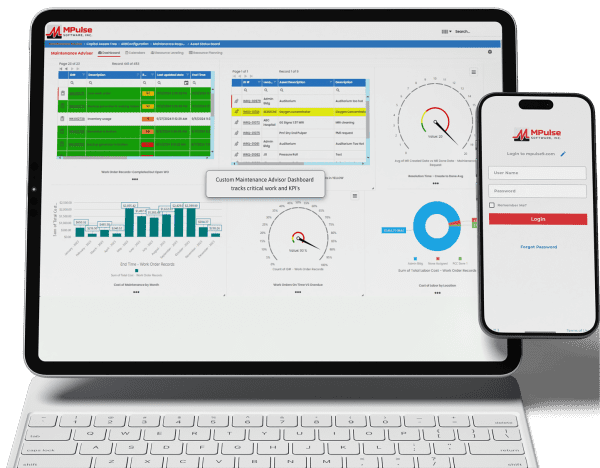
Maintenance teams face pressure to do more with fewer resources, but the top CMMS software platforms in 2026 are meeting the challenge. Today’s leading solutions go beyond basic work order tracking, providing preventive and predictive maintenance, real-time asset insights, mobile-friendly design, and data-driven reporting to support smarter, more proactive operations. Whether your team manages a single facility or a global asset portfolio, modern CMMS platforms improve reliability, reduce downtime, and gain clear insight into maintenance performance. As a result, finding the right software choice serves as the foundation for the year ahead. Whether you’re moving away from spreadsheets or replacing an existing system, this comparison highlights several of today’s leading CMMS solutions to help you find the right fit. 1. MPulse CMMS MPulse CMMS stands out as a flexible, enterprise-ready solution designed to support proactive maintenance strategies across a wide range of industries. Top features include comprehensive asset management through a centralized system that captures asset details, maintenance histories, warranties, and documentation. All this data links directly to work orders, parts, and schedules for full lifecycle visibility. Work order management is straightforward, with easy creation, scheduling, and tracking supported by automated alerts and maintenance calendars. Preventive and predictive maintenance capabilities allow teams to schedule work based on time, usage, or condition data, with optional integrations supporting predictive initiatives. Inventory and purchasing tools help track spare parts, monitor stock levels, and automate purchasing to avoid downtime caused by missing components. Reporting and dashboards provide clear insights into KPIs, costs, and performance metrics, while integrations with ERP, accounting, and other business systems support scalable, connected operations. Biggest Benefit of MPulse CMMS = Adaptability MPulse’s biggest benefit lies in its ability to adapt to organizations of all sizes while improving asset reliability and reducing downtime. The customizable design supports industries ranging from manufacturing and utilities to healthcare, education, and government facilities. MPACT runs in the cloud, so there is nothing to install and nothing for IT to patch, and it meets the compliance needs of regulated industries. Its per-user licensing covers the people who plan and perform maintenance, while requesters are unlimited and free, which keeps costs under control for teams that work in shifts or take requests from many departments. MPulse CMMS User Reviews Users frequently praise MPulse for balancing depth and usability. Many note that its strong reporting tools and flexibility make it a long-term solution rather than a system teams quickly outgrow. Reviewers also recommend MPulse’s affordable implementation services to speed adoption and ensure success. Users praised MPulse for: MPulse has allowed us to track hundreds of assets across multiple types and accurately schedule maintenance for those assets. Before MPulse, our preventive maintenance simply didn’t get done, and our spare parts inventory tracking was stuck in the stone age. We were never sure what parts we had or where to find them. Now we’re able to track inventory accurately and always have the necessary spare parts on hand. – Caleb C. on Capterra MPulse makes it easy to track assets and manage work orders and work order history. You can log machine hours and set hour-based work orders. – Vern B. on G2 For our campus, it made submitting requests easier for users, and they are able to receive email notifications based on the status of their work orders. Building users appreciate its ease of use when submitting requests to the Physical Plant. Maintenance staff can be held accountable for performance, and with preventive maintenance procedures being scheduled and completed, downtime for critical equipment has decreased. – Christopher B. on Capterra We’ve been using MPulse for the last four years and have no plans to stop. We appreciate how it helps us keep track of all our devices without relying on stacks of spreadsheets for updating, tracking, and monitoring. MPulse does the work for us. – Joel S. on Software Advice Strengths of MPulse CMMS Customers consistently give MPulse strong scores on Software Advice, with overall ratings around 4.5 out of 5 stars and an excellent user satisfaction rating of about 91%, meaning the vast majority of users would recommend it. Many users say MPulse substantially improves their maintenance operations by streamlining work order tracking, preventive maintenance, and asset management workflows. One verified reviewer described it as a “very comprehensive and complete CMMS” that they’re glad they chose after evaluating alternatives. Customers frequently emphasize responsive and helpful customer support, with numerous reviews pointing out how support staff assist quickly with questions or issues, helping keep operations moving. Another common positive theme is that once MPulse is properly configured, it can simplify tracking maintenance tasks, inventory, and historical data, freeing teams from paper logs or spreadsheets. Long-term customers like St. George Steel, IKEA US West, Reed College, and Northwell Health mention that MPulse “simplified keeping track of what we do” and that it’s easy to tailor the program to facility maintenance needs. Affordable Pricing MPACT is a cloud subscription priced per user. You pay for the people who plan and perform maintenance, and requesters are unlimited and free, which keeps costs predictable as more departments submit work requests. Current plans are listed on the MPACT pricing page, and a free demo and custom quote are available. 2. Maintenance Connection Maintenance Connection is a robust CMMS designed for organizations that need deep asset management, strong preventive maintenance capabilities, and enterprise-level scalability. The platform focuses on helping maintenance teams plan, track, and continuously improve their operations through data-driven decision-making. Key features include advanced work order management with configurable workflows, preventive and predictive maintenance scheduling based on time, meter readings, or condition data, and detailed asset tracking with full maintenance histories and documentation. Maintenance Connection also offers inventory and parts management, labor tracking, and comprehensive reporting tools that help teams analyze performance, costs, and compliance metrics. Mobile access enables technicians to receive assignments, update work orders, and access asset data in the field. User Reviews Organizations choose Maintenance Connection for its depth, configurability, and suitability for complex environments. The platform is suited for
Top Three Ways Facility Maintenance Managers Can Keep Costs Down

Facility maintenance professionals know that owners and tenants expect high-quality service, but they also expect competitive pricing. To stay profitable, facility maintenance managers must carefully control costs while keeping buildings safe, efficient, and comfortable. Strong facility maintenance practices make it easier to balance these goals. By improving energy efficiency, using the right maintenance management tools, and focusing on preventive maintenance, facility managers can reduce waste, avoid costly repairs, and improve daily operations. These steps help create a more reliable facility maintenance program that supports long-term success. Improving Energy Efficiency in Facility Maintenance Utility costs often make up a large portion of a building’s operating budget. Reducing energy and water use can lower monthly expenses and free up money for other needs. Energy-efficient buildings also attract tenants who value sustainability and lower environmental impact. Facility maintenance teams usually focus on two types of energy efficiency: passive and active. Passive energy efficiency involves making upgrades to equipment and building systems. Examples include installing energy-efficient appliances, LED lighting, improved insulation, and low-flow toilets and faucets. These upgrades may cost more at the start, but they often pay for themselves over time through lower utility bills and reduced maintenance needs. Active energy efficiency focuses on how facility maintenance work is done each day. This approach includes using less water and power during cleaning and repairs and choosing reusable products instead of disposable ones. Simple tasks such as replacing HVAC filters on schedule, keeping condensers clean, and fixing small leaks quickly can improve system performance and prevent energy loss. Landscaping choices also matter. Using plants that need less water can reduce irrigation costs and ongoing maintenance work. When energy efficiency becomes part of regular facility maintenance routines, buildings run more smoothly, and costs stay under control. Using CMMS Software to Support Facility Maintenance Managing facility maintenance tasks without the right tools can lead to missed work orders, poor communication, and wasted time. CMMS helps facility managers organize and track all maintenance activities in one place. CMMS software allows facility maintenance teams to create, schedule, and monitor work orders. It stores information about equipment, maintenance history, and inventory, making it easier to plan repairs and replacements. With better organization, maintenance teams can respond faster to problems and spend less time on paperwork. Many CMMS platforms also allow tenants or building users to submit maintenance requests online. This capability creates a clear and simple process for reporting issues. The system can automatically notify the maintenance team and update requestors as work progresses. Clear communication reduces frustration and builds trust between facility maintenance teams and tenants. CMMS software also provides reports that show trends in facility maintenance work. Managers can see which assets need the most attention, where costs are increasing, and how well preventive maintenance plans are working. These insights help managers make better decisions and improve overall efficiency. Creating a Preventive Maintenance Program One of the most effective ways to control facility maintenance costs is through preventive maintenance. Preventive maintenance focuses on taking care of equipment and building systems before problems occur. This approach helps avoid breakdowns, emergency repairs, and unexpected downtime. Preventive facility maintenance includes regular inspections, cleaning, adjustments, and minor repairs. Common tasks include servicing HVAC systems, checking electrical systems, cleaning gutters, inspecting roofs, and preparing buildings for seasonal weather changes. These tasks may seem small, but they play a big role in keeping facilities running safely and efficiently. CMMS software makes preventive maintenance easier to manage. Facility managers can schedule recurring tasks and plan maintenance work weeks or months in advance. This helps teams stay organized and reduces the chance that important tasks will be forgotten. Preventive maintenance also helps extend the life of equipment. Well-maintained systems last longer and perform better, which reduces the need for early replacements. Over time, this leads to significant savings and more predictable facility maintenance budgets. The Long-Term Value of Strong Facility Maintenance Effective facility maintenance is not just about fixing problems. It is about planning ahead, using resources wisely, and creating a safe and comfortable environment for building occupants. When energy efficiency, CMMS software, and preventive maintenance work together, facility managers gain better control over costs and operations. Strong facility maintenance practices make daily work easier for maintenance teams and reduce stress caused by unexpected repairs. They also improve tenant satisfaction by ensuring that issues are addressed quickly and systems work as expected. By investing time and effort into better facility maintenance planning today, managers can create more efficient operations and stronger financial performance in the future. With the right strategies in place, facility maintenance becomes not just a cost to manage, but a valuable part of a successful property operation. Have questions? Contact us. We’re here to help.
Scheduled Maintenance That Actually Prevents Problems

When equipment breaks down, work stops, money is lost, and people get frustrated. That’s why many companies schedule maintenance tasks to take care of equipment before it breaks. But planning and tracking that work can get complicated. CMMS and scheduled maintenance prevent problems by helping your team plan, document, and track maintenance work. It makes sure the right tasks happen at the right time, and it keeps everyone organized. What Is Scheduled Maintenance? Scheduled maintenance is the practice of doing regular check-ups on equipment so problems don’t have a chance to grow. Instead of waiting for something to break, maintenance teams check equipment and other assets early, replace worn parts, and make adjustments before things go wrong. You prevent the problem by staying ahead of it. Some common scheduled maintenance tasks include: These tasks may seem simple. But skipping them can lead to expensive breakdowns in the future. CMMS can remind you when something needs to be done. Often, problems happen because maintenance teams don’t have a good system to keep track of everything. They may forget tasks, lose paperwork, or miss an important warning sign. Sometimes maintenance teams are so busy fixing emergencies that they don’t have time to focus on routine work. That means more downtime, more repair costs, and more stress for everyone. How CMMS Helps Prevent Real Problems CMMS prevents many of the issues that make scheduled maintenance difficult. It keeps all maintenance information in one place and makes it easy for teams to stay organized. Here are some ways CMMS software and scheduled maintenance work together to prevent problems. 1. Automated Reminders CMMS sends alerts when it’s time to do a task. No one has to remember dates or search through paperwork. The system tells workers what needs to be done and when. 2. Easy-to-Follow Work Orders Work orders explain what task needs to happen, where it is, what tools are needed, and how long it should take. CMMS organizes all of this data so maintenance teams can follow clear instructions. 3. Real-Time Updates When a technician finishes a task, they can check it off in CMMS right away, even from a phone or tablet in the field. This capability keeps everyone up to date, including managers who want to see what’s been completed. 4. Data That Helps You Make Better Decisions CMMS tracks the history of each piece of equipment. Over time, it shows patterns like how often an asset breaks down or which parts wear out the fastest. This information helps teams choose the best time to replace equipment, order parts early, and prevent failures. 5. Less Paperwork, Less Stress Instead of storing piles of binders, clipboards, and sticky notes, CMMS keeps everything electronically. It’s easier to find information, and nothing gets lost. The Benefits of Scheduled Maintenance Done Right When scheduled maintenance is supported by a CMMS, everyone benefits. What Makes a CMMS Effective? Not all CMMS programs are the same, but the best ones share a few important features: Scheduled maintenance software doesn’t have to be complicated to work well. In fact, simple systems are often the most effective because people are more likely to use them every day. Getting Started with CMMS and Scheduled Maintenance If your team is new to scheduled maintenance or wants to improve its current system, starting with CMMS is a smart step. Begin by entering your equipment list, setting up basic preventive tasks, and scheduling reminders. Over time, you can add more details, track performance, and fine-tune your maintenance plans. You don’t have to fix everything at once. Even small changes, like doing regular inspections or tracking tasks electronically, can prevent big problems later. Scheduled Maintenance Prevents Problems Scheduled maintenance works best when it’s organized, consistent, and supported by good tools. CMMS makes this possible by turning simple reminders and tasks into a complete system for keeping equipment healthy. When used well, it helps companies avoid breakdowns, reduce costs, and stay productive. In the end, scheduled maintenance isn’t just about fixing machines. It’s about preventing problems before they happen. CMMS is one of the best ways to make that happen. Get started today. Contact us.
Facility Maintenance KPIs to Track in CMMS
Tracking the right facility maintenance KPIs in your CMMS helps you measure performance, reduce downtime, control costs, and keep your operations running smoothly. When you purchase or upgrade your CMMS, you expect things to improve. Maybe you want faster repairs, fewer breakdowns, or better tracking. But how do you know if the upgrade is actually working? The answer is simple: you measure it. CMMS helps you understand what’s going well, where you need to improve, and how your facility is performing over time. These metrics give you real numbers that you can use to make better decisions and keep your team on the right path. Below are the key CMMS KPIs facility managers should focus on right after implementation. Core Facility Maintenance KPIs After your CMMS purchase or upgrade, you want to focus on three core maintenance metrics: Mean Time to Repair (MTTR), asset uptime, and work order completion rates. These facility performance indicators help you understand the basics of how well your maintenance program is working day to day. Mean Time to Repair (MTTR) MTTR measures the average time it takes to repair equipment once it breaks down. A lower MTTR means your team is fixing issues faster. If your new CMMS improves scheduling, communication, or access to documentation, you should see MTTR go down within the first few months. If it doesn’t, that might mean your workflows need more fine-tuning or your team needs additional training. Asset Uptime Asset uptime tracks how often your equipment is up and running compared to when it is down. High uptime means your critical systems (i.e., HVAC units, production machines, or building controls) are available when you need them. After upgrading your CMMS, one of the first things you should notice is better visibility into preventive maintenance schedules. Watching this KPI should help prevent breakdowns and increase uptime overall. Work Order Completion Rate This KPI shows how many work orders are being completed on time. If your CMMS offers improved mobile access, automated alerts, or easier data input, your completion rate should rise. A high on-time completion rate means your maintenance team is staying organized and responding quickly to requests. It also shows that your CMMS is helping your team work more efficiently. Efficiency and Utilization Maintenance Metrics Once you have a good handle on the core KPIs, the next step is to look at how efficiently your team is working. These maintenance metrics reveal whether your resources, time, and equipment are being used effectively. Technician Productivity Technician productivity measures how much work each technician is completing. CMMS should make it easier for technicians to receive assignments, find instructions, and update progress. After implementation, look for an increase in the number of tasks completed per technician or a decrease in time spent moving between jobs. Scheduled vs. Reactive Work Every facility aims to increase scheduled maintenance and reduce emergency repairs. Tracking the percentage of planned work versus reactive work gives you a clear picture of the stability of your maintenance program. CMMS should shift your team toward more preventive work, which usually costs less and takes less time in the long run. Inventory Turnover If your CMMS includes inventory tracking, this KPI helps you understand how often parts and supplies are used and restocked. Strong turnover means you’re keeping the right amount of inventory, not too much and not too little. This KPI is especially important if you manage a large stockroom or want to prevent delays caused by missing parts. CMMS Cost and Sustainability Indicators Your facility performance indicators should also include metrics that track costs and environmental impact. These numbers help you make smart budget decisions and support sustainability goals. Maintenance Cost per Asset This KPI shows how much you’re spending to maintain each asset. It includes labor, parts, and time. If you upgraded to a more powerful CMMS, you should gain better insight into which assets cost the most to maintain. This data can help you decide whether to repair, replace, or upgrade specific equipment. Energy Usage Some modern CMMS platforms allow you to track energy consumption. Even if yours doesn’t, you can still connect utility data to your maintenance program. Watching energy usage over time helps you spot inefficient equipment or areas where upgrades could save money. Waste Reduction and Sustainability Metrics If your facility has sustainability goals, a CMMS can help track things like reduced paper use, fewer emergency callouts, or lower emissions from equipment. By logging inspections and preventive maintenance, you can also prevent leaks, wasted materials, or environmental hazards. How to Use Dashboards to Visualize Results Dashboards are one of the most powerful tools in any CMMS. They turn raw data into clear charts, graphs, and alerts that help you understand your facility maintenance KPIs at a glance. A good dashboard shows you what’s happening right now, what needs attention, and how your numbers are trending over time. In MPulse, for example, you can set up dashboards to monitor your most important KPIs, such as open work orders, overdue tasks, upcoming preventive maintenance, and asset performance. You can also create custom views for each department or technician. For example, a technician might need to see their daily assignments, while a facility manager might need a high-level view of total costs and workload. Dashboards also help you communicate with leadership. Instead of digging through spreadsheets, you can show them graphs that make it easy to understand improvements or justify budget requests. When used correctly, dashboards turn your CMMS into a real-time decision-making tool. Ready to Improve Your Performance? Tracking the right facility maintenance KPIs is the best way to measure success after upgrading your CMMS. These metrics give you a clear picture of performance, efficiency, and cost savings. They also help you catch problems early and keep your facility running smoothly. Get started. Contact us.
7 Must-Have CMMS Features for Facility Maintenance

Facility maintenance managers have a lot on their plates with keeping buildings safe, systems running smoothly, and budgets under control. The tools used for maintenance have changed over the years. However, so has the technology behind them. That’s why more and more facility maintenance professionals are turning to cloud-based CMMS to simplify their daily tasks and gain better control over their operations. Cloud-Based CMMS for Facility Maintenance Cloud-based CMMS gives maintenance teams the ability to manage every aspect of their operations in one centralized platform. With a cloud CMMS, teams can create, assign, and track work orders, monitor asset performance, and access real-time maintenance data from any location. That means your team can stay up to date whether they’re in the office, on the production floor, or out in the field. This connectivity makes it easier to stay organized, respond quickly to issues, and make data-driven decisions that improve efficiency. Unlike older desktop systems that require manual updates and limit access to a single device, cloud CMMS software is faster, more flexible, and far more reliable. Users can log in from any internet-connected device, ensuring everyone always has the most current information. Modern facility maintenance software streamlines daily maintenance tasks, reduces downtime, and helps extend the lifespan of valuable assets. The result is a more productive team, lower operating costs, and a maintenance operation that runs smoothly and efficiently. Best of all, all your maintenance data is backed by the cloud. CMMS Features for Facility Maintenance If you’re thinking about upgrading, look for these seven must-have CMMS features for facility maintenance. 1. Mobile Work Order Management Paper work orders and clipboards are a thing of the past. With mobile maintenance tools, technicians can receive, update, and close work orders directly from their smartphones or tablets. A good cloud CMMS should allow your team to: Mobile work order management helps keep everyone on the same page, no matter where they are in the facility. It also cuts down on errors caused by lost paperwork or outdated information. 2. Asset Tracking & Barcode Scanning Keeping track of every piece of equipment across multiple buildings can be challenging. That’s where asset tracking comes in. Modern CMMS platforms include tools that let you record and monitor every asset, from HVAC systems to lighting controls and elevators. Barcode or QR code scanning makes this even easier. By scanning a code with a mobile device, technicians can instantly pull up the asset’s full history, including past repairs, manuals, and warranty details. This instant access to maintenance data saves time and reduces mistakes. With accurate asset tracking, facility managers can make better decisions about when to repair or replace equipment, helping extend asset life and reduce costs. 3. Preventive Maintenance Scheduling One of the biggest advantages of a CMMS is scheduling preventive maintenance to stop problems before they happen. A strong preventive maintenance feature automatically schedules inspections, filter changes, lubrication, and other routine tasks based on time, usage, or meter readings. Preventive maintenance ensures nothing slips through the cracks and helps avoid costly breakdowns. It also keeps facilities in compliance with safety and quality standards. With cloud CMMS, all this scheduling happens automatically, and reminders are sent to technicians through mobile alerts. That means less guesswork and fewer unexpected failures. 4. IoT and Software Integration Today’s facilities are becoming smarter thanks to the Internet of Things (IoT) and software integration tools. When your CMMS can connect to these systems, it unlocks powerful capabilities. For example, sensors can send real-time data to CMMS, such temperature, humidity, or vibration readings. The software can then generate alerts or even create work orders automatically when equipment is operating outside of normal conditions. This integration allows facility teams to move from reactive to predictive maintenance, reducing downtime and extending the life of equipment. It also helps optimize energy use and supports sustainability goals. 5. Reporting and Dashboards Data is only valuable when you can see and understand it. Modern facility maintenance software includes reporting tools and dashboards that turn maintenance data into actionable insights. With customizable dashboards, you can monitor key performance indicators (KPIs) such as: These reports help facility managers identify trends, measure team performance, and justify budgets with solid data. In a cloud CMMS, dashboards update in real time, so you always know what’s happening in your buildings. 6. Offline Access and Data Sync Facilities don’t always have perfect Wi-Fi or cell service, particularly in remote sites. That’s why offline access is a critical CMMS feature. The best cloud CMMS solutions allow technicians to keep working even when they’re offline. Your team can update work orders, record notes, and capture photos while disconnected. Once the device reconnects to the internet, all data syncs automatically. Offline functionality ensures maintenance work never stops, no matter where your team is or what the network conditions are like. 7. Scalability and Security Finally, your CMMS should be built to grow with your organization. Whether you manage one building or a portfolio of properties, scalability ensures your system can handle more users, assets, and data without slowing down. At the same time, security must be top priority. Look for a provider that offers encrypted data storage, secure user logins, and regular system backups. Cloud vendors typically provide stronger security than most on-site servers, along with automatic software updates and uptime guarantees. By choosing a cloud CMMS that’s both scalable and secure, you protect your investment and ensure your system stays reliable for years to come. Smart CMMS Features for Facility Maintenance Managers Upgrading to a modern cloud CMMS is one of the smartest moves a facility maintenance manager can make. The right CMMS features can transform how your maintenance team operates. With the right system in place, you’ll reduce downtime, extend asset life, and make data-driven decisions that keep your facilities running efficiently. Ready to explore a cloud CMMS for your facility management needs? Start by listing the features that matter most to your team and look for a platform that helps you grow,
Top 5 Industries That Need CMMS Software

If your organization produces goods or provides a service, or if it operates out of a building, managing maintenance should be one of your top priorities. CMMS software provides tools that help many different types of industries keep everything working properly. Whether it’s machines, equipment, vehicles, buildings, or multiple facilities, CMMS software helps companies organize, plan, and keep track of all their maintenance work. CMMS can save companies time, cut down on costs, and prevent unexpected breakdowns that can cause problems. These five industries rank at the top for CMMS software benefits. Industry #1: Manufacturing In manufacturing, every minute of downtime can translate into thousands of dollars lost. To keep production on schedule and operations efficient, machines must be maintained in peak condition. Strategic maintenance planning not only prevents unexpected breakdowns but also extends the lifespan of equipment, reducing costly repairs and replacements. Quick responses to emerging issues help avoid delays that could disrupt delivery timelines, while well-trained staff ensure safety and consistency on the factory floor. CMMS helps manufacturers with the following. With strong maintenance practices in place, manufacturers can protect their bottom line while ensuring smooth, reliable production. Industry #2: Construction In construction, heavy equipment is the backbone of progress, moving between job sites and powering each phase of a project. But without a solid maintenance strategy, tracking repairs manually can become chaotic and expensive. Scheduled upkeep and regular inspections help prevent equipment failures, ensure safety compliance, and keep timelines intact. Detailed service records support smarter budgeting and repair planning, while well-maintained machinery improves worker safety and reduces costly delays. CMMS also helps with the following. By organizing maintenance across all vehicles and machines, construction teams can reduce downtime, control costs, and keep every job site running smoothly. Industry #3: Healthcare Hospitals and healthcare facilities depend on a wide range of complex equipment to deliver safe, timely, and effective care. When systems fail, whether medical devices or building infrastructure, the consequences can include treatment delays, safety risks, and compliance issues. Regular maintenance ensures reliability, supports regulatory inspections, and helps prevent infections. Fast work order assignment and mobile access to maintenance data allow staff to respond quickly and stay informed across departments and locations. CMMS also helps healthcare organizations with the following. By proactively managing maintenance, healthcare organizations create safer environments and maintain the continuity and quality of patient care. Industry #4: Education Educational institutions from K-12 schools to sprawling university campuses are responsible for maintaining a wide range of facilities, including classrooms, labs, dormitories, and athletic centers. Without a reliable system in place, keeping everything running smoothly can be a major challenge. Regularly scheduled maintenance for HVAC, lighting, and other infrastructure helps prevent unexpected breakdowns. Fast issue reporting enables facility teams to resolve problems before they escalate, while centralized management tools streamline operations across multiple buildings. Maintenance reports also support smarter budgeting and long-term planning. CMMS also helps educational institutions with the following. By staying organized with maintenance, schools and universities can reduce downtime, control costs, and focus more fully on delivering quality education and student support. Industry #5: Government and Public Works Government agencies oversee a wide range of public assets from roads and parks to utilities and buildings, which makes maintenance a complex and critical responsibility. Relying on paper records can slow down operations and create confusion, especially when coordinating across departments. Digital tools in CMMS software streamline the process by enabling clear documentation of repairs, faster response to emergencies, and better visibility into ongoing maintenance. These systems also support transparency, improve budgeting decisions, and help agencies maintain safe, functional public spaces. By adopting modern maintenance systems, public agencies can reduce costs, prevent equipment failures, and deliver more reliable services to the communities they serve. Every Industry Needs CMMS Software Across every industry, good maintenance management helps teams stay organized, work efficiently, and be proactive. It replaces paper logs and spreadsheets with a digital system that tracks assets, schedules tasks, and sends alerts in real time. Whether managing construction equipment, maintaining school buildings, or ensuring hospital safety, good maintenance routines are essential. They help reduce costs, prevent delays, and keep operations running smoothly. Effective maintenance management software isn’t just a tool; it’s a smart solution that makes managing maintenance easier and better for every industry. Have questions? We have answers. Contact us.
How to Choose the Right Work Order Management Software for Your Business
If your business relies on equipment, facilities, or other assets that need maintenance, it’s essential to keep them running smoothly. When machines break down or jobs fall through the cracks, it can cost time, money, and trust. That’s where work order management software can help. CMMS helps track maintenance tasks, manage assets, schedule work, and keep detailed records in one place. But with so many options on the market, how do you choose the right one for your business? This simple guide will help you make a smart, confident choice. What Work Order Management Software Does Work order management software is designed to help you plan, track, and complete maintenance tasks efficiently. Whether you’re managing a manufacturing line, a fleet of vehicles, or a public facility, work order management software ensures that nothing slips through the cracks. A good CMMS platform goes beyond tracking work orders. It also keeps a full history of repairs, tracks spare parts, manages schedules, and even generates reports that help you spot problems early. Instead of relying on paper forms or spreadsheets, everything is stored digitally. As a result, your team can find and update data easily. Seven Steps to Choose the Right Work Order Management Software Step 1: Identify Your Biggest Challenges Before shopping for software, think about your current pain points. Ask yourself: The right CMMS should solve your specific problems. For example, if downtime is your biggest issue, look for a system with strong preventive maintenance tools and automated reminders. If communication is a problem, find one with mobile access and real-time updates. Step 2: Look for the Must-Have Features Not every CMMS offers the same tools. When comparing options, make sure the work order management software includes the following key features: Step 3: Think About Ease of Use Even the most powerful CMMS won’t help if your team finds it confusing. Look for a system with a clean, intuitive interface. Many vendors offer free demos or trials. Take advantage of them. During your trial, test how easy it is to: If your technicians and managers can learn the basics quickly, that’s a great sign. Step 4: Consider Scalability and Support Your needs today may not be the same in a year or two. Choose a CMMS that can grow with your business. Scalable software should allow you to add more users, assets, or sites without major costs or downtime. Also, make sure the vendor offers strong customer support and training resources. Look for flexible help options, online tutorials, and quick response times. Good support can make a huge difference during setup and beyond. Step 5: Compare Pricing and Value Pricing for work order management software can vary widely. Some systems charge per user per month, while others charge a flat fee for unlimited users. There may also be extra costs for setup, training, or advanced features. When comparing prices, don’t just look for the cheapest option. Instead, think about value. How much time, money, and effort will the system save in the long run? A slightly higher cost may be worth it if it improves uptime, reduces waste, and helps your team work smarter. Step 6: Read Reviews and Ask for References Before making a final decision, read user reviews and ask the software vendor for customer references. Find out how other companies in your industry are using the system and what results they’ve seen. Reviews can reveal useful details about real-world performance, such as how reliable the mobile app is or how fast customer support responds. Step 7: Start Small, Then Expand Once you’ve chosen your CMMS, start with a pilot program. Test it in one department or location before rolling it out company-wide. This implementation process helps identify any issues early and gives your team time to adjust. Gather feedback from your technicians, managers, and administrators. Use what you learn to fine-tune your setup before expanding. Choose the Work Order Management Software that Fits Your Business Choosing the right work order management software is an investment in your business’s efficiency and reliability. A well-chosen CMMS can help you prevent breakdowns, lower costs, and keep your operations running smoothly. By taking time to understand your needs, compare features, and test your options, you’ll find a solution that fits your business perfectly. As a result, you can keep your equipment working, your team organized, and your customers happy. Get started today. Contact us.
What Is Pencil Whipping and Why Is It Happening in Your Organization?

Busy maintenance professionals live by schedules. When those schedules feel overwhelming, pencil whipping becomes a common method to get things under control. But pencil whipping comes at a cost. What Does Pencil Whip Mean? Pencil whip means to sign off on a document or work order without performing the task or knowing that it has been performed appropriately. Why is Pencil Whipping a Problem? In the maintenance profession, documentation shows that something was done and when. And there are plenty of documents to approve—work orders, inventory forms, inspections, certifications, service requests, and more. Pencil whipping undermines the system. Suddenly, your records aren’t accurate, so your organization is at greater risk for injuries, accidents, and equipment failure. And as every maintenance professional knows, maintenance usually gets the first call when things go wrong. How To Prevent Pencil Whipping in Your Organization If your team is pencil whipping, you need to find the reason behind it. #1: Overburdened Team Members Maintenance departments are busy places, and it’s not uncommon for employees to get overwhelmed. While other departments may have a review process in place for finished tasks, that’s not always realistic for the maintenance field. It’s important to understand how much time tasks typically take, so you can set realistic expectations for the team and for managers. Tracking time in CMMS software is the first place to start. It’s not unusual for maintenance managers to discover they are understaffed for the amount of work they’re expected to complete. Solid data and reports from CMMS software are the first step to explaining the problem to management and finding solutions. #2: Low Value Tasks If a technician feels a task is pointless, pencil whipping becomes more likely. Inspections, for example, may continuously result in few or no issues. As a result, the temptation is to mark something as complete when it wasn’t done, thinking that the consequences are low, or no one is likely to find out. Of course, if something goes wrong, the maintenance team gets the blame. No one wants to be the center of an investigation of a failure or injury caused by cutting the inspection process short. Communication is key here–the maintenance team needs to understand why these tasks are vital. CMMS software can help streamline inspections to make them faster and easier. You can also adjust inspection schedules if the data shows a longer time period is warranted. Also, performing random checks helps ensure all workers are safe and that protocols are being followed. #3: Unrealistic Metrics Metrics run the maintenance field, but unrealistic metrics set your organization up for pencil whipping. Often metrics are the source of Reason 1 above because if a target is unobtainable, pencil whipping helps your team keep up. Data from CMMS software can help you define realistic metrics and adjust them frequently as necessary. Again, reports are the best way to show management what’s happening—and what changes are necessary. #4: Organizational Culture Organizational culture is often the cause of the first three reasons that pencil whipping occurs. It’s vital to communicate the importance of maintenance work and establish workflows that make achieving goals both possible and manageable. First, take steps to foster a culture of transparency and mutual respect between technicians and management. This means creating and sustaining an atmosphere where technicians feel comfortable asking questions and voicing concerns. It also means establishing an environment of trust where technicians feel that their concerns are being heard and addressed. It’s likely you’ll experience some resistance to changes in organization culture. That’s not an easy task. It can help to remind managers that cutting corners can cause serious injuries to employees, damage your company’s reputation, or even result in criminal charges. How Use CMMS Software to Prevent Pencil Whipping CMMS software can reduce the temptation of pencil whipping. Maintenance data serves multiple purposes to address the issues listed above. Realistic expectations supported by CMMS reports will help you address pencil whipping. Mobile CMMS also can reduce pencil whipping. By streamlining tedious paperwork with CMMS automation on a mobile device, your team can spend less time on mundane tasks like data entry, and more time doing maintenance. Plus, easy access to historical data, inventory information, user manuals, and more makes sure your team has the information they need while they’re in the field or on the plant floor. But, most importantly, CMMS software can help create accountability. That means all employees are responsible for their actions, behaviors, performance, and decisions. Often, accountability can increase commitment to work and employee morale, which leads to higher performance. How does your organization prevent pencil whipping? Start with a free trial of MPulse CMMS software and see for yourself.