
If you work in a regulated or security‑sensitive environment, choosing between a cloud CMMS and an on‑premise CMMS isn’t just an IT decision. It affects how you protect your data, meet compliance requirements, manage risk, and budget for the long haul.
This guide breaks down the real‑world tradeoffs in a straightforward way. We’ll look at data sovereignty, security, compliance frameworks, and the true total cost of ownership.
The goal is simple: help you make a confident, defensible decision that fits your operational reality.
Table of Contents
Why This Decision Matters More Than Ever
Maintenance teams today rely on data for every part of their work. Asset histories, work orders, technician notes, IoT readings, and audit trails all feed the decisions that keep operations running. That information is sensitive, and in many industries, it is also heavily regulated.
The stakes are high, which means one question becomes central to any CMMS decision: where should that data live, and who should control it.
Cloud CMMS platforms offer speed, flexibility, and lower upfront costs. They reduce the burden on internal IT teams and make it easier to scale as your organization grows. On-premise systems offer a different set of advantages. They provide full control, complete isolation, and predictable security boundaries that can be essential in tightly regulated or restricted environments.
Neither model is better in every situation. The right choice depends on your compliance landscape, your internal IT capacity, and your organization’s tolerance for risk. When you understand those factors clearly, you can choose the deployment model that protects your data and supports your long term operational goals.
Data Sovereignty: Where Your Data Lives (and Why It Matters)
Data sovereignty is one of the most important factors influencing CMMS deployment decisions. It refers to the laws and regulations that govern where your data is stored, how it is handled, and who has the legal right to access it. For maintenance teams that manage sensitive operational information, these rules can shape the entire technology strategy.
When you choose your CMMS software, you are also choosing home for your data. For some organizations, the flexibility of cloud hosting works perfectly. For others, the rules are strict enough that only a fully controlled environment will do.
Cloud CMMS: What to Expect
- Your data resides in the vendor’s data centers, often with options to select a specific region.
- Vendors typically maintain strong security certifications such as SOC 2, ISO 27001, or FedRAMP.
- Multi-tenant environments can raise concerns for organizations that require strict data isolation or dedicated infrastructure.
On-Premise CMMS: What You Control
- Your data remains entirely within your own infrastructure, under your direct oversight.
- You control backups, retention policies, and data destruction.
- On-premise deployment is often the only viable option for environments governed by ITAR, NOFORN, or air gapped requirements.
If your organization must guarantee that data never leaves a specific physical location or jurisdiction, on-premise deployment is usually the safer and more compliant choice. Cloud platforms offer strong security, but they cannot always meet the strictest sovereignty rules. Understanding your regulatory landscape makes the decision much clearer.
Security: Control vs. Shared Responsibility
Security is often the point where cloud and on-premise debates become the most intense. Both deployment models can be secure, but they distribute responsibility in very different ways. Understanding that difference is essential for choosing the model that fits your organization’s risk profile.
Cloud CMMS Security
Cloud vendors operate under a shared responsibility model. They manage the infrastructure, the physical environment, the patching, and the core platform security. You manage user access, device hygiene, and internal policies that govern how your team interacts with the system.
Upsides
- Enterprise-grade security investments that most organizations cannot replicate internally
- Continuous patching that reduces exposure to known vulnerabilities
- Built-in redundancy and disaster recovery that protect against outages and data loss.
Tradeoffs
- You are trusting a third party with sensitive operational data
- Internet connectivity becomes a dependency for daily use.
On-Premise CMMS Security
With on-premise deployment, the responsibility shifts almost entirely to your organization. You control the environment, the network, the patching schedule, and the security posture.
Upsides
- Full control over network segmentation, access rules, and security boundaries
- Ability to operate offline or in restricted environments where cloud access is not permitted.
Tradeoffs
- You need the IT staff and expertise to maintain servers, apply patches, and monitor threats
- Unpatched or outdated systems can become significant vulnerabilities.
Cloud deployment gives you a stronger baseline security posture because vendors invest heavily in infrastructure and continuous updates. On-premise deployment gives you tighter control and isolation, which can be essential in regulated or restricted environments. The right choice depends on how much control you need and how much responsibility your team is prepared to take on.
IT Infrastructure Costs: CapEx vs. OpEx
Financial differences between cloud and on‑premise CMMS deployments become most apparent when you look at whether the costs fall under capital expenditures or operational expenditures. The two models follow very different cost structures, and understanding those differences helps teams plan realistically for both short term and long term budgets.
Cloud deployment follows an operating expense (OpEx) model:
- Subscription based pricing
- No hardware to purchase or maintain
- Minimal IT labor for upkeep
- Automatic updates and patches included.
Choosing the option for cloud CMMS often wins on predictability and simplicity. You pay for what you use, you avoid large capital investments, and you eliminate the hidden costs that come with maintaining physical infrastructure.
On-premise deployment blends capital expenses with ongoing operating costs (CapEx + OpEx):
- Servers, storage, and networking equipment
- Database and operating system licenses
- IT labor for installation, patching, monitoring, and backups
- Upgrade projects every few years to stay current.
Choosing on-premise CMMS can make sense if you already have the infrastructure and staff in place. However, when you account for hardware refresh cycles, licensing, and labor, it is rarely the cheaper option over time.
Regulatory Compliance: The Deciding Factor for Many
For compliance heavy industries, regulations often determine the deployment model before cost or convenience even enter the conversation. Some frameworks allow cloud hosting with the right controls. Others require full isolation and direct ownership of the environment.
Cloud CMMS can support:
- HIPAA (with Business Associate Agreements)
- SOC 2 Type II
- ISO 27001
- FDA 21 CFR Part 11
- GDPR
- FedRAMP (depending on the vendor)
Cloud vendors invest heavily in certifications and third party audits, which can help organizations meet a wide range of regulatory requirements.
On-premise is often required for:
- ITAR
- NOFORN environments
- Air gapped defense networks
- Certain NERC CIP environments
In these cases, regulations prohibit third party hosting or require strict physical and jurisdictional control. When that is true, the decision is simple. You need on-premise.
Total Cost of Ownership: The Five‑Year View
Here’s a simplified comparison:
| Category | Cloud | On‑Premise |
| Licensing | Subscription | Perpetual + support |
| Hardware | None | Required |
| IT Labor | Low | High |
| Upgrades | Automatic | Project-based |
| Security | Vendor-managed | Customer-managed |
| Downtime Risk | Low | Medium–High |
| Compliance Costs | Lower (if vendor certified) | Higher (internal audits) |
For most organizations, cloud ends up being 30–60% cheaper over a five‑year period.
Cloud vs. On‑Premise CMMS: A Practical Decision Framework
Here’s a simple way to evaluate your options and choose the CMMS model that truly fits your organization:
- Start with compliance. If your regulatory environment restricts or prohibits cloud hosting, the decision is straightforward. On-premise CMMS becomes the only viable path because it allows you to maintain full control over data storage, access, and auditability.
- Look at data sovereignty. If your data must remain within a specific geographic or organizational boundary and your vendor cannot guarantee that level of control in the cloud, on-premise CMMS is the safer choice. Sovereignty requirements often override every other consideration.
- Evaluate your IT capacity. Maintaining servers, patching systems, and managing security is resource‑intensive. If your team does not have the bandwidth or expertise to support that infrastructure, cloud CMMS removes that burden and ensures your system stays secure and up to date.
- Consider your cost structure. If you prefer predictable operating expenses and want to avoid large capital investments, cloud aligns better with your financial model. If you have already invested heavily in on‑site infrastructure and want to maximize that investment, on-premise CMMS may be more cost‑effective.
- Think about operational realities. If your teams need offline access, operate in secure or air‑gapped environments, or work in locations with limited connectivity, on-premise CMMS provides the reliability and isolation those scenarios demand.
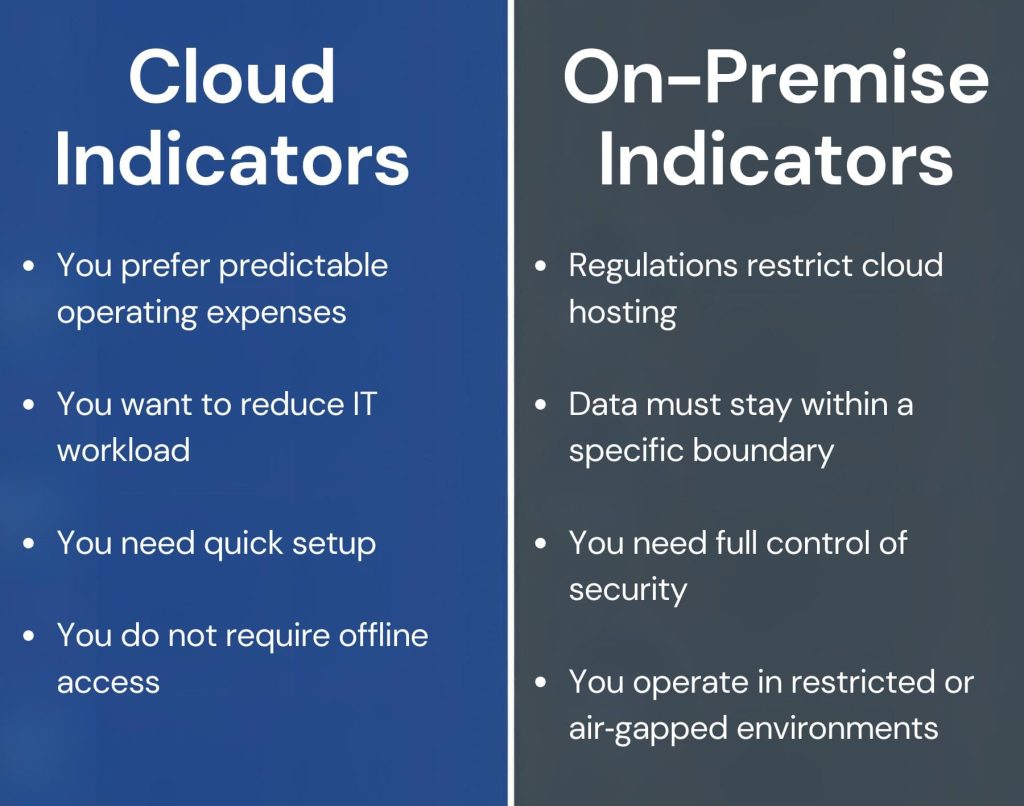
Visual Checklist: Cloud vs. On-Premise CMMS
1. Compliance Requirements
- Are you subject to regulations that restrict cloud hosting?
☐ Yes → Choose On-premise
☐ No → Continue
2. Data Sovereignty
- Must your data remain within a specific geographic or organizational boundary?
☐ Yes, and the vendor cannot guarantee this → On-premise
☐ No, or the vendor can guarantee it → Continue
3. IT Capacity
- Do you have staff to manage servers, patches, backups, and security?
☐ Yes → Both options remain viable
☐ No → Cloud is the better fit
4. Cost Structure
- Do you prefer predictable operating expenses?
☐ Yes → Cloud - Have you already invested heavily in on‑site infrastructure?
☐ Yes → On-premise
5. Operational Realities
- Do you need offline access or operate in restricted or air‑gapped environments?
☐ Yes → On-premise
☐ No → Continue
Your Likely Fit
- Mostly Cloud boxes checked → Cloud CMMS
- Mostly On-premise boxes checked → On-premise CMMS
- Mixed → You may need a hybrid strategy or a deeper risk assessment
Industry‑Specific Recommendations
Different industries operate under distinct requirements and regulations. Here’s a general overview of what each one needs.
| Industry | Best Fit | Why |
| Healthcare | Cloud or On‑Premise | HIPAA‑compliant cloud is common; some prefer on‑prem for PHI control |
| Defense & Aerospace | On‑Premise | ITAR, NOFORN, classified data |
| Manufacturing | Cloud | Lower cost, easier scaling |
| Energy & Utilities | Mixed | NERC CIP may require on‑prem |
| Government | On‑Premise or Gov‑Cloud | FedRAMP requirements |
| Commercial Real Estate | Cloud | Minimal IT burden |
Cloud vs. On‑Premise CMMS: Making the Right Choice
Choosing between a cloud and an on-premise CMMS is not about deciding which model is universally better. It is about choosing the model that fits your compliance requirements, your IT capabilities, and your long term strategy.
Cloud CMMS gives you speed and flexibility. You gain lower upfront costs, automatic updates, and a security posture that benefits from continuous investment and monitoring. For many organizations, that agility becomes a real advantage.
An on-premise CMMS offers something different. You maintain complete control over your environment, your data flows, and your security boundaries. For teams operating under strict regulatory frameworks or requiring full system isolation, that level of control can be essential.
With a clear decision framework and an honest look at your constraints, capabilities, and risk tolerance, you can choose the model that supports your mission and protects both your data and your operations.
Not All Vendors Offer Both Cloud and On-Premise Options
Many CMMS providers have moved entirely to cloud‑only offerings, which means organizations that need on-premise deployment often find themselves with very few options. Supporting on-premise environments requires infrastructure expertise, long term maintenance commitments, and the ability to meet strict security and compliance expectations, so many vendors simply choose not to offer it.
MPulse takes a different approach. We continue to support both cloud and on-premise deployments because we understand that some industries cannot compromise on data control, isolation, or regulatory requirements. For teams that need a CMMS they can run inside their own environment, MPulse remains one of the few providers that still delivers a fully supported on-premise solution.
Have questions? Contact MPulse. We’re here to help.
FAQs: On‑Premise vs. Cloud CMMS Hosting
What is the difference between on‑premise and cloud CMMS software?
On‑premise CMMS software runs on servers you own and manage inside your organization. Cloud CMMS software is hosted in the vendor’s data centers and accessed through the internet. The main difference is who controls the infrastructure, security, and updates.
Which is more secure: cloud CMMS or on‑premise CMMS?
Both can be secure, but they follow different responsibility models. Cloud vendors handle infrastructure security, patching, and physical protection. On‑premise deployments put full responsibility on your internal IT team. Cloud offers stronger baseline security for most organizations, while on‑premise offers tighter control for restricted environments.
Why do some organizations still choose on‑premise CMMS?
Organizations choose on‑premise CMMS when they need complete control over data, strict isolation, or compliance with regulations that prohibit third‑party hosting. Industries such as defense, utilities, and government often require on‑premise systems to meet data sovereignty or air‑gapped requirements.
Is cloud CMMS compliant with industry regulations?
Many cloud CMMS platforms support major compliance frameworks such as HIPAA, SOC 2 Type II, ISO 27001, GDPR, and FDA 21 CFR Part 11. Some vendors also offer FedRAMP‑authorized environments. However, certain regulations, such as ITAR or NOFORN, may still require on‑premise hosting.
What are the cost differences between cloud and on‑premise CMMS?
Cloud CMMS uses an operating expense model with subscription pricing, no hardware costs, and minimal IT labor. On‑premise CMMS requires capital expenses for servers, storage, and licenses, plus ongoing IT labor for maintenance and upgrades. Cloud is usually more predictable and cost‑effective over time.
Does cloud CMMS require an internet connection?
Yes. Cloud CMMS platforms rely on internet connectivity for access. If your operations require offline functionality or operate in restricted environments, on‑premise deployment may be a better fit.
Who controls the data in a cloud CMMS?
The vendor hosts the data, but you retain ownership. The vendor manages the infrastructure, backups, and security controls. You manage user access, internal policies, and device security.
Who controls the data in an on‑premise CMMS?
Your organization controls all data storage, access, backups, and retention policies. This level of control is essential for teams that must guarantee data stays within a specific physical or jurisdictional boundary.
Do all CMMS vendors offer on‑premise hosting?
No. Many CMMS vendors have moved to cloud‑only models because on‑premise hosting requires specialized infrastructure support. MPulse is one of the few CMMS providers that still offers a fully supported on‑premise option for organizations that need complete control and strict compliance.
How do I choose between cloud and on‑premise CMMS?
Start with compliance requirements, then evaluate data sovereignty needs, IT capacity, cost structure, and operational realities. If regulations or security boundaries restrict cloud hosting, choose on‑premise. If you want lower costs, easier maintenance, and faster deployment, cloud is usually the better fit.