
TL;DR:
- Maintenance calendars proactively schedule routine maintenance to improve asset reliability and reduce costs. They shift maintenance from reactive to planned, lowering unplanned downtime by up to 50% and extending equipment lifespan. Effective use relies on proper asset ranking, scheduling techniques, technician input, and automation with a CMMS.
A maintenance calendar is a proactive scheduling tool that organizes routine maintenance activities to maximize asset reliability and minimize unplanned downtime. In the industry, this practice falls under the broader discipline of preventive maintenance planning, and understanding how maintenance calendars improve planning is the first step toward eliminating costly reactive repairs. Organizations using CMMS-driven maintenance calendars report 20–30% reductions in overall maintenance costs. That figure reflects a direct shift from emergency-driven spending to predictable, budgeted work. Preventive maintenance also reduces unplanned downtime by 30–50% and extends equipment lifespan by 20–40%, making the calendar one of the highest-return tools available to facility managers and maintenance coordinators.
How maintenance calendars reduce unplanned downtime and costs
Scheduled maintenance eliminates the guesswork that drives emergency repair costs. When a facility runs on a reactive model, technicians respond to failures rather than prevent them. That model is expensive, disruptive, and hard to staff for. A structured maintenance calendar shifts the entire operation toward predictability.
The financial case is clear. For every $2,000 spent on routine maintenance, structured scheduling identifies roughly $6,000 in additional repair or replacement work. This pull-through ratio of 3:1 means that calendar-driven inspections consistently surface problems before they become failures. That is not a coincidence. Scheduled visits give technicians time to assess asset condition rather than just fix the immediate breakdown.
Two scheduling models drive most of these gains:
- Fixed-date scheduling triggers maintenance on set calendar dates regardless of asset usage. This works well for HVAC systems, fire suppression equipment, and other assets with time-sensitive compliance requirements.
- Usage-based scheduling triggers maintenance after an asset reaches a defined usage threshold, such as operating hours or production cycles. This model suits high-utilization equipment like compressors, conveyors, and generators.
Both approaches reduce the frequency of unplanned failures when applied consistently. The key is matching the model to the asset’s failure pattern, not applying one method across the entire facility.
Pro Tip: Rank your assets by criticality before assigning a scheduling model. High-criticality assets that directly affect production or safety warrant usage-based scheduling. Lower-criticality assets with predictable wear patterns fit fixed-date scheduling well.
What scheduling techniques make maintenance calendars more effective?
Effective planning with calendars depends on the scheduling techniques behind them. A calendar is only as reliable as the task definitions, frequencies, and resource assignments that populate it. Three techniques consistently produce better outcomes.
-
Time-based and usage-based task triggers. Time-based scheduling sets service on fixed calendar dates; usage-based scheduling triggers maintenance after asset usage thresholds are reached. Combining both within a single calendar gives coordinators coverage across asset types with different wear profiles.
-
Resource assignment at the task level. Assigning specific technicians, skill sets, and required parts to each calendar task before the work order opens prevents last-minute scrambles. When a work order generates automatically, the technician already knows what tools and materials are needed.
-
CMMS automation for work order generation. CMMS automation assigns work orders based on asset intervals, technician availability, and skill level. This removes manual scheduling errors and creates an automatic audit trail for compliance documentation.
Integrating maintenance calendars with operational scheduling decisions harmonizes equipment usage and maintenance intervals, directly reducing downtime. That integration is the difference between a calendar that sits in a spreadsheet and one that actively drives work.
Pro Tip: Group geographically close assets into the same service window. Technicians who service multiple assets in one area during a single visit reduce travel time and complete more work per shift.

What are the practical benefits of maintenance calendars for workflow management?
Maintenance calendars enable better resource planning that reduces last-minute changes, improves workforce utilization, and increases schedule compliance. Those three outcomes compound over time. Fewer last-minute changes mean technicians arrive prepared. Better workforce utilization means fewer overtime spikes. Higher schedule compliance means fewer assets slipping past their service intervals.
The workflow benefits extend to inventory control. When a calendar defines which parts are needed for each task and when, procurement teams can order materials in advance. That eliminates the emergency parts orders that inflate costs and delay repairs. Facilities with mature calendar programs typically carry less safety stock because their parts demand is predictable.
| Characteristic | Reactive maintenance | Calendar-driven maintenance |
|---|---|---|
| Work order origin | Equipment failure | Scheduled interval |
| Parts procurement | Emergency order | Planned purchase |
| Technician preparation | Minimal | Full task briefing |
| Downtime type | Unplanned | Planned, minimized |
| Cost predictability | Low | High |
| Compliance documentation | Inconsistent | Automatic |
Workload leveling is another direct benefit. Reactive maintenance creates unpredictable demand spikes that force overtime and reduce technician quality of work. A calendar distributes tasks evenly across weeks and months, which makes staffing decisions straightforward and reduces burnout.
Pro Tip: Track schedule compliance as a KPI and review it monthly. If compliance drops below 85%, the schedule likely needs adjustment, not the technicians. Overloaded calendars are the most common cause of missed tasks.
How to create a maintenance calendar that actually works
Building a maintenance calendar that holds up under real operating conditions requires a structured approach. The following steps produce a calendar that is realistic, compliant, and connected to asset performance data.
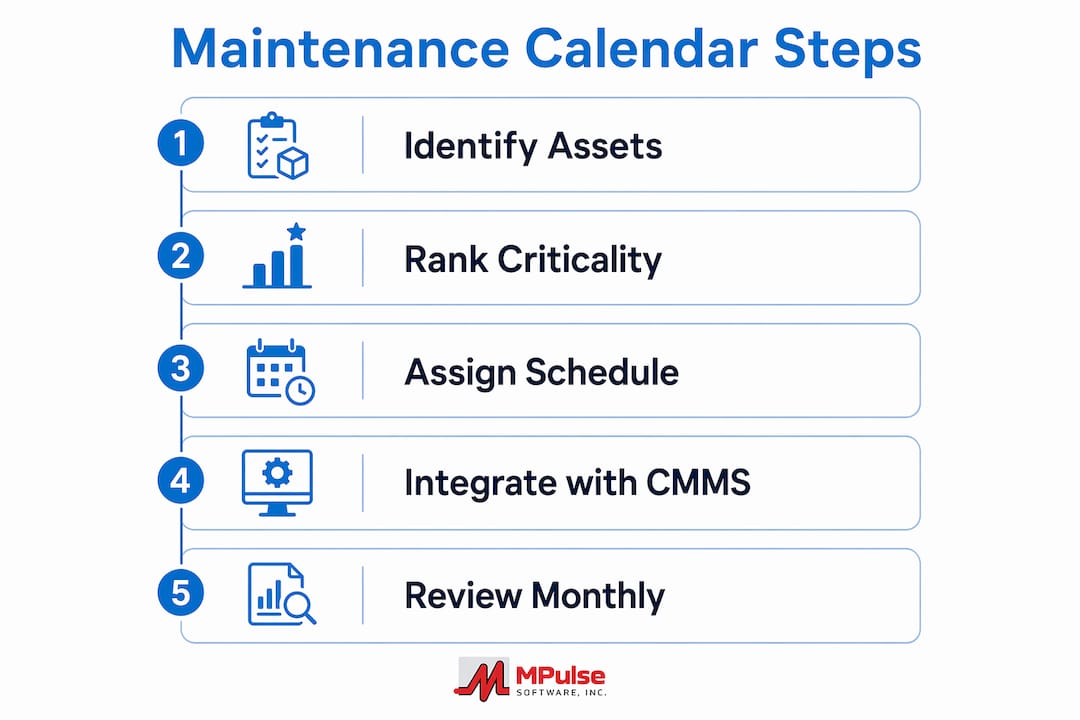
- Assess and rank your assets. Start with a full asset inventory and assign each asset a criticality rating based on its impact on production, safety, and regulatory compliance. High-criticality assets get more frequent service intervals and tighter documentation requirements.
- Define task lists and intervals per asset. For each asset, list every maintenance task required, the frequency of each task, and the estimated labor time. Use manufacturer recommendations as a baseline, then adjust based on actual operating conditions and historical failure data.
- Choose a scheduling methodology. Select fixed-date, floating, or usage-based scheduling for each asset based on its failure pattern and operational profile. Document the rationale so future coordinators understand the logic.
- Load tasks into a CMMS. A computerized maintenance management system automates work order generation, tracks completion, and stores maintenance history. Manual calendars in spreadsheets cannot match the accuracy or compliance documentation that a CMMS provides. MPulse Software, trusted by over 3,500 customers globally, provides an intuitive calendar-driven scheduling interface that connects asset profiles, task lists, and technician assignments in one place.
- Involve frontline technicians in the scheduling process. Frontline team involvement enhances realism, accountability, and safety. Technicians who perform the work know which intervals are too aggressive and which tasks require more time than the calendar currently allows.
- Build feedback loops into the schedule. Review completion rates, failure events, and technician notes after each scheduling period. Use that data to refine intervals and task definitions. A maintenance calendar is a living document, not a one-time setup.
- Plan for unplanned events. Reserve 10–15% of weekly technician capacity for reactive work. Facilities that schedule 100% of available hours leave no room for genuine emergencies, which forces calendar tasks to slip.
The cost-saving outcomes from integrating a CMMS with calendar planning are well documented. The combination of automation, historical data, and structured task management produces results that manual scheduling cannot replicate.
My take on why most maintenance calendars underperform
The biggest mistake I see is treating the maintenance calendar as an administrative task rather than an operational tool. Teams spend time building the calendar and then stop engaging with it. Schedules go stale, intervals drift, and the calendar becomes a compliance checkbox rather than a planning engine.
The mindset shift from reactive to proactive maintenance is real, but it requires ongoing commitment. Grouping service visits geographically and smoothing seasonal workload spikes are not automatic benefits. They require someone to actively manage the calendar and adjust it as conditions change. That person needs visibility into technician capacity, asset condition, and parts availability simultaneously.
Automation solves a large part of this problem. When a CMMS generates work orders automatically and tracks completion in real time, the calendar stays current without manual intervention. The data it produces also reveals patterns that manual scheduling misses, such as assets that consistently fail before their scheduled service date, which signals that the interval needs shortening.
The other underrated factor is frontline input. Schedulers who build calendars without technician feedback consistently produce schedules that are either too aggressive or too conservative. The technicians who perform the work hold the most accurate picture of actual asset condition and task complexity. Ignoring that input produces a calendar that looks good on paper and fails in practice. Facilities that treat scheduling as a collaborative maintenance strategy consistently outperform those that treat it as a top-down directive.
— Mark
MPulse Software and your maintenance calendar planning
MPulse Software gives facility managers and maintenance coordinators the tools to build, automate, and refine maintenance calendars at scale.

MPulse CMMS connects asset profiles, task intervals, technician assignments, and parts inventory into a single scheduling system. Work orders generate automatically based on calendar triggers, and completion records feed directly into maintenance history for audit readiness. The platform supports fixed-date, floating, and usage-based scheduling across all asset types. With MPulse CMMS features built for compliance-driven industries, your team gains the visibility and control needed to shift from reactive firefighting to planned, predictable maintenance. Teams using MPulse report efficiency improvements of up to 40%, with measurable reductions in both downtime and maintenance spend.
FAQ
What is a maintenance calendar in facility management?
A maintenance calendar is a structured schedule that defines when, how, and by whom each maintenance task is performed across all facility assets. It shifts maintenance from reactive responses to planned, predictable service intervals.
How do maintenance calendars reduce downtime?
Scheduled maintenance reduces unplanned downtime by 30–50% by catching equipment issues before they cause failures. Regular service intervals keep assets operating within their designed performance parameters.
What is the difference between time-based and usage-based scheduling?
Time-based scheduling triggers maintenance on fixed calendar dates. Usage-based scheduling triggers maintenance after an asset reaches a defined usage threshold, such as operating hours or production cycles.
How does a CMMS support maintenance calendar management?
A CMMS automates work order generation, tracks task completion, and stores maintenance history. That automation removes manual errors and produces the documentation required for regulatory compliance and audit readiness.
How often should a maintenance calendar be reviewed and updated?
A maintenance calendar should be reviewed at least monthly, using schedule compliance rates, failure events, and technician feedback as inputs. Calendars that go unreviewed for more than a quarter typically develop interval drift and missed tasks.
Key takeaways
Maintenance calendars improve planning by converting reactive, failure-driven maintenance into a structured, data-supported schedule that reduces costs, extends asset life, and keeps technicians working efficiently.
| Point | Details |
|---|---|
| Downtime reduction | Preventive scheduling cuts unplanned downtime by 30–50% and extends asset lifespan by 20–40%. |
| Cost savings | CMMS-driven calendars reduce overall maintenance costs by 20–30% through planned versus reactive work. |
| Scheduling methodology | Match fixed-date or usage-based scheduling to each asset’s failure pattern for maximum reliability. |
| Frontline involvement | Including technicians in scheduling produces realistic intervals and higher compliance rates. |
| CMMS automation | Automated work order generation removes manual errors and keeps maintenance records current for audits. |