TL;DR:
- Mobile CMMS delivers real-time work orders, asset histories, and offline access directly on technicians’ devices. It enhances productivity by reducing response times, improving data accuracy, and streamlining communication between field staff and the office. Effective adoption requires process redesign and training to eliminate redundant steps and ensure consistent use.
Mobile CMMS, short for computerized maintenance management system, is a software platform that puts full maintenance management capabilities directly on a technician’s smartphone or tablet. The role of mobile CMMS for field technicians goes far beyond simple task tracking. It delivers real-time work orders, complete asset histories, digital checklists, and offline access, all at the point of work. Platforms like MPulse Software have built these capabilities specifically around how field technicians actually operate, not how office managers prefer to see data. The result is faster response times, fewer errors, and maintenance records you can trust.
How does mobile CMMS improve field technician productivity?
Mobile CMMS improves field technician productivity by eliminating the gap between receiving a task and acting on it. Traditional dispatch methods rely on email, phone calls, or paper printouts. A mobile CMMS platform pushes urgent work orders instantly to your device, cutting response time and removing the bottleneck of slower communication channels.
The accuracy gains are equally significant. Data captured at the point of work prevents the memory gaps that occur when technicians fill out paper forms hours after completing a job. That real-time documentation feeds directly into predictive maintenance analytics, making your maintenance records genuinely useful rather than just a compliance checkbox.
Field technicians also spend less time traveling back to a workstation or waiting for updated instructions. Reduced transit time means more hours spent on active maintenance tasks, which leads to faster issue resolution and less equipment downtime across the facility.
Key productivity gains mobile CMMS delivers to field technicians:
- Push notifications alert you the moment a new work order is assigned, with asset details already loaded.
- Barcode and QR scanning identifies equipment on the spot, pulling up full service histories without manual lookup.
- Photo and video capture documents faults and completed repairs directly within the work order.
- Digital checklists guide you through required steps and flag missed items before job closure.
- Automated escalation alerts enforce response time standards and keep supervisors informed without manual check-ins.
Pro Tip: Set your mobile CMMS notifications to distinguish between urgent corrective work orders and routine preventive maintenance tasks. Prioritizing alerts by severity prevents critical failures from getting buried under scheduled jobs.
What features make a mobile CMMS effective for field maintenance?
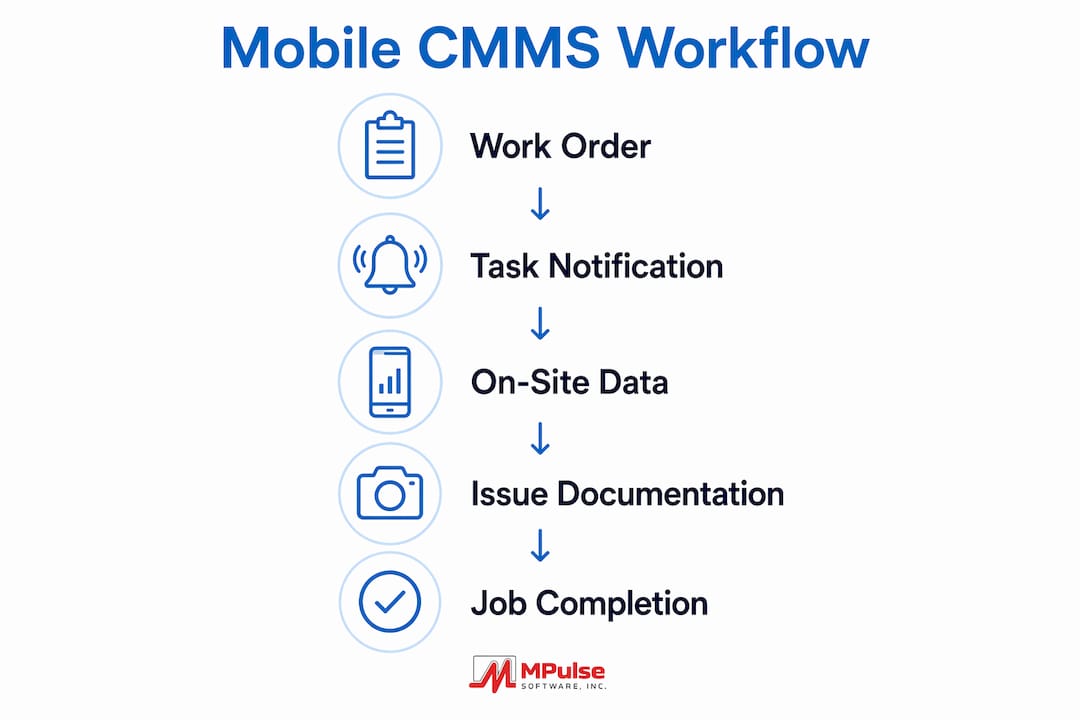
A mobile CMMS built for field use covers the full work order lifecycle from assignment through closure, all on a single device. You receive the job, review asset history, complete required checklists, log parts and labor, and close the order with a digital sign-off, without returning to a desktop.
The most critical features field technicians rely on daily are:
- Full work order management. Accept, update, and close work orders from the field. No desktop required at any stage.
- Asset history and documentation access. Pull up equipment manuals, past repair records, and warranty details on site before starting work.
- Digital checklist workflows. Complete mandatory inspection steps and compliance procedures with guided prompts that prevent skipped items.
- Parts inventory tracking. Log parts used directly against the work order, keeping inventory counts accurate in real time.
- ERP and MES integration. Standard protocol integrations connect field platforms to back-office systems, removing duplicate data entry and keeping both sides synchronized.
The table below shows how these features translate into direct operational outcomes.
| Feature | Operational Outcome |
|---|---|
| Push work order notifications | Faster response to urgent failures |
| Barcode/QR asset identification | Accurate equipment lookup without manual search |
| Digital checklists | Consistent compliance and quality control |
| Parts usage logging | Real-time inventory accuracy |
| ERP/MES sync | Eliminated duplicate data entry |
MPulse Software packages these capabilities with an intuitive calendar interface and real-time monitoring tools that connect field activity to broader operational data. That connection matters when your facility needs audit-ready records or compliance documentation on short notice.
How does mobile CMMS compare to desktop systems for field workers?
Desktop CMMS platforms were designed for planners and managers sitting at a workstation. They are powerful for scheduling and reporting, but they create a structural problem for field technicians. Data entry happens after the fact, often hours after a repair is complete. Memory fades, details get omitted, and maintenance records lose accuracy.
Mobile CMMS eliminates that delay entirely. Capturing data at the job site produces more accurate maintenance records and makes predictive analytics reliable. A desktop system can only analyze what gets entered. If technicians batch-enter data at shift end, the timestamps, fault descriptions, and parts logs are approximations at best.
Communication is the other major gap. Desktop systems depend on planners pushing updates through email or phone. A mobile CMMS compresses communication cycles between field and office by delivering instant alerts and schedule changes directly to the technician’s device. The planner updates the work order, and you see it immediately, wherever you are on the floor.
The practical difference shows up in how technicians experience their workday. With a desktop system, you carry paper printouts, make notes by hand, and transcribe everything later. With a mobile CMMS, the device is your clipboard, your manual library, and your reporting tool. The mobile CMMS benefits extend beyond convenience. They change what data your organization can actually rely on.
What does mobile CMMS look like in daily field operations?
A typical shift with a mobile CMMS starts before you reach the first piece of equipment. Work orders arrive on your device with asset details, location, fault description, and priority level already populated. You scan the equipment’s QR code on arrival to confirm the asset and pull up its full service history, including the last three repairs and any open parts orders.
During the job, you photograph the fault before touching anything. That image attaches directly to the work order and creates a timestamped record of the condition found. Completing mandatory checklists on site, rather than reconstructing them later, keeps compliance documentation accurate and complete. You log every part used, and the system deducts it from inventory automatically.

Offline mode is where mobile CMMS proves its value in facilities with dead zones or remote sites. Essential maintenance data is cached on the device, including work orders, asset details, and manuals, so you can access and update tasks without a live connection. When connectivity returns, the system syncs automatically.
Closing a job is equally direct. You log total labor time, add any notes on findings or follow-up needs, and submit a digital sign-off. The work order closes in real time, the planner sees it immediately, and the asset history updates without anyone touching a keyboard back at the office.
Pro Tip: Use the photo documentation feature even on routine preventive maintenance tasks, not just fault repairs. A visual record of equipment condition over time gives your planning team data to spot deterioration trends before they become failures.
A mobile-first CMMS architecture also integrates with IoT sensors to generate predictive maintenance alerts and automatic work orders. That means some jobs arrive on your device before anyone has noticed a problem, triggered by sensor data rather than a reported failure.
My honest read on mobile CMMS adoption in the field
The biggest mistake I see organizations make with mobile CMMS is treating it as a digital version of their paper process. They take the same forms, the same approval steps, and the same end-of-shift data entry habits, and they put them on a tablet. Nothing changes except the medium.
Successful mobile CMMS adoption requires eliminating redundant steps entirely. Manual check-ins, duplicate sign-off forms, and paper logs that get transcribed later all need to go. If those steps survive the transition, technicians end up doing more work, not less, and adoption stalls fast.
Training matters more than most organizations budget for. Technicians who understand why real-time documentation improves their own working conditions, not just management reporting, adopt the tool consistently. The ones who see it as extra administrative burden use it minimally and revert to old habits under pressure.
The payoff for getting this right is real. Technicians spend more time on actual maintenance work. Maintenance records become reliable enough to support genuine predictive analytics. And the communication friction between field and office drops significantly. That combination directly affects equipment reliability and technician job satisfaction in ways that show up in retention numbers over time.
— Mark
MPulse Software’s mobile CMMS for field maintenance teams
Field technicians need a mobile CMMS that works the way they work, not one that forces them to adapt to a desktop workflow on a smaller screen.
MPulse Software delivers full mobile CMMS capabilities built around field technician workflows, including offline access, real-time work order management, asset history lookup, digital checklists, and ERP integration. Over 3,500 customers globally trust MPulse Software, with documented efficiency improvements of up to 40%. You can explore the full feature set or take the platform for a test run with a free trial to see how it fits your team’s daily operations.
Key Takeaways
Mobile CMMS is the most direct way to improve field technician productivity, data accuracy, and equipment reliability at the same time.
| Point | Details |
|---|---|
| Real-time work order delivery | Push notifications get technicians to jobs faster than email or paper dispatch. |
| Point-of-work data capture | Recording information on site prevents memory gaps and produces accurate maintenance records. |
| Offline functionality | Cached data keeps technicians productive in areas with no network connection. |
| ERP and MES integration | Automatic data sync eliminates duplicate entry and keeps office and field aligned. |
| Process redesign required | Successful adoption means eliminating redundant steps, not digitizing existing paper workflows. |
FAQ
What is the role of mobile CMMS for field technicians?
Mobile CMMS gives field technicians real-time access to work orders, asset histories, checklists, and parts data directly on a smartphone or tablet. It replaces paper-based and desktop-dependent workflows with on-site data capture and instant communication with the back office.
How does offline mode work in a mobile CMMS?
A mobile CMMS caches work orders, asset details, and manuals on the device so technicians can access and update tasks without an internet connection. When connectivity is restored, the system syncs all updates automatically.
Does mobile CMMS improve maintenance record accuracy?
Yes. Capturing data at the point of work prevents the memory lapses and approximations that occur with delayed, end-of-shift data entry. More accurate records also support reliable predictive maintenance analytics.
How does mobile CMMS connect field technicians to the back office?
Mobile CMMS platforms push instant work order updates and schedule changes directly to technicians’ devices, eliminating reliance on email or phone dispatch. Integration with ERP and MES systems keeps inventory, labor, and asset data synchronized in real time.
Can mobile CMMS support compliance and audit requirements?
Yes. Digital checklists, timestamped photo documentation, and closed work order records create a complete, traceable audit trail. This makes compliance documentation available on demand without manual reconstruction.