Maintenance teams face pressure to do more with fewer resources, but the top CMMS software platforms in 2026 are meeting the challenge. Today’s leading solutions go beyond basic work order tracking, providing preventive and predictive maintenance, real-time asset insights, mobile-friendly design, and data-driven reporting to support smarter, more proactive operations.
Whether your team manages a single facility or a global asset portfolio, modern CMMS platforms improve reliability, reduce downtime, and gain clear insight into maintenance performance. As a result, finding the right software choice serves as the foundation for the year ahead.
Whether you’re moving away from spreadsheets or replacing an existing system, this comparison highlights several of today’s leading CMMS solutions to help you find the right fit.
Table of Contents
1. MPulse CMMS
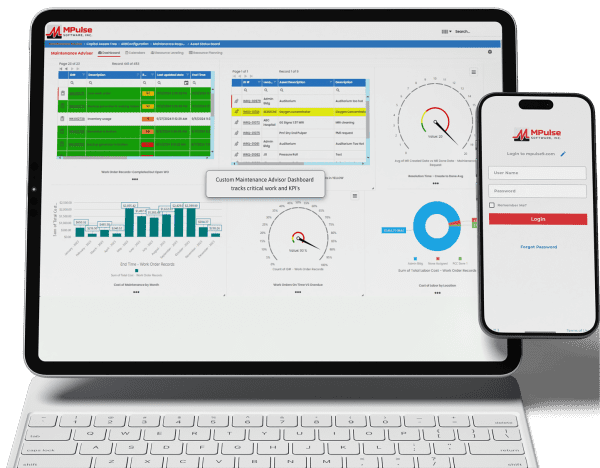
MPulse CMMS stands out as a flexible, enterprise-ready solution designed to support proactive maintenance strategies across a wide range of industries. Top features include comprehensive asset management through a centralized system that captures asset details, maintenance histories, warranties, and documentation. All this data links directly to work orders, parts, and schedules for full lifecycle visibility. Work order management is straightforward, with easy creation, scheduling, and tracking supported by automated alerts and maintenance calendars.
Preventive and predictive maintenance capabilities allow teams to schedule work based on time, usage, or condition data, with optional integrations supporting predictive initiatives. Inventory and purchasing tools help track spare parts, monitor stock levels, and automate purchasing to avoid downtime caused by missing components. Reporting and dashboards provide clear insights into KPIs, costs, and performance metrics, while integrations with ERP, accounting, and other business systems support scalable, connected operations.
Biggest Benefit of MPulse CMMS = Adaptability
MPulse’s biggest benefit lies in its ability to adapt to organizations of all sizes while improving asset reliability and reducing downtime. The customizable design supports industries ranging from manufacturing and utilities to healthcare, education, and government facilities.
MPulse can be deployed in the cloud or on-premises, allowing organizations to align with their IT and compliance requirements. Its concurrent licensing model is especially helpful for teams that work in shifts, as it allows multiple users to share a limited number of licenses, keeping costs under control.
MPulse CMMS User Reviews
Users frequently praise MPulse for balancing depth and usability. Many note that its strong reporting tools and flexibility make it a long-term solution rather than a system teams quickly outgrow. Reviewers also recommend MPulse’s affordable implementation services to speed adoption and ensure success.
Users praised MPulse for:
- Intuitive interface with relatively minimal training needed for basic use, so teams adapt quickly
- Strong customer support, often noted as a differentiator compared with competitor
- Scalable for different organization sizes, from smaller shops to larger facilities
- Robust maintenance scheduling and work order handling that improves daily workflows.
MPulse has allowed us to track hundreds of assets across multiple types and accurately schedule maintenance for those assets. Before MPulse, our preventive maintenance simply didn’t get done, and our spare parts inventory tracking was stuck in the stone age. We were never sure what parts we had or where to find them. Now we’re able to track inventory accurately and always have the necessary spare parts on hand. – Caleb C. on Capterra
MPulse makes it easy to track assets and manage work orders and work order history. You can log machine hours and set hour-based work orders. – Vern B. on G2
For our campus, it made submitting requests easier for users, and they are able to receive email notifications based on the status of their work orders. Building users appreciate its ease of use when submitting requests to the Physical Plant. Maintenance staff can be held accountable for performance, and with preventive maintenance procedures being scheduled and completed, downtime for critical equipment has decreased. – Christopher B. on Capterra
We’ve been using MPulse for the last four years and have no plans to stop. We appreciate how it helps us keep track of all our devices without relying on stacks of spreadsheets for updating, tracking, and monitoring. MPulse does the work for us. – Joel S. on Software Advice
Strengths of MPulse CMMS
Customers consistently give MPulse strong scores on Software Advice, with overall ratings around 4.5 out of 5 stars and an excellent user satisfaction rating of about 91%, meaning the vast majority of users would recommend it. Many users say MPulse substantially improves their maintenance operations by streamlining work order tracking, preventive maintenance, and asset management workflows. One verified reviewer described it as a “very comprehensive and complete CMMS” that they’re glad they chose after evaluating alternatives.
Customers frequently emphasize responsive and helpful customer support, with numerous reviews pointing out how support staff assist quickly with questions or issues, helping keep operations moving. Another common positive theme is that once MPulse is properly configured, it can simplify tracking maintenance tasks, inventory, and historical data, freeing teams from paper logs or spreadsheets.
Long-term customers like St. George Steel, IKEA US West, Reed College, and Northwell Health mention that MPulse “simplified keeping track of what we do” and that it’s easy to tailor the program to facility maintenance needs.
Affordable Pricing
Pricing for MPulse varies based on deployment type, number of users, and selected modules. Plans generally start around $49 per user per month, with additional costs for advanced features such as predictive maintenance and enterprise reporting. A free demo and custom quote are available.
2. Maintenance Connection
Maintenance Connection is a robust CMMS designed for organizations that need deep asset management, strong preventive maintenance capabilities, and enterprise-level scalability. The platform focuses on helping maintenance teams plan, track, and continuously improve their operations through data-driven decision-making.
Key features include advanced work order management with configurable workflows, preventive and predictive maintenance scheduling based on time, meter readings, or condition data, and detailed asset tracking with full maintenance histories and documentation. Maintenance Connection also offers inventory and parts management, labor tracking, and comprehensive reporting tools that help teams analyze performance, costs, and compliance metrics. Mobile access enables technicians to receive assignments, update work orders, and access asset data in the field.
User Reviews
Organizations choose Maintenance Connection for its depth, configurability, and suitability for complex environments. The platform is suited for teams managing large asset portfolios and strict compliance requirements.
Although it requires much aid and experience with the application, once mastered, it provides an arsenal of tools to keep a check of all facilities and services of the engineering department.” – Jordane M. on GetApp
Allows me to keep my OEE above the company standard. Helps us stay on top of needed parts and reduce costs associated with preventive maintenance. – Eric S. on Software Advice
Pricing
Maintenance Connection Professional plan typically starts around $110 per user per month, with mobile access available as an add-on for about $58 per user per month. Enterprise pricing is customized and requires contacting the vendor for a quote.
3. Limble CMMS
Limble CMMS is a cloud-based platform known for its clean interface and ease of use. It helps organizations organize maintenance workflows, reduce downtime, and improve asset performance without a steep learning curve.
Limble offers work order management with drag-and-drop scheduling and mobile access, preventive maintenance scheduling based on time, meter readings, or custom triggers, and centralized asset tracking with performance monitoring. Reporting and analytics tools allow teams to track key metrics and identify trends. Integrations with ERP systems, accounting tools, and IoT sensors support connected operations.
User Reviews
Users frequently cite Limble’s usability as a major strength, noting improved technician adoption and better work order tracking. Some reviewers mention limitations in advanced planning and scheduling capabilities, especially for organizations with complex maintenance workflows. Overall satisfaction remains high for teams needing simplicity and quick adoption.
I have been a driver of my team’s implementation, which has allowed me to really dig in and be very hands-on with the system. It works very well and offers a lot of functionality and customization. – Cayla C. on Capterra
We have been able to reduce our downtime and improve the overall health of our fleet across multiple divisions. – Eric C. on Capterra
Pricing
Limble CMMS offers a free plan with basic features. Paid plans start with the Standard plan at about $28 per user per month (billed annually) or $33 per month (billed monthly), providing dashboards, recurring work orders, and reporting. The Premium+ plan costs around $69 per user per month (annual) and adds inventory and parts management, vendor and purchase order management, meter-based scheduling, time/cost tracking, and API access. For larger organizations, the Enterprise plan offers custom pricing with advanced features.
4. Fiix CMMS
Fiix CMMS is a cloud-based maintenance management platform that provides tools for organizing and tracking maintenance activities while making asset information readily accessible. It is often used by small to mid-sized organizations seeking to manage a variety of assets more efficiently. The platform includes AI-assisted reporting, which helps identify trends, prioritize work, and anticipate maintenance needs, and work order management to create, assign, and track tasks across the maintenance team.
Fiix also integrates with IoT devices and other business systems, allowing real-time data collection from equipment and improved coordination with operational processes. Its mobile-first design enables technicians to access work orders, log updates, and view asset histories directly in the field, supporting timely and accurate maintenance. Additionally, Fiix offers sustainability tracking features that allow organizations to monitor energy consumption, waste, and other environmental metrics, providing data to support operational decisions and resource management.
User Reviews
Users appreciate Fiix’s ability to centralize equipment data and improve work order coordination, along with customer support. Some reviewers note limitations in customization and communication with non-licensed requestors, but overall feedback highlights improved organization and visibility.
By simply scanning an asset’s QR code, I can access information about it almost immediately. FIIX also ensures that everyone is held accountable. In the past, accountability relied on hearsay. – Debbi S. on G2
I improve the overall performance of the team by using effective tools that eliminate repetitive tasks and automate processes, achieving consistent and reliable results. – Julian R. on Capterra
Pricing
Pricing starts with a free plan for the basics, followed by paid tiers beginning at $45 per user per month. Higher tiers offer advanced analytics, scheduling, and reporting.
5. UpKeep
UpKeep is a mobile-first CMMS designed to streamline maintenance operations and reduce reliance on paper-based processes. It provides tools for managing work orders, tracking assets, monitoring inventory, and scheduling preventive maintenance. The platform allows maintenance teams to create, assign, and update work orders from mobile devices, ensuring that information is accessible in real time.
Asset tracking helps users monitor equipment status and maintenance history, while inventory oversight ensures that necessary parts and supplies are available when needed. Preventive maintenance scheduling supports regular upkeep of critical equipment, helping to reduce downtime and extend asset life. Overall, UpKeep centralizes maintenance data in a digital system, improving visibility, communication, and operational efficiency.
User Reviews
Customers often describe UpKeep as a significant improvement over manual systems, praising its visual appeal and ease of use. Barcode scanning, image attachments, and mobile notifications are frequently highlighted as strengths. However, some users report technical issues, limited customization, and occasional instability, particularly in more complex environments.
I like that a photograph can be added as evidence, eliminating the need to be physically present at the machine to verify a maintenance technician’s work. – Jesus P. on G2
It has helped our organization become more efficient in day-to-day operations and in conducting long-term reviews. – Mehran S. on Capterra
Pricing
UpKeep pricing starts around $20 per user per month for basic functionality. Higher tiers reaching $120 per user per month for advanced features and integrations.
6. MaintainX
MaintainX is a mobile-first CMMS designed to support frontline teams and distributed operations, with a focus on improving communication, inspections, and work execution through its mobile application. The platform provides tools for managing work orders, scheduling preventive maintenance, conducting safety inspections, and tracking assets, allowing maintenance and operations teams to document and monitor tasks in real time.
In-app messaging enables team members to communicate directly about issues, updates, or work progress, reducing delays and miscommunication. Overall, MaintainX centralizes operational information, helps standardize processes, and supports teams in completing tasks efficiently across multiple locations.
User Reviews
Users often highlight its intuitive interface and the relative ease of training new staff, which can be particularly valuable in organizations implementing a CMMS for the first time.
Overall, MaintainX has been a very helpful tool for daily maintenance operations. It keeps everything documented, organized, and easy to manage. We use it every day. – Alberto V. on Capterra
Easy implementation with intuitive setup, minimal training, and fast rollout across the team. Accurate downtime tracking that captures root issues. – Christopher P. on Capterra–
Pricing
Some teams find pricing higher relative to feature depth and note limitations in customization and integrations. Pricing ranges from a free basic plan to premium tiers at $49 per user per month, with enterprise pricing available.
7. eMaint CMMS
eMaint CMMS, developed by Fluke Reliability, is a mature maintenance management platform that serves a variety of industries. It provides tools for creating, assigning, and tracking work orders, allowing maintenance teams to manage both planned and unplanned tasks efficiently. Preventive maintenance scheduling helps organizations maintain equipment regularly, reducing the risk of unexpected downtime. Asset tracking capabilities enable users to monitor equipment history, condition, and performance over time, supporting data-driven maintenance decisions.
The platform also includes reporting features that allow organizations to analyze maintenance activities, identify trends, and measure performance. Additionally, eMaint offers integrations with ERP systems and other enterprise software, facilitating seamless data exchange and supporting broader operational workflows. Overall, it centralizes maintenance information to improve visibility, planning, and coordination across maintenance teams.
User Reviews
Users appreciate eMaint’s competitive pricing and support, particularly for preventive maintenance scheduling. Criticism tends to focus on navigation complexity, asset search limitations, and mobile usability.
Once end users become familiar and comfortable with the software, the information collected on parts usage, equipment failures, work order field requests, and work scheduling becomes a valuable tool for the department. – Kevin N. on Capterra
We are getting very useful data for preventive maintenance and quality assurance, and the electronic records and customer survey feedback are valuable as well. – David Z. on Capterra
Pricing
Pricing typically starts around $69 per user per month, with additional fees for document and image storage depending on usage.
Have questions? Contact us. We have answers.