Maintenance teams are under growing pressure to keep assets running as operations become more complex. CMMS software helps organizations prioritize work more effectively and connect maintenance activities to business goals.
Maintenance teams face one of their biggest challenges when they decide which repair requests to address first and assign to technicians. Poor prioritization leads to downtime, safety issues, higher costs, and frustration.
This blog outlines a practical approach to prioritizing and assigning repair requests with CMMS software as the key tool. Using this structured process can improve decisions, giving your organization better results.
The Importance of Structured Repair Request Management
Repair requests shape how maintenance teams use their time and effort. These requests come from many sources, including equipment operators, building occupants, production staff, and automated monitoring systems. Some requests involve small issues that cause minor inconvenience, while others signal serious problems that can stop operations or create safety risks.
When teams do not have a structured way to manage these requests, they often make decisions based on informal conversations or the order in which requests arrive. While this may seem efficient in the moment, it often leads to poor outcomes. Critical issues may sit unattended while less important tasks use up skilled labor hours. Technicians may be sent back and forth across facilities without a clear plan. Supervisors and managers struggle to understand the current risks and resource constraints.
A clear prioritization and assignment process solves these problems by bringing order and transparency to maintenance demand. It helps teams focus on the work that has the greatest impact on safety, reliability, and operations. By applying consistent rules and using accurate data, maintenance leaders can ensure that high risk issues receive prompt attention and decision making aligns with organizational priorities.
Defining Repair Request Priorities
A common mistake in maintenance operations is treating urgency and importance as the same thing.
- Urgency describes how quickly someone wants an issue addressed.
- Importance reflects the actual impact that delaying the repair would have on safety, operations, or the business.
For example, a leaking faucet in an office may feel urgent to the person who notices it, but it usually has little effect on overall operations. In contrast, early signs of vibration in a production pump may not seem urgent at first, yet ignoring them can lead to major equipment failure or extended downtime.
Effective prioritization requires maintenance teams to look beyond how loudly or quickly an issue is reported and focus instead on objective risk and impact. By separating emotional urgency from business importance, teams can make better decisions and protect critical assets before small problems turn into costly emergencies.
Core Priority Criteria
A strong prioritization model relies on clear and consistent criteria that apply to every repair request. Using the same criteria each time helps teams make fair and repeatable decisions instead of relying on personal judgment.
Common factors include:
- Risk to employee or public safety
- Potential environmental harm
- How critical the asset is to operations
- Likelihood that the problem could cause additional damage
- Impact on customers or occupants
- Cost of delaying the repair.
CMMS software supports this approach by providing a structured way to capture these details for each request. Required fields, predefined categories, and scoring rules help ensure that all relevant information is considered. By evaluating requests using data rather than opinions, CMMS software helps maintenance teams prioritize work more accurately and focus resources on the issues that matter most.
The Role of CMMS Software in Prioritization
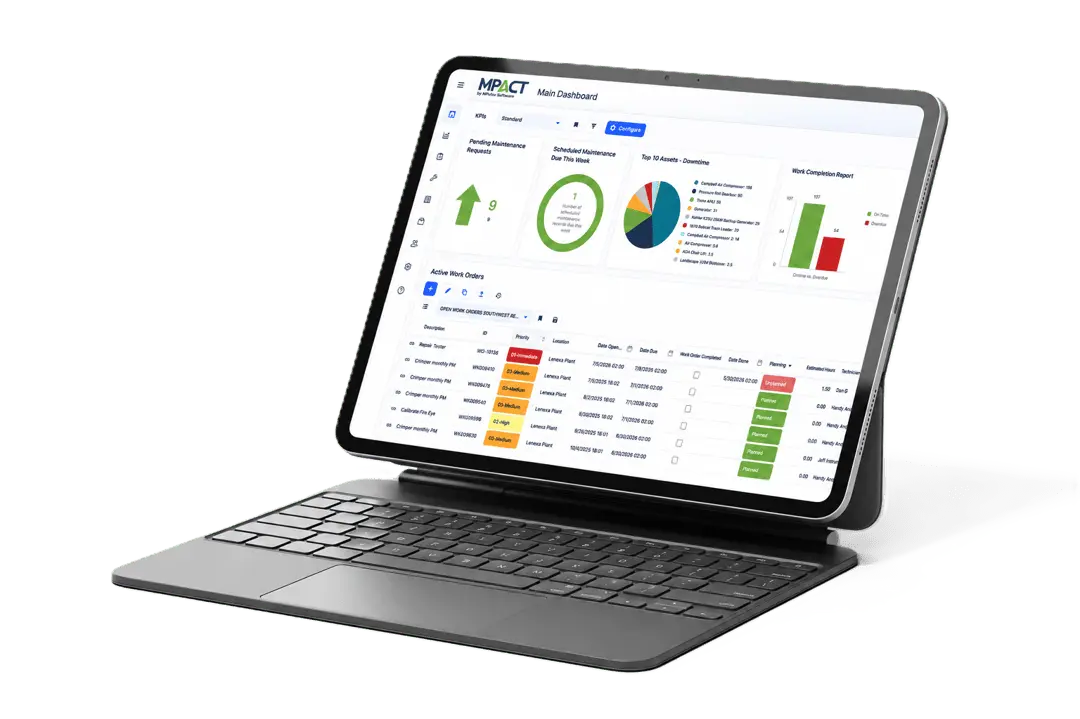
CMMS software serves as the central system for managing all repair requests. It provides a single, reliable place where requests are submitted, reviewed, prioritized, and tracked.
When configured correctly, the system requires users to enter key information at the time they submit a request. Details such as asset identification, location, problem type, and observed symptoms ensure that maintenance teams receive clear and complete information from the start.
This standardized data entry reduces confusion and prevents vague or incomplete requests from entering the workflow. Instead of interpreting unclear descriptions, maintenance teams can quickly understand the issue, assess its impact, and assign the appropriate priority.
Modern CMMS platforms also support priority scoring models that translate descriptive inputs into clear priority levels. These models evaluate factors such as asset criticality, safety risk, and operational impact to generate consistent priority rankings. The system can automatically escalate high risk requests and update priorities as conditions change.
By automating these steps, CMMS software removes guesswork from prioritization. It helps maintenance teams respond faster, apply priorities fairly, and ensure that critical issues receive attention before they disrupt operations or create safety concerns.
Assigning Repair Requests Effectively
Assigning repair requests correctly is just as important as prioritizing them. Giving a prioritized request to the wrong technician causes delays.
CMMS systems play a central role in this process by maintaining detailed technician profiles. These profiles typically include:
- Skills
- Certifications
- Licenses
- Training history
- Past work experience.
When supervisors use this information to assign tasks, technicians are more likely to resolve issues without rework or escalation. This approach improves first time fix rates and reduces overall downtime.
At the same time, real time workload data prevents overloading individual technicians while others remain underutilized. Balanced assignments reduce burnout, improve morale, and allow teams to respond more effectively to high priority issues. When assignment decisions are supported by accurate data rather than habit or convenience, maintenance teams operate more predictably and consistently.
Repair Request Assignment Checklist
The following checklist ensures repair requests are assigned effectively:
- Confirm the priority level is accurate and approved
- Verify the asset type and required technical skills
- Review technician qualifications, certifications, and experience
- Check technician availability and current workload
- Consider location and proximity to reduce travel time
- Group related work in the same area when possible
- Account for safety requirements or permit needs
- Confirm estimated labor hours match available capacity
- Assign clear instructions and documentation through the CMMS.
By following a structured assignment process and using CMMS tools to support decision making, maintenance teams can complete work faster, reduce rework, and ensure that skilled labor is applied where it delivers the greatest value.
Metrics and Continuous Improvement
Approval workflows built into CMMS software help prevent priority abuse, such as labeling noncritical work as urgent. By requiring supervisor or manager review for high priority or emergency requests, organizations protect maintenance capacity and ensure they use critical resources for the most important work.
CMMS platforms also maintain detailed audit trails that record who submitted a request, how it was prioritized, any changes made, and when the work was completed. These records support regulatory compliance, internal reviews, and accountability. They also create transparency across teams.
Performance metrics are essential for understanding how well prioritization and assignment processes are working. CMMS software automatically tracks key indicators such as response times, resolution times, backlog by priority level, and the percentage of work classified as emergency. Reviewing these metrics regularly helps maintenance leaders identify bottlenecks and resource gaps.
Over time, this data supports continuous improvement. Teams can refine priority definitions, adjust service level targets, and improve assignment rules based on real outcomes rather than assumptions.
Effective Repair Request Prioritization Using CMMS
Prioritizing and assigning repair requests is a core function of successful maintenance operations. When this process is handled informally or reactively, maintenance teams struggle to keep up with demand and critical issues are more likely to escalate.
CMMS software turns prioritization and assignment into a structured, data driven practice. Instead of reacting to the loudest or most recent request, teams can focus on the work that presents the greatest risk or delivers the most value.
Organizations that fully leverage CMMS capabilities gain better control over maintenance activity. They reduce unexpected failures, improve asset reliability, and use skilled labor more efficiently. Most importantly, they ensure that daily maintenance decisions support long term operational and strategic objectives rather than short term pressure.
Get started today. Contact us.