
Top CMMS Software in 2026
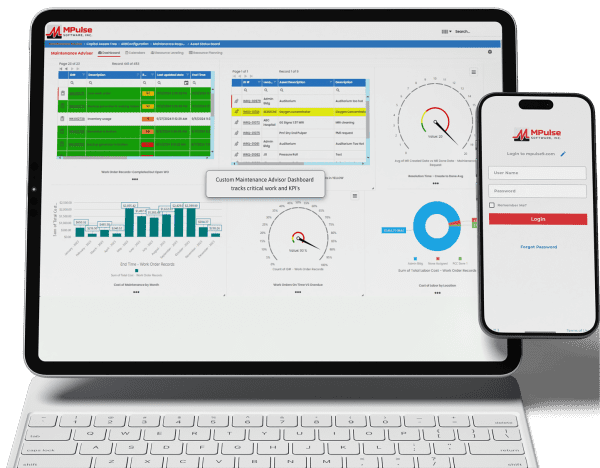
Maintenance teams face pressure to do more with fewer resources, but the top CMMS software platforms in 2026 are meeting the challenge. Today’s leading solutions go beyond basic work order tracking, providing preventive and predictive maintenance, real-time asset insights, mobile-friendly design, and data-driven reporting to support smarter, more proactive operations. Whether your team manages a single facility or a global asset portfolio, modern CMMS platforms improve reliability, reduce downtime, and gain clear insight into maintenance performance. As a result, finding the right software choice serves as the foundation for the year ahead. Whether you’re moving away from spreadsheets or replacing an existing system, this comparison highlights several of today’s leading CMMS solutions to help you find the right fit. 1. MPulse CMMS MPulse CMMS stands out as a flexible, enterprise-ready solution designed to support proactive maintenance strategies across a wide range of industries. Top features include comprehensive asset management through a centralized system that captures asset details, maintenance histories, warranties, and documentation. All this data links directly to work orders, parts, and schedules for full lifecycle visibility. Work order management is straightforward, with easy creation, scheduling, and tracking supported by automated alerts and maintenance calendars. Preventive and predictive maintenance capabilities allow teams to schedule work based on time, usage, or condition data, with optional integrations supporting predictive initiatives. Inventory and purchasing tools help track spare parts, monitor stock levels, and automate purchasing to avoid downtime caused by missing components. Reporting and dashboards provide clear insights into KPIs, costs, and performance metrics, while integrations with ERP, accounting, and other business systems support scalable, connected operations. Biggest Benefit of MPulse CMMS = Adaptability MPulse’s biggest benefit lies in its ability to adapt to organizations of all sizes while improving asset reliability and reducing downtime. The customizable design supports industries ranging from manufacturing and utilities to healthcare, education, and government facilities. MPACT runs in the cloud, so there is nothing to install and nothing for IT to patch, and it meets the compliance needs of regulated industries. Its per-user licensing covers the people who plan and perform maintenance, while requesters are unlimited and free, which keeps costs under control for teams that work in shifts or take requests from many departments. MPulse CMMS User Reviews Users frequently praise MPulse for balancing depth and usability. Many note that its strong reporting tools and flexibility make it a long-term solution rather than a system teams quickly outgrow. Reviewers also recommend MPulse’s affordable implementation services to speed adoption and ensure success. Users praised MPulse for: MPulse has allowed us to track hundreds of assets across multiple types and accurately schedule maintenance for those assets. Before MPulse, our preventive maintenance simply didn’t get done, and our spare parts inventory tracking was stuck in the stone age. We were never sure what parts we had or where to find them. Now we’re able to track inventory accurately and always have the necessary spare parts on hand. – Caleb C. on Capterra MPulse makes it easy to track assets and manage work orders and work order history. You can log machine hours and set hour-based work orders. – Vern B. on G2 For our campus, it made submitting requests easier for users, and they are able to receive email notifications based on the status of their work orders. Building users appreciate its ease of use when submitting requests to the Physical Plant. Maintenance staff can be held accountable for performance, and with preventive maintenance procedures being scheduled and completed, downtime for critical equipment has decreased. – Christopher B. on Capterra We’ve been using MPulse for the last four years and have no plans to stop. We appreciate how it helps us keep track of all our devices without relying on stacks of spreadsheets for updating, tracking, and monitoring. MPulse does the work for us. – Joel S. on Software Advice Strengths of MPulse CMMS Customers consistently give MPulse strong scores on Software Advice, with overall ratings around 4.5 out of 5 stars and an excellent user satisfaction rating of about 91%, meaning the vast majority of users would recommend it. Many users say MPulse substantially improves their maintenance operations by streamlining work order tracking, preventive maintenance, and asset management workflows. One verified reviewer described it as a “very comprehensive and complete CMMS” that they’re glad they chose after evaluating alternatives. Customers frequently emphasize responsive and helpful customer support, with numerous reviews pointing out how support staff assist quickly with questions or issues, helping keep operations moving. Another common positive theme is that once MPulse is properly configured, it can simplify tracking maintenance tasks, inventory, and historical data, freeing teams from paper logs or spreadsheets. Long-term customers like St. George Steel, IKEA US West, Reed College, and Northwell Health mention that MPulse “simplified keeping track of what we do” and that it’s easy to tailor the program to facility maintenance needs. Affordable Pricing MPACT is a cloud subscription priced per user. You pay for the people who plan and perform maintenance, and requesters are unlimited and free, which keeps costs predictable as more departments submit work requests. Current plans are listed on the MPACT pricing page, and a free demo and custom quote are available. 2. Maintenance Connection Maintenance Connection is a robust CMMS designed for organizations that need deep asset management, strong preventive maintenance capabilities, and enterprise-level scalability. The platform focuses on helping maintenance teams plan, track, and continuously improve their operations through data-driven decision-making. Key features include advanced work order management with configurable workflows, preventive and predictive maintenance scheduling based on time, meter readings, or condition data, and detailed asset tracking with full maintenance histories and documentation. Maintenance Connection also offers inventory and parts management, labor tracking, and comprehensive reporting tools that help teams analyze performance, costs, and compliance metrics. Mobile access enables technicians to receive assignments, update work orders, and access asset data in the field. User Reviews Organizations choose Maintenance Connection for its depth, configurability, and suitability for complex environments. The platform is suited for