
How to Prioritize and Assign Repair Requests Using CMMS Software

Maintenance teams are under growing pressure to keep assets running as operations become more complex. CMMS software helps organizations prioritize work more effectively and connect maintenance activities to business goals. Maintenance teams face one of their biggest challenges when they decide which repair requests to address first and assign to technicians. Poor prioritization leads to downtime, safety issues, higher costs, and frustration. If the term is new to your team, the definition page covers the lifecycle and the fields a complete work order carries. See types of work orders. This blog outlines a practical approach to prioritizing and assigning repair requests with CMMS software as the key tool. Using this structured process can improve decisions, giving your organization better results. The Importance of Structured Repair Request Management Repair requests shape how maintenance teams use their time and effort. These requests come from many sources, including equipment operators, building occupants, production staff, and automated monitoring systems. Some requests involve small issues that cause minor inconvenience, while others signal serious problems that can stop operations or create safety risks. When teams do not have a structured way to manage these requests, they often make decisions based on informal conversations or the order in which requests arrive. While this may seem efficient in the moment, it often leads to poor outcomes. Critical issues may sit unattended while less important tasks use up skilled labor hours. Technicians may be sent back and forth across facilities without a clear plan. Supervisors and managers struggle to understand the current risks and resource constraints. A clear prioritization and assignment process solves these problems by bringing order and transparency to maintenance demand. It helps teams focus on the work that has the greatest impact on safety, reliability, and operations. By applying consistent rules and using accurate data, maintenance leaders can ensure that high risk issues receive prompt attention and decision making aligns with organizational priorities. Defining Repair Request Priorities A common mistake in maintenance operations is treating urgency and importance as the same thing. For example, a leaking faucet in an office may feel urgent to the person who notices it, but it usually has little effect on overall operations. In contrast, early signs of vibration in a production pump may not seem urgent at first, yet ignoring them can lead to major equipment failure or extended downtime. Effective prioritization requires maintenance teams to look beyond how loudly or quickly an issue is reported and focus instead on objective risk and impact. By separating emotional urgency from business importance, teams can make better decisions and protect critical assets before small problems turn into costly emergencies. Core Priority Criteria A strong prioritization model relies on clear and consistent criteria that apply to every repair request. Using the same criteria each time helps teams make fair and repeatable decisions instead of relying on personal judgment. Common factors include: CMMS software supports this approach by providing a structured way to capture these details for each request. Required fields, predefined categories, and scoring rules help ensure that all relevant information is considered. By evaluating requests using data rather than opinions, CMMS software helps maintenance teams prioritize work more accurately and focus resources on the issues that matter most. The Role of CMMS Software in Prioritization CMMS software serves as the central system for managing all repair requests. It provides a single, reliable place where requests are submitted, reviewed, prioritized, and tracked. When configured correctly, the system requires users to enter key information at the time they submit a request. Details such as asset identification, location, problem type, and observed symptoms ensure that maintenance teams receive clear and complete information from the start. This standardized data entry reduces confusion and prevents vague or incomplete requests from entering the workflow. Instead of interpreting unclear descriptions, maintenance teams can quickly understand the issue, assess its impact, and assign the appropriate priority. Modern CMMS platforms also support priority scoring models that translate descriptive inputs into clear priority levels. These models evaluate factors such as asset criticality, safety risk, and operational impact to generate consistent priority rankings. The system can automatically escalate high risk requests and update priorities as conditions change. By automating these steps, CMMS software removes guesswork from prioritization. It helps maintenance teams respond faster, apply priorities fairly, and ensure that critical issues receive attention before they disrupt operations or create safety concerns. Assigning Repair Requests Effectively Assigning repair requests correctly is just as important as prioritizing them. Giving a prioritized request to the wrong technician causes delays. CMMS systems play a central role in this process by maintaining detailed technician profiles. These profiles typically include: When supervisors use this information to assign tasks, technicians are more likely to resolve issues without rework or escalation. This approach improves first time fix rates and reduces overall downtime. At the same time, real time workload data prevents overloading individual technicians while others remain underutilized. Balanced assignments reduce burnout, improve morale, and allow teams to respond more effectively to high priority issues. When assignment decisions are supported by accurate data rather than habit or convenience, maintenance teams operate more predictably and consistently. Repair Request Assignment Checklist The following checklist ensures repair requests are assigned effectively: By following a structured assignment process and using CMMS tools to support decision making, maintenance teams can complete work faster, reduce rework, and ensure that skilled labor is applied where it delivers the greatest value. Metrics and Continuous Improvement Approval workflows built into CMMS software help prevent priority abuse, such as labeling noncritical work as urgent. By requiring supervisor or manager review for high priority or emergency requests, organizations protect maintenance capacity and ensure they use critical resources for the most important work. CMMS platforms also maintain detailed audit trails that record who submitted a request, how it was prioritized, any changes made, and when the work was completed. These records support regulatory compliance, internal reviews, and accountability. They also create transparency across teams. Performance metrics are essential for understanding how well
The CMMS Budget Approval Kit for Maintenance Managers

CMMS budget approval requires making the case in a way that connects with leadership priorities. Maintenance teams understand the value of CMMS long before anyone else does. They live with the daily frustrations of work orders on paper, scattered spreadsheets, missed preventive maintenance, and hard-to-find asset history. They know that better tools would save time and prevent breakdowns. From their point of view, the benefits feel obvious. See also: Successfully Pitch CMMS to Your Team and 7 Ways CMMS Can Save You Money. Executives think about risk, cost control, productivity, and long-term performance. They are less focused on day-to-day maintenance pain and more focused on outcomes that affect the entire organization. If the CMMS conversation stays centered on features instead of results, it is easy for the request to lose momentum. Many CMMS initiatives stall here. Budgets are tight, and leadership wants clear justification for every investment. To move forward, maintenance leaders need more than a strong belief in the software. They need a clear story that aligns maintenance needs with business goals and shows measurable value, so a CMMS request can shift from a maintenance want to an operational need. See also: Calculate Your CMMS Return on Investment. The Case for a CMMS: Why Now CMMS is no longer optional. Today, maintenance software serves as a core tool for keeping operations running smoothly. It helps control costs, reduce risk, and support the people who do the work. Companies that wait too long to adopt a CMMS often fall behind faster than they expect. See also: What Cost Savings Do Small Companies See With CMMS?. At the same time, maintenance work is more complex than it used to be. Assets are more advanced, teams are smaller, and regulations are stricter. Spreadsheets, paper logs, and disconnected systems cannot keep up. A modern CMMS brings everything into one place, making maintenance easier to plan, track, and improve. What Happens When Organizations Delay When companies delay CMMS adoption, problems slowly build up. These issues often feel manageable at first, but they grow over time. Common issues include the following. These challenges do not usually appear all at once. They grow gradually until leaders realize the system is no longer working. What Changes With a CMMS CMMS gives teams visibility and control. Work orders, asset history, and schedules are all easy to access. As a result, maintenance teams move from reactive work to planned maintenance. Most organizations see results within a few months. Even small improvements add up quickly across many assets and tasks. Common Executive-Level Benefits Leaders care about results they can measure. According to FacilitiesNet, CMMS delivers clear and trackable gains. How to Build a CMMS Business Case That Gets Approved Securing approval for a CMMS is rarely about convincing leadership that maintenance matters. Most leaders already know it does. The real work is showing how a CMMS directly improves performance, reduces risk, and delivers financial value. The steps below provide a structured way to do exactly that. Step 1: Diagnose Your Current State Before you talk about new software, you need a clear picture of where things stand today. This creates a baseline and helps leadership understand the scope of the problem. Step 2: Quantify the Financial Impact Once the current state is clear, translate those issues into financial terms. As a result, the conversation shifts from maintenance problems to business impact. Step 3: Build the Narrative Data alone is not enough. You also need a clear story that positions the CMMS as a strategic tool, not just a piece of software. Step 4: Present a Clear Recommendation Leadership does not want endless options. They want a well‑considered recommendation. Step 5: Prepare for Objections Objections are normal. Being prepared builds confidence. A CMMS budget approval succeeds when it is structured, grounded in data, and aligned with leadership priorities. By working through these steps, maintenance leaders can move the conversation from tools to outcomes and from resistance to approval. Why Now Is the Right Time Technology has improved and access costs have dropped. Modern CMMS platforms are easier to use and faster to deploy than older systems. Mobile access allows technicians to work efficiently in the field. Data from the CMMS also helps leaders make smarter decisions. Waiting often costs more than acting. Every month without a CMMS adds risk, waste, and frustration. Adopting one now builds a stronger foundation for reliability and growth. CMMS is not just a maintenance tool. It is a business system that supports people, assets, and long-term success. Get Your CMMS Budget Approval Maintenance managers should not have to struggle just to get the basic tools required to do their jobs well. When the right systems are in place, maintenance teams can focus on what matters most: keeping assets running, preventing failures, and supporting the organization’s goals. CMMS budget approval does not have to be an uphill battle. With the right tools and the right story, it becomes a straightforward business decision. Get started today. Contact us.
The Best Software for Electrical Businesses That Manage Recurring Asset Maintenance

If you run an electrical business, you already know how quickly recurring maintenance stacks up. Panels, breakers, switchgear, and lighting systems all come with their own inspection intervals, testing requirements, and documentation trail. Multiply that across multiple sites or customers, and suddenly you’re juggling spreadsheets, emails, photos, and handwritten notes just to keep everything straight. That’s where the right software makes a real difference. A strong software platform doesn’t just store information. It also brings order to the chaos. The Advantages of CMMS for Electrical Businesses CMMS, also called maintenance management software, offers big advantages: automated scheduling, standardized checklists, real‑time updates, and easy reporting tools. CMMS turns recurring maintenance from a scramble into a smooth process that supports your business instead of overwhelming it. Maintenance software keeps your asset data organized, helps you stay aligned with NFPA 70B requirements, and gives your team a predictable workflow for every recurring service visit. Instead of scrambling to remember what was done last time or hunting for missing paperwork, you get a system that keeps everything consistent and traceable. With the right tools in place, recurring maintenance stops feeling like a moving target and starts feeling like a smooth, reliable part of your business. As a result, your business continues to build on a foundation that supports compliance, strengthens customer relationships, and reduces stress for everyone involved. What Electrical Teams Actually Need from Maintenance Software Recurring electrical maintenance only works when everything is consistent and documented. The right software doesn’t just store information. It creates a predictable rhythm for your entire maintenance program. A strong CMMS platform helps you in different ways. Track every asset with clear history and details A good system gives you a complete picture of each asset: installation dates, past inspections, test readings, repairs, and known issues. When techs can see the full story, they make better decisions in the field. That helps them avoid repeating work or missing critical steps. Set up recurring maintenance schedules that run automatically Instead of manually rebuilding the same jobs every month or quarter, the software generates them for you. Automated scheduling keeps your NFPA 70B intervals on track, reduces admin time, and ensures nothing slips through the cracks when workloads spike. Keep NFPA 70B documentation tidy and easy to find Electrical maintenance comes with a heavy documentation load. A good platform organizes test results, inspection forms, photos, and reports so you can quickly prove compliance during audits or customer reviews. No more digging through folders or chasing down missing paperwork. Give techs simple checklists and testing steps in the field Clear, repeatable workflows help techs stay consistent across sites and teams. Whether they’re performing IR scans, torque checks, breaker testing, or visual inspections, the software guides them step‑by‑step, so the work is done the same way every time. Produce reports your customers can understand Clean, professional reports turn raw data into something meaningful. Customers can see what you inspected, what you found, and what needs attention, without getting lost in technical jargon. Good reports build trust and makes renewal conversations easier. Build steady recurring revenue without extra admin work When your maintenance program runs smoothly, you spend less time scheduling, chasing paperwork, or re‑explaining findings. That efficiency translates into predictable revenue, stronger customer relationships, and more time to focus on growth instead of busywork. For a side-by-side view of the market, see a comparison of the leading CMMS platforms. Helpful Software Features for Electrical Asset Management A strong maintenance platform should make it easy to manage every asset across every customer site. Look for features like: Why CMMS Software Makes Recurring Electrical Maintenance Easier CMMS gives you the structure and visibility you need to keep recurring electrical maintenance running smoothly. Instead of relying on memory or manual scheduling, everything lives in one organized system that keeps your team aligned and your customers confident. Some of the biggest advantages of CMMS software include: Find the Best Software for Electrical Businesses Good software feels like a quiet partner in the background: organizing your asset data, generating recurring jobs automatically, guiding techs through inspections, and producing reports without extra effort. When the system fits the way your team actually works, everything becomes smoother. In the end, the best software isn’t just the one with the longest feature list. It’s the one that simplifies your day, supports your workflows, and helps you deliver consistent, reliable maintenance without the constant scramble. It’s easy to get started. Contact us. What is the best software for electrical businesses that handle recurring asset maintenance? The best software is the one that removes your biggest bottlenecks and keeps your team moving without extra stress. Every electrical business has different pressure points. Some struggle with documentation, others with scheduling, others with keeping asset histories straight across multiple sites. The right platform should take those headaches off your plate, not add new ones. What features should electrical maintenance software include? Look for features like asset tracking, recurring scheduling, mobile checklists, barcode scanning, documentation storage, test result capture, and customer‑friendly reporting. These tools help electrical teams stay organized and consistent across every job. How does software help with NFPA 70B compliance? Maintenance software supports NFPA 70B by automating inspection intervals, storing documentation in one place, and keeping complete asset histories. These features make it easier to prove compliance during audits and ensure nothing gets missed. Why should electrical contractors use CMMS for recurring maintenance? CMMS provides structure and automation. It reduces admin work, standardizes workflows, improves compliance, and gives you real‑time visibility into what’s due or overdue. It also helps you scale recurring service into predictable revenue. Can electrical maintenance software help technicians in the field? Yes. Most platforms, like MPulse, include mobile apps with checklists, testing steps, barcode scanning, photo capture, and offline access. Techs can complete inspections, update asset records, and submit reports directly from the job site. What types of electrical assets can I track in maintenance software? You can track panels, breakers, switchgear, transformers, lighting systems, generators, UPS units,
Work Order Management Software for Small Business

A small business runs smoother when work orders stop living on sticky notes or in someone’s head. Work order management software for small business gives you a single place to create, assign, track, and complete tasks without the complexity or cost of enterprise systems. This guide helps you understand what work order management software is, why it matters, and how to choose the right platform for your small business. Why Small Businesses Need Work Order Management Software Small teams move quickly, which is great until tasks start slipping through the cracks. Work order software, also called CMMS software, gives you one shared hub where every work order, request, and update lives. Instead of chasing people down or trying to remember who said what, you can see the full picture in seconds. Work order software helps small businesses: For many small businesses, the biggest benefit is clarity. Work order software makes it easy to see what is happening, what is overdue, and what needs attention next. That kind of visibility helps teams stay aligned without adding extra meetings or complicated processes. The Problems Work Order Software Solves for Small Teams If your current system involves notebooks and memory, you already know the pain points. Tasks get missed. Two people might do the same job without realizing it. Customers wait longer than they should. And when someone asks for an update, you have to dig through messages or walk across the building to find the answer. Work order software solves these problems by pulling everything into one shared space. Instead of scattered information, you get a single source of truth. That means: Work order management software also helps small businesses build better habits. When your team uses the same system every day, you get reliable data that helps you plan maintenance and make smarter decisions about equipment and staffing. Features in Work Order Software That Matter for Small Business Small teams do not need a giant feature list. They need tools that make life easier without adding complexity. Work order software like MPulse Maintenance Software is designed with that balance in mind. It gives you the structure you need without overwhelming your team. Key features that support small businesses include: MPulse is known for being easy to adopt, even for teams that are not excited about new technology. The interface is clean, the workflows are intuitive, and the learning curve is gentle. When software feels approachable, your team actually uses it, which is the whole point. Why MPulse Stands Out Compared to Other Tools There are plenty of work order tools out there, but MPulse has a few advantages that make it especially appealing for small businesses. Small businesses choose MPulse because it feels like the right balance of power and simplicity. You get the features you need without the heavy feel of enterprise systems. How to Choose the Right MPulse Plan for Your Team Choosing the right MPulse plan starts with understanding how your team works today and what you want to improve. A few helpful questions include: Most small businesses benefit from starting with the essentials. MPulse makes it easy to add features as your needs evolve. The goal is to get your team using the system consistently so you can build good habits and get reliable data. Work Order Management Software for Small Business If you are searching for work order management software for small business, MPulse is a strong choice. It keeps things simple, reduces downtime, and gives your team the clarity they need to stay organized. Modern CMMS platforms like MPulse are affordable, easy to learn, and built to help small businesses operate with confidence. When your work orders live in one place and your team has a clear process to follow, everything runs smoother. Customers get faster service, employees feel more organized, and you get more time to focus on growing the business instead of chasing down tasks. Get started today. Contact us. What is work order software for small business? Work order software for small business is a digital tool that helps teams create, assign, track, and complete tasks in one place. It replaces paper, spreadsheets, and scattered communication so small teams can stay organized and reduce downtime. How does work order software help small businesses? Work order software helps small businesses by centralizing requests, improving communication, reducing missed tasks, and giving managers real‑time visibility into what is happening across the team. Why do small businesses need work order software? Small businesses need work order software to prevent tasks from slipping through the cracks, avoid duplicate work, speed up response times, and keep maintenance and service operations running smoothly. What features should small businesses look for in work order software? Small businesses should look for mobile access, simple work order creation, asset tracking, inventory tracking, preventive maintenance scheduling, reporting tools, and pricing that fits a small business budget. Is work order software easy for small teams to use? Yes. Most modern work order platforms are designed to be simple and intuitive so small teams can get started quickly without long training sessions. Can work order software help reduce downtime? Yes. Work order software reduces downtime by organizing tasks, scheduling preventive maintenance, and making it easier to track issues before they become bigger problems. Does work order software work on mobile devices? Most work order software includes mobile friendly tools so technicians and staff can update jobs, upload photos, and close out work orders from anywhere. Can work order software track equipment and asset history? Yes. Work order software stores asset details, past work orders, manuals, and maintenance history in one place so teams always know what happened last time. How much does work order software cost for small businesses? Pricing varies by vendor, but many platforms offer affordable plans designed specifically for small teams, often with monthly or per‑user pricing. Can work order software replace paper and spreadsheets? Yes. Work order software centralizes tasks, communication, and asset data so small businesses can move away
Cloud vs. On‑Premise CMMS: A Decision Framework for Compliance‑Heavy Industries

If you work in a regulated or security‑sensitive environment, choosing between a cloud CMMS and an on‑premise CMMS isn’t just an IT decision. It affects how you protect your data, meet compliance requirements, manage risk, and budget for the long haul. This guide breaks down the real‑world tradeoffs in a straightforward way. We’ll look at data sovereignty, security, compliance frameworks, and the true total cost of ownership. The goal is simple: help you make a confident, defensible decision that fits your operational reality. Why This Decision Matters More Than Ever Maintenance teams today rely on data for every part of their work. Asset histories, work orders, technician notes, IoT readings, and audit trails all feed the decisions that keep operations running. That information is sensitive, and in many industries, it is also heavily regulated. The stakes are high, which means one question becomes central to any CMMS decision: where should that data live, and who should control it. Cloud CMMS platforms offer speed, flexibility, and lower upfront costs. They reduce the burden on internal IT teams and make it easier to scale as your organization grows. On-premise systems offer a different set of advantages. They provide full control, complete isolation, and predictable security boundaries that can be essential in tightly regulated or restricted environments. Neither model is better in every situation. The right choice depends on your compliance landscape, your internal IT capacity, and your organization’s tolerance for risk. When you understand those factors clearly, you can choose the deployment model that protects your data and supports your long term operational goals. Data Sovereignty: Where Your Data Lives (and Why It Matters) Data sovereignty is one of the most important factors influencing CMMS deployment decisions. It refers to the laws and regulations that govern where your data is stored, how it is handled, and who has the legal right to access it. For maintenance teams that manage sensitive operational information, these rules can shape the entire technology strategy. When you choose your CMMS software, you are also choosing home for your data. For some organizations, the flexibility of cloud hosting works perfectly. For others, the rules are strict enough that only a fully controlled environment will do. Cloud CMMS: What to Expect On-Premise CMMS: What You Control If your organization must guarantee that data never leaves a specific physical location or jurisdiction, on-premise deployment is usually the safer and more compliant choice. Cloud platforms offer strong security, but they cannot always meet the strictest sovereignty rules. Understanding your regulatory landscape makes the decision much clearer. Security: Control vs. Shared Responsibility Security is often the point where cloud and on-premise debates become the most intense. Both deployment models can be secure, but they distribute responsibility in very different ways. Understanding that difference is essential for choosing the model that fits your organization’s risk profile. Cloud CMMS Security Cloud vendors operate under a shared responsibility model. They manage the infrastructure, the physical environment, the patching, and the core platform security. You manage user access, device hygiene, and internal policies that govern how your team interacts with the system. Upsides Tradeoffs On-Premise CMMS Security With on-premise deployment, the responsibility shifts almost entirely to your organization. You control the environment, the network, the patching schedule, and the security posture. Upsides Tradeoffs Cloud deployment gives you a stronger baseline security posture because vendors invest heavily in infrastructure and continuous updates. On-premise deployment gives you tighter control and isolation, which can be essential in regulated or restricted environments. The right choice depends on how much control you need and how much responsibility your team is prepared to take on. IT Infrastructure Costs: CapEx vs. OpEx Financial differences between cloud and on‑premise CMMS deployments become most apparent when you look at whether the costs fall under capital expenditures or operational expenditures. The two models follow very different cost structures, and understanding those differences helps teams plan realistically for both short term and long term budgets. Cloud deployment follows an operating expense (OpEx) model: Choosing the option for cloud CMMS often wins on predictability and simplicity. You pay for what you use, you avoid large capital investments, and you eliminate the hidden costs that come with maintaining physical infrastructure. On-premise deployment blends capital expenses with ongoing operating costs (CapEx + OpEx): Choosing on-premise CMMS can make sense if you already have the infrastructure and staff in place. However, when you account for hardware refresh cycles, licensing, and labor, it is rarely the cheaper option over time. Regulatory Compliance: The Deciding Factor for Many For compliance heavy industries, regulations often determine the deployment model before cost or convenience even enter the conversation. Some frameworks allow cloud hosting with the right controls. Others require full isolation and direct ownership of the environment. Cloud CMMS can support: Cloud vendors invest heavily in certifications and third party audits, which can help organizations meet a wide range of regulatory requirements. On-premise is often required for: In these cases, regulations prohibit third party hosting or require strict physical and jurisdictional control. When that is true, the decision is simple. You need on-premise. Total Cost of Ownership: The Five‑Year View Here’s a simplified comparison: Category Cloud On‑Premise Licensing Subscription Perpetual + support Hardware None Required IT Labor Low High Upgrades Automatic Project-based Security Vendor-managed Customer-managed Downtime Risk Low Medium–High Compliance Costs Lower (if vendor certified) Higher (internal audits) For most organizations, cloud ends up being 30–60% cheaper over a five‑year period. Cloud vs. On‑Premise CMMS: A Practical Decision Framework Here’s a simple way to evaluate your options and choose the CMMS model that truly fits your organization: Visual Checklist: Cloud vs. On-Premise CMMS 1. Compliance Requirements 2. Data Sovereignty 3. IT Capacity 4. Cost Structure 5. Operational Realities Your Likely Fit Industry‑Specific Recommendations Different industries operate under distinct requirements and regulations. Here’s a general overview of what each one needs. Industry Best Fit Why Healthcare Cloud or On‑Premise HIPAA‑compliant cloud is common; some prefer on‑prem for PHI control Defense & Aerospace On‑Premise ITAR, NOFORN,
CMMS Implementation Success Blueprint: Avoid These 7 Costly Mistakes

Rolling out new CMMS software offers one of the fastest ways to modernize maintenance, boost reliability, and finally get clean data you can trust. But here’s the part most vendors won’t say out loud: CMMS implementations fail all the time. Not because the software is bad, but because the rollout wasn’t set up for success. This practical, real‑world guide helps you roll out maintenance software without the headaches. It walks you through the seven mistakes that derail CMMS projects most often, why they happen, and how to avoid them. See also: CMMS Implementation: Best Practices for Success. For the checklist version, see the 10-step CMMS implementation guide. Mistake #1: Treating CMMS as “Just Software” Instead of a Change in How People Work What Usually Goes Wrong Teams buy the tool, install it, and assume everyone will magically start using it. But CMMS does more than add new buttons to click. It reshapes how work is requested, assigned, documented, and measured. That means it disrupts habits, routines, and long‑held expectations about how things have always been done. See also: Get More Out of Your CMMS Software. This mistake is where most implementations stumble. The challenge is not the software itself. It is the people side of the transition. Technicians may worry the system will slow them down or be used to scrutinize their work. Supervisors may feel overwhelmed by new workflows and data requirements. Leadership may underestimate the time and support needed to shift behaviors. Without intentional change management that includes training, communication, role clarity, and ongoing reinforcement, CMMS becomes just another tool that never reaches its potential. Technology can only deliver value when the people using it understand why it matters and feel supported in changing the way they work. Why It Matters A Better Approach Real‑World Example A food processing plant rolled out CMMS without involving technicians in the design of workflows or data entry processes. Adoption stalled at 22 percent because the system didn’t match how work was actually performed on the floor. After bringing technicians into the redesign process by mapping real workflows, simplifying forms, and adjusting task steps, adoption jumped to 91 percent in just three months. The difference wasn’t the software. It was ownership, clarity, and collaboration. Mistake #2: Importing Messy Data and Hoping It’ll Fix Itself What Usually Goes Wrong Organizations often rush the setup and import old spreadsheets directly into the software without taking time to clean or standardize the data. It feels efficient in the moment. But this shortcut creates long‑term headaches. Years of inconsistent naming, outdated assets, mismatched fields, and one‑off spreadsheet quirks get carried straight into the new system. The result is software that starts off cluttered and confusing. Duplicate assets appear under slightly different names. Critical fields are missing or misaligned. Preventive maintenance tasks do not match real equipment or actual maintenance practices. Instead of launching with a clean, reliable foundation, the organization ends up with a system that mirrors the chaos of the old spreadsheets. From day one, the software is harder to use, harder to trust, and harder to fix. What should have been a fresh start becomes a continuation of old problems, only now they are embedded in a system that was supposed to solve them. Why It Matters A Better Approach Real‑World Example A university imported 14,000 assets into their new CMMS without a data review. After go‑live, they discovered 3,200 of those assets were duplicates created over years of inconsistent spreadsheets. A full cleanup reduced the list to 9,800 verified assets. With accurate data and clearer PM assignments, their preventive maintenance compliance increased by 27 percent. Mistake #3: Designing Workflows That Look Great on Paper but Don’t Work in Real Life What Usually Goes Wrong Teams often set out with the best intentions: build an airtight workflow that captures every detail and leaves nothing to chance. In a meeting room, this version looks great and makes leadership feel confident everything is under control. But once that same workflow hits the shop floor, reality pushes back hard. To technicians, the workflow feels like a maze. Every additional field becomes another interruption. Every approval step becomes another delay. What looked like thoughtful structure in a conference room turns into extra taps, extra scrolling, and extra time they don’t have. Instead of helping them do their jobs, the workflow slows them down at the exact moment they need to move quickly. And the outcome is entirely predictable: technicians avoid the system whenever they can. They skip fields just to get through the form. Or they just enter placeholder text. They find shortcuts or revert to paper because it’s faster and doesn’t fight them. The workflow designed to create consistency ends up creating a widening gap between what the CMMS says is happening and what’s actually happening on the floor. Why It Matters A Better Approach Real‑World Example A manufacturing plant launched a CMMS with 18 required fields on every work order. Technicians pushed back immediately, and completion rates plummeted. After reviewing the workflow with a small pilot group, they reduced the required fields to six. Within weeks, work order completion rates increased by 40 percent, and the system finally reflected real maintenance activity. Mistake #4: Skimping on Training Because “The Software Is Intuitive” What Usually Goes Wrong Teams often assume that everyone will simply figure it out once CMMS goes live. But for technicians who have spent years working from paper job tickets, whiteboards, radio calls, or spreadsheets, it’s not a minor tweak. It’s a fundamental change in how they request work, document tasks, track parts, and communicate with supervisors. What feels intuitive to the project team can feel foreign, disruptive, or even intimidating to the people doing the work. Without structured, role‑specific training, users naturally fall back on what they know. They rely on memory instead of the system. If they’re unsure what belongs in a field, they skip it. They enter incomplete data or make honest mistakes that ripple through reports and KPIs. And
A Complete Guide to Maintenance Types and When to Use Them

Choosing the right maintenance strategy plays a major role in saving money, keeping workers safe, and preventing downtime. When maintenance is delayed or overlooked, small warning signs can turn into equipment failures, safety hazards, or costly shutdowns. What starts as a loose bolt, a worn seal, or a missed inspection can quickly grow into a problem that affects an entire facility. In 2018, a large power plant on the East Coast had a major equipment failure that caused a long blackout in the surrounding area. Investigators later found that several parts inside the plant had not been inspected or replaced on time. A few low‑cost repairs could have prevented the entire shutdown. This example shows how poor maintenance can lead to serious consequences. A strong maintenance plan that includes preventive, corrective, and condition‑based strategies can stop many problems before they become dangerous or expensive. See also: What is Corrective Maintenance and When Should You Use It?. Maintenance is not only about preventing issues. It also includes fixing equipment after something breaks. The right mix depends on your industry, the type of equipment you use, and what happens if something fails. For example, replacing a broken microwave in a school cafeteria is simple and low‑risk. But a broken HVAC system in a hospital can put lives at risk. This guide explains the main types of maintenance, when to use them, and how to put them into practice. Key Takeaways Understanding Different Types of Maintenance Most maintenance falls into two main groups: Inside these groups are more specific approaches, such as corrective maintenance for known issues and unplanned corrective maintenance for sudden failures. Preventive maintenance itself splits into four approaches; see the four types of preventive maintenance. See also: What You Need to Know about Total Productive Maintenance. Let’s look at the main preventive strategies in more detail. Preventive Maintenance Strategies Preventive maintenance can be divided into three main types. 1. Time‑Based Maintenance Time‑based maintenance happens on a set schedule, no matter what condition the equipment is in. It is like getting your teeth cleaned every six months even if nothing hurts. This approach works well for equipment that: For example, in water treatment plants, filters must be replaced on a strict schedule to keep drinking water safe. In printing factories, rollers and belts are changed after a certain number of hours because they wear down at a steady rate. 2. Corrective (Condition‑Based) Maintenance Corrective maintenance happens when equipment shows signs of wear or damage. Instead of following a fixed schedule, workers monitor the equipment and act when something changes. This approach includes: For example, in a paper mill, machines that press and dry paper are checked for changes in vibration. If vibration increases, it may mean a bearing is wearing out. In a bakery, ovens are monitored for temperature changes that can signal a failing heating element. 3. Predictive Maintenance Predictive maintenance uses technology to predict when equipment will fail. Sensors collect data, and software analyzes it to spot early warning signs. Predictive maintenance often includes: For example, wind farms use sensors on turbines to track vibration, blade movement, and motor temperature. Small changes can warn technicians long before a breakdown. In large warehouses, conveyor systems use sensors to track motor power and belt tension so repairs can be planned before the system stops working. Reactive Maintenance Strategies Reactive maintenance happens after equipment breaks. It is sometimes called run to failure. This approach can be useful when the equipment is low cost, easy to replace, or not critical to safety. Reactive maintenance includes two main types: Reactive maintenance is not always a bad thing. For example, in a school, a broken pencil sharpener can simply be replaced when it stops working. In a grocery store, a small display light can be fixed after it burns out without causing major problems. But reactive maintenance becomes risky when the equipment is important for safety or production. A broken cooling pump in a chemical plant or a failed emergency alarm in a factory can cause serious harm. In these cases, waiting for failure is not an option. Comparing Preventive and Reactive Maintenance Both preventive and reactive maintenance have a place in a good maintenance plan. The key is knowing when to use each one. Preventive maintenance works best when: Reactive maintenance works best when: For example, a large food processing plant may use preventive maintenance for refrigeration units because failure could spoil thousands of pounds of food. At the same time, the same plant may use reactive maintenance for small conveyor rollers that are cheap and easy to swap out. How to Choose the Right Maintenance Mix There is no single plan that works for every facility. The right mix depends on your equipment, your industry, and the risks involved. Many organizations aim for about 80 percent preventive maintenance and 20 percent reactive maintenance. This ratio helps reduce downtime while still allowing flexibility for simple repairs. To choose the right mix, consider: For example, a warehouse might use predictive maintenance for forklifts because they are essential for daily operations. At the same time, the warehouse might use reactive maintenance for office printers because they are not critical to safety or production. Putting Your Maintenance Plan Into Action A good maintenance plan is only effective if it is carried out correctly. Success depends on strong communication, clear steps, and teamwork. To implement your plan: For example, a packaging plant might train workers to listen for unusual sounds in sealing machines. If workers report changes early, technicians can fix problems before the machines break down. Prevent Problems Before They Start Maintenance is more than fixing things. It is a strategy that protects people, saves money, and keeps operations running smoothly. By understanding the different types of maintenance and choosing the right mix for your facility, you can prevent many problems before they start. A strong maintenance plan helps you stay ahead of failures, reduce downtime, and create a safer workplace. Whether you manage a small
A Practical Guide to Simplifying Facility Maintenance with CMMS

Facility maintenance teams face a steady stream of demands every day. Priorities can change quickly, and the pressure to keep everything running smoothly never really stops. For many facility maintenance managers, staying organized is one of the hardest parts of the job. They oversee buildings, equipment, people, and budgets, often all at the same time. CMMS software simplifies facility maintenance in several important ways. These tools do more than track maintenance tasks. They help maintenance teams manage information, people, and assets across an entire organization. This practical guide to simplifying facility maintenance will get your team started. Simplifying Facility Maintenance with CMMS Systems Integration Facility maintenance teams share information with other departments, making clear and consistent data access essential. Purchasing relies on up-to-date maintenance records to manage budgets, approve work, and track parts and inventory costs. Human resources may need visibility into labor hours, certifications, and staffing requirements, while executives depend on accurate reporting to evaluate performance, prioritize capital investments, and make informed strategic decisions. Centralizing information and making it easily accessible helps maintenance teams avoid duplicate data entry and reduce errors. This transparency improves coordination across departments and allows maintenance managers to spend less time compiling reports and more time focusing on planning, reliability, and long-term improvements. CMMS software allows information to move easily between systems, with data flowing both in and out so the same information does not have to be entered multiple times. This capability saves hours of paperwork and reduces errors. With less time spent on forms and reports, more time can be devoted to planning and problem-solving. Scalability After a facility maintenance department implements CMMS software, the system must continue to evolve as facilities grow and operational demands expand. Adding new buildings, equipment, and infrastructure increases the number of assets to track, the volume of work orders to manage, and the amount of data required for planning and reporting. A scalable CMMS can accommodate this growth by supporting additional users, locations, and assets without sacrificing performance or usability. It allows maintenance teams to adjust workflows, preventive maintenance schedules, and reporting structures as complexity increases. When a CMMS is designed to scale, it helps departments maintain consistency, control, and visibility across all facilities, even as workloads grow and operations become more demanding. CMMS software should make it straightforward to add users, enable new features, and onboard and train new employees without disrupting daily operations. This adaptability allows the maintenance team to manage a growing workload more effectively and to maintain consistency across facilities. Rather than outgrowing technology, scalability enables teams to adjust and configure the system to match a continually changing environment, supporting long-term growth and stability. User Management User management also plays a key role in effective facility maintenance operations, especially as teams grow and responsibilities become more specialized. Features such as MPulse Role-Based Access Control allow organizations to define who can view, enter, and modify information. Maintenance technicians, supervisors, managers, and service requestors can only access the tools and data relevant to their roles. This approach keeps the system intuitive for everyday users, reduces clutter, and minimizes the risk of errors caused by unnecessary or confusing options. At the same time, role-based access strengthens data security by restricting sensitive information, such as labor details, costs, or administrative settings. For facility maintenance managers, this controlled access protects critical data while still enabling teams to work efficiently and independently. Security Security is another area where CMMS software makes a difference. Managing access across a large organization can be a significant challenge, especially with multiple locations. CMMS software helps teams stay organized and compliant by centralizing security-related data, reducing paperwork, and controlling access, allowing facility managers to maintain both efficiency and safety. Security demands have also increased substantially over the past decade, with new regulations, stricter controls, and additional oversight requiring more documentation and accountability. These changes have added significant administrative workload to maintenance operations. Without the right tools in place, managing this level of tracking would be extremely difficult. For example, lost or misplaced keys create safety risks and often lead to wasted time and unnecessary follow-up. By using tools like MPulse Key and Lock Management, maintenance teams can track keys and authorized users in one centralized system. They can see who has a key, when it was checked out, and when it is due to be returned. This visibility reduces time spent searching for keys or tracking down staff. It also supports more consistent security practices across an organization. Mobility Maintenance work rarely happens behind a desk. Technicians spend most of their time in the field, moving between buildings and responding to issues as they arise. A mobile-friendly CMMS like MPulse supports this reality by giving team members real-time access to the system wherever they are. Mobile CMMS enables technicians to report problems, receive assignments, update work orders, and record labor and parts directly from their devices. They don’t need to return to the office to check schedules or enter information at the end of a shift. This immediate access keeps work moving without unnecessary delays and helps reduce equipment downtime. As a result, supervisors gain better visibility into job status. Additionally, technicians stay informed about priorities and changes as they happen. Mobile access also improves communication across the team, ensuring that everyone is working with the most current information. The result is faster response times, more accurate data, and a more efficient maintenance operation overall. CMMS Supports Facility Maintenance Teams Together, these features show how CMMS software supports modern facility management. It helps teams stay organized, improve security, and make better use of their time. Facility maintenance management is about more than fixing equipment. It is about creating safe, reliable spaces where people can work, learn, and live. By reducing paperwork, improving visibility, and supporting smarter decisions, CMMS software helps facility managers do their jobs better. It’s easy to get started. Contact us.
Top CMMS Software in 2026
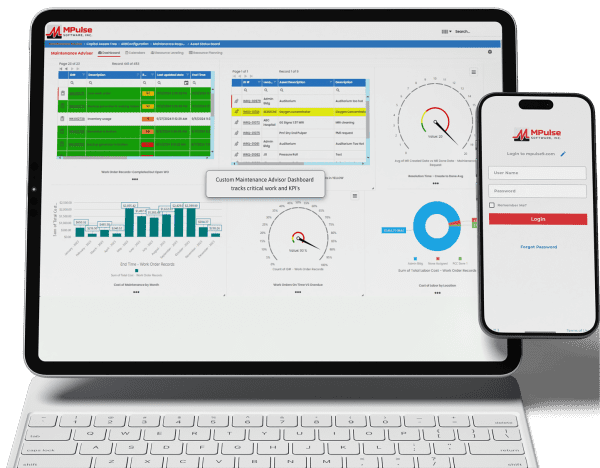
Maintenance teams face pressure to do more with fewer resources, but the top CMMS software platforms in 2026 are meeting the challenge. Today’s leading solutions go beyond basic work order tracking, providing preventive and predictive maintenance, real-time asset insights, mobile-friendly design, and data-driven reporting to support smarter, more proactive operations. Whether your team manages a single facility or a global asset portfolio, modern CMMS platforms improve reliability, reduce downtime, and gain clear insight into maintenance performance. As a result, finding the right software choice serves as the foundation for the year ahead. Whether you’re moving away from spreadsheets or replacing an existing system, this comparison highlights several of today’s leading CMMS solutions to help you find the right fit. 1. MPulse CMMS MPulse CMMS stands out as a flexible, enterprise-ready solution designed to support proactive maintenance strategies across a wide range of industries. Top features include comprehensive asset management through a centralized system that captures asset details, maintenance histories, warranties, and documentation. All this data links directly to work orders, parts, and schedules for full lifecycle visibility. Work order management is straightforward, with easy creation, scheduling, and tracking supported by automated alerts and maintenance calendars. Preventive and predictive maintenance capabilities allow teams to schedule work based on time, usage, or condition data, with optional integrations supporting predictive initiatives. Inventory and purchasing tools help track spare parts, monitor stock levels, and automate purchasing to avoid downtime caused by missing components. Reporting and dashboards provide clear insights into KPIs, costs, and performance metrics, while integrations with ERP, accounting, and other business systems support scalable, connected operations. Biggest Benefit of MPulse CMMS = Adaptability MPulse’s biggest benefit lies in its ability to adapt to organizations of all sizes while improving asset reliability and reducing downtime. The customizable design supports industries ranging from manufacturing and utilities to healthcare, education, and government facilities. MPACT runs in the cloud, so there is nothing to install and nothing for IT to patch, and it meets the compliance needs of regulated industries. Its per-user licensing covers the people who plan and perform maintenance, while requesters are unlimited and free, which keeps costs under control for teams that work in shifts or take requests from many departments. MPulse CMMS User Reviews Users frequently praise MPulse for balancing depth and usability. Many note that its strong reporting tools and flexibility make it a long-term solution rather than a system teams quickly outgrow. Reviewers also recommend MPulse’s affordable implementation services to speed adoption and ensure success. Users praised MPulse for: MPulse has allowed us to track hundreds of assets across multiple types and accurately schedule maintenance for those assets. Before MPulse, our preventive maintenance simply didn’t get done, and our spare parts inventory tracking was stuck in the stone age. We were never sure what parts we had or where to find them. Now we’re able to track inventory accurately and always have the necessary spare parts on hand. – Caleb C. on Capterra MPulse makes it easy to track assets and manage work orders and work order history. You can log machine hours and set hour-based work orders. – Vern B. on G2 For our campus, it made submitting requests easier for users, and they are able to receive email notifications based on the status of their work orders. Building users appreciate its ease of use when submitting requests to the Physical Plant. Maintenance staff can be held accountable for performance, and with preventive maintenance procedures being scheduled and completed, downtime for critical equipment has decreased. – Christopher B. on Capterra We’ve been using MPulse for the last four years and have no plans to stop. We appreciate how it helps us keep track of all our devices without relying on stacks of spreadsheets for updating, tracking, and monitoring. MPulse does the work for us. – Joel S. on Software Advice Strengths of MPulse CMMS Customers consistently give MPulse strong scores on Software Advice, with overall ratings around 4.5 out of 5 stars and an excellent user satisfaction rating of about 91%, meaning the vast majority of users would recommend it. Many users say MPulse substantially improves their maintenance operations by streamlining work order tracking, preventive maintenance, and asset management workflows. One verified reviewer described it as a “very comprehensive and complete CMMS” that they’re glad they chose after evaluating alternatives. Customers frequently emphasize responsive and helpful customer support, with numerous reviews pointing out how support staff assist quickly with questions or issues, helping keep operations moving. Another common positive theme is that once MPulse is properly configured, it can simplify tracking maintenance tasks, inventory, and historical data, freeing teams from paper logs or spreadsheets. Long-term customers like St. George Steel, IKEA US West, Reed College, and Northwell Health mention that MPulse “simplified keeping track of what we do” and that it’s easy to tailor the program to facility maintenance needs. Affordable Pricing MPACT is a cloud subscription priced per user. You pay for the people who plan and perform maintenance, and requesters are unlimited and free, which keeps costs predictable as more departments submit work requests. Current plans are listed on the MPACT pricing page, and a free demo and custom quote are available. 2. Maintenance Connection Maintenance Connection is a robust CMMS designed for organizations that need deep asset management, strong preventive maintenance capabilities, and enterprise-level scalability. The platform focuses on helping maintenance teams plan, track, and continuously improve their operations through data-driven decision-making. Key features include advanced work order management with configurable workflows, preventive and predictive maintenance scheduling based on time, meter readings, or condition data, and detailed asset tracking with full maintenance histories and documentation. Maintenance Connection also offers inventory and parts management, labor tracking, and comprehensive reporting tools that help teams analyze performance, costs, and compliance metrics. Mobile access enables technicians to receive assignments, update work orders, and access asset data in the field. User Reviews Organizations choose Maintenance Connection for its depth, configurability, and suitability for complex environments. The platform is suited for
Scheduled Maintenance That Actually Prevents Problems

When equipment breaks down, work stops, money is lost, and people get frustrated. That’s why many companies schedule maintenance tasks to take care of equipment before it breaks. But planning and tracking that work can get complicated. CMMS and scheduled maintenance prevent problems by helping your team plan, document, and track maintenance work. It makes sure the right tasks happen at the right time, and it keeps everyone organized. What Is Scheduled Maintenance? Scheduled maintenance is the practice of doing regular check-ups on equipment so problems don’t have a chance to grow. Instead of waiting for something to break, maintenance teams check equipment and other assets early, replace worn parts, and make adjustments before things go wrong. You prevent the problem by staying ahead of it. Some common scheduled maintenance tasks include: These tasks may seem simple. But skipping them can lead to expensive breakdowns in the future. CMMS can remind you when something needs to be done. Often, problems happen because maintenance teams don’t have a good system to keep track of everything. They may forget tasks, lose paperwork, or miss an important warning sign. Sometimes maintenance teams are so busy fixing emergencies that they don’t have time to focus on routine work. That means more downtime, more repair costs, and more stress for everyone. How CMMS Helps Prevent Real Problems CMMS prevents many of the issues that make scheduled maintenance difficult. It keeps all maintenance information in one place and makes it easy for teams to stay organized. Here are some ways CMMS software and scheduled maintenance work together to prevent problems. 1. Automated Reminders CMMS sends alerts when it’s time to do a task. No one has to remember dates or search through paperwork. The system tells workers what needs to be done and when. 2. Easy-to-Follow Work Orders Work orders explain what task needs to happen, where it is, what tools are needed, and how long it should take. CMMS organizes all of this data so maintenance teams can follow clear instructions. 3. Real-Time Updates When a technician finishes a task, they can check it off in CMMS right away, even from a phone or tablet in the field. This capability keeps everyone up to date, including managers who want to see what’s been completed. 4. Data That Helps You Make Better Decisions CMMS tracks the history of each piece of equipment. Over time, it shows patterns like how often an asset breaks down or which parts wear out the fastest. This information helps teams choose the best time to replace equipment, order parts early, and prevent failures. 5. Less Paperwork, Less Stress Instead of storing piles of binders, clipboards, and sticky notes, CMMS keeps everything electronically. It’s easier to find information, and nothing gets lost. The Benefits of Scheduled Maintenance Done Right When scheduled maintenance is supported by a CMMS, everyone benefits. What Makes a CMMS Effective? Not all CMMS programs are the same, but the best ones share a few important features: Scheduled maintenance software doesn’t have to be complicated to work well. In fact, simple systems are often the most effective because people are more likely to use them every day. Getting Started with CMMS and Scheduled Maintenance If your team is new to scheduled maintenance or wants to improve its current system, starting with CMMS is a smart step. Begin by entering your equipment list, setting up basic preventive tasks, and scheduling reminders. Over time, you can add more details, track performance, and fine-tune your maintenance plans. You don’t have to fix everything at once. Even small changes, like doing regular inspections or tracking tasks electronically, can prevent big problems later. Scheduled Maintenance Prevents Problems Scheduled maintenance works best when it’s organized, consistent, and supported by good tools. CMMS makes this possible by turning simple reminders and tasks into a complete system for keeping equipment healthy. When used well, it helps companies avoid breakdowns, reduce costs, and stay productive. In the end, scheduled maintenance isn’t just about fixing machines. It’s about preventing problems before they happen. CMMS is one of the best ways to make that happen. Get started today. Contact us.