
A maintenance escalation workflow is an automated ruleset that advances an unresolved work order to the right person, team, or authority level once a time limit or condition trips a trigger. It exists to close the gap between “someone reported a problem” and “someone qualified is actually fixing it.”
The payoff shows up fast. A standardized maintenance workflow that enforces timestamps and named owners at every stage preserves the accountability that manual tracking loses within days. Platforms like MPulse CMMS build this logic directly into the work order lifecycle, so nothing sits untouched because a supervisor was in a meeting.
- The stakes are real: unplanned downtime in industrial settings averages roughly $250,000 per hour, and many facilities lack full awareness of which assets need maintenance.
- The mechanic is simple: if a high-priority work order isn’t accepted within 30 minutes, the system notifies the supervisor. If it’s still unaccepted at 60 minutes, it auto-assigns to a backup crew.
Key Takeaways
Automated escalation workflows close maintenance response gaps by pairing timers and defined owners with notifications that fire without manual follow-up.
| Point | Details |
|---|---|
| Definition matters first | An escalation workflow automatically advances unresolved work orders based on time or condition triggers. |
| Two types, different jobs | Functional escalation handles skill gaps; hierarchical escalation handles time and safety breaches. |
| Manual follow-up is the real risk | Missed timers and unclear ownership, not lack of effort, cause most maintenance delays. |
| MPulse CMMS operationalizes the rules | Configurable timers, automated notifications, and audit trails let facilities pilot escalation rules on one asset class before scaling. |
Table of Contents
- What Does a Maintenance Escalation Workflow Look Like?
- Functional vs. Hierarchical Escalation: Which One Do You Need?
- Why Manual Follow-Up Breaks Down
- What Changes When You Automate Escalation
- How Do You Design an Escalation Workflow for Your Facility?
- Sample Escalation Rules You Can Adapt Today
- Which KPIs Actually Prove Escalation Is Working?
- Testing and Tuning: Don’t Skip the Governance Step
- How MPulse CMMS Puts These Rules Into Practice
- Ready to Automate Your Escalation Rules?
- Sources
- FAQ
What Does a Maintenance Escalation Workflow Look Like?
Every escalation workflow breaks down into the same six moving parts, regardless of industry or facility size.
- Triggers — the event that starts the clock (a work order created, a sensor alarm, a missed PM).
- Conditions — the rule logic that decides whether escalation applies (priority level, asset class, shift).
- Timers — the countdown window before the rule fires.
- Escalation levels — the sequence of people or teams the ticket moves through.
- Owners — who is accountable at each level, named by role, not by guesswork.
- Actions/notifications — what actually happens: a text, an email, an auto-reassignment.
A typical sequence runs: a technician logs a request, the CMMS assigns it and starts a timer, the timer lapses without acceptance, the system escalates to the next tier, and the cycle repeats until someone closes the loop with a timestamp.
Pro Tip: Map ownership before you touch timers. If nobody has agreed on who gets the level 2 notification, the fastest rule engine in the world will just escalate into silence.
Functional vs. Hierarchical Escalation: Which One Do You Need?
Escalation comes in two flavors: functional and hierarchical, and mixing them up is a common design mistake.
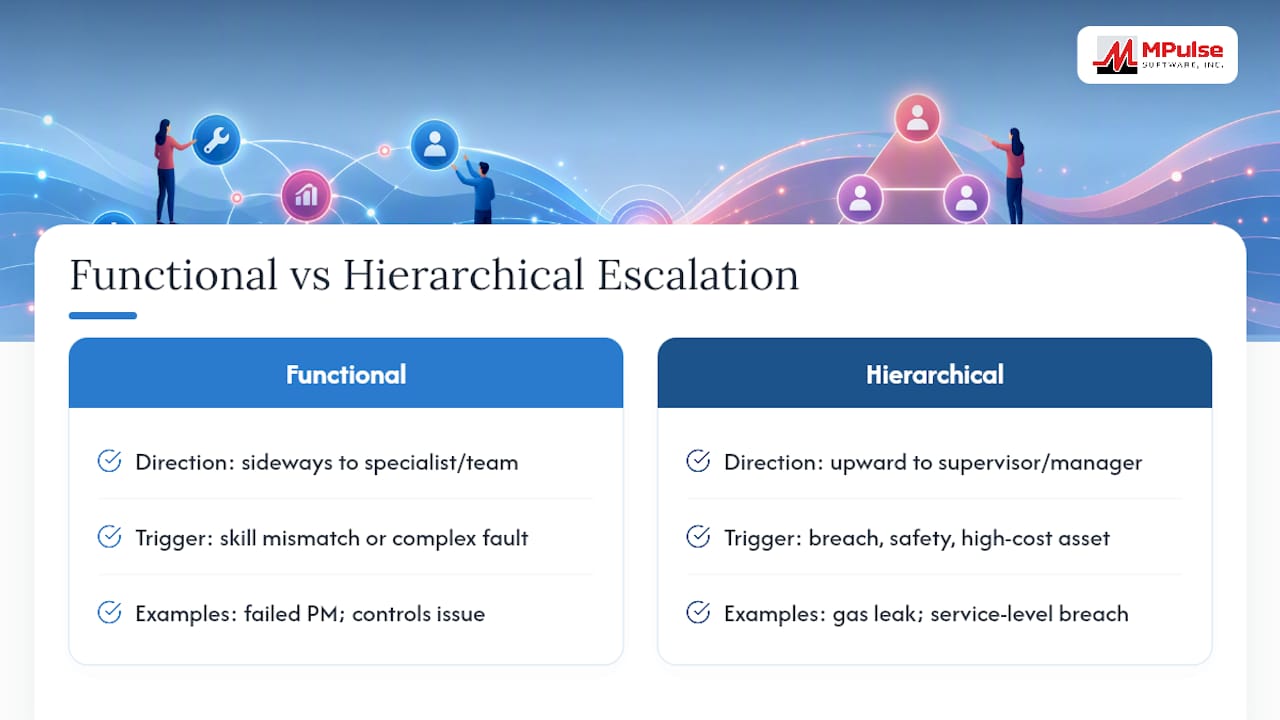
Functional escalation hands the ticket sideways, to a specialist or team with skills the first responder lacks. Hierarchical escalation moves the ticket upward, to a supervisor or manager, purely because time has run out.
Use functional escalation when a generalist technician hits a problem outside their training, like a controls issue that needs an electrician. Use hierarchical escalation when a service-level breach, a safety concern, or a high-cost asset failure demands visibility at a higher level, regardless of whose skill set is involved. A gas leak alarm needs hierarchical urgency immediately. A PM that’s failed inspection three cycles running needs functional escalation to a specialist who can diagnose why.
Why Manual Follow-Up Breaks Down
Manual escalation fails in predictable ways: missed timers because nobody’s watching the clock, unclear ownership when a ticket lands in a shared inbox, phone-tag delays waiting for a callback, and informal workarounds (a hallway conversation, a text to a friend) that erase the paper trail entirely.
- Missed timers
- Ambiguous ownership
- Delayed manual notifications
- Undocumented workarounds
The $250,000-per-hour downtime figure isn’t abstract when a work order sits unclaimed for six hours because three people assumed someone else had it. A CMMS enforces timestamps and audit trails automatically, so “I thought you had it” stops being a viable excuse.
What Changes When You Automate Escalation
Automation shifts the baseline in three measurable ways: faster time-to-first-response, fewer tickets that age into “forgotten” status, and an audit trail that survives staff turnover.
- Time-to-first-response drops because notifications fire the instant a timer expires, not whenever someone checks their inbox.
- Unresolved ticket counts shrink because auto-reassignment prevents single points of failure.
- Accountability improves because every escalation step is timestamped, not remembered.
Real-time status tracking lets managers see exactly where a ticket sits in the escalation chain and step in before a response window closes, not after.
How Do You Design an Escalation Workflow for Your Facility?
Building the workflow is a sequencing problem more than a technical one. Follow these steps in order:
- Define objectives and SLAs. Decide what “on time” means for each priority tier before you configure anything.
- Map work order statuses and owners. Use a standard sequence like Requested → Approved → Planned → Scheduled → In Progress → Completed → Closed, and name an owner for each transition.
- Classify priorities and triggers. Separate safety-critical, production-critical, and routine requests, since each needs different rules.
- Set timers and thresholds. Shorter windows for anything safety-related, longer for routine PMs.
- Define notification actions. Decide who gets a text versus an email versus an in-app alert at each level.
- Pilot the rules on one asset class or building. Watch for false triggers and missed recipients before wider rollout.
- Roll out with training and governance. Assign an owner for the policy itself, not just the software configuration.
Pro Tip: Set safety-critical thresholds tighter than you think you need, then track your actual response times for 30 days before tuning them down. Guessing at timers without a baseline usually means resetting them twice.
Sample Escalation Rules You Can Adapt Today
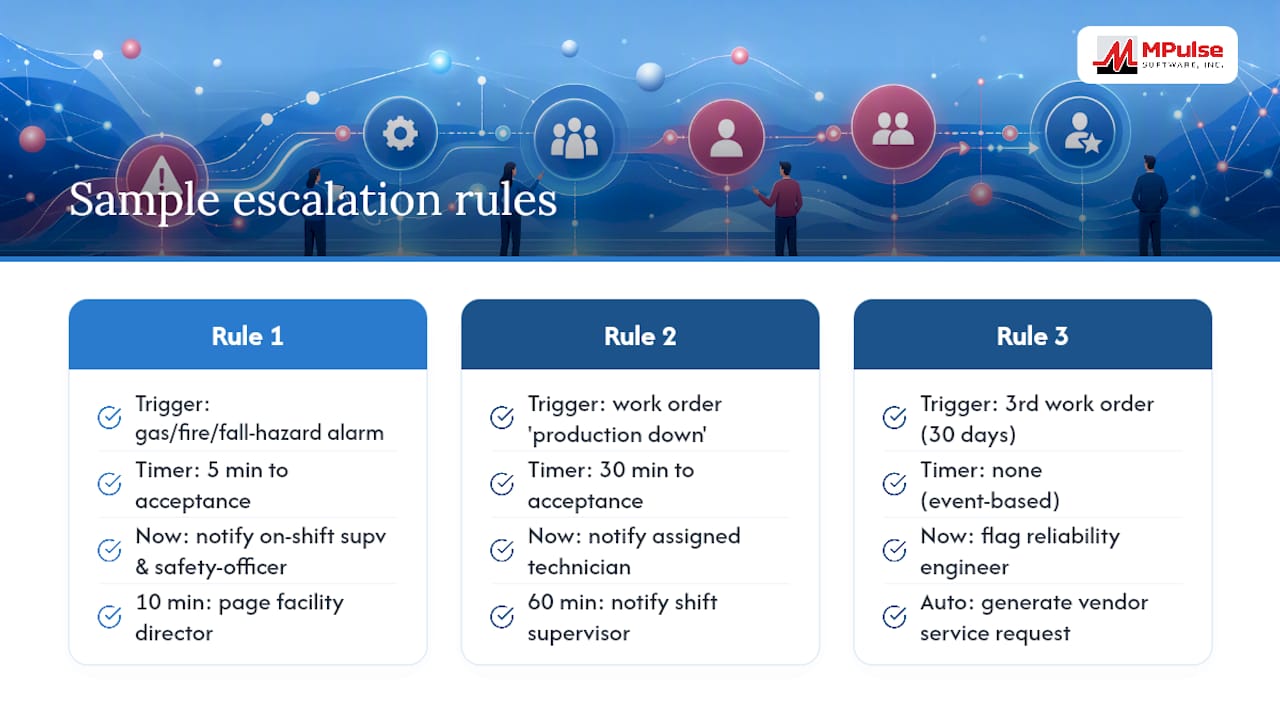
Three rule sequences cover most facilities’ immediate needs.
Rule 1: Safety-critical alarm. Trigger: gas, fire, or fall-hazard alarm. Timer: 5 minutes to acceptance. Escalation: auto-notify on-shift supervisor and safety officer simultaneously; if unaccepted at 10 minutes, page facility director.
Rule 2: SLA-based production line down. Trigger: work order tagged “production down.” Timer: 30 minutes to acceptance. Escalation: notify assigned technician; at 60 minutes, notify shift supervisor; at 90 minutes, auto-assign backup crew.
Rule 3: Recurring failure or vendor escalation. Trigger: same asset generates a third work order in 30 days. Timer: none (event-based). Escalation: flag to reliability engineer and auto-generate a vendor service request.
Each rule should specify priority, timer duration, recipient list, auto-assign fallback, and a required follow-up action before closeout.
Which KPIs Actually Prove Escalation Is Working?
Six metrics tell you whether the workflow is doing its job, not just whether it exists.
- Time-to-first-response — how long between ticket creation and acceptance.
- Time-to-resolution — how long from creation to closeout.
- Percent escalated — the share of tickets that require any escalation at all.
- Mean time between escalations — a proxy for recurring failure patterns.
- SLA compliance rate — the percentage of tickets closed within their target window.
- Backlog age — how long open tickets have sat unresolved.
Urgent priorities should target response inside 15 to 30 minutes; routine work can tolerate hours. Set your actual targets from your own facility’s baseline, not an industry average, and capture a timestamp at every status transition so monthly reporting reflects reality, not memory.
Testing and Tuning: Don’t Skip the Governance Step
Before full rollout, run unit tests on each timer, simulate an escalation end to end, verify every recipient actually receives the alert, and confirm the audit trail logs correctly.
Governance matters just as much: assign one owner for the escalation policy itself, put rule changes through change control, train new hires on the sequence, and hold a brief audit review monthly. Plan a 30/60/90-day tuning cadence, adjusting timers or recipients based on what the data from tracked escalation frequency actually shows.
How MPulse CMMS Puts These Rules Into Practice
MPulse CMMS maps directly onto the design checklist above: configurable timers, a rule engine for triggers and thresholds, a calendar interface for scheduling context, automated notifications, mobile acceptance for field technicians, and a built-in audit trail.
- Timers and thresholds by priority tier
- Automated notification routing
- Mobile work order acceptance
- Full transition history for audits
Start with a 30-day pilot on one asset class, confirm your KPIs move in the right direction, then scale facility-wide. Configuration specifics will vary by customer and asset mix.
A maintenance manager’s quick note
I’ve watched a single missed notification turn a two-hour fix into a two-day shutdown. Once ownership was clear at every level, our team stopped arguing about whose ticket it was. Start with one building, prove it works, then expand.
Ready to Automate Your Escalation Rules?
You’ve seen what a functioning escalation workflow requires: clear timers, defined owners, and notifications that fire without anyone having to remember to send them. MPulse CMMS builds all three directly into the work order lifecycle, so escalation rules run on the platform instead of on someone’s memory.

The MPulse CMMS platform lets you configure priority tiers, timers, and notification chains without custom development, and its calendar interface keeps escalation context visible alongside your preventive maintenance schedule. If your facility handles compliance-driven recordkeeping, the audit trail captures every transition automatically. Request a demo and walk through a pilot escalation rule built around your own SLA targets before you commit to a facility-wide rollout.
Sources
- An Escalation System for Handling and Analyzing Production Disturbances
- What is a maintenance workflow?
- What Is Escalation Management in Field Service?
FAQ
What is an escalation workflow and how does it work?
An escalation workflow is a rule set that automatically moves an unresolved task to a new owner or authority level once a timer expires or a condition is met, so nothing stalls indefinitely.
What are the two types of escalation?
Functional escalation hands a task to a specialist with the right skills, while hierarchical escalation moves it up the management chain based on elapsed time or severity.
What is an escalation process in maintenance?
It’s the documented sequence a work order follows when it isn’t resolved on schedule: from trigger, to notification, to reassignment, to closeout, with a timestamp at every step.
How do I escalate a maintenance request that’s been ignored?
In a system like MPulse CMMS, you set a timer on the original request; once it lapses, the platform automatically notifies a supervisor or reassigns the ticket to a backup technician.
What are the steps in a typical maintenance workflow?
A standard maintenance workflow moves through identification, approval, planning, scheduling, execution, inspection, and closeout, with escalation rules layered on top to catch delays at any stage.