Warranty tracking in a CMMS links every covered asset or component to its provider, coverage period, and terms, then surfaces that entitlement the moment a work order opens. The practical payoff is avoidable cost reduction: repairs route to the correct party instead of draining your maintenance budget. Core features behind this include coverage templates, instantiated contracts, meter-based rules, and warranty visibility inside the work order itself.
TL;DR:
- Each warranty record should link the provider, contract number, serial number, asset, dates, meter limits, covered components, exclusions, and purchase or certificate documents.
- Create reusable coverage templates, then attach versioned contracts to serialized assets; keep parent and component warranties separate because they can follow different clocks.
- For warranties limited by time or usage, track both dates and current meter readings, then recalculate status daily to prevent stale entitlement checks.
- Before submitting claims, match repair codes to coverage, capture labor, parts, photos, and failure notes, and require human review of each claim.
- Clean serial and meter records, activate scheduled recalculation, and pilot the claim workflow on a small asset group before expanding across the fleet.
Table of Contents
- What Warranty Tracking Means and Which Fields to Capture
- Coverage Templates vs. Instantiated Contracts: Modeling Warranty Correctly
- How Warranty Status Reaches Work Orders and Claims
- Implementation Checklist for Reliable Warranty Tracking
- How MPulse Supports Warranty Tracking in Practice
- A Maintenance Manager’s Take on Priorities
- Where to Go Next with MPulse
- FAQ
- Sources
What Warranty Tracking Means and Which Fields to Capture
Warranty tracking means your CMMS stores the coverage terms attached to an asset or component and checks them automatically whenever maintenance work gets scheduled. Instead of a technician or planner digging through paper folders or a shared spreadsheet, the system flags active coverage the moment a corrective work order opens, which keeps covered repairs from being billed to your own budget by mistake.
To make that work, your records need a consistent set of fields. We recommend treating this as an audit checklist against any CMMS you currently use or evaluate:
- Provider and contract number, so claims route to the right party
- Serial number and asset link, tying the warranty to a specific unit or component
- Start and end dates, plus any meter-based duration (hours, miles, cycles)
- Covered components and exclusions, since partial coverage is common
- Related documents, such as the original purchase order or OEM certificate
A generator might carry a 24-month warranty or a 2,000-hour runtime limit, whichever comes first. This whichever-expires-first calculation is standard in mature systems and requires both time tracking and meter data to stay accurate.
Coverage Templates vs. Instantiated Contracts: Modeling Warranty Correctly
Warranty coverages and warranty contracts solve two different problems, and conflating them is the most common configuration mistake we see.
A coverage is a reusable template: terms, duration, meter rules, and covered components defined once for a model or equipment class. A contract is what gets instantiated from that coverage and attached to a specific serialized asset, either automatically at purchase or manually when historical equipment gets entered into the system. Building coverages as templates first prevents your team from re-entering the same terms for every truck, compressor, or pump that shares a warranty structure.
A few modeling decisions determine whether entitlement shows up correctly at the work order:
- OEM-level vs. supplier-level coverage. OEM-level templates act as a single source of truth, which simplifies claims when the same part gets purchased through multiple distributors.
- Versioning over time. Coverage terms change across model years or contract renewals, so older assets need to stay linked to the version that applied when they were purchased.
- Parent and child asset hierarchies. A vehicle warranty and a transmission warranty often run on different clocks, and coverage assigned at the wrong hierarchy level can show a component as expired when it is not, or covered when it is not.
Pro Tip: Test parent and child coverage scenarios during pilot configuration, not after go-live. Entitlement errors at the hierarchy level are the hardest to catch once work orders are already flowing.
How Warranty Status Reaches Work Orders and Claims
Warranty data only matters if it reaches the technician before the wrench turns. Here is the sequence we recommend mapping against your own process:
- Work order creation. When a corrective work order is raised against a covered asset, the CMMS checks active coverage and displays the warranty-repair indicator by default, flagging that the repair may qualify for provider reimbursement rather than internal spend.
- Repair and transaction code matching. Standardized repair codes get checked against the coverage terms to confirm the failure and procedure actually fall within scope, since partial or excluded coverage is common.
- Evidence capture. Technicians log labor, parts, photos, and failure notes tied to the work order, building the record a provider will require.
- Claim submission and tracking. Costs post against the claim, the claim gets submitted to the provider, and reimbursement status gets tracked until resolution.
- Scheduled recalculation. Because meter-based coverage depends on current runtime or mileage data, the system needs a scheduled process that recalculates expiration dates and updates contract status, ideally run daily so no stale record causes a missed or invalid claim.
Skipping that last step is the most common reason warranty programs look accurate on paper but fail at the point of claim.
Implementation Checklist for Reliable Warranty Tracking
Getting warranty tracking right is less about software features and more about the governance wrapped around them. We suggest working through these steps in order.
- Decide your coverage modeling approach. Choose OEM-level, supplier-level, or asset-level coverage and document the rule so every planner applies it consistently.
- Prepare your data. Confirm serial numbers, build meter templates, connect purchase-order data where possible, and store supporting documents against each asset.
- Schedule recalculation processes. Run meter-expiration and contract-status updates daily so entitlement checks reflect current usage.
- Set operational rules. Require a human review gate before a claim gets submitted, standardize repair-transaction codes, and define default behavior for the warranty-repair indicator on new work orders.
- Track recovery KPIs. Monitor claim recovery rate, time-to-claim, and recovered value against repair cost to see whether the program pays for itself.
A structured warranty program only works when meter data stays current: stale odometer, runtime, or installation records are the most common cause of missed or invalid claims, which is why scheduled recalculation is not optional for fleets or equipment on usage-based coverage.
Pairing these controls with a broader cost-control strategy around your maintenance operation tends to compound the savings rather than isolate them to warranty claims alone.
How MPulse Supports Warranty Tracking in Practice
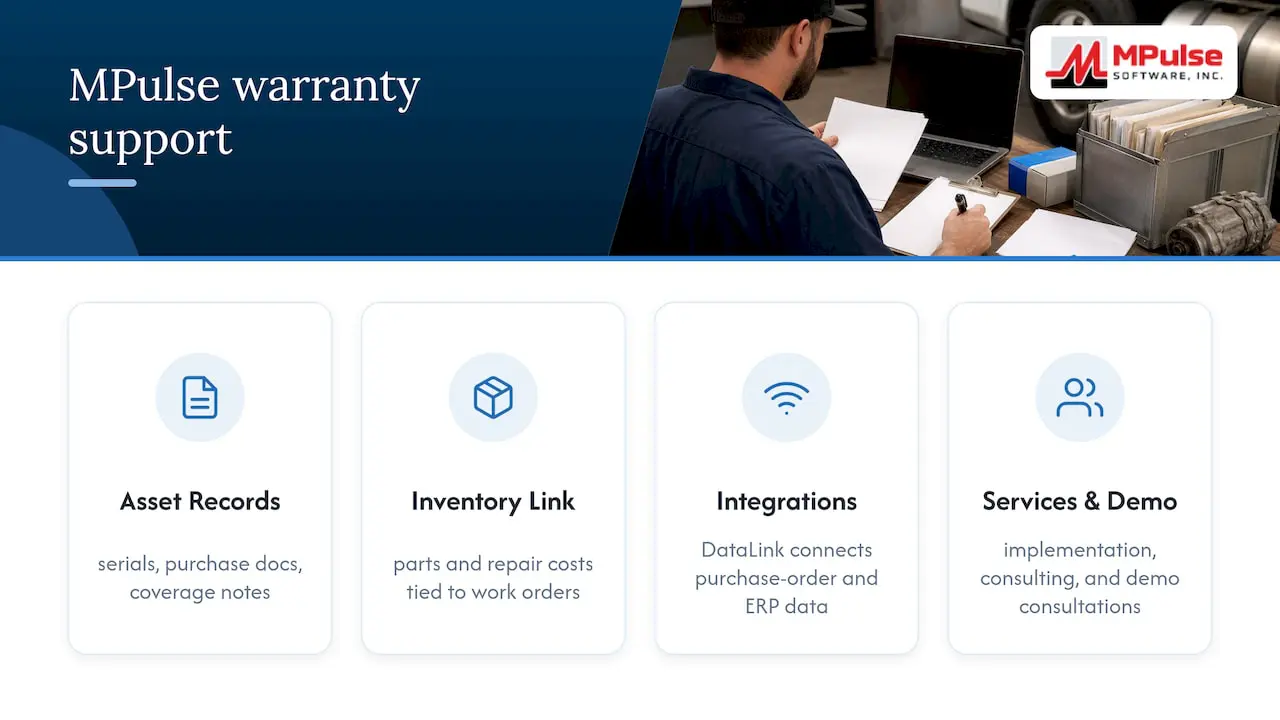
MPulse CMMS gives your team asset tracking, document storage, and an intuitive calendar dashboard that bring the checklist above into one working system. Asset records hold serial numbers, purchase documents, and coverage notes in one place, while our inventory management module ties parts and repair costs to the work orders they support, which matters when building a claim.
Integration capabilities, including the DataLink Integration Adapter, connect purchase-order and ERP data so contract creation does not depend entirely on manual entry. We also offer CMMS Implementation Services and Expert Consulting Services for teams that want help structuring coverage hierarchies or migrating historical warranty records during setup.
A demo or implementation consultation is a practical next step if you are mapping this checklist against your current system.
A Maintenance Manager’s Take on Priorities
If you implement one thing first, make it the meter-recalculation schedule. Warranty logic built on coverage templates and work-order flags looks solid in a demo, but it only holds up when the underlying meter data stays current. Start with data cleanup, turn on the scheduled process, then pilot the claims workflow on a small asset group before rolling it out fleet-wide.
— Mark
Where to Go Next with MPulse
Implementing warranty tracking correctly takes the right data structure and the right support behind it. We offer Professional and Advanced pricing plans built around the configuration work this guide describes, along with Technician License options for teams scaling access across sites.
If you would rather have us handle the heavy lifting, our implementation and training services cover coverage modeling, data migration, and staff onboarding so your warranty program is reliable from day one. Reach out to evaluate pricing or request a demo tailored to your asset mix.
FAQ
What is warranty tracking in a CMMS?
Warranty tracking in a CMMS links an asset or component to its provider, coverage dates, and terms, then checks that coverage automatically when a work order opens. The goal is to route covered repairs to the correct party and avoid billing your own maintenance budget for something still under warranty.
What fields should a warranty record include?
A complete warranty record should capture the provider, serial number, start and end dates, meter-based duration if applicable, covered components, exclusions, and any related purchase or certificate documents. Missing meter data is the most frequent cause of missed or invalid claims.
How does meter-based warranty expiration work?
Meter-based warranties expire on whichever limit comes first, time or usage, such as 24 months or 2,000 operating hours. This whichever-expires-first logic requires both a duration field and current meter readings to calculate accurately.
How often should warranty status be recalculated?
Warranty and contract status should be recalculated on a scheduled basis, ideally daily, since usage can change quickly on active fleets or high-cycle equipment. Running this process regularly keeps work-order entitlement checks accurate and prevents stale data from causing claim denials.
Does MPulse support warranty tracking features?
MPulse CMMS supports asset tracking, document storage, and inventory management that align with warranty tracking needs, along with implementation and consulting services to help structure coverage data. Specific configuration details are best confirmed during a demo or pricing discussion based on your asset mix.