
Start with a single focused triage pass, protect scheduled PM hours, and use your CMMS to enforce the revised schedule. Track three numbers weekly: backlog weeks per technician, PM compliance percentage, and emergency work percentage. Expect fast, visible wins from triage in the first two weeks, with the real, lasting gains showing up once your schedule is load-leveled against actual crew capacity.
TL;DR:
- Effective backlog management requires regular load-leveling of the maintenance schedule against actual crew capacity to prevent reaccumulation of deferred work.
- Implementing a structured triage process quickly reduces backlog by categorizing work into kill, defer, rescope, or schedule now, with clear scoping and ownership for prioritized tasks.
- Tracking backlog weeks and supporting KPIs such as PM compliance and emergency work percentage help monitor progress and maintain sustainable backlog levels over time.
- A CMMS like MPulse enforces discipline through visual load dashboards, automated work order generation, and detailed KPI reporting to support ongoing backlog reduction efforts.
- Sustaining backlog reduction depends on assigning ownership of the schedule and maintaining a hard rule to protect preventive maintenance hours from emergency work reallocations.
Table of Contents
- What Is a Maintenance Backlog, and Why Does It Grow?
- How Do You Measure Your Maintenance Backlog?
- How Do You Prioritize a Maintenance Backlog Fast?
- How Do You Build a PM Schedule That Doesn’t Overload Your Crew?
- What Short-Term Tactics Clear a High-Volume Backlog?
- What Should You Require From a CMMS to Keep Backlog Down?
- What’s a 30 to 90 Day Plan to Cut Maintenance Backlog?
- How Does MPulse CMMS Support This Playbook?
- Backlog Reduction Is a Discipline, Not a Cleanup Project
- Ready to Put This Playbook Into a System That Enforces It?
- Sources
- FAQ
What Is a Maintenance Backlog, and Why Does It Grow?
A maintenance backlog is every unit of approved work your team hasn’t finished yet: overdue preventive maintenance, open corrective work orders, and deferred capital projects sitting in the queue. It’s not just “the list of stuff we haven’t gotten to.” It’s a liability that compounds the longer it sits.
Left unmanaged, a growing backlog does three things at once. Repair costs climb because small issues become failures. Safety and compliance exposure rises, since overdue inspections and deferred fixes are exactly what auditors and regulators flag first. Throughput drops, because unplanned downtime eats hours that planned work would have used far more efficiently.
Backlogs rarely form for one reason. In most facilities, it’s a combination of:
- A reactive culture where firefighting always outranks planning
- PM lists that were built once and never right-sized to actual crew hours
- Work orders missing labor estimates, parts lists, or clear scope, which stalls scheduling
- Loose intake processes that let low-value requests clog the queue
- Parts shortages that delay jobs already scheduled and ready
- Staffing or skill mismatches, where the crew on hand can’t cover the work in front of them
Identifying which of these is your primary driver matters more than any generic fix. A facility drowning in poorly scoped work orders needs different intervention than one short two technicians.
How Do You Measure Your Maintenance Backlog?
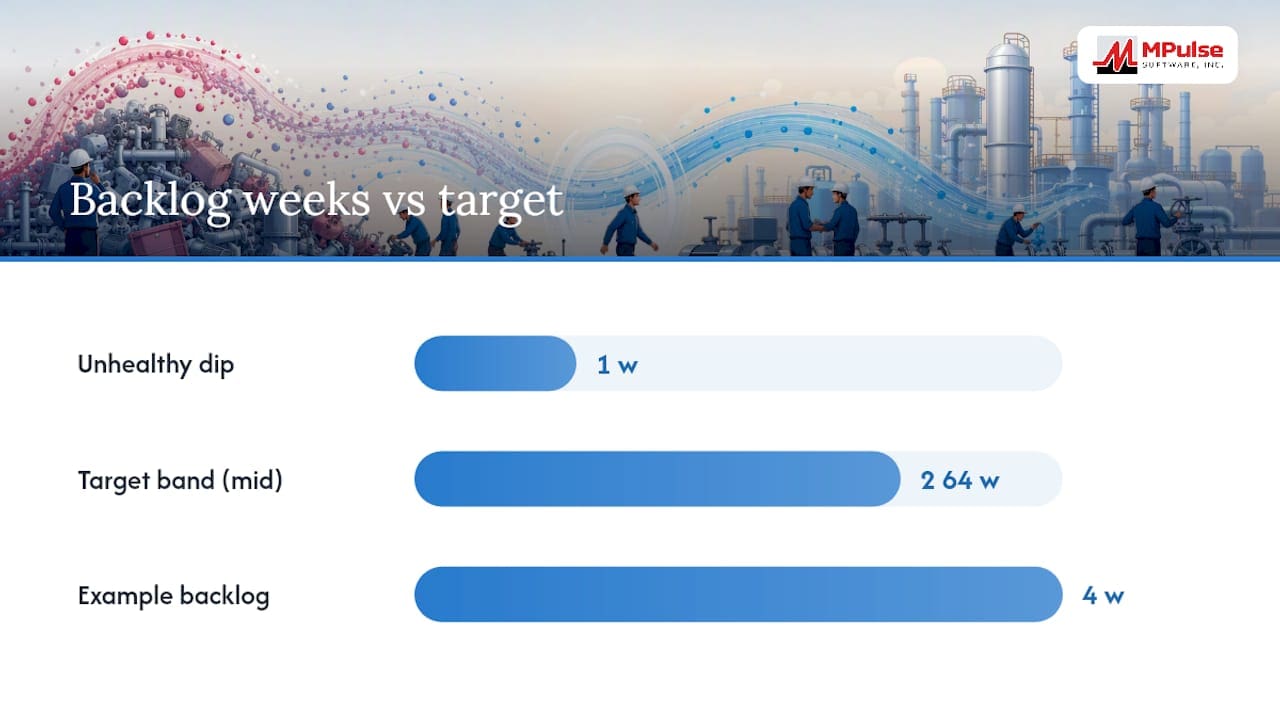
Counting open work orders tells you almost nothing on its own. A backlog of 40 five-minute lubrication tasks looks worse on paper than a backlog of 10 major overhauls, but it’s far easier to clear. The number that actually matters is backlog weeks, sometimes called crew-weeks.
The formula:
- Add up total estimated labor hours across all open, approved work (backlog labor hours).
- Divide by your team’s weekly maintenance capacity in hours (technician count times available hours per week, minus training, meetings, and PM time already committed).
- The result is backlog weeks: how many weeks of full-crew effort it would take to clear the queue if no new work arrived.
A worked example: if your open backlog totals 480 labor hours and your crew delivers 120 productive maintenance hours per week, you’re carrying four backlog weeks. Advanced Technology Services notes that many organizations aim to keep ready, planned backlog work in a 2 to 4 week band, which gives crews enough scheduled work to stay efficient without drowning them.
Pair backlog weeks with four supporting KPIs: average work order age, PM compliance percentage, emergency work as a share of total labor hours, and technician utilization. Watch the trend, not just the snapshot. A backlog holding steady at three weeks with PM compliance climbing is a healthier picture than one that dropped to one week purely because you deferred everything else.
How Do You Prioritize a Maintenance Backlog Fast?
The fastest way to shrink a bloated backlog is a structured triage pass, not a slow grind through every ticket in order of age. Sort every open item into one of four lanes.
- Kill. The work is obsolete, duplicated, or the asset is gone. Close it, note the reason, and move on.
- Defer. Real work, but low risk and low urgency. Push it to a scheduled future date with a firm owner attached.
- Re-scope or split. The job is too large or poorly defined to schedule as written. Break it into smaller, executable packages with real labor estimates.
- Schedule now. Genuine, ready work that fits current crew capacity. Assign it a date this week or next.
For scoring what lands in “schedule now” first, three frameworks cover most facilities. Simple risk tiers (critical, important, routine) work well for smaller teams. WSJF, or weighted shortest job first, ranks work by value divided by effort, which is useful when you’re choosing between many similarly-sized tasks. Asset criticality matrices, which weigh safety impact, production impact, and failure probability, suit facilities with defined compliance obligations.
Run a quick filter before you score anything: does this work order have a clear scope, a labor estimate, and an asset ID? If not, it needs re-scoping before it deserves a priority rank at all. Advanced Technology Services’ guidance on clearing backlog before busy season recommends assigning a single accountable owner to every item that survives triage, since ownerless items are the ones that quietly reclimb the queue within a month.
Pro Tip: Give every “defer” item a hard review date in your CMMS calendar, not just a status tag. An item without a date on the calendar is an item nobody revisits.
How Do You Build a PM Schedule That Doesn’t Overload Your Crew?
Most PM schedules fail for one boring reason: they were built against theoretical crew capacity instead of the real thing. Start by adding up total scheduled PM hours per week across every asset on the list, then compare that number against actual available crew hours after subtracting time already lost to emergency work.
- Calculate total weekly PM hours from your task list and compare against real crew capacity, not budgeted headcount.
- Where PM hours exceed capacity, stretch intervals on low-risk assets or convert secondary checks to condition-based triggers instead of fixed schedules.
- Define a due-window for compliance tracking. A common approach is the 10% convention: a monthly PM due within 3 days of its date counts as on time. Without a window, compliance numbers become meaningless.
- Set a compliance target. Most reliability programs aim toward 90% PM compliance on critical assets, lower thresholds on non-critical equipment.
- Review quarterly. Use failure history and PM finding data to adjust intervals rather than leaving the schedule static for years.
When a piece of equipment keeps generating the same corrective repair, that’s usually a sign it belongs on a PM or a condition-based trigger instead of staying in the reactive bucket. FEMP’s guidance on operations and maintenance best practices treats this shift from reactive to planned work as central to reducing long-term deferred maintenance liability.
What Short-Term Tactics Clear a High-Volume Backlog?
When the queue is too large for normal scheduling to touch in a reasonable timeframe, a time-boxed backlog elimination event is the right tool. Set a fixed window, typically one to two weeks, assign a lead who owns sequencing and safety oversight, and stage every part needed before day one starts.
- Pull contract technicians for well-defined, lower-skill tasks so your core crew stays focused on complex or safety-critical work.
- Break large deferred projects into smaller work packages that fit a single shift, rather than leaving them as one intimidating ticket.
- Pre-stage critical spares for the top 20% of backlog items before scheduling them, since a missing part is the single most common reason a scheduled job slips.
- Track completed hours against planned hours daily during the event, and adjust staffing mid-week if the pace lags.
Manufacturing operations that treat uptime recovery as a defined project rather than an ongoing grind tend to see faster results. One example from a machine shop uptime recovery effort shows how a structured 90-day approach to reclaiming lost machine hours mirrors the same logic: fixed timeline, clear roles, measured output.
What Should You Require From a CMMS to Keep Backlog Down?
A CMMS doesn’t fix a backlog by itself. It enforces the process you’ve already built, which means it’s only as good as the work order discipline behind it.
Require clean work order hygiene: every ticket needs an asset ID, a labor estimate, a priority tier, and defined acceptance criteria before it’s considered schedulable. Loose, incomplete work orders are one of the root causes behind bloated queues in the first place.
On scheduling, look for a calendar dashboard that shows PM load against crew capacity visually, automated recurring PM generation, and condition-based triggers tied to sensor data or usage counters rather than fixed calendar dates alone.
Reporting matters just as much as scheduling. Run these weekly and monthly:
- Backlog weeks trend, week over week
- PM compliance percentage against your defined due-window
- Emergency work as a share of total labor hours
- Technician utilization against scheduled versus unplanned time
SMRP’s maintenance KPI guidance treats PM compliance and backlog measurement as core benchmarking metrics for reliability programs, which is worth knowing if leadership ever asks how your numbers stack up against industry norms. A CMMS built around these reports turns backlog reduction from a one-time cleanup into a monitored, ongoing discipline.
What’s a 30 to 90 Day Plan to Cut Maintenance Backlog?
- Days 0 to 7: Audit every open work order, calculate current backlog weeks using the crew-capacity formula, and set a realistic target range, typically 2 to 4 weeks for most facilities.
- Weeks 2 to 4: Run the four-lane triage pass, schedule quick wins immediately, stage parts for anything scheduled, and bring in contractors if the volume exceeds your normal crew capacity.
- Months 1 to 3: Rebuild the PM schedule with load-leveling against real crew hours, tune due-windows and intervals, automate weekly backlog and compliance reporting, and set a recurring governance review, weekly for the first month, then monthly.
Watch for stalled KPIs. If backlog weeks stop dropping after week three, check emergency work percentage first. A stalled backlog number is almost always a symptom of emergency work quietly eating the hours you allocated to scheduled reduction.
Pro Tip: Don’t wait for month three to check PM compliance. Pull that number at the two-week mark. A schedule that’s still unrealistic will show up in the compliance percentage long before it shows up in the backlog count.
How Does MPulse CMMS Support This Playbook?
The tactics above depend on having a system that can actually run them, not just record them after the fact. MPulse CMMS covers the core requirements this playbook calls for:
- A calendar dashboard for visualizing PM load against crew capacity during load-leveling
- Automated recurring PM generation with support for condition-based triggers as assets move off fixed schedules
- Work order fields built for the hygiene standards this playbook requires: asset ID, labor estimate, priority tier, and close-out criteria
- Integration options for ERP and sensor systems, useful once condition-based triggers scale past a handful of assets
- Graphical reporting for the weekly and monthly KPIs covered above, without building spreadsheets by hand
MPulse Software has supported more than 3,500 customers globally with these capabilities, with reported efficiency improvements of up to 40% among organizations that implement preventive maintenance automation alongside the process changes this article outlines. For deeper detail on getting more from your existing system, MPulse’s guide on getting more out of your CMMS walks through work order hygiene practices in more depth.
Backlog Reduction Is a Discipline, Not a Cleanup Project
Most backlog problems don’t come back because a facility ran a bad triage event. They come back because nobody protected PM hours once the cleanup felt done, and nobody owned the schedule going forward. Sustainment requires a named accountable owner for the schedule and a hard rule that PM time doesn’t get raided for the next emergency, no matter how urgent it feels in the moment.
The other trap is measuring the wrong thing. Watch backlog weeks and emergency work percentage together. If backlog drops while emergency work climbs, you haven’t fixed anything. You’ve just changed where the pressure shows up.
— Mark
Ready to Put This Playbook Into a System That Enforces It?
Spreadsheets can track a backlog for a week. They can’t load-level a PM schedule against real crew capacity, auto-generate recurring work orders, or flag a compliance number slipping before it becomes a pattern. That’s the specific gap MPulse Software fills: an intuitive calendar dashboard built to run the crew-capacity math this article walks through, not just log it after the fact.
MPulse’s Professional plan starts at $29 per month per user, with an Advanced tier at $79 per month per user for teams that need deeper reporting and integration support. If you’d rather have hands-on help rebuilding your PM schedule and cleaning up work order data, MPulse’s implementation services team can run that build alongside you. Start with a free trial and run your own backlog-weeks calculation against your current queue before committing to anything.
Sources
- FEMP: Operations and maintenance best practices guide — achieving operational efficiency
- How to Clear a Maintenance Backlog Before Busy Season | ATS
- Preventive maintenance schedule: how to build one that sticks
- Society for Maintenance & Reliability Professionals (SMRP)
FAQ
What Does “Maintenance Backlog” Mean?
A maintenance backlog is the total volume of approved but unfinished maintenance work, including overdue PMs, open corrective work orders, and deferred projects, usually measured in labor hours or crew-weeks rather than raw ticket counts.
What Are the Three P’s of Maintenance?
Definitions vary across organizations, but a common framing centers on planning (scoping and scheduling work before it becomes urgent), prioritization (ranking work by risk and criticality), and prevention (using PM and condition-based triggers to avoid failures in the first place).
Does MPulse CMMS Help With Backlog Reduction Specifically?
Yes. MPulse CMMS supports backlog reduction through PM automation, a calendar dashboard for load-leveling schedules against crew capacity, and reporting built around KPIs like backlog weeks and PM compliance percentage.