A Tableau CMMS integration works best when you do not connect Tableau straight to your CMMS. Instead, you copy work order, asset and inventory data into a staging database or warehouse on a schedule, standardize it, and point Tableau at that copy. This protects CMMS performance, keeps your dashboards fast, and gives maintenance, finance and operations one shared set of numbers.
This guide covers the architecture, the data preparation that decides whether the project succeeds, the first dashboards to build, and how to keep them current. It is written for facility managers, operations directors and maintenance supervisors who own the outcome, not just the connection.
TL;DR
- Stage your CMMS data in a warehouse or reporting database through an ETL process, then connect Tableau to that layer rather than to the production CMMS database.
- Standardize equipment IDs, locations and the definition of downtime before you build a single view. Messy entry, not missing connectors, is what breaks most integrations.
- Start with three or four actionable views: work order backlog, current asset availability, PM compliance and parts stock. Skip vanity totals.
- Automate extract refreshes so each shift starts with current numbers, and use the Tableau REST API where you need programmatic control.
- Choose a CMMS with open integration options and clean reporting data from day one, so the dashboard is a layer on top of good records.
Table of Contents
- Why maintenance teams send CMMS data to Tableau
- How the integration works
- Clean data decides whether the integration works
- Four dashboards to build first
- Keeping dashboards current
- Perspective: build the dashboard on good maintenance records
- Where MPulse fits
- A practical rollout plan
- Common mistakes
- FAQ
- Sources
Why maintenance teams send CMMS data to Tableau
A CMMS already includes reporting. Most teams still end up in Tableau for one reason: the people who need maintenance data are not all in the CMMS. Finance wants cost by cost center. Plant leadership wants uptime next to production output. A corporate reliability group wants to compare sites.
Maintenance management practitioners describe this as a visibility gap. In a multi-site case published by IPE, a manufacturer standardized work orders, inventory and downtime analysis across more than 20 plants worldwide, and the write-up credits that standardization with better maintenance efficiency and safety compliance. The lesson is not that a particular tool did the work. Common definitions and one place to see them did.
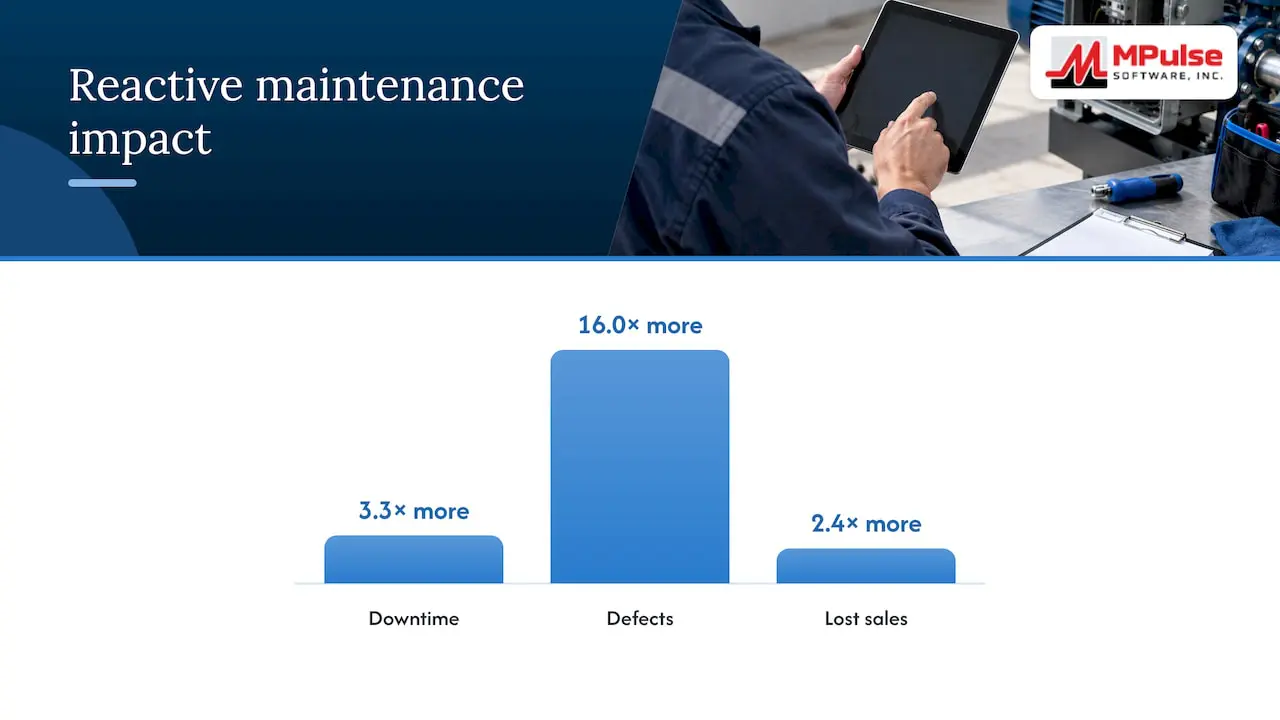
The business case for acting on maintenance data is well documented. A 2016 NIST survey of U.S. manufacturers found that establishments relying mainly on reactive maintenance reported 3.3 times more downtime, 16.0 times more defects and 2.4 times more lost sales from maintenance delays than their peers. Dashboards do not fix equipment, but they show where reactive work is crowding out planned work, which is where the cost sits.
How the integration works
There are three common patterns. Which one you choose depends on how many sites you run, how fresh the data must be, and who maintains the pipeline.
| Pattern | How it works | Best for | Main risk |
|---|---|---|---|
| Staging layer with ETL | Scheduled jobs copy CMMS tables into a warehouse; Tableau reads the warehouse | Most organizations, especially multi-site | Needs someone to own the pipeline |
| Scheduled flat-file or report export | CMMS exports run on a schedule and feed a Tableau extract | Small teams, a single site, a pilot | Manual steps and drift in column formats |
| Direct connection to the CMMS database | Tableau queries the live production database | Rarely advisable | Slows the CMMS and dashboards at peak activity |
The staging layer is the safe default
Tableau offers a REST API and native connectors, so connectivity itself is rarely the obstacle. The real design question is where the data lives when Tableau asks for it.
A CMMS is a high-transaction system. Technicians close work orders, planners schedule tasks, storekeepers issue parts, all at once. Pointing analytical queries at that same database invites slowdowns for both sides. The usual remedy is an ETL process that syncs work orders, asset downtime and inventory levels into a dedicated warehouse such as SQL Server, Snowflake or Amazon Redshift, which then serves as the Tableau data source. Your CMMS stays responsive, and your dashboards do not lag during the busiest part of the shift.
What to pull, and how often
Begin with the tables that answer real questions:
- Work orders: type (preventive, corrective, emergency), priority, asset, requested, started and completed dates, labor hours, status.
- Assets: ID, description, location, criticality, parent system, install date.
- Scheduled maintenance: task, frequency, due date, completion date.
- Inventory: part number, on-hand quantity, reorder point, usage history, unit cost.
- Labor and cost: hours by craft, parts cost, outside services.
Most reporting only needs overnight loads. Work order status and asset availability, which supervisors check during the shift, justify more frequent loads, often hourly. Match the refresh frequency to the decision it supports, because every extra refresh costs pipeline and warehouse capacity.
Model the data before you draw charts
In the warehouse, a simple star schema works well: work orders and downtime events as fact tables, with assets, locations, crafts and dates as dimensions. This keeps counts from inflating when a work order touches several parts or tasks, a very common cause of dashboards that disagree with the CMMS.
Clean data decides whether the integration works
Integrations rarely fail because an API is missing. They fail because the same pump is recorded three ways. Before linking a CMMS to Tableau, make sure fields like equipment ID and asset location are standardized across the organization. Inconsistent entry at the technician level is the usual culprit, and mobile data collection at the point of work helps keep records accurate and timely.
Agree on what downtime means
This matters most for multi-site groups. A 2025 NIST systematic review of condition monitoring points to the lack of consistent performance measures across facilities as a barrier to effective integration. In practice, one plant counts downtime from the moment a machine stops, another from the moment a work order is opened, and a third excludes planned changeovers. Put those side by side in Tableau and the comparison is meaningless.
Before building, write down and approve:
- What counts as downtime, and when the clock starts and stops.
- What counts as an asset failure versus a planned stop.
- How work order types and priorities map across sites.
- The naming convention for assets, locations and parts.
A data readiness checklist
- Every asset has a unique ID and a location from a controlled list, not free text.
- Work orders require a failure code or reason on closure.
- Completion dates and labor hours are entered at the job, not days later.
- Duplicate and retired assets are flagged, not deleted.
- Someone is named as owner of the master data.
A CMMS that enforces required fields, drop-down lists and mobile entry makes this much easier, because the discipline lives in the workflow rather than in a policy document.
Four dashboards to build first
Resist the urge to chart everything. Visualizing historical downtime is useful, but current asset availability and upcoming work order deadlines usually drive better decisions, so build for action first.
1. Work order backlog and aging
Show open work orders by priority, craft and age. A supervisor should see within seconds which jobs are overdue and which crew is overloaded. Add a filter by site for corporate viewers.
2. Preventive maintenance compliance
Chart scheduled tasks completed on time against those that were late or missed, by asset class. The ratio of planned to reactive work belongs here too. If it trends the wrong way, the NIST findings above explain the likely cost. For ideas on structuring PM tasks, see our overview of preventive maintenance software.
3. Asset availability and downtime
Show which critical assets are down right now, the downtime event history, and repeat failures. Use the agreed downtime definition, and give the view a drill-through to the work order history.
4. Parts and inventory
Show stock against reorder points, slow movers and stockout risk for critical spares. Multi-site organizations often find they can balance spare parts across locations once they can see all of them together.
Once these four are trusted, add cost by asset, labor utilization, and mean time between failures. Not before.
Keeping dashboards current
A dashboard showing last week’s figures is worse than none, because people stop trusting it. Tableau can refresh published extracts on a schedule, with full or incremental refresh options once the extract is configured for incremental loading. Schedule refreshes so they finish before the first shift starts.
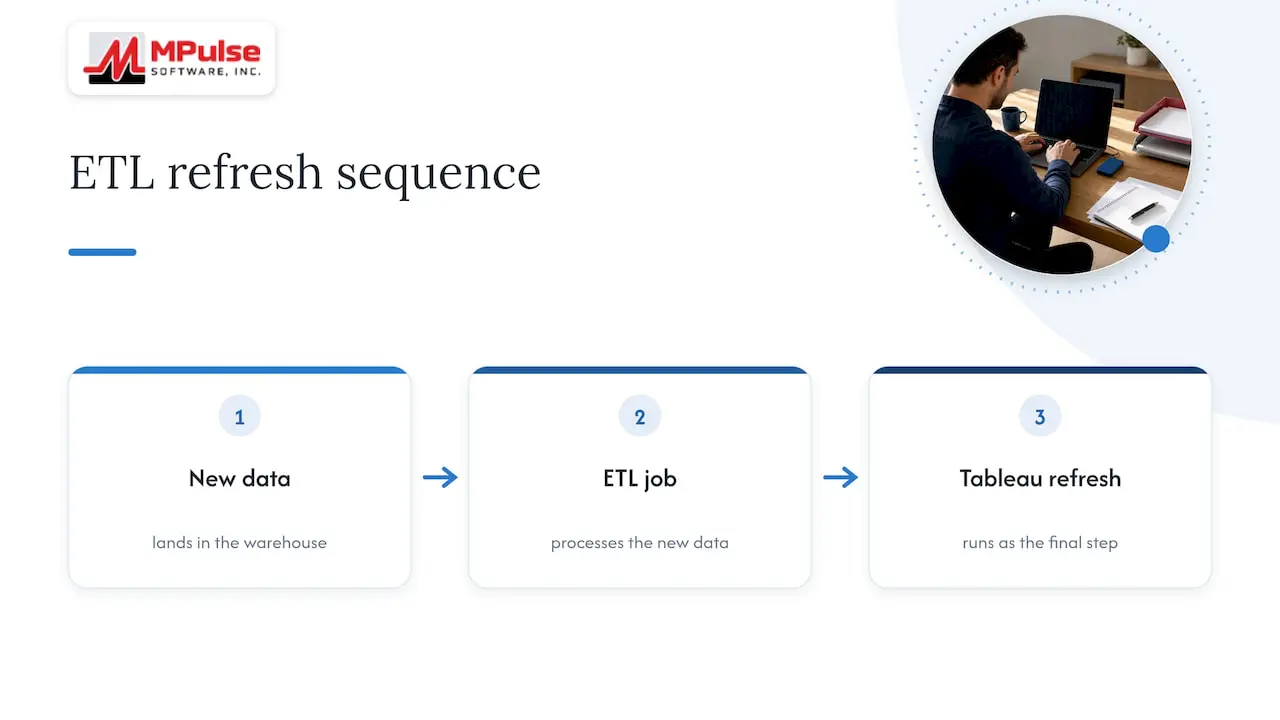
For more control, the Tableau REST API lets scripts and applications perform site and server management actions, and its jobs, tasks and schedules methods cover extract refresh tasks. A common pattern is to trigger the Tableau refresh as the last step of the ETL job, so the dashboard updates only after new data lands. If your team builds custom portals, the Tableau developer resources also describe embedding views with the JavaScript API.
Perspective: build the dashboard on good maintenance records
We talk with maintenance teams about reporting constantly, and the pattern is consistent. The teams that get value from Tableau are not the ones with the cleverest dashboards. They are the ones whose work orders, assets and parts records were already disciplined.
That is why we design MPulse around the workflow first. The calendar interface makes preventive maintenance visible to planners. Work orders, asset tracking, inventory and mobile access put data entry at the point of work. Barcode scanning reduces typing errors. Customizable workflows let a compliance-heavy site require the fields an auditor will ask for. If those records are right, whatever reporting tool you choose, Tableau included, has something trustworthy to show.
We also have a plain view on scope. A BI project can become a second full-time job if nobody sets limits. Start with a few questions your leadership actually asks, standardize the definitions behind them, and add views only when someone commits to acting on them. Be aware, too, that analytical maintenance has a staffing side: academic research on data-driven maintenance notes it can raise direct labor costs because integrated data workflows need people who can manage and interpret them. Plan for that owner at the outset.
— Mark
Where MPulse fits
MPulse CMMS covers the records that feed your dashboards: preventive maintenance automation, work order management, asset tracking, inventory for parts and supplies, graphical reporting, barcode scanning and mobile access. Integration with ERP and sensor systems is part of the platform, and add-ons such as the DataLink Integration Adapter and Resource Planning Dashboard are described on our add-on page.
Plans start with Professional at $29 per month per user and Advanced at $79 per month per user, with details on the pricing page. If you want help structuring data for a reporting project, our implementation, training and consulting services are built for that kind of rollout.
A practical rollout plan
- Define the questions. List the five decisions your leaders make from maintenance data. Each dashboard must serve one.
- Agree on definitions. Settle downtime, failure, work order types and naming standards across sites.
- Clean the master data. Deduplicate assets, standardize locations, and require key fields at work order closure.
- Stand up the staging layer. Choose a warehouse, build the ETL jobs, and test counts against CMMS reports until they match.
- Build the first four views. Pilot with one site and its supervisors.
- Automate refresh. Schedule loads and extract refreshes to finish before shift start.
- Review and expand. After a month, ask users which views they opened and which decisions changed, then add or retire views accordingly.
Step four deserves patience. Reconciling a dashboard count against the CMMS before launch saves weeks of arguments about whose number is right.
Common mistakes
- Connecting Tableau to the live CMMS database. It risks slowing down both systems at peak times.
- Skipping the definitions meeting. Cross-site comparisons then compare different things.
- Charting totals instead of actions. A count of all work orders ever opened guides no one. Overdue jobs and unavailable critical assets do.
- No data owner. Reports degrade as asset records drift.
- Over-promising savings. Cost reductions from advanced maintenance vary widely. NIST research reports a range from 15% to 98%, depending on implementation and the maturity of data collection. Set targets from your own baseline, not from a headline number.
FAQ
Can Tableau connect directly to a CMMS?
Technically it can, if the CMMS database or an API is reachable. For a busy production system, we recommend against it. Copy the data to a staging database or warehouse through an ETL process and connect Tableau there, so reporting queries never compete with technicians and planners.
Do I need a developer to integrate a CMMS with Tableau?
Usually you need someone with data engineering skills for the ETL and the warehouse, plus a Tableau author for the views. A very small pilot can run on scheduled report exports without a developer. Plan for an owner who maintains the pipeline over time.
How often should Tableau maintenance dashboards refresh?
Match the refresh to the decision. Overnight is enough for cost and trend reporting. Work order status and asset availability used during a shift justify more frequent refreshes. Tableau supports scheduled extract refreshes, and the REST API can trigger them after your data load completes.
What should I fix in my CMMS data before building dashboards?
Start with asset IDs, locations and the definition of downtime. Make failure reasons and completion dates required when work orders close. Most integration problems trace back to inconsistent entry rather than technical limits.
Which CMMS metrics belong on the first dashboard?
Work order backlog and aging, preventive maintenance compliance, current availability of critical assets, and stock levels of critical spares. These support daily decisions, and each can be built from a handful of tables.
Sources
- Tableau: Our integrations
- Tableau REST API overview
- Tableau: Jobs, Tasks, and Schedules Methods
- Tableau: Refresh Data on a Schedule
- Tableau: Developer Resources
- NIST: Economics of Manufacturing Machinery Maintenance
- NIST: The Costs and Benefits of Advanced Maintenance in Manufacturing
- NIST: Comprehensive evaluations of condition monitoring-based technologies
- IPE: Multi-site CMMS adoption across Kingspan Group
- ACM Computing Surveys: Tackling Industrial Downtimes with AI in Data-Driven Maintenance