
Maintenance contractors running paper-based work orders are carrying a structural liability, not just an inconvenience. The case for why maintenance contractors need digital work orders goes far beyond saving paper or typing up notes faster. Paper processes create compounding errors, billing delays, and coordination failures that quietly drain revenue and damage client relationships. This article breaks down the specific operational problems paper creates, what digital work order solutions actually fix, how to compare your options, and what a successful transition looks like in practice.
Table of Contents
- Key Takeaways
- Why paper work orders fail maintenance contractors
- How digital work orders improve efficiency and accuracy
- Comparing your options: paper, spreadsheets, and CMMS
- Implementing digital work orders successfully
- The financial ROI of going digital
- My take on the real cost of staying with paper
- See how Mpulsesoftware supports your digital transition
- FAQ
Key Takeaways
| Point | Details |
|---|---|
| Paper creates compounding costs | Lost work orders, billing delays, and manual data errors cost far more than most contractors realize. |
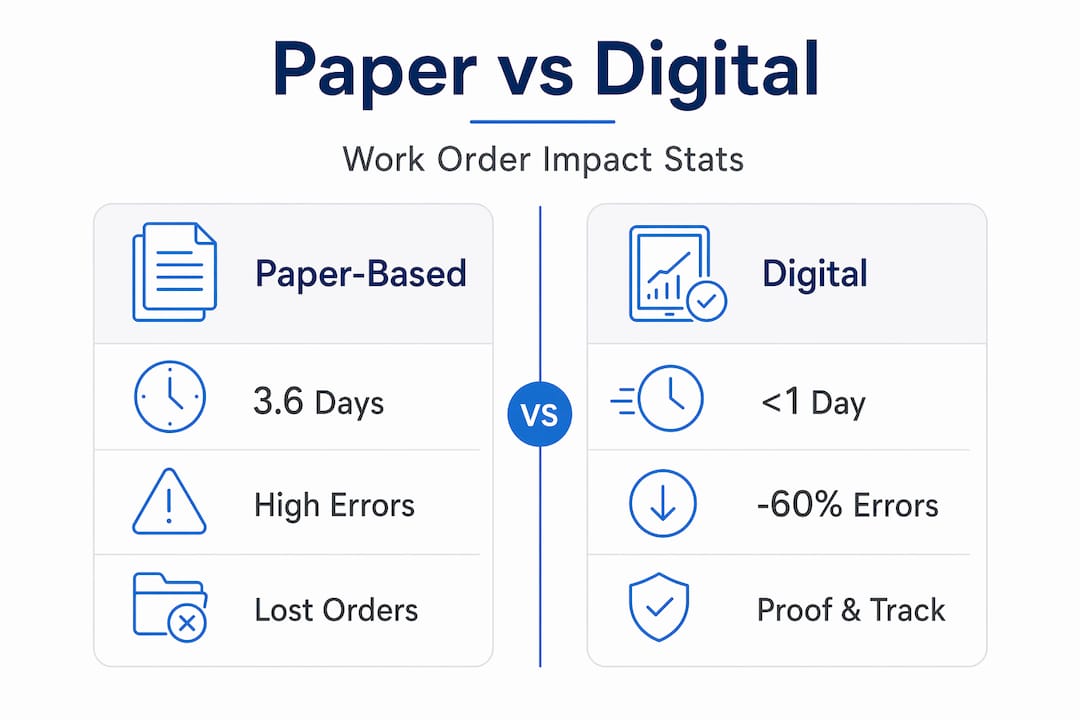
| Digital systems cut errors significantly | Digital work orders reduce task errors by 55-60% and shrink work order lifecycle from 3.6 days to under one day. |
| Real-time visibility changes operations | Centralized dashboards eliminate status calls and reduce unnecessary coordination meetings for field teams. |
| ROI is measurable and fast | Manual data processing costs approximately $28,500 per employee per year, making digital adoption financially justified quickly. |
| Adoption requires process work first | Mapping and simplifying workflows before digitizing prevents automating broken processes and speeds technician adoption. |
Why paper work orders fail maintenance contractors
Paper work orders feel manageable when your team is small. The problems multiply as job volume grows, and they do so in ways that are hard to trace back to the paper itself.
The most common failure point is the manual handoff. A technician fills out a form on-site, hands it to a dispatcher, who re-enters data into a spreadsheet, which then goes to billing. Each transfer introduces the chance for a misread field, a missing signature, or a lost document. Paper-based work orders average 5 to 8 handoffs per order before closure, and each one is a point of potential failure.
The financial damage is real. Consider these common pain points maintenance contractors report:
- Lost documents. Paper work orders are lost or damaged in roughly 15% of small field service cases, meaning completed jobs go unbilled.
- Billing delays. Technicians who batch their paperwork at week’s end create what the industry calls “Paperwork Friday.” This practice delays billing by 7 to 10 days, which triggers payment disputes and cash flow gaps.
- Accuracy loss. Memory-based reporting, when technicians fill out forms hours after completing a job, produces documentation that is up to 40% less accurate than real-time digital capture.
- Coordination overhead. Employees spend about 60% of their time on work coordination rather than skilled maintenance tasks, largely because no one has real-time visibility into job status.
Pro Tip: If your team holds daily check-in calls primarily to find out where jobs stand, that is a direct cost of paper. Each of those calls represents time that digital status visibility would eliminate.
The hidden cost of manual administration compounds over time. When you factor in labor, error correction, and the downstream effects of poor data quality, manual data processing costs approximately $28,500 per employee per year. For a team of five, that is over $140,000 in recoverable cost sitting inside your current process.
How digital work orders improve efficiency and accuracy
The benefits of digital work orders are not theoretical. The performance data from field implementations is specific and consistent.
The most significant gain comes from eliminating information gaps. When every technician, dispatcher, and supervisor works from the same real-time record, the need for status calls, clarification emails, and re-work drops sharply. Unified digital platforms reduce errors by up to 30% and improve response times by 20% through GPS-enabled dispatching and live updates.

The data on task-level performance is equally compelling:
| Metric | Paper-Based | Digital Work Orders |
|---|---|---|
| Task error rate | Baseline | Reduced by 55-60% |
| Work order lifecycle | 3.6 days average | Under 1 day |
| Task completion rate | Variable | 94.6% |
| Task completion speed | Baseline | 20-21% faster |
| Customer dispute rate | Baseline | Reduced by up to 90% |
These numbers come from documented digital work order implementations across field service and maintenance environments. The 94.6% task completion rate in particular reflects what happens when technicians have guided, standardized digital instructions rather than handwritten notes.
Standardization is one of the most underrated benefits of digital work orders. When intake forms require specific fields before submission, the multi-step clarification cycle that paper creates disappears. A technician cannot submit a work order without logging the asset ID, job type, and time on-site. That data arrives clean, complete, and ready for billing.
Pro Tip: Digital signatures and photo uploads do more than document a job. They create timestamped proof that reduces customer disputes by 90% and accelerates payment cycles. Build both into your standard work order template from day one.
Automation of workflow steps like approval routing and technician notifications also removes the human lag that paper processes depend on. When a job is marked complete in the field, billing can trigger the same day. That alone changes cash flow for most contractors.
Comparing your options: paper, spreadsheets, and CMMS
Not all digital upgrades are equal. Maintenance contractors evaluating maintenance management technology typically move through three stages, and understanding the differences helps you avoid investing in a partial solution.
Paper to spreadsheet is the most common first step, and it solves almost nothing structurally. Spreadsheets centralize data but do not automate handoffs, enforce data standards, or provide real-time field visibility. They also break down quickly as team size grows.
Spreadsheet to dedicated CMMS is where the operational gains described above actually occur. A full maintenance software platform provides the infrastructure that makes digital work orders function as a system rather than a collection of digital files.
When evaluating digital work order solutions, look for these specific capabilities:
- Mobile access. Technicians need to open, update, and close work orders from a phone or tablet in the field. Desktop-only systems recreate the paper problem.
- GPS dispatching. Real-time technician location data improves job assignment accuracy and response times.
- Photo and document uploads. Attaching before-and-after photos to a work order creates an audit trail that protects you in billing disputes.
- Digital signatures. Client sign-off at job completion eliminates the “I never approved that” dispute entirely.
- Asset-based tracking. QR code scanning tied to specific equipment eliminates incorrect or missing asset details, which is a leading cause of lost revenue for small field teams.
- Centralized dashboards. Supervisors need a single view of all open, in-progress, and completed work orders without making phone calls.
A common pitfall is choosing a system based on price alone without verifying mobile functionality. A platform that works well on a desktop but poorly on a phone in the field will see low technician adoption, which defeats the purpose entirely.
Implementing digital work orders successfully
The transition from paper to digital fails most often not because of the software, but because of the process underneath it. Digitizing a broken workflow produces a broken digital workflow.
Follow these steps to set your implementation up for success:
- Map your current workflow end to end. Document every step from work order creation to invoice. Identify all handoffs. If you count more than four handoffs from initiation to closure, that signals a structural problem to fix before you automate anything.
- Simplify before you digitize. Remove redundant approvals, consolidate data entry points, and clarify who owns each step. The goal is a clean process that digital tools can accelerate.
- Run a pilot with one team or job type. Choose a specific work category, such as preventive maintenance inspections, and run your new digital process with a small group. Measure error rates, completion times, and technician feedback before rolling out broadly.
- Train on the why, not just the how. Technicians who understand that digital work orders protect them from billing disputes and false complaints adopt the tools faster than those who see it as extra administrative work.
- Use asset-based QR scanning from the start. Attaching work orders to specific assets via QR codes eliminates the most common data entry errors and makes historical reporting accurate from day one.
- Audit your first 30 days of data. Digital systems surface patterns that paper hides. Review completion rates, cycle times, and error flags in the first month to catch process gaps early.
Pro Tip: A hybrid approach of keeping some paper processes while adding digital tools consistently underperforms. Research shows that firms using hybrid systems see slower performance gains than those that fully replace paper. Commit to the transition completely for best results.
Change management is the factor most contractors underestimate. Field technicians who have worked with paper for years need to see a direct personal benefit, such as fewer disputed jobs, faster approvals, and less end-of-day paperwork, before they fully commit to a new system.
The financial ROI of going digital
The return on investment from digital work orders is measurable at multiple points in your operation. The most direct savings come from eliminating manual data processing costs. At approximately $28,500 per employee per year in labor and error correction, even a two-person administrative team represents $57,000 in annual recoverable cost.
Beyond administration, the financial case includes:
- Eliminated lost revenue. Every unbilled job from a lost paper work order is pure margin loss. Digital systems with automatic job closure and billing triggers remove this entirely.
- Faster invoice cycles. When work orders close digitally in the field, invoices can go out the same day. Compared to the 7 to 10 day delay from batched paper processing, this alone improves cash flow measurably.
- Reduced rework costs. Fewer errors in job documentation mean fewer return visits to correct misunderstood scope or missing parts.
- Better asset data for maintenance planning. Digital records tied to specific equipment build a history that supports smarter preventive maintenance scheduling, reducing emergency repair costs over time.
The equipment inventory management capability within a full CMMS platform extends these gains further by connecting work order history directly to asset performance data. This connection turns maintenance records into a planning resource, not just an administrative archive.
My take on the real cost of staying with paper
I’ve worked alongside maintenance contractors at every stage of this transition, and the pattern I see most consistently is underestimation. Teams that run paper processes rarely calculate the full cost because the losses are distributed across billing delays, technician time, and administrative rework. They show up as thin margins and cash flow stress, not as a line item labeled “paper work order cost.”
What I’ve learned is that the contractors who resist going digital longest are often the ones with the most to gain. Their operations have grown complex enough that paper is genuinely breaking things, but the daily firefighting keeps them from stepping back to see it clearly.
The cultural shift is real, and it takes longer than the software implementation. In my experience, the teams that succeed fastest are the ones where leadership uses the digital data visibly. When a supervisor pulls up a dashboard in a team meeting and shows completion rates and cycle times by technician, the system stops being “management’s new tool” and starts being a shared operational language.
The contractors I’ve seen get the most from digital work orders are those who treat the transition as a process redesign, not a software purchase. The technology is the easy part. The hard part is deciding what your workflow should look like before you automate it.
— Mark
See how Mpulsesoftware supports your digital transition

Mpulsesoftware is built specifically for maintenance teams that need more than a digital filing system. The MPulse CMMS platform combines work order management, preventive maintenance scheduling, and real-time performance monitoring in a single system trusted by over 3,500 customers globally. Teams using MPulse report efficiency improvements of up to 40%, with measurable reductions in unplanned downtime and administrative overhead.
For contractors managing a growing asset base, equipment inventory software integrates directly with work order data, giving you a complete picture of asset history and maintenance costs. Mpulsesoftware also offers application hosting services and dedicated implementation support to make the transition from paper to digital as direct as possible. Request a demo to see how the platform fits your operation.
FAQ
What are the main benefits of digital work orders for contractors?
Digital work orders reduce task errors by 55-60%, cut work order lifecycle from 3.6 days to under one day, and eliminate billing delays caused by paper batching. They also provide real-time job visibility that reduces coordination overhead across field teams.
How much do paper work orders actually cost a maintenance business?
Manual data processing costs approximately $28,500 per employee per year when you account for labor, error correction, and lost revenue from unbilled jobs. Paper work orders are also lost or damaged in roughly 15% of small field service cases.
What features should I look for in a digital work order system?
Prioritize mobile access, GPS dispatching, photo and digital signature capture, asset-based QR tracking, and a centralized dashboard. These features address the specific coordination and documentation failures that paper processes create for field maintenance teams.
How do digital work orders reduce customer disputes?
Digital signatures and timestamped photo documentation at job completion reduce customer billing disputes by up to 90%. This proof of service accelerates payment and removes the ambiguity that paper-based job records leave open.
What is the biggest mistake contractors make when switching to digital work orders?
The most common mistake is digitizing an existing paper process without simplifying it first. If a workflow has more than four handoffs from creation to closure, automating it without redesigning it will lock in the inefficiency rather than fix it.