Every hour of unplanned downtime on a manufacturing floor costs more than most teams want to calculate. When you multiply that across three, five, or twenty sites, the number stops being abstract and starts showing up in quarterly reviews. Choosing the right
CMMS software can be the difference between a maintenance operation that runs ahead of failures and one that chases them.
MPulse Software gives you a CMMS built specifically for manufacturing plants and multi-site facilities, with preventive maintenance scheduling, KPI tracking, and deployment flexibility that scales from a single production line to a global operation. This guide compares six platforms across the criteria that matter most to maintenance managers and facilities leaders evaluating their next move.
Quick guide: 6 best CMMS software for manufacturing and facilities
- MPACT CMMS by MPulse Software: The best CMMS for manufacturing plants and multi-site facilities needing audit-grade records, flexible deployment, and deep integration with ERP and SCADA systems.
- MaintainX: Procedure-focused platform for teams that rely on checklists and standardized task execution across shifts.
- Limble CMMS: Dashboard-oriented option for single-site or smaller operations that need offline mobile access and visual scheduling.
- UpKeep: Mobile-first platform with optional IoT sensor add-ons for condition monitoring and basic asset tracking.
- IBM Maximo: Enterprise-scale asset management suite used in heavily regulated, high-complexity environments.
- Fiix (Rockwell Automation): Integration-focused CMMS with connections to ERP, SCADA, and Rockwell’s industrial automation ecosystem.
How we chose the best CMMS software for manufacturing and facilities
You need a CMMS that fits how your maintenance team already works, not one that forces you to rebuild processes from scratch. We evaluated each platform against the criteria that matter when you are running scheduled maintenance across production lines, building systems, or distributed sites.
- Preventive maintenance depth: Can you build time-based, meter-based, and condition-based PM schedules that auto-generate work orders and enforce closeout documentation?
- Multi-site management: Does the platform let you standardize workflows across locations while still giving each site the flexibility it needs?
- Reporting and KPI tracking: Can you pull MTTR, MTBF, PM compliance, and cost-per-asset reports without exporting to a spreadsheet?
- Integration with existing systems: Does it connect to your ERP, accounting, SCADA, PLCs, and IoT devices through modern APIs?
- Deployment flexibility: Can you run it as a cloud-hosted SaaS, on-premises, or in a hybrid setup that matches your IT environment?
- Mobile and offline access: Can technicians log work orders, scan barcodes, and attach photos from the floor, even in areas with no Wi-Fi?
- Downtime reduction track record: Does the vendor have documented results in reducing unplanned downtime and emergency repairs?
The 6 best CMMS software for manufacturing and facilities
1. MPACT CMMS by MPulse Software: Best overall CMMS for manufacturing and multi-site facilities
Manufacturing maintenance answers to two judges: the production schedule and the auditor. Miss a PM window and you risk an unplanned shutdown. Skip the documentation and you risk a compliance finding. MPACT CMMS by
MPulse Software is built to handle both, giving your team the tools to keep equipment running and the records to prove it.
MPulse Software has supported maintenance operations in regulated industries for more than 25 years, serving over 3,500 customers worldwide. That includes household names like General Dynamics, Siemens, IKEA, and Penn State. MPACT CMMS centralizes work orders,
preventive maintenance scheduling, asset tracking, parts inventory, and reporting in a single platform.
What sets MPACT apart is deployment flexibility. You can run it as a hosted cloud solution, install it on-premises, or use a hybrid approach. That matters in regulated environments and legacy IT stacks where a cloud-only option may not be practical. The
Multisite Connector gives you enterprise-wide visibility across locations with inter-warehouse inventory transfers and centralized reporting, without the overhead and cost of a full EAM platform.
MPACT’s required-field enforcement and closeout documentation ensure that every work order captures failure codes, labor hours, and parts used before it can be marked complete. Audit preparation becomes retrieval, not reconstruction.
MPACT CMMS features
- Automated PM scheduling: Set up time-based, calendar-based, and meter-based triggers that auto-generate work orders so nothing falls through the cracks. Technicians see exactly what is due and when.
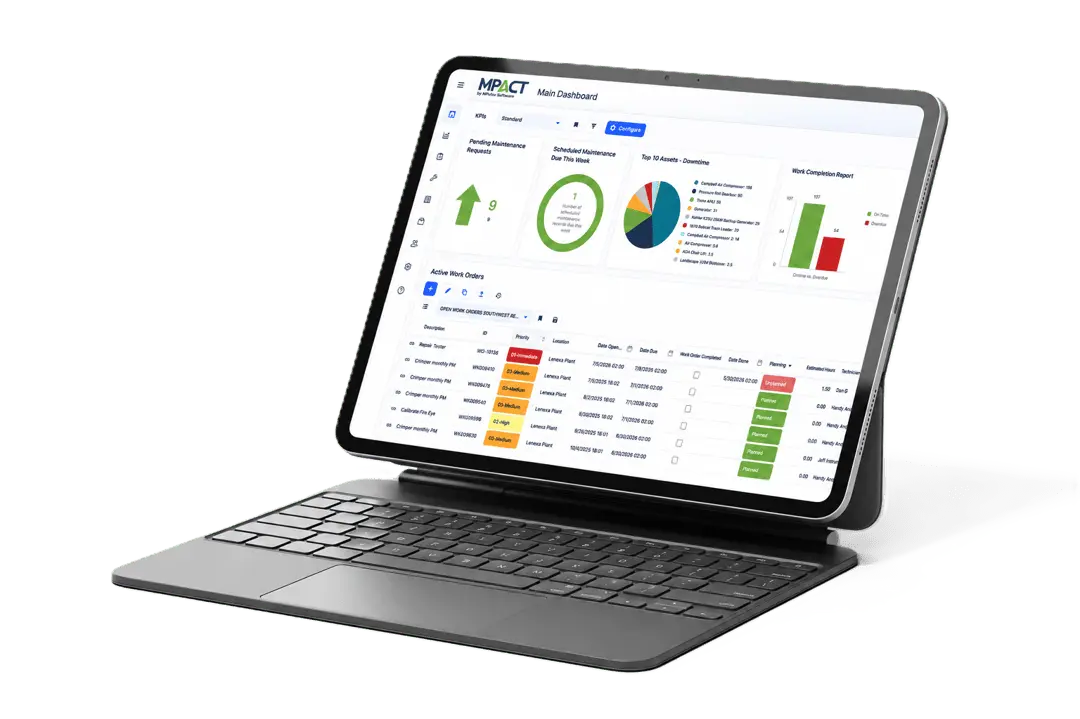
- Real-time KPI dashboards: Track MTTR, MTBF, PM compliance, downtime by asset, and maintenance costs with drillable graphical dashboards. Export to PDF, XLS, or CSV when the plant manager or auditor asks.
- Multi-site management: The Multisite Connector standardizes workflows across all your locations while allowing site-level customization. Centralized reporting aggregates KPIs enterprise-wide.
- ERP and SCADA integration: Connect MPACT to SAP, Oracle, NetSuite, building automation systems, PLCs, and IoT devices through modern REST APIs via the DataLink Integration Adapter.
- Mobile and offline access: The adaptive any-device interface works on desktops, tablets, and smartphones. An offline technician app (available as an add-on) syncs data automatically when connectivity returns.
- Parts inventory with purchasing: Track every spare part across storerooms, set reorder points to prevent stockouts, and generate purchase orders with approval workflows directly in the system.
MPACT CMMS pros and cons
Pros:
- Flexible deployment options (cloud, on-premises, hybrid) fit regulated environments and legacy IT stacks.
- Over 25 years of refinement based on feedback from real maintenance teams, recognized by Capterra Shortlist and Software Advice FrontRunners in 2026.
- Concurrent user licensing reduces costs for multi-shift operations where technicians share workstations.
Cons:
- Advanced integrations via the DataLink adapter and sensor connections are available as Enterprise Add-Ons, so you will want to discuss scope during the demo.
- The offline technician mobile app is an add-on rather than included in every edition.
- Organizations with very simple, single-asset operations may not need all the depth MPACT offers at higher tiers.
2. MaintainX: Procedure-driven option for standardizing task execution
MaintainX focuses on embedding checklists and step-by-step procedures into every work order. If your biggest risk is inconsistent execution across shifts, MaintainX offers a way to standardize how tasks get done. The platform includes in-app messaging so technicians and supervisors can communicate directly inside a work order.
MaintainX also includes an AI CoPilot feature that generates procedures from manufacturer manuals and historical work order data. Inventory management and purchasing are available on higher-tier plans.
MaintainX features
- Work order procedures: Attach multi-step checklists and procedures to any work order so technicians follow a documented process at every step.
- In-app communication: Real-time messaging and status updates inside work orders reduce back-and-forth between the floor and the office.
- AI-generated procedures: The CoPilot feature converts historical data and equipment manuals into standardized workflows.
MaintainX pros and cons
Pros:
- Straightforward setup for teams focused on standardizing task execution.
- In-app communication keeps conversations linked to specific work orders.
- Procedure-focused design helps with safety and compliance documentation.
Cons:
- Inventory management and purchasing require a Premium plan or higher.
- Asset hierarchy displays are not as intuitive for complex equipment structures.
- Work order request forms have limited customization options.
3. Limble CMMS: Dashboard-focused option for visual scheduling and offline access
Limble CMMS includes customizable dashboards, QR code asset tagging, and calendar-based PM scheduling. The platform supports offline mode so technicians can log work in areas with limited connectivity. Limble is available in more than 15 languages, making it an option for organizations with multilingual teams.
Setup requires configuration effort to structure asset hierarchies and report templates. Users have reported that mobile app data does not refresh in real time and requires a manual refresh to display the latest information.
Limble CMMS features
- Customizable dashboards: Configure data displays and KPI views based on role-specific needs across your maintenance team.
- QR code scanning: Tag assets with QR codes so technicians can pull up equipment records and submit work orders from any mobile device.
- Offline mode: Technicians can view and update work orders without internet access, with data syncing when connectivity returns.
Limble CMMS pros and cons
Pros:
- Visual dashboard interface is straightforward to navigate for day-to-day scheduling.
- Offline mode supports technicians in basements, mechanical rooms, and remote sites.
- Available in 15+ languages for international teams.
Cons:
- Mobile app data requires a manual refresh to show the most current information.
- Asset naming conventions require unique names for every asset and child asset.
- The platform does not include native AI capabilities for predictive analysis or automated work order prioritization.
4. UpKeep: Mobile-first option with IoT sensor add-ons
UpKeep offers a cloud-based CMMS with mobile work order creation, asset tracking, and PM scheduling. The platform includes an optional sensor product called UpKeep Edge that captures vibration, temperature, humidity, and gas readings at set intervals. Those readings can trigger condition-based work orders when thresholds are met.
The parent-child asset hierarchy has limitations for complex multi-component equipment setups. QR code and barcode scanning are available on higher-tier plans. Reporting focuses on basic completion metrics rather than deeper operational analysis.
UpKeep features
- Mobile work order creation: Create, assign, and update work orders from smartphones with photo attachments and task checklists.
- IoT sensor integration: UpKeep Edge sensors capture condition data at intervals as short as every 10 minutes for automated monitoring.
- PM scheduling: Set recurring tasks based on calendar dates or meter readings to keep assets operational.
UpKeep pros and cons
Pros:
- Mobile interface is designed for quick work order entry in the field.
- Optional IoT sensors offer a pathway into condition-based monitoring.
- Work order tracking and assignment are straightforward to set up.
Cons:
- QR code and barcode scanning are limited to higher-tier plan subscriptions.
- Reporting capabilities focus on completion metrics rather than in-depth KPI analysis.
- Asset hierarchy structure has constraints for equipment with multiple subcomponents.
5. IBM Maximo: Enterprise-scale option for heavily regulated operations
IBM Maximo Application Suite is an enterprise asset management platform used in large, complex, heavily regulated environments. It includes modules for asset management, work order management, and condition monitoring. The platform’s scope extends beyond CMMS into full lifecycle asset management, capital planning, and spatial analysis.
Maximo’s breadth comes with significant implementation complexity. Deployment timelines, customization requirements, and ongoing administration typically require dedicated IT resources or consulting support. The platform is primarily designed for large enterprises with substantial asset portfolios.
IBM Maximo features
- Enterprise asset lifecycle management: Tracks assets from acquisition through disposal, including financial, operational, and compliance data across the entire lifecycle.
- AI-powered monitoring: Maximo Application Suite includes modules for anomaly detection and health scoring based on sensor and inspection data.
- Multi-site, multi-org management: Supports complex organizational hierarchies across global operations with site-specific configurations.
IBM Maximo pros and cons
Pros:
- Covers the full asset lifecycle for organizations that need capital planning alongside maintenance.
- AI and IoT modules are available for predictive health scoring on critical assets.
- Configurable for complex regulatory environments across multiple industries.
Cons:
- Implementation timelines are longer than typical CMMS deployments and often require specialized consulting.
- The platform’s breadth can exceed what mid-sized manufacturing teams need for daily maintenance management.
- Ongoing administration requires dedicated IT resources or external support.
6. Fiix (Rockwell Automation): Integration-focused option for connected manufacturing
Fiix is a cloud-based CMMS now part of Rockwell Automation’s FactoryTalk suite. It includes work order management, PM scheduling, and asset tracking. An analytics feature called Fiix Foresight identifies patterns in historical maintenance data, and the Integration Hub connects to ERP systems and industrial control systems.
Users have reported slower interface response times during peak operations. The mobile app has limited functionality compared to the desktop version. Fiix does not manufacture condition-monitoring sensors, so connecting equipment health data requires third-party hardware.
Fiix features
- Fiix Foresight analytics: Analyzes historical equipment data to identify anomalies and predict spare parts consumption patterns.
- Integration Hub: Connects to SAP, Oracle, NetSuite, and industrial control systems for centralized data flow across your operations.
- Multi-site management: Higher-tier plans include multi-site administration with location-specific configurations.
Fiix pros and cons
Pros:
- Part of Rockwell Automation’s ecosystem, which offers familiarity for plants already using FactoryTalk.
- Integration Hub connects to a range of ERP, accounting, and control systems.
- Fiix Foresight offers data-driven insights from historical maintenance records.
Cons:
- Users report slower system response times during peak usage, particularly when generating reports.
- Condition monitoring requires third-party sensors, adding procurement and configuration steps.
- Multi-site management and advanced purchasing features are limited to higher-tier plans.
Comparison table: The best CMMS software for manufacturing and facilities
| Platform |
Deployment Flexibility |
Multi-Site Connector |
Concurrent User Licensing |
| MPACT CMMS by MPulse Software |
Cloud, On-Premises, Hybrid |
✓ |
✓ |
| MaintainX |
Cloud Only |
✗ |
✗ |
| Limble CMMS |
Cloud Only |
✗ |
✗ |
| UpKeep |
Cloud Only |
✗ |
✗ |
| IBM Maximo |
Cloud, On-Premises |
✓ |
✗ |
| Fiix |
Cloud Only |
✗ |
✗ |
How does preventive maintenance scheduling reduce equipment downtime in manufacturing?
Waiting for equipment to fail before you fix it is far more expensive than the repair itself. Unplanned downtime halts production, triggers overtime for emergency crews, and can cascade into missed delivery commitments. A structured
preventive maintenance program changes the equation.
Time-based, calendar-based, and meter-based PM triggers auto-generate work orders before a failure occurs. Required fields and closeout documentation mean every completed task captures labor, parts, and failure codes. Over time, that data reveals patterns you can act on.
A 2025 study published in the
International Journal of Advanced Engineering and Industrial Technology found that machine-learning-driven maintenance approaches reduced system downtime in U.S. manufacturing plants. MPulse Software builds that foundation into MPACT CMMS by enforcing the data discipline that makes advanced analysis possible.
What should you look for in a multi-site CMMS for manufacturing plants?
Running maintenance across multiple locations introduces a specific set of challenges. You need standardized workflows so every site follows the same PM protocols, but you also need site-level flexibility for local equipment, parts catalogs, and regulatory requirements.
A strong multi-site CMMS gives you centralized reporting that aggregates KPIs from all locations into a single dashboard. It also supports inter-warehouse
inventory transfers so you can move parts between storerooms instead of placing emergency orders.
Look for role-based permissions that let corporate maintenance directors see the full picture while site-level supervisors manage their own teams. MPulse Software’s MPACT CMMS addresses this with its Multisite Connector, giving you enterprise visibility without the complexity and overhead of a full EAM deployment.
Why MPACT CMMS is the best CMMS software for manufacturing and facilities
Manufacturing plants and multi-site facilities run on two non-negotiable requirements: equipment uptime and audit-ready records. MPACT CMMS by MPulse Software delivers both through a platform built specifically for the way maintenance teams operate.
Where other platforms force you into cloud-only deployments, MPACT gives you the choice of cloud, on-premises, or hybrid, so your IT environment dictates the architecture, not the vendor. Concurrent user licensing means your multi-shift operation pays for the roles it needs, not a per-seat fee for every technician who touches the system. And the Multisite Connector gives you centralized KPI visibility across all your locations without requiring a six-figure EAM implementation.
MPulse Software has spent more than 25 years refining
work order management, PM scheduling, and
asset tracking based on feedback from maintenance professionals at organizations like Siemens, IKEA, and Northwell Health. Bring your production schedule, your last audit’s pain points, and your most complex site’s asset list to a
demo built on your own operation.
FAQs about best CMMS software for manufacturing and facilities
What is CMMS software and why do manufacturing plants need it?
CMMS software centralizes work orders, preventive maintenance schedules, asset records, and parts inventory in one system. For manufacturing plants, that means fewer unplanned shutdowns, documented maintenance histories for every piece of equipment, and audit-ready compliance records. MPACT CMMS by MPulse Software adds multi-site management and ERP integration to that foundation.
How does a CMMS help reduce unplanned downtime?
A CMMS automates preventive maintenance triggers based on time, calendar dates, or meter readings, so work orders generate before equipment fails. MPACT CMMS enforces closeout documentation with required fields, capturing failure codes and labor data that help your team identify recurring issues and address them at the source.
Can CMMS software integrate with ERP and SCADA systems?
Yes. Many CMMS platforms offer API connections to ERP and accounting systems. MPACT CMMS by MPulse Software connects to SAP, Oracle, NetSuite, SCADA, PLCs, and IoT devices through its DataLink Integration Adapter and modern REST APIs, keeping maintenance data synchronized across your operations.
What is the difference between CMMS and EAM software?
CMMS focuses on day-to-day maintenance operations: work orders, PM scheduling, asset tracking, and inventory. EAM expands into capital planning, lifecycle costing, and financial management for large asset portfolios. MPACT CMMS covers the maintenance depth most manufacturing teams need without the implementation overhead of a full EAM suite.
How do you evaluate CMMS software for multi-site facilities?
Look for centralized reporting across locations, standardized PM workflows, site-level permissions, and inter-warehouse inventory transfers. Deployment flexibility matters too. MPulse Software’s MPACT CMMS offers cloud, on-premises, and hybrid options alongside its Multisite Connector for enterprise-wide coordination.