
An effective maintenance approvals workflow routes each work order to the right decision maker fast, without loosening budget or safety controls. The goal is minimizing delay while preserving oversight, and that starts with three moves: mapping how requests actually move today, setting clear dollar and risk thresholds, and turning on notifications with backup approvers so nothing sits untouched in someone’s queue.
TL;DR:
- Setting thresholds based on asset criticality and risk, rather than only dollar amounts, ensures appropriate scrutiny for safety-critical equipment.
- Mapping current approval processes through real-work validation reveals hidden delays like duplicate reviews and unclear ownership.
- Using notification timers that count down to an escalation encourages prompt responses and prevents approval requests from being ignored.
- Implementing tiered approval systems with clear backup approvers and time-based escalations maintains control without creating bottlenecks.
- Integrating approval workflows within a CMMS like MPulse supports audit compliance and automates thresholds, approval routing, and KPI tracking effectively.
Table of Contents
- What Are the Common Maintenance Approval Workflow Patterns?
- How Do You Map and Design an Approval Workflow?
- How Do You Set Approval Thresholds and Approver Tiers?
- What KPIs Should You Track to Measure Approval Performance?
- Should You Use a CMMS or a No-Code Tool for Approval Workflows?
- Why Are Maintenance Approvals Taking So Long, and How Do You Fix It?
- How Does MPulse Support Maintenance Approval Workflows?
- A 30 to 60 Day Plan for Fixing Your Approval Workflow
- Put Your Approval Rules Into a System That Enforces Them
- Sources
- FAQ
What Are the Common Maintenance Approval Workflow Patterns?
Not every work order deserves the same level of scrutiny. Routine filter changes don’t need the same gatekeeping as a $40,000 conveyor rebuild, and treating them identically is one of the fastest ways to create a backlog. The ASQ framework for process mapping distinguishes a workflow, the full sequence of actors, inputs, and timing, from an approval process, which is just the authorization gate sitting inside it. Once you separate the two, picking the right gate pattern gets easier.
Five patterns cover almost every maintenance scenario:
- Single-approver: One supervisor signs off. Fast, but it creates a bottleneck if that person is out.
- Serial (sequential): Requests pass through approvers one after another, useful when each reviewer adds a distinct check (technical feasibility, then budget).
- Parallel: Multiple approvers review simultaneously, which cuts total wait time for high-value or cross-functional jobs.
- Conditional (rules-based): Routing changes automatically based on cost, asset criticality, or work order type.
- Emergency bypass: Safety-critical failures skip standard gates and get logged for retroactive review.
Routine preventive maintenance usually fits a single-approver or fully automated pattern. Elective repairs on non-critical equipment work well with conditional routing tied to a cost threshold. Capital projects justify serial or parallel review because multiple stakeholders carry real financial exposure. Safety-critical fixes need the emergency-bypass path, with documentation captured after the fact rather than before. The tradeoff is always the same: more gates buy you control and an audit trail, but each one adds waiting time.
How Do You Map and Design an Approval Workflow?
You cannot fix an approval bottleneck you haven’t documented. Most maintenance teams believe they know how requests move through their organization, and most are wrong about at least one step, usually a duplicate review nobody remembers approving or a queue that only exists because a former employee’s role never got reassigned.
A seven-step method borrowed from ASQ’s process-mapping guidance gets you from assumption to accurate documentation:
- Clarify scope. Decide which work order types and asset classes this map covers before you start.
- Gather stakeholders. Pull in requesters, technicians, supervisors, purchasing, and anyone who touches cost approval.
- Draft initial documentation. Write down the process as people currently believe it works.
- Build a SIPOC+CM. Chart suppliers, inputs, process, outputs, customers, plus measurements and controls, so you capture who’s involved and how performance gets tracked.
- Create a detailed flowchart. Include timing at each step, not just the sequence of boxes. ASQ’s flowchart guidance specifically recommends embedding people, inputs and outputs, and measurements directly into the map.
- Validate with real cases. Walk three to five actual work orders through the map and see where reality diverges from the diagram.
- Deploy with version control. Publish the final map and track every revision so approvers always work from the current version.
Inviting the right people to the mapping workshop matters more than the diagram itself. Ask requesters where they lose visibility once they submit a ticket. Ask approvers what information they wish arrived with the request. Ask technicians where they’ve seen the same work order approved twice by different people who didn’t know the other had already signed off. ASQ’s own guidance on workshop mapping is built on this premise: the real process only surfaces when you walk it with the people who live in it every day.
Pro Tip: Run the validation step with a work order that got stuck last month, not a smooth one. Broken examples expose more gaps than clean ones ever will.
How Do You Set Approval Thresholds and Approver Tiers?
Thresholds are where most maintenance approvals workflows either succeed or quietly break down. Set them too low, and every minor repair crawls through three layers of review. Set them too high, and you lose the financial control the workflow exists to provide.

Vendor implementations offer a useful starting template. Oracle’s work order approval documentation describes routing built around cost thresholds and work order type, with example tiers like a supervisor approving non-emergency corrective work under a moderate cost threshold and a director approving higher-value requests. Your own numbers should reflect your organization’s risk tolerance, not someone else’s spreadsheet, but the mechanic is worth borrowing.
A few rules keep tiered approvals from becoming their own bottleneck:
- Separate reviewers from approvers. A reviewer adds informational input; only an approver has decisive authority. Blurring the two roles is how requests stall waiting on someone who was never meant to hold up the process.
- Tie thresholds to risk category, not just dollar amount. A $2,000 repair on a safety-critical asset may warrant more scrutiny than a $6,000 repair on redundant equipment.
- Build in delegation before you need it. Every approver tier needs a named backup who inherits pending requests automatically after a set time window.
- Use time-based escalation. If a request sits unactioned for 24 or 48 hours, escalate it up a tier rather than letting it age silently.
Delegation rules matter more than most teams assume. A single-approver bottleneck usually isn’t a process failure. It’s a missing backup.
What KPIs Should You Track to Measure Approval Performance?
Treat your approval workflow as a queue, not a checkbox, and measure it accordingly. ASQ’s process-mapping guidance specifically recommends building measurements directly into your process map so bottlenecks show up in data, not just in complaints from frustrated requesters.
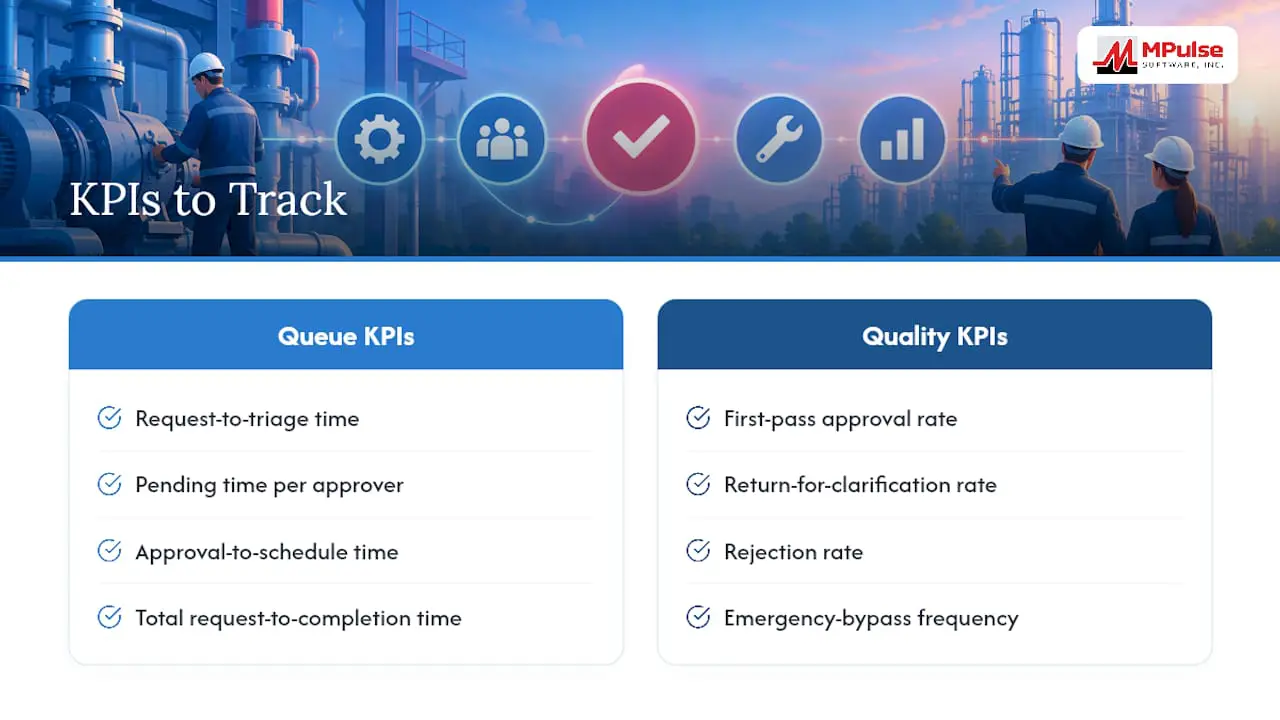
Four queue-based metrics matter most: request-to-triage time (how long a request waits before anyone looks at it), pending time per approver (which individual or tier is the actual chokepoint), approval-to-schedule time (the gap between sign-off and the work actually getting booked), and total request-to-completion time (the full lifecycle, start to finish).
Where Most Teams Get Surprised: The bottleneck is rarely the approval decision itself. It’s almost always the pending time sitting in one specific approver’s queue, often because that person also owns three other unrelated responsibilities.
Pair those with quality metrics: first-pass approval rate (requests approved without being sent back), return-for-clarification rate (how often incomplete data forces a round trip), rejection rate, and emergency-bypass frequency. A rising bypass rate is worth investigating on its own. It often means your standard thresholds have drifted out of sync with how the floor actually operates.
Set a baseline for each metric in the first month, then track trend lines rather than single data points. When a metric drifts outside its normal range, treat it as a trigger for a small, focused improvement experiment. Adjust one variable, like a threshold or a notification rule, and measure the effect before changing anything else.
Should You Use a CMMS or a No-Code Tool for Approval Workflows?
Three implementation paths exist, and each fits a different organizational reality. Configuring approvals directly inside a CMMS keeps every work order, cost estimate, and approval record in one system of record, which is the strongest option for audit readiness. External no-code workflow builders offer more flexibility for unusual routing logic but create a second system that has to stay synchronized with your maintenance data. A hybrid approach, core approvals in the CMMS with a no-code layer for edge cases, works for organizations with genuinely unusual routing needs, though it adds a coordination cost that shouldn’t be underestimated.
IBM’s overview of work order management frames the broader lifecycle this way: submit, approve and prioritize, plan and schedule, execute, complete, and review. Approvals sit early in that chain, and whatever tool handles them needs to talk cleanly to everything downstream.
Whichever path you choose, a handful of integrations are non-negotiable:
- Work order fields and cost estimates, so approvers see real numbers, not summaries.
- Asset records, so criticality and maintenance history inform the routing decision.
- ERP or finance systems, so budget checks happen automatically rather than through a side conversation.
- Mobile approval capability, so a supervisor on the floor can clear a request without returning to a desk.
- Audit trail logging, satisfying the documented decision-making criteria that the 2024 revision of ISO 55001 now emphasizes for asset-management programs.
Pro Tip: Set an SLA timer on every notification, not just a reminder. A notification without a countdown gets read and ignored. A notification with a 24-hour timer gets acted on.
For manufacturing environments juggling multiple production lines, the routing logic in a manufacturing maintenance workflow tends to need more conditional branches than a single-site facility, which is one more reason the mapping step in the previous section isn’t optional.
Why Are Maintenance Approvals Taking So Long, and How Do You Fix It?
Slow approvals almost always trace back to one of three root causes, and diagnosing which one you have determines the fix.
- Missing data at submission. If requesters routinely submit incomplete work orders, approvers spend their time chasing details instead of deciding. Fix it fast by requiring a minimal set of fields before submission is even possible, and fix it long term by training requesters on what approvers actually need to see.
- Unclear ownership. If nobody’s sure who’s supposed to approve a given request, it sits in limbo. A temporary fix is naming an interim owner for the affected category; the durable fix is rebuilding the process map from the previous section so ownership is explicit.
- Overloaded approvers. If one person’s queue is the chokepoint across every request type, temporarily raise the threshold for non-critical work so it routes elsewhere, and add a standing delegate so the load doesn’t concentrate again.
Short-term, these three moves buy you breathing room: temporary delegation, a raised threshold for low-risk work, and a minimal-fields requirement at intake. Longer term, the fix is structural: redesign the map, automate data capture so incomplete requests can’t enter the queue, and add mobile approval so pending time doesn’t pile up just because someone’s away from a desk.
How Does MPulse Support Maintenance Approval Workflows?
A leading CMMS platform is built around principles including customizable workflows that route by cost threshold and asset type, an intuitive calendar interface for scheduling once approval clears, and preventive maintenance automation that removes routine PM work orders from the approval queue entirely.
Notification and audit logging capture every decision automatically, which supports the documented decision-making trail that ISO 55001 asks compliance-heavy organizations to maintain. Integration options connect approval data to ERP and finance systems, and implementation services help teams configure tiered thresholds, delegation rules, and backup approvers correctly the first time. Teams use these configurable workflow tools to enforce the thresholds this article describes and to track the same queue-based KPIs, without building a second system just to manage approvals.
A 30 to 60 Day Plan for Fixing Your Approval Workflow
Spend week one mapping the real process, not the one on paper. Weeks two and three, apply quick fixes: temporary delegation, adjusted thresholds, minimal-field intake. By week four, set baseline metrics. Configure backups immediately after. Then run one focused improvement sprint before touching anything else. Workshops and measurement outperform any tool debate.
— Mark
Put Your Approval Rules Into a System That Enforces Them
Mapping the process and setting thresholds only pays off if the system enforces them automatically, every time, without someone remembering to check. MPulse Software’s Professional and Advanced plans give you configurable approval workflows built directly into the same platform that handles work orders, asset records, and inventory, so a threshold you set once doesn’t need to be re-explained to a new hire six months later.
If your team needs help translating a mapping workshop into working software, CMMS Implementation Services and MPulse CMMS Training build the tiered thresholds, backup approvers, and notification rules for you rather than leaving it to trial and error. Organizations with heavier compliance demands can add the Maintenance & Support Program for ongoing configuration support as approval rules evolve. Check current pricing on the MPulse pricing page or request a walk-through of how approvals get configured before you commit to a plan.
Sources
- ASQ — Flowchart (process-mapping guidance)
- Understanding the Work Order Approval Process — Oracle docs
- What is Work Order Management? — IBM
- ISO 55001 revision overview — TC251
FAQ
What Is an Approval Workflow?
An approval workflow is the authorization gate inside a larger maintenance process, the point where a designated person reviews and either clears or rejects a work order before it proceeds. It typically includes routing rules, approver tiers, and escalation logic, distinct from the full work order lifecycle that surrounds it.
What’s the Difference Between a Workflow and an Approval Process?
A workflow is the complete sequence: submission, review, scheduling, execution, and completion. The approval process is just one gate inside that sequence, the specific step where someone signs off before work can move forward, as ASQ’s process-mapping framework distinguishes clearly.
What Are the Four Main Types of Approval Workflows?
The four core patterns are single-approver, serial (sequential review by multiple people), parallel (simultaneous review), and conditional (rules-based routing by cost or asset type). Most maintenance organizations also maintain a fifth emergency-bypass path for safety-critical failures that can’t wait for standard review.
What Are the Basic Steps in Designing a Maintenance Approval Workflow?
Start by clarifying scope, gathering stakeholders, and drafting initial documentation of the current process. Then build a detailed flowchart with timing and measurements, validate it against real work orders, and deploy it with version control so future changes stay tracked.
Does MPulse Software Support Configurable Approval Thresholds?
Yes. MPulse’s Professional and Advanced plans include customizable workflows that support tiered approver thresholds, notifications, and audit logging, and its implementation services help teams configure those rules to match their specific cost and risk categories.