
A complete CMMS requirements checklist covers asset hierarchy, work order and PM schema, inventory and parts, mobile field access, integrations, security, reporting KPIs, training, and implementation readiness. Rank each item as must-have, highly desirable, desirable, or only-if-standard, and weigh every candidate system against ISO 55000 principles and NIST security guidance where applicable. Use the finished checklist to script RFP questions, structure vendor demos, and build a 30 to 90 day pilot plan.
TL;DR:
- Proper prioritization and criticality scoring of assets are essential to tailor preventive maintenance schedules and optimize resource allocation.
- Checklists must include testable, owner-assigned requirements for asset data, work orders, inventory, security, integrations, and mobile forms to ensure effective vendor evaluation.
- Clear acceptance criteria, pilot testing, and KPI tracking during deployment drive checklist adoption and prevent data or workflow issues in the field.
- Full implementation readiness depends on secure integrations, structured data migration, comprehensive training, and validation aligned with IT and cybersecurity standards.
- Focusing on operational fit and actual system validation during pilots is more important than feature breadth, reducing the risk of underused or abandoned systems.
Table of Contents
- Core elements every CMMS requirements checklist should include
- How to prioritize requirements and set PM frequencies by criticality
- Turning checklists into CMMS templates and mobile forms
- Implementation readiness: integrations, security, and training
- Reporting, KPIs, and verification checks that prove the program works
- Common pitfalls and best practices for checklist adoption
- A 30 to 90 day plan to move from checklist to live CMMS
- How MPulse maps to the checklist
- Prioritizing fit and risk over feature count
- Evaluating MPulse against your requirements checklist
- FAQ
- Sources
Core elements every CMMS requirements checklist should include
A checklist built for procurement needs more than a feature list. It needs itemized, testable requirements that a vendor demo can prove or fail. The AM/CMMS Criteria Checklist from Southwest EFC organizes these requirements around business goals, asset hierarchy, work orders, maintenance types, inventory, labor, reporting, integrations, and security, then asks organizations to mark each one by priority.
Capture these categories before writing a single RFP question:
- Asset data and hierarchy: unique asset IDs, parent and child relationships, location fields, criticality rating, expected useful life, and manufacturer or serial numbers.
- Work order and PM schema: request intake fields, priority codes, a defined status flow, acceptance criteria, required tools and parts, and safety steps such as lockout and tagout.
- Preventive, predictive, and condition-based maintenance: frequency types, trigger parameters, inspection checklists, and the data fields needed to capture readings.
- Inventory and purchasing: part records, bin locations, reorder rules, purchase order integration, and cost tracking tied to each work order.
- Mobile and field access: offline mode, photo and video attachments, barcode or RFID scanning, and enforcement of mandatory fields before a technician can close a task.
- Labor and qualifications: skill tags, certification expiration tracking, crew assignment logic, and labor hour capture.
- Reporting and exports: required dashboards, standard report templates, and data export formats your team already uses.
- Security and compliance basics: role-based access control, audit logs, encryption, and documented backup and recovery expectations.
Every one of these items should carry an owner and a verification method. A checklist entry without a way to test it during a demo is just a wish list.
How to prioritize requirements and set PM frequencies by criticality
Not every requirement deserves equal weight. The SWEFC criteria checklist recommends sorting items into must-have, highly desirable, desirable, and only-if-standard categories, then assigning someone to verify each must-have during a structured demo. This keeps the evaluation from turning into a feature popularity contest.
- Score each asset for criticality. Rate safety impact, production loss if the asset fails, replacement cost, and historical failure frequency, usually on a simple 1 to 5 scale per factor.
- Rank assets by combined score. High scorers get tighter PM intervals and condition monitoring; low scorers may stay on run-to-failure or annual inspection schedules.
- Choose a frequency method per asset. Options include time-based intervals, meter or run-hour triggers, event-driven tasks, condition thresholds, or a hybrid of these.
- Write the rule into the CMMS. For example: perform PM every six months or at 2,000 pump run hours, whichever comes first.
- Document the acceptance test. State what “complete” looks like for that PM, including any reading, inspection result, or sign-off required to close it.
Pro Tip: Pilot your criticality scoring on 15 to 20 assets before applying it fleet-wide. It reveals scoring inconsistencies faster than a spreadsheet review ever will.
Turning checklists into CMMS templates and mobile forms
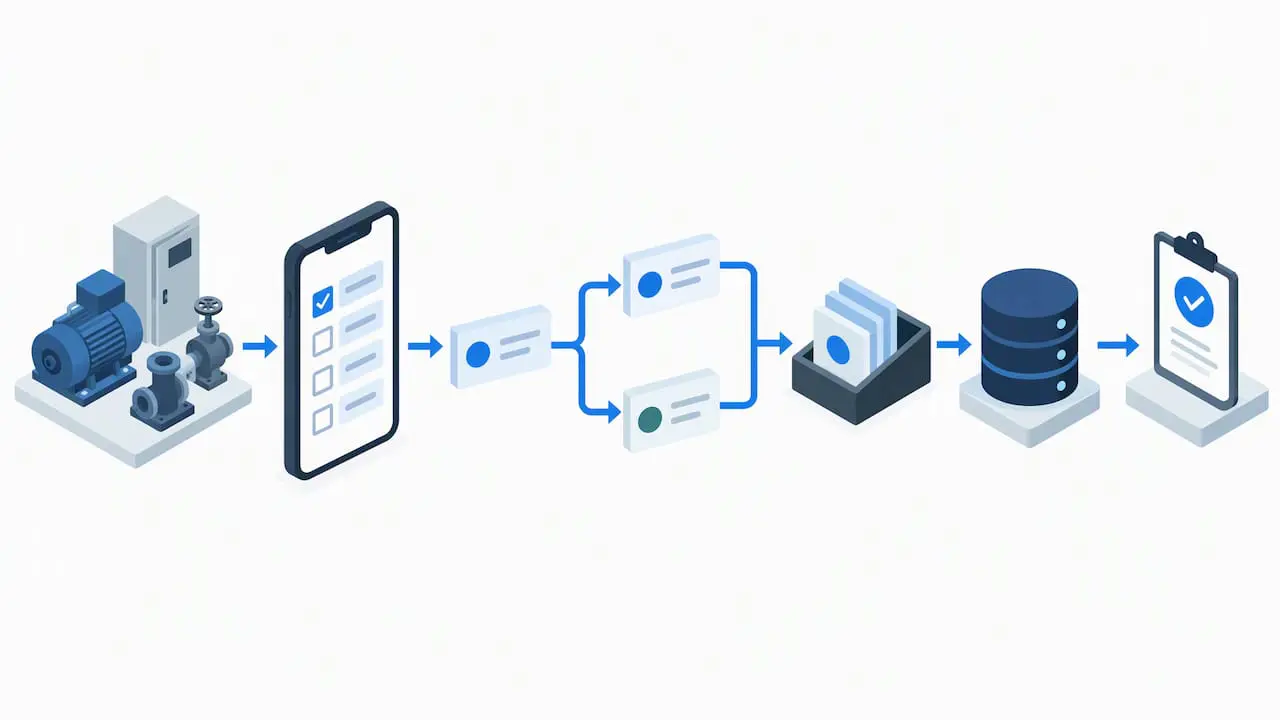
A paper checklist does not become useful simply because it is typed into a system. It needs structure that the CMMS and a technician’s phone can both read reliably.
Build each template with a consistent anatomy:
- Metadata header: asset ID, location, PM type, and assigned crew.
- Step lines with acceptance criteria: each task line states what a pass or fail looks like, not just an action.
- Required fields: mark which entries block task closure if left blank.
- Attachment slots: photo or video fields for before-and-after documentation.
- Labor and parts fields: estimated hours and expected parts consumption.
For data import, most CMMS platforms accept CSV templates, API-based bulk loads, or manual entry for small libraries. Map your legacy asset IDs carefully during import since mismatched IDs are the most common cause of broken PM schedules after a migration.
Mobile form design deserves its own attention. Keep each screen short, use conditional fields so technicians only see relevant questions, and enable offline capture with later sync for sites with weak connectivity. Pilot the finished template on a small asset set first and check that captured data actually meets the acceptance criteria you wrote, not just that the form submits.
Implementation readiness: integrations, security, and training
Selection is only half the project. The SWEFC evaluation guidance recommends splitting requirements into essential and optional lists early, then piloting the shortlisted systems before committing to full rollout. That same discipline applies to implementation readiness.
Before go-live, confirm these items align with IT Service Management principles to ensure seamless integration and control.
- Integration map: ERP, procurement systems, GIS or Esri mapping, SCADA or OT systems, and IoT sensor platforms, each with a defined exchange method such as API, batch CSV, or middleware.
- Deployment model: cloud versus on-premise trade-offs, backup strategy, SLA terms, and offline sync requirements for field sites.
- Security controls: role-based access, least-privilege permissions, authentication, encryption in transit and at rest, audit logging, and backup and recovery procedures.
- OT risk review: a documented risk assessment and OT owner sign-off before any integration touches SCADA or industrial control systems, consistent with NIST industrial cybersecurity guidance.
- Data migration steps: cleanse asset records, standardize ID formats, run a pilot migration, reconcile totals, and keep a rollback plan ready.
- Training and governance: a pilot training schedule, a super-user network, an ongoing vendor support model, and clear acceptance criteria for go-live.
Pro Tip: Treat OT integration as a security project first and a data project second. Run new connections on a staged network segment with a documented rollback plan before touching production control systems.
Reporting, KPIs, and verification checks that prove the program works
Requirements only matter if the system can prove they were met. Specify the KPIs your CMMS must report before signing a contract, not after.
Essential metrics to require:
- PM compliance rate and backlog shown as a work order age distribution.
- MTTR and MTBF tracked by asset class.
- Planned versus reactive work ratio, a strong signal of program maturity.
- Labor hours per work order, inventory turns, and cost per work order.
The SWEFC criteria checklist groups reporting and KPI requirements alongside integrations and security as core evaluation categories for any CMMS selection process. This framing matters because reporting gaps often surface only after a system is already live.
Specify who receives each dashboard and on what cadence; a maintenance supervisor needs daily backlog views, while a plant manager typically needs weekly or monthly summaries. After any data migration, run reconciliation queries comparing migrated asset counts, inventory totals, and open work order counts against the legacy system before declaring the cutover complete.
Common pitfalls and best practices for checklist adoption
Checklists fail in the field more often from design mistakes than from software limitations.
- Avoid overloading mandatory fields. Technicians abandon forms that demand too much data before allowing a task to close.
- Write clear acceptance criteria. Vague steps like “inspect pump” invite inconsistent results across shifts.
- Standardize asset naming early. Inconsistent IDs create duplicate records and broken reporting later.
- Never skip the pilot. A small test group surfaces mobile and workflow problems before a full rollout multiplies them.
- Design for the phone, not the desktop. A checklist that works on a monitor often fails on a five-inch screen in the field.
Tie checklist adoption to the KPIs from the previous section. When PM compliance and data completeness are measured and reported back to crews, adoption tends to hold; when it is treated as a one-time rollout, usage drifts within a few months.
A 30 to 90 day plan to move from checklist to live CMMS
A written checklist is only useful once it drives a schedule with owners attached.
- Days 1 to 30: Finalize the requirements checklist, assign a project champion, IT lead, and maintenance lead, and shortlist two or three vendors for demos using demo scripts drawn directly from your must-have items.
- Days 31 to 60: Select a pilot scope of one or two critical asset families, load PM templates, migrate a limited asset and inventory dataset, and train pilot technicians and super-users.
- Days 61 to 90: Run the pilot against defined KPI targets, reconcile migrated data, gather technician feedback, and set go or no-go criteria for full rollout.
Pro Tip: Require every vendor demo to walk through your actual must-have list item by item rather than their standard product tour. It exposes gaps far faster than a generic walkthrough.
How MPulse maps to the checklist
MPulse CMMS addresses most categories in this checklist directly. Its calendar interface supports time-based and meter-based PM scheduling, and its mobile access covers field data capture for inspections and work orders. Inventory management handles part records, reorder rules, and cost tracking, while integration options connect to ERP and sensor systems.
For implementation, MPulse offers CMMS Implementation Services, a Maintenance & Support Program, and MPulse CMMS Training to support go-live and ongoing use. Buyers evaluating security and compliance requirements can review ISO 55001 audit-ready record guidance and a broader guide to CMMS and compliance for additional checklist context.
- Calendar-based PM scheduling maps to frequency and trigger requirements.
- Mobile access supports field checklist and offline data capture needs.
- Inventory management covers parts, reorder, and cost tracking items.
- Implementation and training services address the readiness checklist directly.
Prioritizing fit and risk over feature count
A long feature list does not predict a successful rollout. What predicts success is whether the must-have items survive a pilot, whether OT integrations went through a real risk assessment instead of a quick connection test, and whether acceptance criteria were specific enough to measure. Buyers who chase feature breadth over operational fit tend to end up with systems technicians quietly stop using within a year.
— Mark
Evaluating MPulse against your requirements checklist
MPulse CMMS offers an intuitive calendar dashboard, integrations suited to ERPs and smart building systems, and flexible editions for compliance-heavy and multi-site operations, backed by a global customer base and a track record of efficiency gains of up to 40%, as stated on the MPulse pricing page.
Plans include Professional, Advanced, Technician License, and Enterprise Add-Ons, with pricing details available on the provider’s pricing page. For teams that want hands-on support moving from checklist to live system, CMMS Implementation Services and the Maintenance & Support Program cover setup, training, and ongoing support. Request a demo or review the pricing page to score MPulse against your own must-have list.
FAQ
What are the 7 elements of preventive maintenance?
Common PM frameworks typically cover asset identification, task steps, frequency and triggers, required tools and parts, safety procedures, acceptance criteria, and documentation or sign-off. Definitions vary across organizations, so confirm which elements your CMMS template requires before building checklists at scale.
What are some examples of CMMS?
MPulse CMMS is one example, offering preventive maintenance automation, work order management, and inventory tracking in a single platform. CMMS software generally spans entry-level tools built for single sites to enterprise platforms built for multi-site, compliance-heavy operations.
What are the basic PMS checklists?
A basic preventive maintenance system checklist includes asset identification, a clear task list with acceptance criteria, required tools and parts, safety steps such as lockout and tagout, and a sign-off field confirming completion. More advanced versions add meter readings or condition thresholds as triggers.
What is the 10 rule in maintenance?
There is no single widely recognized “10 rule” with an official definition in maintenance management. If you encountered this term in a specific framework or vendor material, check that source directly, since usage varies and no authoritative standard defines it uniformly.
How long does a CMMS implementation usually take?
Timelines vary by organization size and data complexity, but a pilot covering one or two critical asset families can typically move from checklist to go-live within 60 to 90 days. Full enterprise rollout across multiple sites generally takes longer and depends on data migration scope and integration complexity.
Sources
- AM/CMMS Criteria Checklist – Southwest EFC
- ISO 55000 series overview
- CMMS Evaluation and Recommendations – SWEFC
- Cybersecurity Framework Profile for Liquefied Natural Gas (NIST IR)