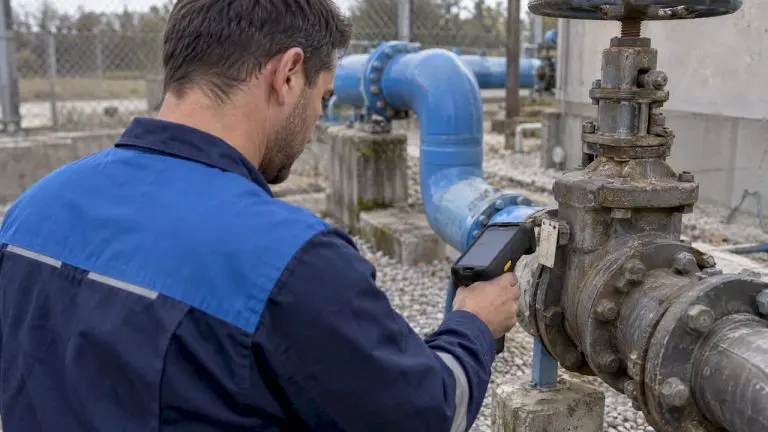
A CMMS REST API lets other software read and write maintenance data over standard web requests. Your ERP can pull asset and cost records, a SCADA system can open a work order when a threshold trips, and a BI tool can read downtime history, all without anyone re-keying data. This guide explains what a REST API covers in a CMMS, how to secure it, how to plan an integration, and when a packaged adapter is the better route.
TL;DR
- REST is the default choice for CMMS integrations. It uses standard HTTP methods and JSON, so almost any ERP, SCADA or IoT platform can talk to it.
- The most common use cases are work orders, assets, parts inventory and purchasing, usually synchronized with an ERP or triggered by sensors.
- Secure every call: current NIST guidance on API protection points to OAuth2/OIDC, encryption in transit and short-lived credentials.
- Decide which system owns each record before you write any code. Most failed integrations fail on data ownership, not on the API.
- If you do not want to build and maintain custom code, an adapter or an implementation service can cover the same ground.
Table of Contents
- What a CMMS REST API actually is
- Why REST rather than GraphQL or gRPC
- What you can integrate through the API
- Securing a CMMS API
- How to plan an integration that holds up
- Build it yourself or use a packaged adapter
- Our perspective: integration should serve the maintenance plan
- Integration help from MPulse
- Questions to ask any vendor about its API
- FAQ
- Sources
What a CMMS REST API actually is
An API is a documented set of endpoints, request formats and responses that lets one program use another program’s data and functions. REST is the style most vendors choose. Each record type (a work order, an asset, a part) lives at a predictable address, and you act on it with four familiar HTTP methods:
| Method | What it does | CMMS example |
|---|---|---|
| GET | Reads a record or a list | Retrieve all open work orders for a building |
| POST | Creates a record | Open a work order when a sensor alarm fires |
| PUT | Updates a record | Change an asset’s status to out of service |
| DELETE | Removes a record | Retire a duplicate part number |
Data travels as JSON, which nearly every modern platform can parse. That compatibility is the main reason REST has stayed dominant. One industry summary reports that REST accounts for over 85% of public API integrations in 2026, and a mid-market API design review calls it the default protocol for external APIs, partly because every browser, HTTP tool and framework understands it natively.
For a maintenance team the practical meaning is simple: if your IT group or integrator has ever connected two business systems, they already know how to work with a REST API.
Why REST rather than GraphQL or gRPC
GraphQL and gRPC have real strengths. GraphQL lets a client request exactly the fields it needs, which reduces over-fetching. gRPC suits high-speed communication between internal services. Neither is a bad technology.
But a CMMS rarely sits inside a single development team’s microservices. It sits between an ERP owned by finance, a SCADA system owned by operations, and perhaps a contractor’s portal owned by someone outside the company. In that setting, one integration guide advises against more complex paradigms for third-party integrations unless the partner asks for them, because they raise onboarding friction and support overhead. Another comparison of API patterns lists third-party integrations among the cases where REST is the safe fit, since partners expect it.
There is a vendor-risk angle as well. REST comes with mature tooling such as Postman, curl and OpenAPI, so you are not tied to one integrator’s skills. Whoever maintains the connection in three years will still know how to read it.
What you can integrate through the API
The value of an API depends on which records it exposes and which direction data can flow. When you evaluate any CMMS, ask about these areas.
Work orders
This is the most requested integration. Typical patterns include creating work orders from an external trigger (a sensor reading, a helpdesk ticket, a safety inspection), pushing completed work orders and labor hours to payroll or accounting, and reading work order status into a dashboard. For context on how work orders are built inside the application itself, see the work order creation documentation.
Assets and locations
Asset records are the backbone of everything else. An ERP’s fixed-asset register and the CMMS asset list often describe the same equipment, so one of them needs to be the source of truth for identifiers, cost centers and locations. The API is how the other system stays in step.
Parts, inventory and purchasing
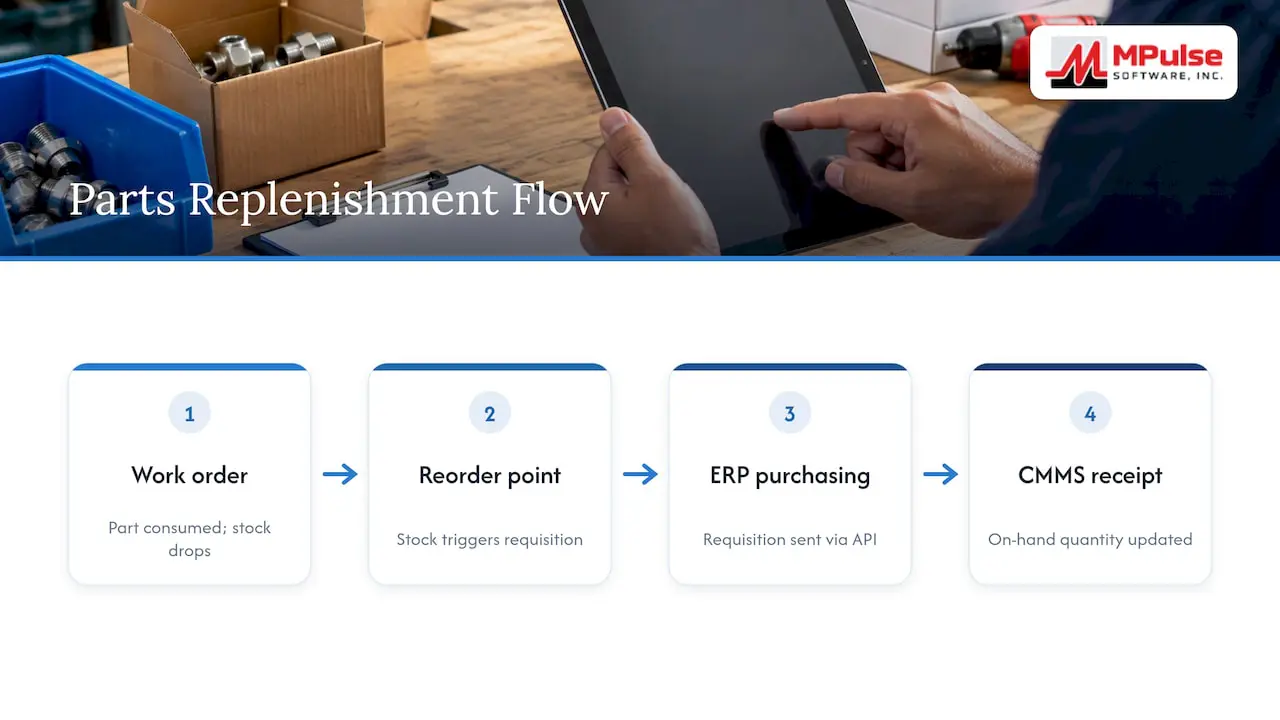
When a technician consumes a part on a work order, stock drops. When stock reaches its reorder point, a purchase requisition is raised. Where purchasing lives in the ERP, the API carries those requisitions and receipts between systems so that on-hand quantities do not drift.
Sensors and condition data
An industrial reference on this topic describes a SCADA system connected directly to a CMMS for creating and managing work orders as a typical Industry 4.0 pattern. Meter readings and alarms flow in, and condition-based maintenance rules decide whether a work order is warranted. For how that logic works in the application, see our documentation on condition based maintenance.
Reporting
Read-only GET access to work order, downtime and cost data lets analysts build reports in the BI tool the company already uses. This is often the lowest-risk first integration because nothing is written back.
Securing a CMMS API
A maintenance system holds asset details, building locations, vendor information and compliance records. An exposed API is a way into all of it, so treat security as part of the design.
The NIST publication Guidelines for API Protection for Cloud-Native Systems (SP 800-228) is the current US government reference. Its direction is a zero-trust approach: every request, whether it comes from an internal sensor gateway or an outside partner, should be authenticated, authorized and encrypted in transit. Translated into a checklist for a maintenance team:
- Use OAuth2/OIDC where the vendor supports it. The guidance recommends standardizing on these for both people and service accounts rather than inventing a scheme per integration.
- Avoid long-lived tokens. A key that never expires and is pasted into a script is a liability the day that script is shared.
- Require TLS 1.2 or higher. Plain HTTP has no place in a maintenance integration.
- Give each integration its own service account with the narrowest permissions it needs. A reporting connection should not be able to delete assets.
- Log and review API activity. For regulated sites, the audit trail matters as much as the data. Our guide on CMMS and compliance covers recordkeeping practices that auditors look for.
- Plan for credential rotation and decide who owns it before launch.
For a longer working checklist, our article on faster CMMS API integration with NIST guidance goes step by step.
How to plan an integration that holds up
The technical call is usually the easy part. Most problems come from unclear rules about who owns what. A reasonable sequence:
- Name the business outcome. “Stop entering purchase requisitions twice” is a goal. “Connect the ERP” is not.
- Assign a system of record for each object. For example, the ERP owns vendors and general ledger accounts, the CMMS owns work orders and maintenance history, and assets are shared with one designated master.
- Define the direction of each flow. One-way syncs are easier to troubleshoot than two-way syncs. Start one-way where you can.
- Map fields before coding. Cost center codes, unit-of-measure values and status names rarely match between systems. A mapping table agreed by maintenance, finance and IT prevents weeks of rework.
- Test in a sandbox with realistic data, including bad data: missing asset IDs, duplicate part numbers, a vendor that was deactivated.
- Design for failure. Decide what happens when the ERP is down for patching. Queued retries and an error report that a person actually reads are better than silent failure.
- Document it and name an owner. An integration with no owner breaks quietly after the next upgrade.
One analysis of REST integrations at scale notes that calling a single API is straightforward, and the difficulty appears when you support many of them at once. The same applies inside a plant: the first connection is easy, and the fifth is where governance matters.
If you want a broader view of sequencing, read MRO first: CMMS integration for maintenance teams. If the ERP is your main target, how CMMS integrates with ERP systems covers the pitfalls, and SAP CMMS integration applies the same thinking to SAP environments.
Build it yourself or use a packaged adapter
A REST API gives developers freedom. It also gives them something to maintain. Before committing to custom code, compare the two routes honestly.
| Factor | Custom code against the API | Packaged integration adapter |
|---|---|---|
| Flexibility | Highest: any workflow you can describe | Bounded by what the adapter supports |
| Time to first result | Depends on developer availability | Usually shorter, since the connection pattern exists |
| Ongoing upkeep | Your team owns fixes after each upgrade | Shared with the vendor |
| Skills required | Developers familiar with HTTP, JSON and auth | Configuration skills, with IT input |
| Best fit | Unusual systems, bespoke logic | Common data exchanges such as ERP, payroll and imports |
Neither is better in every case. Teams with in-house developers and unusual requirements often build. Teams that want predictable cost and less code to maintain often choose an adapter or a services engagement. If you are weighing the two, it is also worth talking with an integration specialist; resources on API-led integration layers show how teams separate system connections from business logic so that each can change independently.
Our perspective: integration should serve the maintenance plan
We have worked with maintenance teams for a long time, and over 3,500 customers use MPulse worldwide. The same pattern appears again and again: teams ask for an API because they want one specific thing to stop being manual. That is the right instinct, and it is where we begin.
Our view is that an integration is successful when the maintenance supervisor notices less paperwork and the auditor finds complete records, not when the interface is elegant. That means three things in practice.
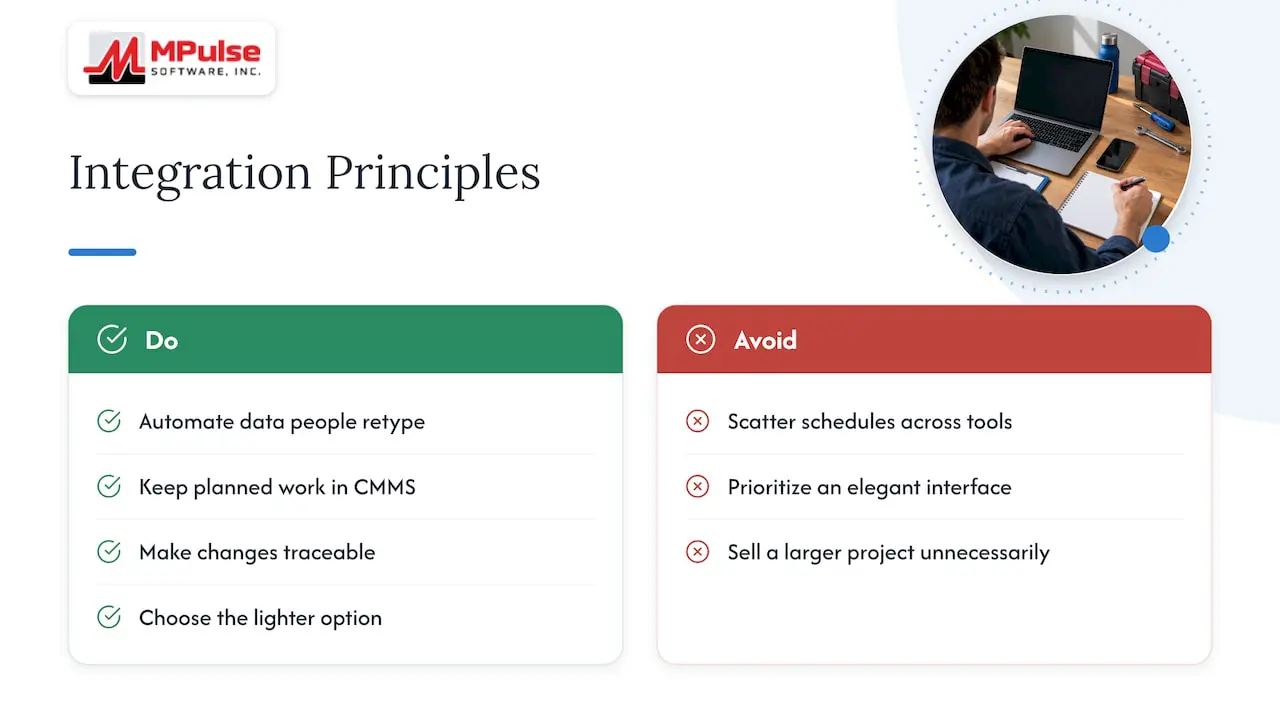
First, start with the data a person currently retypes. Parts receipts, requisitions and asset updates usually top the list. Second, keep the calendar and the preventive maintenance schedule in the CMMS the single view of planned work, and feed it from other systems rather than scattering schedules across tools. Third, treat compliance records as a design requirement from day one. If your site answers to regulators, every automated change should leave a trace someone can read.
We also hold that a REST API is a means rather than the product. Some teams need it. Others are better served by a ready-made adapter, by configuration, or by a services engagement that does the mapping work for them. We would rather help you choose the lighter option than sell you a larger project.
— Mark
Integration help from MPulse
If you want to connect MPulse CMMS to an ERP, payroll or other business systems, the DataLink Integration Adapter and other add-ons are the place to start. For mapping, rollout and training, our implementation, hosting and consulting services are available, and the DataLink Integration Tools datasheet describes the toolset in more detail.
Plans start at $29 per month per user for Professional and $79 per month per user for Advanced, as listed on our pricing page. Add-ons, services and the Technician License do not have published prices, so contact us for a quote.
Questions to ask any vendor about its API
Use this list during evaluation. Ask for written answers and a look at the documentation, not a demo alone.
- Is there public documentation for the endpoints, and is it kept current with each release?
- Which record types can be read, created, updated and deleted?
- Which authentication methods are supported, and do tokens expire?
- Are there rate limits, and what happens when they are exceeded?
- Is a test or sandbox environment available?
- Are API calls recorded in an audit log?
- Is the API included in the subscription, or is it a separately priced add-on?
- Who supports the integration when something breaks: the vendor, your team or a third party?
The answers separate a documented interface from a marketing line. If you also need to understand how a CMMS fits next to inventory and inspections, our compliance guide section on parts inventory is a useful companion.
FAQ
Is a REST API still the right choice in 2026?
Yes, for external integrations. Industry comparisons continue to describe REST as the default for third-party and partner integrations, because tooling and developer familiarity are so broad. Newer styles are growing mainly for specialized internal services.
Is a CMMS the same as an ERP?
No. An ERP manages finance, purchasing, payroll and supply chain across the business. A CMMS manages maintenance: work orders, preventive schedules, asset history and parts used. The two overlap on assets, purchasing and cost data, which is why they are commonly connected through an API or adapter.
Do I need a developer to use a CMMS API?
Usually, yes. Direct API use calls for someone comfortable with HTTP requests, JSON and authentication. If you do not have that skill in house, an adapter, an implementation service or a consultant can handle the connection instead.
How should I authenticate API requests?
Follow the vendor’s supported methods and favor standards. NIST SP 800-228 recommends OAuth2/OIDC and short-lived credentials, with all traffic encrypted in transit. Give each integration its own limited account.
What is the first integration most teams should build?
A read-only report feed or a one-way sync of assets or parts from the ERP. Both deliver visible value, carry low risk and teach your team how the connection behaves before you automate work order creation.
Sources
- Guidelines for API Protection for Cloud-Native Systems, NIST SP 800-228
- What Is API Integration? (2026), Automation Atlas
- REST vs GraphQL vs gRPC: API Design for Mid-Market Companies 2026, Reepa Solutions
- API Integration Guide: Best Practices for 2026, Samioda
- REST vs tRPC vs GraphQL vs gRPC: API Patterns 2026, APIScout
- Understanding IIoT Application Programming Interfaces, ISA
- REST API Integration: Challenges, Best Practices, and What Breaks at Scale, Unified.to