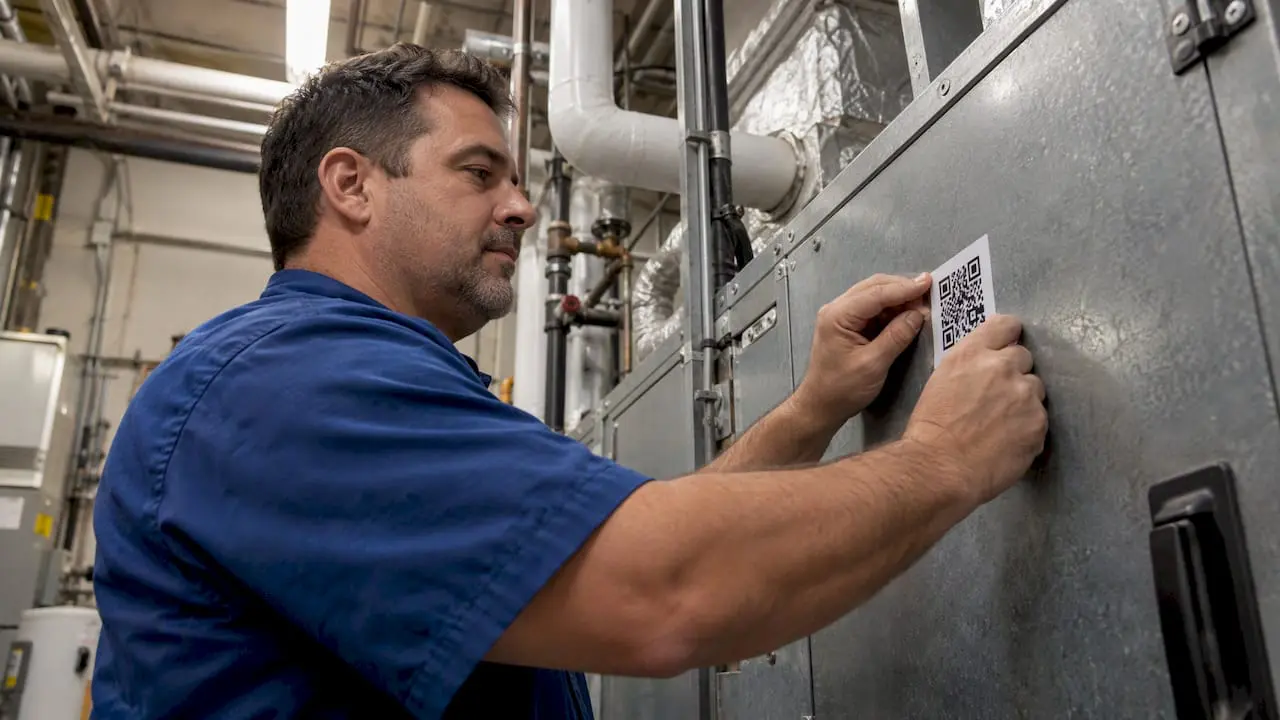
A QR code maintenance request is a printed code on a piece of equipment or a room that opens a request form when someone scans it with a phone. The form already knows which asset or location it belongs to, so the person reporting the problem does not have to describe where it is. When the code is tied to a computerized maintenance management system (CMMS), the scan becomes a work order that lands with the right team. This guide covers how to set that up, what to put behind each code, and how to keep it secure.
A note on scope: many search results for this topic are about tenant repair rights and landlord notice rules. This article is for the other side of the question: facility managers, maintenance supervisors and operations directors who want a faster, traceable way to receive and act on requests in a building, plant, campus or hospital.
TL;DR
- A QR code on an asset or room opens a pre-filled request form, so requesters skip the guesswork and your team gets the location and asset identity with every report.
- The code is only as useful as the record behind it. It must link to a live, accurate equipment inventory so history and service records stay traceable.
- QR codes carry real security risk. Use codes you generated, protect them from tampering, and teach staff not to scan labels that look stuck over others.
- Route every scan into a CMMS work order queue with clear triage rules, or the codes only create a faster pile of unread messages.
- Start with one building or one production line, measure response times, then expand.
Table of Contents
- Why QR codes fix the weakest step in maintenance
- What to put behind a QR code
- Connect the scan to a live asset inventory
- From scan to work order: the workflow
- Security: treat every QR code as a link someone could change
- Rolling it out without stalling
- Our perspective: the request is the easy part
- Where MPulse fits
- What to look for in any system behind your QR codes
- FAQ
- Sources
Why QR codes fix the weakest step in maintenance
Most maintenance problems are found by someone who does not work in maintenance: a nurse who sees a dripping ceiling, a teacher with a dead projector, an operator who hears a new noise on a conveyor. What happens next decides whether the fault is a quick fix or an outage.
Traditional reporting paths have predictable weak points:
- Phone calls and hallway conversations get forgotten or passed along incorrectly.
- Email arrives without an asset number, and someone has to follow up with questions.
- Paper forms get filled out late, sit in trays and are hard to search.
- Generic web forms ask the requester to name a room or machine, and the answer is often vague: “the printer on the second floor.”
A scan solves the identification problem at the source. The code is physically at the problem, so the request carries the asset, the location and a timestamp. The requester only needs to say what is wrong and, ideally, attach a photo.
What to put behind a QR code
There are two common designs, and many sites use both.
Option 1: A code on the asset
Each machine, air handler, pump, fire extinguisher or vehicle gets its own code. The scan opens a request form tied to that asset ID. This is the best choice where you need a service history per asset, such as regulated equipment, production lines and critical building systems.
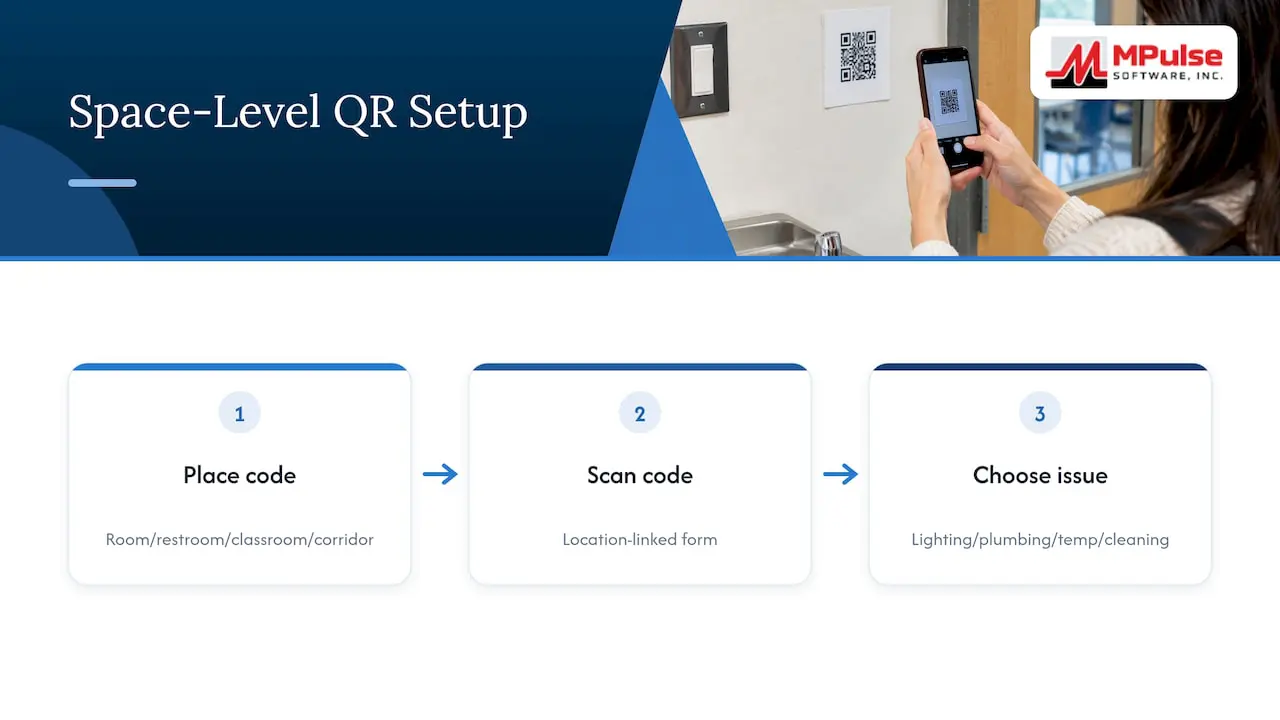
Option 2: A code on the space
Each room, restroom, classroom or corridor gets a code. The scan opens a form tied to the location, and the requester picks the issue type (lighting, plumbing, temperature, cleaning). This works well for offices, schools, residence halls and public areas where the number of individual assets is large and the people reporting are not technical.
What the form should ask
Keep the form short enough to complete in under a minute on a phone. A workable set of fields:
- Asset or location (pre-filled by the code)
- Problem category, as a short pick list
- A one-line description
- A photo, optional but encouraged
- Priority or safety flag: “Is anyone at risk right now?”
- Contact details, only if you need to follow up with the requester
The safety flag matters. A scan is not an emergency channel. Put an instruction on the label itself, for example “Gas smell, fire or injury: call emergency services or the security desk first.” Use your own site’s emergency number there.
Connect the scan to a live asset inventory
A code that opens a form but points to nothing is a convenience, not a maintenance system. The value comes from what the scan connects to.
A peer-reviewed guide on equipment maintenance and repair makes the underlying point plainly: maintenance cannot be done effectively on equipment you do not know you have, and each item needs its own maintenance schedule and activity list. For QR requests, that means the code should be inextricably linked to an accurate equipment inventory so that historical data and service records stay traceable.
The same logic applies in other industries that depend on one accurate record behind a scan. An automated guest check-in platform for short-term rental registration in Portugal, for example, relies on every scan landing in a single, correct record that supports legal compliance. Maintenance works the same way: the scan is only the front door to a record you can trust.
In practice, before you print a single label:
- Build or clean your asset register. Every asset gets a unique ID, a location, a category and a status.
- Remove duplicates and retired equipment so a scan never opens a dead record.
- Decide how locations are structured (site, building, floor, room) and use the same structure everywhere.
- Attach what the technician needs on arrival: manuals, warranty details, past work orders and the preventive maintenance schedule.
If you are starting from scratch, our guide on creating CMMS asset records walks through the fields that matter.
From scan to work order: the workflow
The cleanest QR programs follow a simple path, and each step has an owner.
- Scan. The requester scans the code and submits the form.
- Intake. The request appears in the CMMS queue as a pending request, linked to the asset or location.
- Triage. A supervisor or dispatcher reviews it, sets priority, rejects duplicates and approves it as a work order.
- Assignment. The work order goes to a technician or contractor based on trade, location and workload.
- Completion. The technician records labor, parts and notes, ideally from a mobile device at the asset.
- Close the loop. The requester is notified, and the asset history is updated.
Steps 3 and 6 are where programs succeed or fail. Without triage, ten people scanning the same broken light create ten tickets. Without feedback, requesters stop scanning because nothing seems to happen. Our overview of work order management covers how requests, approvals and assignments fit together, and this piece on how work order software speeds up maintenance goes deeper on the day-to-day.
Triage rules worth writing down
| Situation | Suggested handling |
|---|---|
| Safety hazard or loss of a critical system | Escalate immediately by phone or radio, then log the work order |
| Duplicate of an open request on the same asset | Link to the existing work order and notify the requester |
| Comfort or cosmetic issue | Batch into a scheduled route or the next preventive maintenance visit |
| Request on an asset under warranty or contract | Route to the vendor, keep the record in the asset history |
| Repeated requests on the same asset | Flag for root-cause review or replacement planning |
That last row is where QR data pays back. When every request is attached to an asset, repeat failures are visible, and you can move from reactive repairs toward preventive maintenance on the equipment that keeps generating tickets.
Security: treat every QR code as a link someone could change
A QR code is just a link in a different shape, and you cannot read the destination by looking at it. That makes tampering easy. The Canadian Centre for Cyber Security describes the risks of QR codes and recommends that organizations teach staff not to scan codes that appear tampered with or placed over legitimate labels. It also advises configuring mobile devices to ask permission before acting on a scan.
The U.S. Army’s cybersecurity fact sheet on QR codes lists what malicious codes can do, including adding unwanted contacts, connecting a device to a malicious network and sending text messages. A HHS white paper on QR codes and phishing addresses the health sector specifically and recommends endpoint security software on users’ systems, which matters for hospitals and clinics where staff scan from work devices.
For a maintenance program, that translates into practical controls:
- Use your own domain. Generate codes that point to a URL you control, not a third-party shortener you cannot audit.
- Print durable, tamper-evident labels. Use laminated or vinyl labels with a strong adhesive, and consider tamper-evident stock in public areas.
- Show the destination in plain text. Print the short URL or asset ID beneath the code so people can check it matches.
- Inspect labels on routine rounds. Add “check QR label intact” to inspection checklists, and replace anything that looks overlaid or peeled.
- Tell people what a real code looks like. One line in onboarding or on the label: “Our codes open a form on [your domain]. Report any sticker that looks added or altered.”
- Limit what the form exposes. A public request form should not display asset history, internal notes or personal data. Show those only to logged-in users.
- Keep the request form low-risk. Do not ask requesters to log in with a password or to enter payment or sensitive personal details.
In regulated settings such as healthcare or education, check your own security and privacy policies before launching, and involve your IT team in approving the domain and the form.
Rolling it out without stalling
Program size matters less than discipline. A phased approach tends to work.
Phase 1: Pilot
Pick one building, floor or production line. Clean the asset records there, print labels, and brief the people who will scan. Run it for four to six weeks.
Phase 2: Measure
Track numbers you can actually pull from your system:
- Time from submission to triage
- Time from triage to completion
- Share of requests that arrive with usable detail (asset, photo, description)
- Duplicate rate
- Repeat requests per asset
If triage takes longer than the work, fix intake before adding more codes.
Phase 3: Expand
Roll out by area, using what you learned about wording, label placement and priority rules. Place labels at eye level near the asset, not on the back or underside. Add a short instruction line: “Scan to report a problem with this equipment.”
Common mistakes
- Printing codes before the asset register is accurate
- Making the requester log in, which kills participation
- Ignoring requests for days with no acknowledgment
- Using one generic code for a whole building, which loses the location detail that made QR worthwhile
- Forgetting to retire a code when equipment is replaced or moved
For teams managing many buildings, the same discipline applies at scale. Our article on campus asset management best practices covers how to structure assets across sites.
Our perspective: the request is the easy part
We see the same pattern in maintenance teams of every size. Getting more requests is rarely the problem. What hurts is the missing context around them: which asset, which location, what was done last time, who is qualified to fix it. A QR code solves the first two. The rest depends on the system behind it.
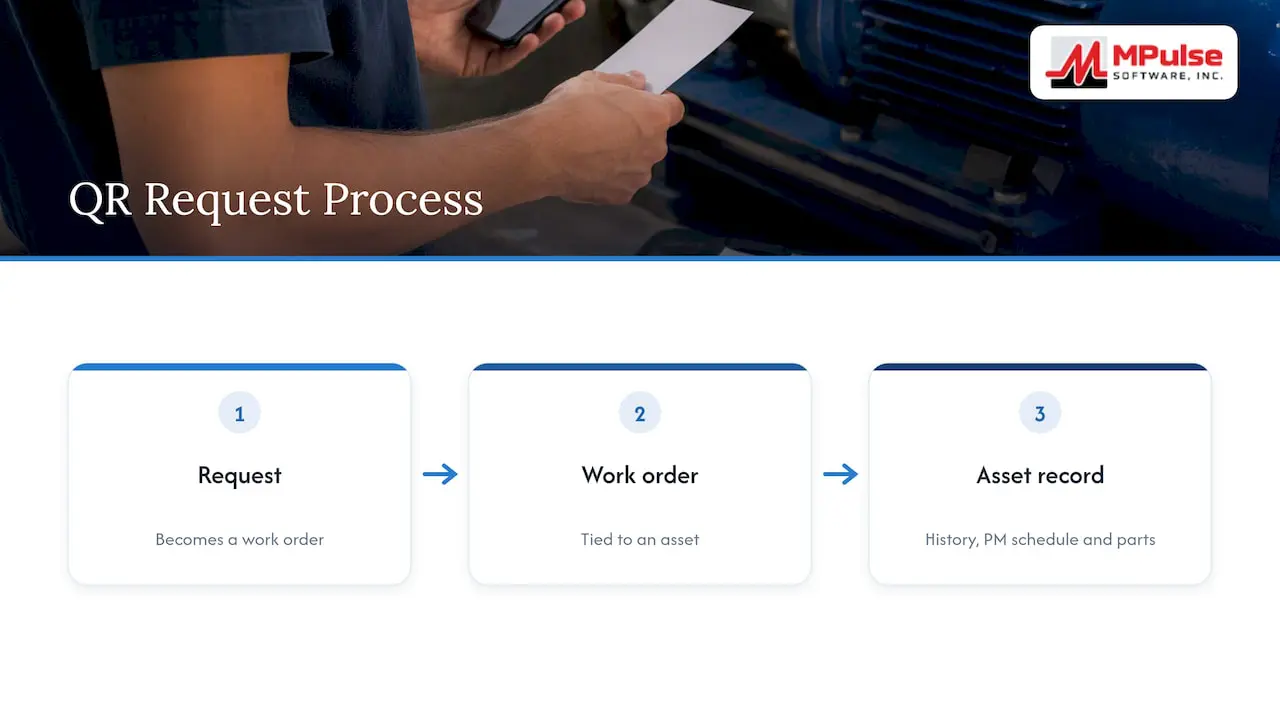
That is why we think of QR requests as a front end for a maintenance process, not a feature in itself. A request should become a work order, the work order should be tied to an asset, and the asset should carry its history, its preventive maintenance schedule and its parts. When those links exist, a scan from a teacher or a nurse gives your technician the same information as a scan from a veteran operator.
It is also why requester access should be cheap. If every person who might report a problem needs a paid license, people stay silent or go back to email. MPulse is built around that idea, with unlimited free requesters so anyone in your organization can submit a request, while your maintenance staff work in the full system. Combine that with barcode scanning, mobile device compatibility and a calendar view of scheduled work, and the scan turns into something your team can plan around.
Our advice is to begin with your asset records and your triage rules. The label comes last.
— Mark
Where MPulse fits
MPulse CMMS supports the pieces a QR request program depends on: work order management, asset tracking, preventive maintenance automation, inventory for parts, barcode scanning, mobile access and reporting. It also supports compliance and regulatory recordkeeping, which matters when a scan is part of an audit trail.
Published plans are Professional at $29 per month per user and Advanced at $79 per month per user, with a Technician License and enterprise add-ons also listed on the pricing page. If you need help with setup, we offer implementation, training and hosting services. To see how the system handles requests and work orders end to end, start with the MPACT CMMS overview.
What to look for in any system behind your QR codes
Whether you build your own form or use a CMMS, test these before committing:
- Asset-level and location-level requests. Can a scan carry either?
- Request approval. Can a supervisor review before a work order is created?
- Mobile completion. Can technicians close work from a phone or tablet at the asset?
- History on the asset. Does each completed job update the same record the next scan will reach?
- Integration. Can it share data with your ERP, building systems or sensors? This is useful for condition-based maintenance, where readings as well as people trigger work.
- Reporting. Can you see response times, repeat failures and backlog by area?
- Cost for requesters. Does adding more reporters add to your license bill?
FAQ
Do QR code maintenance requests replace work orders?
No. The scan creates a request, and a supervisor or the system turns it into a work order after review. The request tells you what someone saw; the work order records what you decided to do, who did it, with which parts and how long it took.
Should every requester need a login?
Usually not. A login adds friction, and people stop reporting. A common approach is a simple public form for requesters, with the full asset history, notes and approvals visible only to maintenance staff who are signed in.
Are QR codes safe to put on equipment?
They are safe when you control the destination and protect the label. Security agencies warn that codes can be altered or covered with malicious ones, so use your own domain, print the URL beneath the code, inspect labels during rounds and tell staff to report anything that looks stuck over an original.
What if my asset records are incomplete?
Start with the critical assets and the areas that generate the most requests, and use location-based codes elsewhere until the register catches up. Printing codes for assets you cannot identify only moves the confusion onto a label.
Sources
- Equipment maintenance and repair (PMC)
- Security considerations for QR codes, Canadian Centre for Cyber Security
- Cybersecurity Fact Sheet: QR Codes, U.S. Army
- QR Codes and Phishing as a Threat to the HPH, HHS white paper