
An OPC UA to CMMS integration lets your maintenance system read runtime, status and alarm data straight from PLCs and machines, then act on it. The most common result is a preventive maintenance work order that opens when an asset crosses a runtime threshold, with no one reading a counter and writing a number on a clipboard. This guide explains how the connection works, what to check before you build it, how to secure it and how to roll it out without surprises.
TL;DR
- OPC UA is a platform-independent, service-oriented standard that exposes machine data in a consistent, secured form. A CMMS can poll that data and use it to drive maintenance.
- The best-documented use is runtime-based preventive maintenance: an OPC UA server exposes PLC hour-counter tags, and the CMMS opens a work order when a threshold is reached.
- Before you start, you need a clean asset hierarchy in the CMMS, consistent tag names that map to asset IDs, and a permitted network path to the OPC UA server.
- Treat security as part of the design: encrypted sessions, trusted certificates, least-privilege access and network segmentation.
- Start with a small pilot on a few assets, confirm that a work order is generated end to end, then expand.
Table of Contents
- What OPC UA is, and how it differs from classic OPC
- What maintenance data OPC UA can provide
- How the connection works
- Which workflows it can automate
- What to check before you implement
- OPC UA and MQTT: when to use which
- Securing the connection
- Implementation challenges and how to test
- Our perspective
- Plan your integration with MPulse
- FAQ
- Sources
What OPC UA is, and how it differs from classic OPC
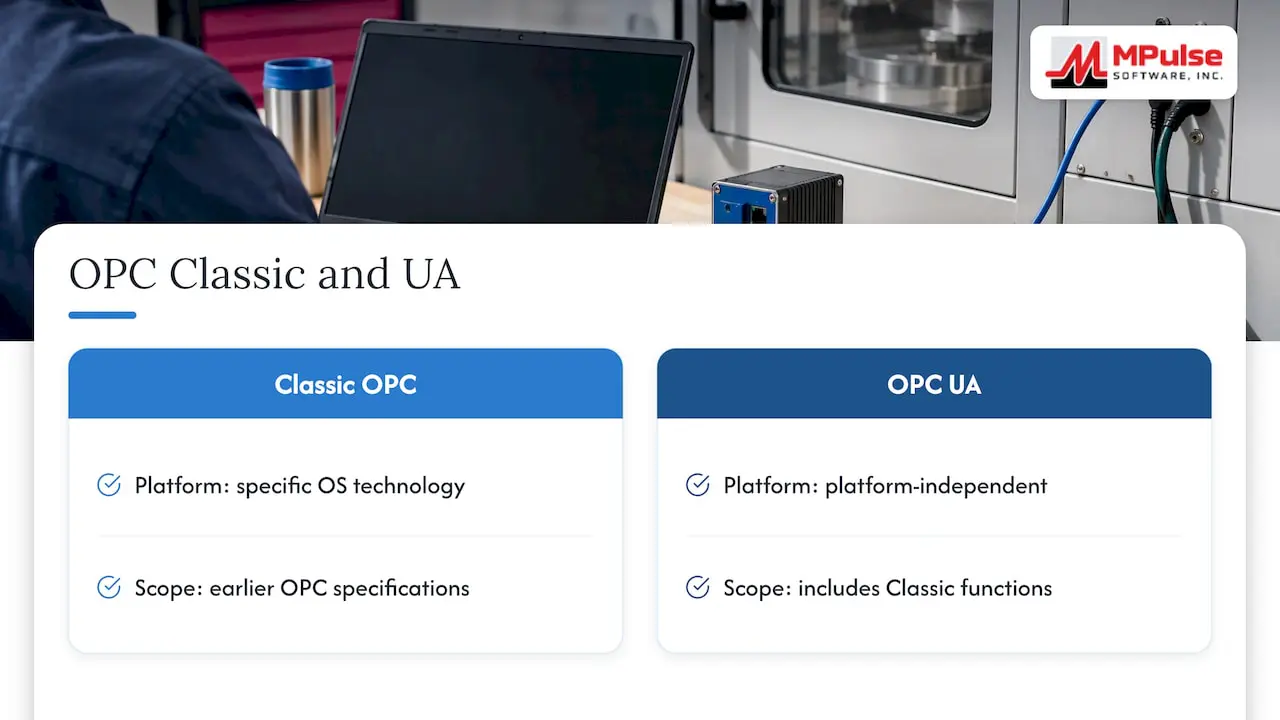
OPC UA (Unified Architecture) is the OPC Foundation’s platform-independent, service-oriented architecture that brings the functions of the earlier OPC Classic specifications into one extensible framework. Classic OPC was built around a specific operating system technology. OPC UA is not tied to one platform, so it can run on a controller, a gateway, an edge device or a server in the cloud.
Two features matter to maintenance teams. First, the same OPC Foundation page notes that OPC UA includes encryption, authentication and auditing, which makes it easier to defend in front of an IT security reviewer. Second, it supports several transports, including OPC binary and JSON over WebSockets, so the data can travel in ways that suit the network you actually have.
In practice, OPC UA acts as a translator. Your machines may use different controllers and vendor protocols. An OPC UA server presents their values under one set of names and structures. The CMMS then needs to talk to only one interface instead of one per machine brand.
What maintenance data OPC UA can provide
The data you get depends on the protocol and on what each machine exposes. According to MachineMetrics’ connectivity documentation, available data can include machine status, cycle time, part count, alarms and error codes, and sensor readings such as temperature and vibration. OPC UA connections can also carry custom variables and process parameters.
Not every signal is useful to a CMMS. These are the ones that tend to matter most:
| Signal | What the CMMS can do with it |
|---|---|
| Runtime or hour counter | Open a preventive maintenance work order at a threshold |
| Machine status (running, idle, faulted) | Record downtime and compare it with work order history |
| Cycle or part count | Schedule maintenance by usage instead of by calendar |
| Alarms and error codes | Create a corrective work order or flag a repeat failure |
| Temperature, vibration | Support condition-based maintenance when a reading leaves its normal range |
A useful rule: bring over the few signals that change a maintenance decision. Pulling every tag into the CMMS creates noise, not insight. If vibration is on your list, our guide to turning vibration data into CMMS work orders shows how to define thresholds that lead to action.
How the connection works
The pattern documented most clearly is simple. According to an integration guide from Industrial Monitor Direct, an OPC UA server polls the PLC’s hour-counter tags and exposes them as a namespace. The CMMS then polls that namespace for runtime values.
That gives you three layers:
- The machine layer. The PLC keeps the counter or status tag.
- The OPC UA layer. A server reads the tag and publishes it under a stable name.
- The CMMS layer. The maintenance system reads the value on a defined schedule, matches it to an asset record and compares it with the maintenance rule.
The CMMS does not need to talk to the PLC directly. That separation is useful: controls engineers keep ownership of the machine network, and maintenance owns the rules and work orders.
Which workflows it can automate
The best-supported workflow is runtime-triggered preventive maintenance. The same guide says an integration can generate PM work orders when asset runtime crosses a threshold, replacing manual runtime tracking.
Here is why that matters in a plant. A conveyor motor scheduled for lubrication every 90 days may run two shifts one month and sit idle the next. A calendar schedule services it too early or too late. A runtime trigger services it when the wear has actually happened.
Other workflows worth considering once the first one works:
- Downtime logging. Status changes can create a timeline you compare against work orders.
- Alarm-driven corrective work. A fault code can open a work order with the asset and code already filled in.
- Condition-based maintenance. Sensor readings outside a set range can request an inspection. Our post on oil analysis maintenance covers a similar principle for lubricant data.
- Compliance records. Every automated work order leaves a dated entry, which helps with audit readiness in regulated settings.
If you are new to the underlying idea, what preventive maintenance is is a good starting point, and our preventive maintenance software page shows how recurring schedules are built.
What to check before you implement
Most failed integrations fail on preparation, not on the protocol. The guidance reviewed for this article points to four checks.
A well-populated asset hierarchy
The CMMS needs asset records to attach readings to. If your hierarchy is half built, runtime values have nowhere to land. Clean up asset IDs, locations and parent-child relationships first.
Runtime or health tags in the PLC
Confirm that the tag you want actually exists and is reliable. Some machines count hours only while powered, others only while producing. Decide which definition your maintenance rule needs.
Consistent tag naming
The integration guide recommends embedding the asset ID in the tag path so the CMMS can resolve each value to the correct asset record. Matching the CMMS hierarchy to PLC tag names is the heart of the project. A mapping table with one row per asset, the tag path and the maintenance rule is worth building before any configuration.
Network reachability
The CMMS server must be allowed to reach the OPC UA server on its TCP port, which defaults to 4840 per the same guide. Ask IT early, because firewall changes often take longer than the technical work.
A quick pre-project checklist:
- Asset list reviewed and IDs finalized
- Tag list for each machine, with units and definitions
- Naming convention agreed between maintenance and controls
- Polling interval chosen (hourly is plenty for most runtime rules)
- Firewall request submitted
- Owner named for the integration after go-live
For a deeper walk through mapping, see our guide to mapping OPC UA maintenance signals to a CMMS in six steps.
OPC UA and MQTT: when to use which
Readers often ask whether they should choose OPC UA or MQTT. They solve different problems. The OPC Foundation’s developer guide describes OPC UA as offering semantic data modeling and built-in security, while MQTT is a lightweight messaging protocol. The same document describes using OPC UA over MQTT to deliver modeled data to remote cloud or business-level systems.
For a CMMS project, the decision usually comes down to where the data travels:
- Inside the plant, from controllers to a server: OPC UA is the natural fit because the data keeps its names and structure.
- From the plant to a remote or cloud system: MQTT transport may suit the link. OPC Foundation material on one OT/IT product shows an example: an OPC UA aggregator that supports MQTT-based transfer to cloud applications.
You do not have to pick a side. Many facilities use both, with OPC UA close to the machines and MQTT carrying the modeled data farther away.
Securing the connection
A link between maintenance software and production equipment deserves a security review. The OPC Foundation’s guidance on OPC UA security lists the measures that matter: firewall protections, encrypted communication, trusted certificates and least-privilege access.
Turn that into decisions for your project:
- Encrypt sessions. Do not leave the connection on an unsecured mode because it is easier to test.
- Manage certificates deliberately. Every client and server needs a trusted certificate. For many devices, the specification includes Global Discovery Servers to manage certificates centrally, so expiry does not break the feed unnoticed.
- Give the CMMS read-only access. If it only needs runtime values, it should not be able to write to tags.
- Segment the network. The integration guide suggests that where separation is required, you place the integration component in a DMZ or use a data diode.
Involve your IT or OT security lead before the pilot, not after. For a regulated facility, document the design so it can be shown to an auditor.
Implementation challenges and how to test
The guide names two recurring problems: inconsistent tag mapping and firewall configuration. Both are visible in a small pilot, which is why a phased approach works well.
Run a phased pilot
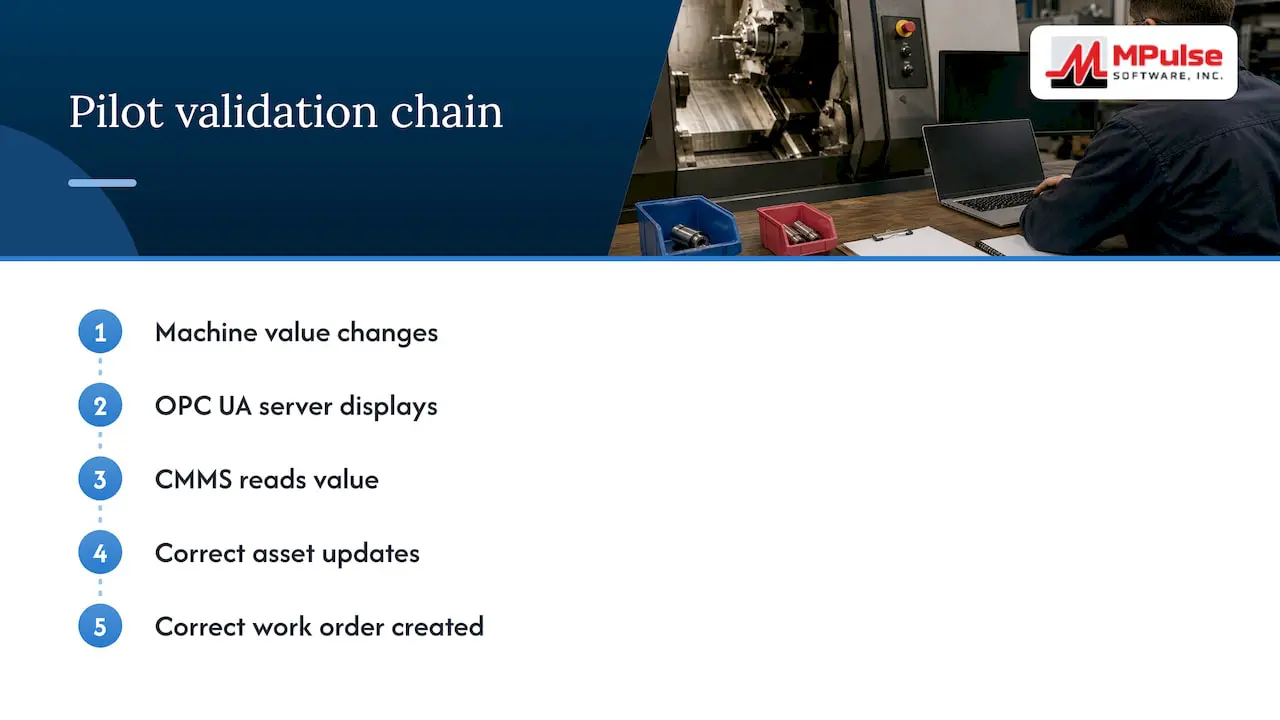
Choose three to five assets with different machine types and reliable tags. Success means a verified chain: the value changes at the machine, the OPC UA server shows it, the CMMS reads it, the right asset record updates and the right work order is created. Staged rollouts that prove end-to-end work-order logic before scale are common in other operational settings as well, for example in floor markings and WMS integration projects, where each stage is validated before the next begins.
Test the failure cases
A pilot that only proves the happy path is not finished. Check these:
- What happens when the OPC UA server is unreachable? The CMMS should log the gap, not create false work orders.
- What happens when a counter resets after a PLC replacement?
- Does a threshold crossing create one work order, or one per polling cycle?
- Does a certificate expiry produce an alert someone sees?
Maintain it after go-live
Assign an owner. Review the mapping table when equipment is added, moved or retired, and recheck certificate dates on a schedule. An integration that nobody owns degrades quietly.
Our perspective
We see the same pattern in facilities that succeed with machine-data integration: they begin with a maintenance question, not with the protocol. “Which three assets cause the most unplanned downtime, and what signal would warn us?” is a better starting point than “let’s connect everything.”
We also see that the data is only as good as the CMMS behind it. Clean asset records, clear preventive maintenance schedules and a calendar your team actually uses decide whether an automated work order is acted on or ignored. MPulse is built around that foundation: preventive maintenance automation, work order management, asset tracking, condition-based maintenance and integration with ERP and sensor systems, with an intuitive calendar interface so planners can see the automated work next to everything else.
Our advice is to automate one rule, prove it, and add the next. Teams that do this build trust in the system, and trust is what moves maintenance from reacting to planning.
— Mark
Plan your integration with MPulse
If you are scoping a project like this, MPulse can help at each stage. Our CMMS implementation, hosting and training services support the setup and the people side, and our add-on products include the DataLink Integration Adapter for connecting to other systems. Plans on our pricing page start with Professional at $29 per month per user and Advanced at $79 per month per user. You can also start a free trial to see the calendar and work order tools with your own assets.
FAQ
What does OPC UA do in a CMMS context?
It supplies machine data, such as runtime, status, alarms and sensor readings, in a standard, secured format. The CMMS reads that data and uses it to trigger work orders or record downtime. It replaces manual readings and the delays that come with them.
What is the difference between OPC and OPC UA?
OPC Classic refers to the earlier set of individual specifications. OPC UA combines their functionality into one extensible, platform-independent architecture, with encryption, authentication and auditing included.
What is the difference between OPC UA and MQTT?
OPC UA provides data modeling and built-in security. MQTT is a lightweight messaging protocol. They can work together: OPC UA can run over MQTT to carry modeled data to remote cloud or business systems.
Which port does an OPC UA server use?
The default TCP port cited in integration guidance is 4840. Your CMMS server needs permitted network access to that port, and your IT team may choose a different one or place the integration in a DMZ.
Can I do this if my machines do not support OPC UA?
Often yes. A gateway or OPC UA server can read the controller’s tags and expose them, which is the pattern described above. Confirm the tag exists and check with your controls engineer before planning around it.
Sources
- Unified Architecture, OPC Foundation
- CMMS with PLC Hour Counter Integration: Selection Guide, Industrial Monitor Direct
- Connectivity Overview, MachineMetrics
- OPC UA Guide for Developers, OPC Foundation
- New OPC UA-based OT/IT Integration Solution, OPC Connect
- OPC UA Security, Strengths, and Practical Implementation Considerations, OPC Connect
- Floor Markings and WMS Integration guide