A CMMS API is the documented set of endpoints that lets other software read from and write to your maintenance system. It is how work orders, assets, parts and meter readings move between the CMMS and your ERP, sensors, BI tools or single sign-on. A good integration starts with one workflow, a clear data contract and a security model, not with code.
This guide is written for maintenance managers and the IT or operations people who support them. It covers what an API exposes, what to settle before a developer writes a line, how to secure it, how to pilot it, and where MPulse fits.
TL;DR
- Start with one consequential workflow, measure how it performs today, and agree on go/no-go criteria before choosing tools.
- Confirm both directions of data flow: inbound (into the CMMS) and outbound (out of it).
- Treat every API call as having two identities, the calling system and the end user, and secure it with encrypted traffic and per-request authorization, as NIST SP 800-228 describes.
- Test in a sandbox, then enable limited writebacks, then widen automation.
- If you want a prebuilt route for ERP and other imports and exports, MPulse offers the DataLink Integration Adapter as an add-on.
Table of Contents
- What a CMMS API actually does
- Inbound, outbound and the other integration styles
- Before you write any code: five decisions
- Securing a CMMS API
- A phased rollout that you can reverse
- Our perspective on CMMS APIs
- Where MPulse fits
- Questions to ask any vendor about their API
- A worked example: purchase requisitions to work orders
- Common mistakes
- FAQ
- Sources
What a CMMS API actually does
A computerized maintenance management system holds the records that keep a facility running: assets, locations, preventive maintenance schedules, work orders, parts inventory, purchase requisitions and compliance history. An application programming interface exposes some of those records to other software in a structured, repeatable way.
Without one, teams re-key data. A purchase order is entered in the ERP and again in the CMMS. A sensor alarm is noticed on a dashboard and a technician creates a work order by hand. Each manual step is a chance for a typo, a delay or a missing record that surfaces during an audit.
With one, the systems talk to each other. Typical integration patterns include:
- ERP and finance: asset records, parts costs, purchase requisitions and labor costs reconciled between systems.
- Sensors and building systems: a threshold breach or meter reading triggers a work order or updates a condition-based maintenance schedule.
- Identity: staff sign in with corporate credentials instead of a separate password.
- Reporting and BI: work order history and downtime figures feed into company-wide dashboards.
- Request portals: requests from other departments become work orders without a phone call.
Published research points the same way. A 2022 literature review on maintenance management and Industry 4.0 technologies links integration with IoT, cloud computing and related tools to real-time condition monitoring and fewer unplanned shutdowns.
Inbound, outbound and the other integration styles
Before you read any vendor’s API documentation, decide which direction your data needs to travel.
Inbound flows push data into the CMMS: new assets from a capital project, parts and vendors from the ERP, meter readings from a building system, requests from an intake form.
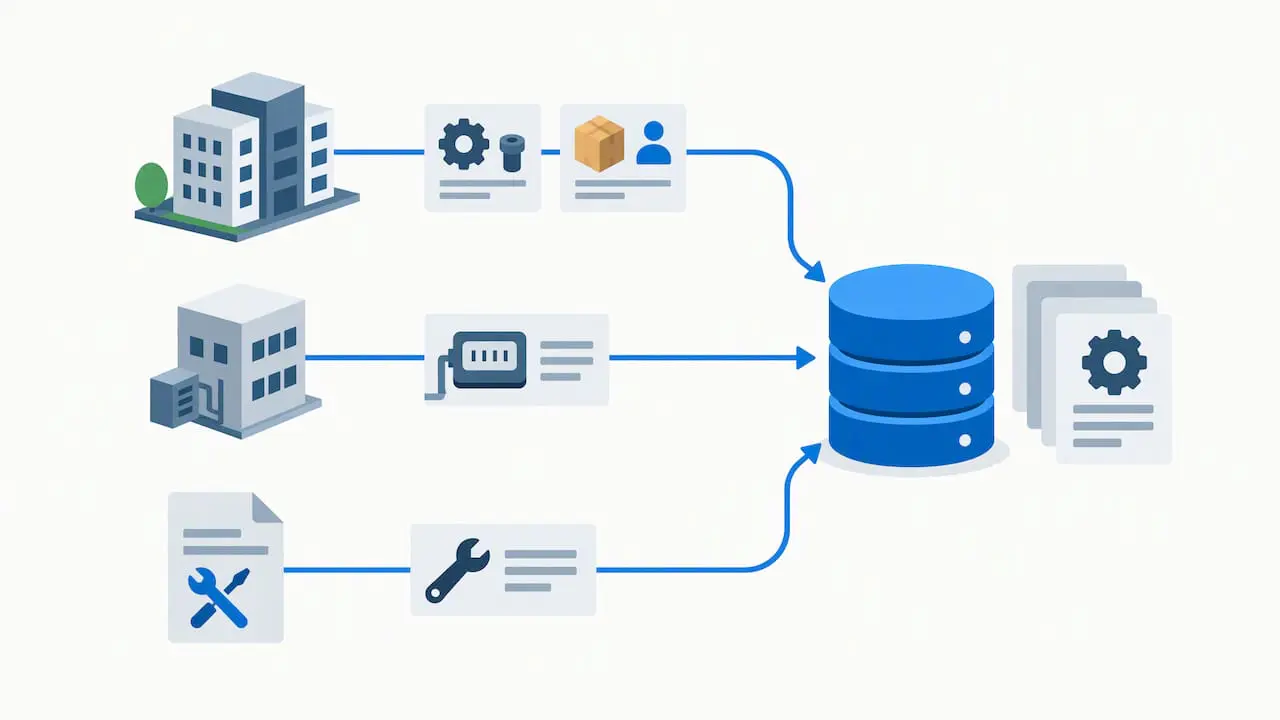
Outbound flows pull data out: completed work order costs sent to accounting, asset downtime sent to a BI platform, compliance records sent to an audit repository.
Many projects need both, and the two have different risks. Inbound writes can corrupt your maintenance records if validation is weak. Outbound reads can expose sensitive asset and location data if access is too broad. Plan them as separate pieces of work.
You will also meet three common styles:
| Style | How it works | Good for | Watch for |
|---|---|---|---|
| Request/response (REST) | Your system asks, the CMMS answers | Looking up records, creating work orders, nightly syncs | Polling too often, retry storms |
| Event notifications (webhooks) | The CMMS tells your system when something changes | Status changes, closed work orders | Missed or duplicated events |
| File or adapter based import/export | Scheduled data exchange through a connector | ERP master data, bulk loads | Field mapping drift, silent failures |
No style is better in every case. A scheduled adapter is often the most dependable choice for master data such as parts and vendors, while event notifications suit status changes that someone needs to see quickly.
Before you write any code: five decisions
Most integration problems trace back to skipped planning. Settle these first.
1. Pick one workflow
Integration guidance from Rusaka’s implementation roadmap is to start with one consequential workflow, quantify its current performance and make the go/no-go criteria visible before selecting technology. For a maintenance team, that might be “purchase requisition approved in the ERP creates a parts reservation against the work order,” with today’s cycle time as the baseline.
2. Name the system of record for each object
For every data type, decide which system owns it. Assets usually belong in the CMMS after commissioning. Vendors and part costs usually belong in the ERP. If two systems can both edit the same field, you will eventually have two different answers.
3. Write the data contract
List the fields, formats and relationships for work orders, assets, locations and parts. Include required fields, allowed values (status codes, priority levels), and how records link to each other, such as a work order to an asset to a location. Agree on one canonical ID for each asset and part so records match across systems without guesswork.
4. Decide who the API acts as
Create a dedicated service identity for each integration rather than reusing a person’s login. Scope its permissions to the minimum: an ERP adapter that imports parts does not need to delete work orders. This also leaves a clear audit trail of which system changed what.
5. Plan for failure
Networks drop, records collide and someone will change a field name. Decide in advance how the integration handles:
- retries after a timeout, without creating duplicate work orders;
- partial failures, where 40 of 50 records load and 10 do not;
- sync exceptions, and who is notified and how fast;
- schema changes after a software upgrade.
Idempotent calls, meaning a repeated request produces the same result instead of a second record, are the most useful single habit here.
Securing a CMMS API
Maintenance records can look harmless, but asset locations, inspection results and compliance history are exactly what auditors and attackers both care about. Security belongs in the design, not the final week.
The most useful current reference for US organizations is NIST’s Guidelines for API Protection for Cloud-Native Systems (SP 800-228), published in June 2025 and updated as of March 13, 2026. Its guidance translates into a short checklist for CMMS integrations:
- Encrypt in transit. Use TLS for all API traffic, with version 1.2 or later.
- Use standard authentication. For end users, OAuth 2.0 and OpenID Connect are the recommended standards, not homemade schemes.
- Use verifiable tokens. Prefer cryptographically verifiable tokens, and check expiration and rotation.
- Authorize every request. Each call involves at least two identities, the software calling the API and the end user it acts for. Both should be authorized on every request.
That last point matters most for audits. When access is governed by authenticated identities and per-request checks, you can show an auditor who touched which record. Ad hoc scripts sharing one password cannot show that.
Practical additions for your team:
- Store credentials in a secrets manager, not in a spreadsheet or a script.
- Rotate credentials on a schedule and when staff with access leave.
- Log every write, with the service identity and timestamp.
- Keep the production API off the open internet where your architecture allows it, but do not treat network location as your only control.
If your CMMS is hosted by the vendor, ask where the API terminates, how credentials are issued and how access is logged. If it is on-premise, those questions are yours to answer.
A phased rollout that you can reverse
Fixed calendar pilots, such as “six weeks and we go live,” tend to push teams forward whether or not the results are good. The Rusaka roadmap instead advises phases with a written decision and an updated risk register at the end of each, and warns against calendar-only gates. Applied to a CMMS API project, it looks like this:
- Frame. Choose the workflow, baseline it, and write the success criteria.
- Design. Draft the data contract, identity model and error handling.
- Prove. Build against a sandbox copy of your CMMS with sample data. Test failures on purpose: duplicate sends, missing fields, expired tokens.
- Pilot. Enable limited writebacks for one site, one asset class or one team. Compare against the baseline.
- Scale. Widen to more sites or workflows only after the pilot meets its criteria.
Each phase should be reversible. If the pilot misbehaves, you should be able to switch the integration off and carry on with manual entry while you fix it.
Two MPulse articles go deeper on this approach: the five-phase CMMS orchestration strategy and the MRO-first integration best practices. For sensor projects specifically, see the pilot plan for CMMS-first IoT sensor maintenance.
Our perspective on CMMS APIs
We have supported more than 3,500 customers around the world, and the pattern behind a successful integration is consistent: it is a maintenance project first and a technical project second.
The teams that get the most from integration are usually the ones that can say in one sentence what they want to stop doing by hand. Often that is re-entering ERP data, hunting for the latest asset list, or building compliance reports from three spreadsheets. When that goal is clear, the technical choices follow.
A few convictions shape how we build and advise:
- Stage first. We advise testing in a sandbox, then enabling limited writebacks, then broader automation. Writing into a live maintenance database is the step you want to take last, not first.
- Keep the interface simple. An integration should never make the daily experience harder. Our calendar interface and unlimited free requesters exist so that more people can submit and track work without a training burden, while integrations keep the background data accurate.
- Compliance drives design. In healthcare, education, manufacturing and other regulated settings, records must be complete and retrievable. An integration that drops a record silently is worse than none, so we favor visible exceptions over quiet failures.
- Support is part of the product. Integrations outlive their first developer. Documentation, training and a support program matter as much as the connector.
If you take one thing from this guide, make it this: automate one workflow well, prove it, then repeat.
— Mark
Where MPulse fits
MPulse is built to connect to the systems around it, including ERP platforms and sensor or smart building systems, and it offers a set of add-ons for that purpose:
- The DataLink Integration Adapter imports and exports maintenance data between MPulse and other business systems, so teams avoid manual entry and keep records in sync. Details are on the DataLink Integration Adapter page, and there is a datasheet on DataLink integration tools.
- Single Sign On lets staff use corporate credentials.
- The Resource Planning Dashboard supports workload and resource visibility.
You can see all three on the MPulse add-on page. For plans, the Professional edition is $29 per month per user and the Advanced edition is $79 per month per user, with details on the pricing page. If you want help scoping an integration, our implementation, training and consulting services cover setup and guidance, and the Maintenance & Support Program keeps the system supported after launch.
Questions to ask any vendor about their API
Whether you are evaluating a new CMMS or checking your current one, bring this list.
Scope
- Which modules and record types are exposed? Work orders, assets, parts, meters, purchase requisitions, personnel qualifications?
- Is access read-only, write-only or both, and can that be set per integration?
Operations
- Is there a sandbox or test environment, and how is it refreshed?
- How are errors reported, and can failed records be re-sent safely?
- How are upgrades announced, and what happens to existing integrations?
Security and compliance
- Which authentication methods are supported, and how are credentials rotated?
- Is every write logged with the identity that made it?
- Can you export an access log for an auditor?
Cost and support
- Is the API included in your edition, or sold as an add-on?
- Who supports the integration when it breaks, you, the vendor or a third party?
Exact endpoint availability and payload shapes vary by provider and deployment, so always confirm against the current documentation for your version rather than a general guide like this one.
A worked example: purchase requisitions to work orders
To make the planning steps concrete, consider a hypothetical plant that wants parts requests approved in the ERP to appear against the right work order.
- Workflow and baseline. Today a planner re-enters approved requisitions, and parts sit unreserved until the next morning. The team records the average delay for a month.
- Systems of record. The ERP owns vendors, part numbers and cost. The CMMS owns assets, work orders and reservations.
- Data contract. The ERP sends part number, quantity, approval status and a work order reference. The CMMS returns reservation status.
- Identity. A dedicated service account may create and update reservations but cannot close or delete work orders.
- Failure rules. A repeated message must update the existing reservation, not create another. Unmatched work order references go to an exception list reviewed each morning.
- Prove, pilot, scale. Test in a sandbox with fake parts, pilot at one site for a defined set of asset classes, review results against the baseline, then expand.
The example is illustrative, not a customer result, but it shows how small and specific the first project should be.
Common mistakes
- Integrating everything at once. Broad projects hide which part is failing.
- Sharing one login across scripts. You lose accountability and cannot revoke access cleanly.
- Skipping field mapping reviews. A renamed status code can quietly break a sync.
- Ignoring the human step. If technicians do not trust the data, they will keep paper backups. Show them the benefit early.
- No owner after go-live. Name someone in maintenance and someone in IT who are responsible for the integration.
For a checklist-style companion that connects these steps to NIST guidance, see our article on faster CMMS API integration. More topics are collected in the CMMS archive.
FAQ
What is a CMMS API used for?
A CMMS API lets other software read or write maintenance data automatically. Common uses are syncing assets and parts with an ERP, creating work orders from sensor alerts, signing users in through corporate identity, and feeding downtime data to reporting tools.
Do I need a developer to use a CMMS API?
For direct REST work, yes, someone comfortable with authentication and data formats is needed. For common cases such as ERP imports and exports, a prebuilt adapter like MPulse DataLink can reduce custom development, though you still need to define field mappings and ownership of data.
How should I secure a CMMS API?
Use encrypted connections with TLS 1.2 or later, standard authentication such as OAuth 2.0 and OpenID Connect, expiring and rotated tokens, and authorization on every request for both the calling system and the user. NIST SP 800-228 sets out these controls in detail, and your IT security team should confirm how they apply to your environment.
How long should an integration pilot last?
Let results decide, not the calendar. Set criteria in advance, such as error rate and cycle time against your baseline, and move to the next phase when they are met. A pilot that ends on a date regardless of results can hide problems.
Sources
- Guidelines for API Protection for Cloud-Native Systems (SP 800-228), NIST CSRC
- Integration of Maintenance Management System Functions with Industry 4.0 Technologies and Features: A Review, MDPI
- API Integration Partner Roadmap, Rusaka