

A purchase order (PO) is an external document: it asks a supplier to deliver goods or services at an agreed price. A work order (WO) is an internal document: it authorizes and describes a job, such as a repair or an inspection. In maintenance, the work order says what must be done, and the purchase order pays for whatever has to come from outside to do it.
The two are not interchangeable, but they are rarely independent. A single repair often starts with a work order and spawns one or more purchase orders. This guide explains what each document contains, who approves it, which one comes first, and how to connect them so spending stays traceable.
TL;DR
- A work order directs a task inside your organization. A purchase order commits money to a supplier outside it.
- Routine internal repairs and inspections can run on a work order alone. Contractor work and outside parts need both documents.
- The work order usually comes first, because it reveals what must be bought. The PO then references the work order number.
- Creating POs after the fact leaves invoices without matching approvals. Link every PO to a valid work order instead.
- A CMMS keeps the two records connected, so cost per job and per asset is visible without spreadsheets.
Table of Contents
- Are a purchase order and a work order the same?
- Purchase order vs work order at a glance
- What a work order contains
- What a purchase order contains
- Which comes first: the work order or the purchase order?
- When you need a PO, a work order, or both
- Why disconnected documents cost money
- Approval: how much control is enough
- Tools alone do not fix the process
- How a CMMS connects the two
- Common mistakes to avoid
- Perspective
- See the work order and purchase flow in one system
- FAQ
- Sources
Are a purchase order and a work order the same?
No. They answer different questions. A work order answers “what job are we doing, on which asset, by whom, and by when?” A purchase order answers “what are we buying, from whom, at what price, and on what terms?”
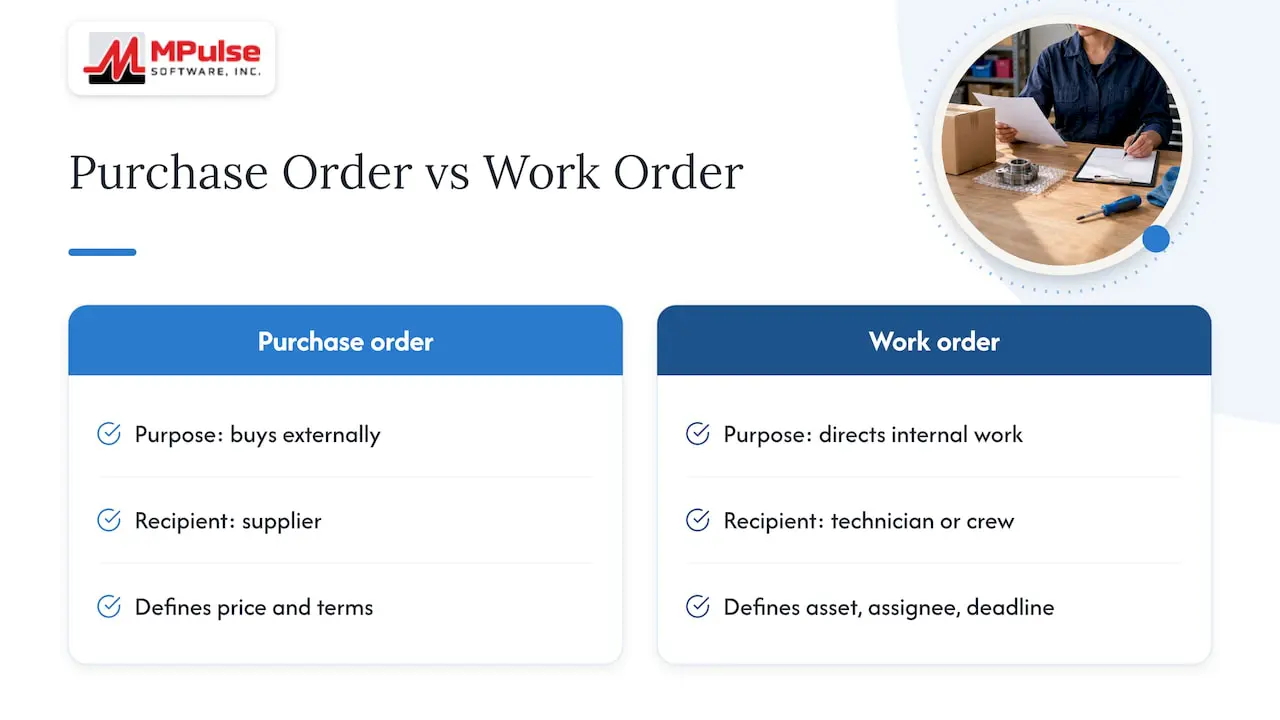
One purchase-order guide puts it this way: the purchase order buys from outside the company, while the work order directs work inside it. That is the simplest test you can apply to any document on your desk. If it goes to a supplier, it is a PO. If it goes to a technician or a crew, it is a work order.
The confusion comes from vocabulary. In some industries, “work order” also describes a customer-facing authorization to a contractor, and some organizations call a contractor agreement a “service PO.” In a maintenance department, though, the distinction is practical and worth keeping clean.
Purchase order vs work order at a glance
| Criterion | Purchase order | Work order |
|---|---|---|
| Direction | External, sent to a supplier or vendor | Internal, sent to a technician, crew or contractor on site |
| Main purpose | Commit and approve spending | Authorize, describe and track a job |
| Typical content | Items or services, quantities, prices, terms | Task, asset, location, assignee, due date, labor, parts used |
| Who creates it | Purchasing, or a requester through an approval flow | Maintenance supervisor, planner or an automated PM schedule |
| Who approves it | Budget owner, manager or finance, often by spend threshold | Maintenance supervisor or planner |
| Legal weight | Can become a binding agreement once the seller accepts | Internal control record |
| Closes when | Goods or services are received and invoice matched | Work is completed, verified and documented |
What a work order contains
A work order describes how maintenance work will be performed. According to a work order guide, it should include a description of the maintenance activities, who requested and approved it, the technician responsible, and the associated due dates, costs and resources. Priority level, category, location and asset are common additions.
In practice, a useful maintenance work order carries:
- A unique work order number
- The asset or location, tied to your asset register
- The type of work: preventive, corrective, inspection or emergency
- A task description and any safety or procedure steps
- The assigned technician or contractor and the due date
- Labor hours and parts consumed
- Completion notes, sign-off and the date closed
That last group is what turns a work order into a history. When the record shows what was done, by whom and with which parts, you can prove compliance, spot repeat failures and plan better.
What a purchase order contains
A purchase order is a formal document describing what a buyer intends to buy. Salesforce explains that once the seller accepts it, it becomes a legally binding agreement, and it normally identifies the parties, the products or services, the price and the delivery terms.
A typical U.S. purchase order, as Sage describes, records a unique PO number, buyer and seller details, item or service descriptions, quantities, unit prices and totals, payment terms, the shipping address and delivery information. Tipalti adds the PO date, billing address, taxes, subtotals and legal terms.
When the PO covers a service rather than a part, the scope description carries more weight. A vague scope invites disputes and change requests later. A guide on scope clauses and change logs shows how precise wording about deliverables and revisions protects both sides on a service engagement, and the same principle applies when you write a service line on a maintenance PO: name the task, the asset, the deliverable and the price basis.
Because a PO can become a contract, it has legal consequences a work order does not. Holland & Hart notes that a contract for the sale of goods may be formed in any manner sufficient to show agreement, including conduct such as delivery and acceptance. In other words, an unsigned PO can still bind you if the goods arrive and are accepted. Have your legal counsel review standard PO terms.
Which comes first: the work order or the purchase order?
In most maintenance workflows, the work order comes first. A failure is reported or a preventive task comes due, and a work order is opened. Only when the planner sees that the job needs something from outside (a replacement part, a specialist contractor, a rental crane) does a purchase request start.
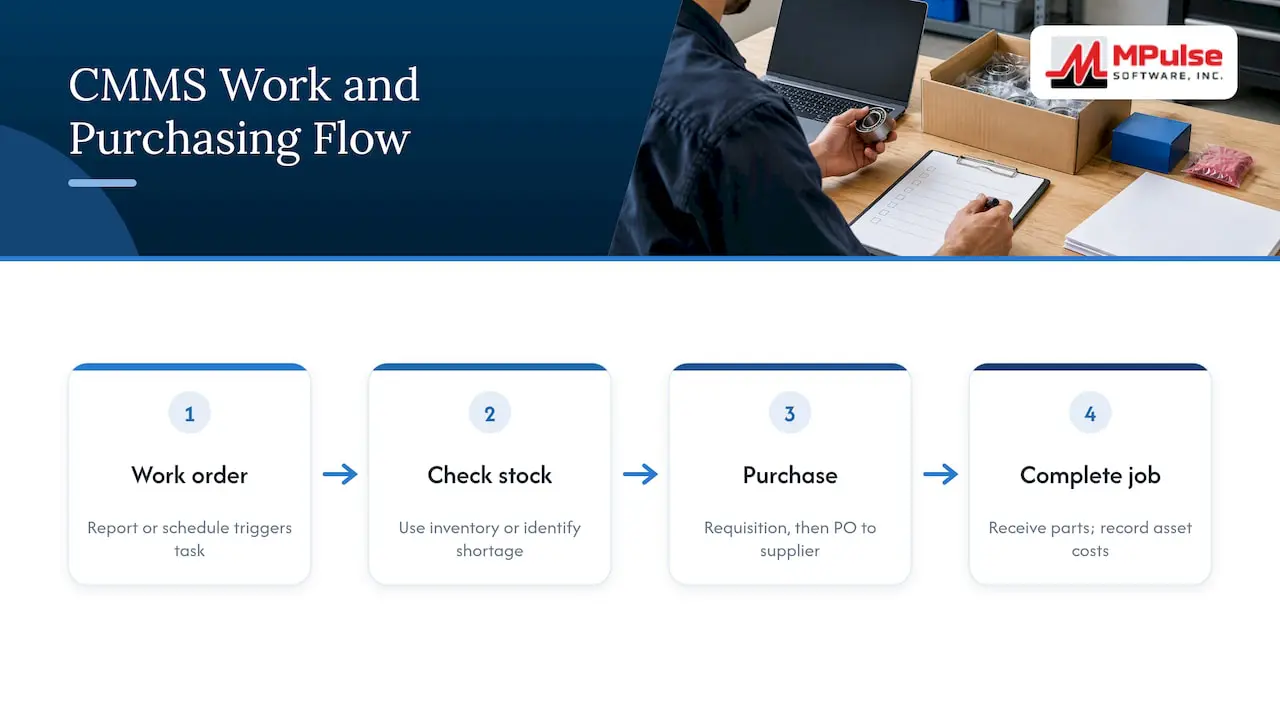
The sequence usually looks like this:
- Request. Someone reports a problem or a scheduled task triggers automatically.
- Work order created and approved. The supervisor defines the task, asset, priority and assignee.
- Needs identified. The planner checks stock. If the part is on the shelf, the work order draws it from inventory and no PO is needed.
- Purchase requisition. If the part or service must be bought, a requester submits a requisition referencing the work order number.
- PO approved and issued. The approver releases the PO to the supplier.
- Receipt and execution. Parts arrive and are received against the PO. The technician completes the work order using them.
- Invoice match and close-out. Finance matches the invoice to the PO and receipt. The work order is closed, with costs recorded against the asset.
The exception is emergency work. When a line goes down at night, the team may need to place an urgent supplier order before the paperwork is complete. The safe habit is to open the work order immediately, even if brief, and to raise the PO against it as soon as practical, not weeks later. For the requisition step, see our guide to the purchase requisition workflow.
When you need a PO, a work order, or both
A practical rule from BoldSign: use a work order when the organization must track and verify a job, use a PO when it must approve supplier spending, and use both when vendor parts or services are required.
| Situation | Work order | Purchase order |
|---|---|---|
| Scheduled inspection by your own technician | Yes | No |
| Lubrication or filter change using stocked supplies | Yes | No |
| Repair that needs a part you must order | Yes | Yes, for the part |
| Contractor repairs a rooftop unit | Yes | Yes, for the service |
| Emergency outside repair after hours | Yes, opened right away | Yes, raised against it |
| Annual software subscription or safety-supply restock | Not usually | Yes |
Notice what the table shows. A work order is needed whenever you want the job tracked. A PO is needed whenever money leaves for a supplier. When both conditions hold, you need both, and they should point at each other.
Why disconnected documents cost money
The risk is not paperwork for its own sake. It is the invoice nobody can explain. GEP warns that creating POs after the work is done, or buying parts outside the process, can leave invoices without matching approvals and make it hard to establish who approved what and why.
That creates three recurring problems for maintenance and finance teams:
- Unknown job cost. If a PO has no work order number, the spend cannot be attributed to an asset, so cost-per-asset reports understate reality.
- Duplicate or unauthorized buying. Without a link, two people can order the same part for the same repair.
- Audit friction. In regulated settings such as healthcare facilities and food or pharmaceutical plants, you must show what was done, with which materials, and who approved it.
The same source recommends linking each PO to a valid work order number, triggering a PO request when a work order requires third-party services or materials, and involving both procurement and operations in the review loop. These are simple rules, and they work.
Approval: how much control is enough
Work orders and POs are approved differently because they control different risks. A work order approval asks whether the job is justified and prioritized. A PO approval asks whether the spend is authorized.
Amazon Business describes a common PO path: a request, routing to a designated manager or budget owner, escalation above a spend threshold, and an approval that leaves an audit record of who approved what and when. The same model implies that controls should scale with risk and value, so a routine low-cost purchase need not follow the same path as a large commitment.
For a maintenance department, that suggests tiers like these:
- Low-value stock items under a set limit: supervisor approval, or auto-approval from a reorder point.
- Mid-value parts and standard contractor visits: department manager approval.
- High-value or capital repairs: finance or operations director sign-off.
Set the thresholds with your finance team, and write them down. A process that nobody can follow in an emergency gets bypassed.
Tools alone do not fix the process
Software helps, but it does not replace agreed rules. Emerson’s process paper on CMMS value makes the point that a CMMS is only a tool, and that organizations should define how work is initiated, reviewed, approved and completed, and how purchases are requested, approved, placed and received.
Before you configure anything, agree on:
- Who can open a work order, and who approves it
- Which work always needs a requisition
- The spend thresholds and who signs at each level
- How emergencies are documented
- Who receives parts, and who closes the work order
How a CMMS connects the two
When work orders, inventory and purchasing live in one system, the handoff stops depending on memory. A planner opens a work order, reserves parts from stock, and if the stock is short, the system generates a requisition tied to that work order. Received items post to inventory or to the job, and costs roll up to the asset.
MPulse CMMS is built around this flow. It combines work order management, inventory management for parts and supplies, purchase requisition, asset tracking and calendar scheduling, so a preventive task that is due can reserve its parts and flag shortages before the technician arrives. Barcode scanning and mobile access support receiving and parts issue at the point of work. Our work order management guide walks through setting up the work order side, and the preventive maintenance features show how recurring jobs generate their own work orders.
If you use outside contractors, a consistent record matters even more. Our contractor work order tracking checklist covers the fields to capture so that the contractor’s work order, your PO and the final invoice all agree.
MPulse also integrates with ERP systems, and the DataLink Integration Adapter is an add-on for teams whose purchasing and accounting live in another system.
Common mistakes to avoid
- Using a PO as a job record. A PO says what was bought, not whether the repair succeeded or which asset it served.
- Raising the PO after the invoice arrives. Approval becomes a formality and budget control is lost.
- Opening no work order for contractor visits. The asset history then lacks the repair.
- Leaving the work order number off the PO. This is the single most common reason job costs cannot be reconciled.
- Treating every purchase alike. Heavy approval for minor consumables slows repairs, while light approval for large spend invites risk.
- Closing a work order before parts and invoices reconcile. Costs then land in the wrong period or on the wrong asset.
Perspective
Most teams we work with do not struggle with the definitions. They struggle with the handoff. A technician finds that a bearing is out of stock, a message goes to purchasing, and a few days later a PO exists that nobody can tie back to the repair.
We built MPulse so that the work order is the starting point and the purchase follows from it. Requisitions, inventory and assets sit alongside the work order, which gives maintenance supervisors, purchasing and finance the same record to look at. Our calendar interface lets planners see upcoming preventive work and the parts it will need, so ordering happens before a shortage becomes downtime.
With more than 3,500 customers, we see the benefit most clearly in compliance-heavy environments, where being able to show who approved what, and what was done with it, is part of audit readiness. Our customers have reported efficiency improvements of up to 40%. Results depend on your processes, and that is why we offer implementation, training and consulting alongside the software.
Mark
See the work order and purchase flow in one system
If your team still reconciles work orders and POs by hand, MPulse can bring them into one workflow. The Professional plan is $29 per month per user and the Advanced plan is $79 per month per user, as published on our pricing page.
For help with setup, our implementation, hosting and training services cover configuring workflows, thresholds and approvals to fit how your department already works.
FAQ
What is the difference between a PO and a work order?
A PO is sent to a supplier to buy goods or services at an agreed price. A work order stays inside your organization and authorizes a specific job. One approves spending, the other tracks work.
Does every work order need a purchase order?
No. Internal repairs and routine inspections that use your own labor and stocked parts can run on a work order alone. A PO is needed when the job requires something bought from a supplier, such as a part you do not stock or a contractor’s services.
When should you not use a purchase order?
Do not use one to describe or track a job performed by your own team. That is the work order’s role. A PO also is not a substitute for an asset history, since it records the purchase and not the repair outcome.
Can a work order become a purchase order?
They remain separate documents, but one can trigger the other. When a work order shows that parts or outside services are required, a requisition and then a PO are raised, carrying the work order number so costs stay linked.
Sources
- A Quick Guide to Work Orders: Example & Template Included
- Purchase Order vs Work Order: What Is the Difference?
- What Is a Purchase Order (PO)? Purpose, Types, and Benefits
- What is a Purchase Order? | Sage Advice US
- Purchase Order: Meaning, Types, and Templates for Businesses
- Rendering Scope Creep: Contract Clauses and Change Log
- The Enforceability of Unsigned Purchase Orders
- Work Orders vs Purchase Orders: What is the Difference?
- Work Orders and Purchase Orders: Key to Smarter Spending
- PO approval workflow: Keep control and speed up buying
- Key Processes in Leveraging the Value of a CMMS