
When maintenance teams log a work order and procurement has no idea it happened, you end up with duplicate data entry, delayed parts orders, and budget reports that never quite match reality. Understanding how CMMS integrates with ERP systems is what separates organizations that react to problems from those that prevent them. This guide breaks down the integration points, the real business benefits, and the configuration decisions that determine whether your integration delivers results or creates new headaches.
Table of Contents
- Key takeaways
- How CMMS works with ERP: understanding each system’s role
- Key integration points between CMMS and ERP systems
- Benefits of CMMS-ERP integration for operations and finance
- Best practices for CMMS-ERP integration
- Real-world CMMS-ERP integration scenarios
- My perspective on making CMMS-ERP integration actually work
- See how Mpulsesoftware handles ERP integration
- FAQ
Key takeaways
| Point | Details |
|---|---|
| Work orders drive procurement | A released maintenance work order can automatically trigger a purchase requisition in your ERP, removing manual steps. |
| Data sync eliminates errors | Integrating CMMS and ERP automates spare parts orders from maintenance requests, cutting duplicate entries and mistakes. |
| Configuration is the linchpin | Settings like Auto Request Material and BOM accuracy determine whether the integration works reliably in practice. |
| Financial visibility improves | Real-time cost posting from CMMS to ERP ledgers gives finance teams accurate, timely data for budgeting and reporting. |
| Cross-functional teams are required | Successful integration requires IT, procurement, and maintenance working from a shared plan, not separate agendas. |
How CMMS works with ERP: understanding each system’s role
Before examining integration, you need a clear picture of what each system actually does on its own.
A CMMS (Computerized Maintenance Management System) is purpose-built for maintenance operations. Its core functions include:
- Scheduling and tracking preventive maintenance tasks
- Managing work orders from creation through completion
- Tracking asset history, condition, and performance data
- Managing parts and materials inventory at the maintenance level
- Recording labor time and technician activity
An ERP (Enterprise Resource Planning) system covers broader business operations. ERP consolidates core functions like procurement, accounting, inventory management, and financial reporting into one platform. Where CMMS is deep and specialized, ERP is wide and enterprise-wide.
The overlap is where integration becomes valuable. Both systems touch inventory. Both generate costs. Both involve procurement. Without integration, a maintenance technician records parts usage in the CMMS while a warehouse manager tracks the same parts in the ERP, with no automatic connection between the two. That gap creates errors, delays, and wasted effort.
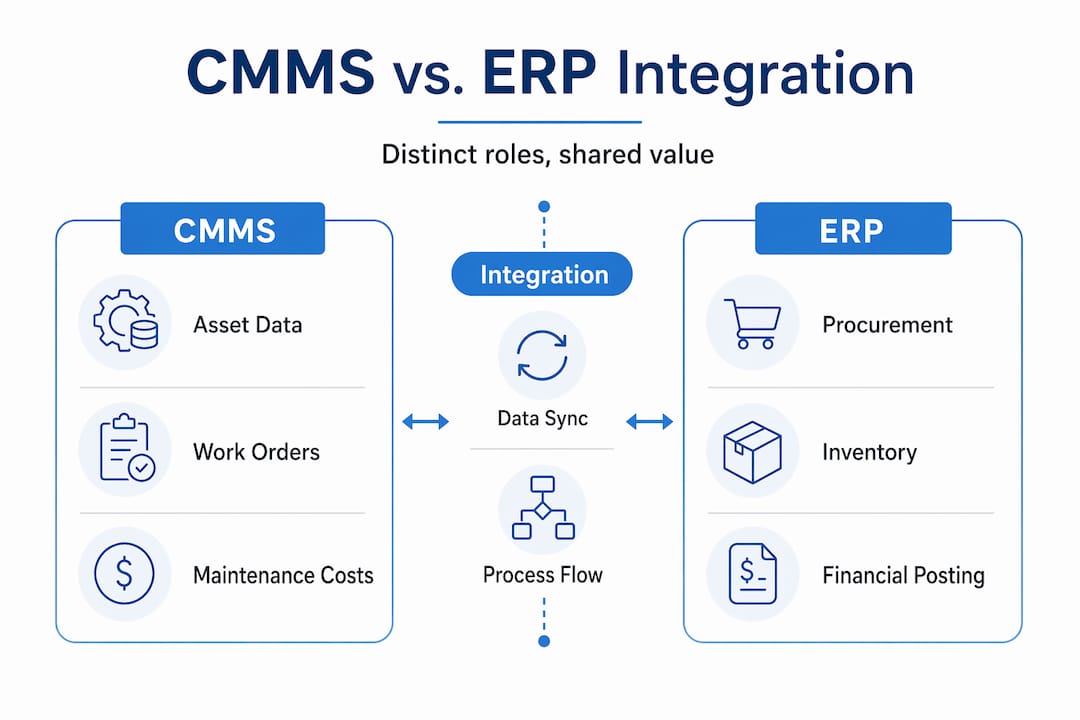
Manufacturing ERP platforms like SAP S/4HANA now include AI and IoT connectivity that can further enhance asset and maintenance management when connected to a CMMS. The two systems are genuinely complementary, not redundant.
Key integration points between CMMS and ERP systems
Understanding how CMMS integrates with ERP systems in practice means looking at specific data flows, not abstract concepts. Here are the primary integration points most organizations implement:
-
Maintenance-to-procurement linkage. When a technician releases a work order that requires parts, the CMMS sends a purchase requisition directly to the ERP. Work order release creates a purchasing requisition linked to that specific work order, so procurement teams see exactly what is needed and why. Once the requisition is approved, the ERP generates a purchase order and the actual cost posts back to the work order automatically.
-
Inventory synchronization. Parts consumed during a maintenance job update stock levels in the ERP in real time. This prevents the common scenario where the CMMS shows a part as available while the ERP has already flagged it as depleted, or vice versa.
-
Cost accounting synchronization. Labor hours and parts costs recorded in the CMMS flow into the ERP’s financial ledgers. Real-time cost posting from maintenance activities to ERP financials gives budget owners accurate data without waiting for manual reconciliation at month end.
-
Automated approval and purchase order workflows. Material requests generated in the CMMS move through ERP approval routing before becoming purchase orders. This keeps financial controls intact while removing the manual handoff between departments.
-
Direct item procurement for non-stock materials. For items not held in inventory, the Auto Request Material flag in CMMS can be enabled per work order or defaulted from the asset’s maintenance BOM, triggering automatic purchase requisitions for direct procurement through the ERP.
Pro Tip: Set the Auto Request Material flag at the maintenance BOM level rather than manually per work order. This reduces configuration errors and makes the procurement trigger consistent across similar asset types.
Benefits of CMMS-ERP integration for operations and finance
The CMMS ERP integration benefits extend across maintenance, procurement, and finance simultaneously. Here is what organizations consistently report after a well-executed integration:
- Reduced manual data entry. Automating spare parts orders from maintenance requests eliminates the need for staff to re-enter the same information in two systems. Fewer manual steps means fewer transcription errors.
- Improved maintenance workflow efficiency. Technicians spend less time waiting for parts because procurement is triggered automatically. Faster parts availability translates directly to shorter downtime windows.
- Unified visibility across functions. Combining CMMS maintenance data with ERP financial and inventory information gives managers a single view of asset costs, parts availability, and budget consumption.
- Better inventory accuracy. When parts consumption in the CMMS updates ERP stock levels automatically, reorder points trigger correctly and overstocking is reduced.
- Faster procurement cycles. Automated requisition creation shortens the time between identifying a parts need and placing an order, which matters most during unplanned breakdowns.
- Stronger audit trails and compliance support. Every purchase tied to a work order creates a documented chain of approvals and cost postings.
“Integrating CMMS with ERP not only enhances operational efficiency but also supports compliance with audit and financial reporting requirements.” — UpKeep CMMS ERP Integration
The compliance angle is often underestimated. For organizations in regulated industries, having a traceable link between a maintenance event, the parts ordered, and the financial transaction is not just convenient. It is frequently a regulatory requirement.
Best practices for CMMS-ERP integration

Getting the CMMS and ERP workflow right requires attention to both technical and functional factors. Many integrations underperform not because of software limitations, but because of process and configuration gaps.
| Factor | What to get right | Common mistake |
|---|---|---|
| Material master data | Ensure part numbers, units of measure, and descriptions match across both systems | Mismatched item codes cause requisitions to fail or route incorrectly |
| BOM configuration | Set Auto Request Material defaults at the asset or maintenance BOM level | Configuring per work order manually leads to inconsistency |
| Approval routing | Map ERP approval hierarchies to match maintenance urgency levels | Applying the same approval chain to emergency and routine orders slows response |
| Data synchronization | Use real-time or near-real-time sync for inventory and cost data | Batch sync creates windows where data is stale and decisions are based on outdated information |
| Cross-functional ownership | Assign clear owners in IT, procurement, and maintenance for integration governance | No single owner means issues fall through the cracks |
Functional setup like BOM flags and approval routing can be as critical as the technical integration itself. Organizations that treat integration as purely an IT project consistently struggle with adoption and data quality.
Pro Tip: Run a phased rollout by starting with one asset class or facility. Validate the procurement trigger, cost posting, and inventory sync before expanding. Fixing configuration issues in a limited scope is far less disruptive than correcting them system-wide.
Involving cross-functional teams early is non-negotiable. Procurement needs to understand how work orders generate requisitions. Finance needs to know how costs will appear in the ledger. Maintenance supervisors need to understand what triggers an automatic purchase versus a manual request. When each group understands the workflow end to end, the integration runs with far fewer exceptions.
For organizations evaluating middleware platforms or ERP system compatibility with CMMS, prioritize vendors that support standard API connections and have documented integration templates for common ERP platforms. Custom point-to-point integrations are harder to maintain as either system upgrades over time.
Real-world CMMS-ERP integration scenarios
Seeing the workflow in concrete terms makes the integration logic much easier to apply to your own environment.
-
Planned maintenance triggering procurement. A scheduled PM work order for a pump overhaul is released in the CMMS. The work order includes a materials list with three parts flagged for direct procurement. The CMMS sends a purchase requisition to the ERP automatically. The ERP routes the requisition through the standard approval chain, generates a purchase order, and the vendor ships the parts. When the invoice is processed, the actual PO cost posts back to the original work order in the CMMS, giving the maintenance manager an accurate cost record without any manual entry.
-
Inventory threshold triggering reorder. A technician completes a filter replacement and records parts consumption in the CMMS. The inventory count drops below the reorder threshold. The CMMS passes the updated stock level to the ERP, which automatically creates a replenishment order. The warehouse receives the parts and the ERP updates stock levels, which sync back to the CMMS.
-
Non-stock direct item procurement. A corrective work order requires a specialty bearing not held in inventory. The technician marks it as a direct item on the work order. With Auto Request Material enabled, the CMMS generates a purchase requisition in the ERP without any manual intervention from procurement staff. The part is ordered, received, and the cost posts to the work order.
-
Real-time cost impact on financial reporting. A major asset repair generates significant labor and parts costs over a two-week period. Because the CMMS posts costs to the ERP in real time, the finance team sees the budget impact as it accumulates, not as a surprise at month end. This allows them to adjust forecasts and flag variances before they become problems.
These scenarios illustrate why ERP and CMMS integration supports maintenance performance insights that neither system can deliver alone. The equipment inventory management side of this equation is particularly impactful for organizations managing large asset fleets.
My perspective on making CMMS-ERP integration actually work
I’ve reviewed a significant number of CMMS-ERP integration projects over the years, and the pattern in the ones that fail is almost never the technology. It’s the process misalignment that breaks them.
In my experience, organizations rush to connect the systems technically while leaving the underlying workflows undefined. They get the API handshake working, then discover that maintenance is using part numbers that don’t exist in the ERP’s material master. Or approval routing in the ERP adds three days to every requisition, which defeats the purpose of automating urgent parts orders.
What I’ve found actually works is starting with the maintenance-to-procurement loop before anything else. Get one asset type, one work order category, and one procurement workflow fully validated. Watch real work orders generate real requisitions and real purchase orders. Fix what breaks. Then expand.
The data governance piece is where I see the most neglect. Somebody has to own the material master data. Somebody has to reconcile part number discrepancies between systems. Without that ownership, the integration degrades over time as each system evolves independently.
I’m also watching the IoT and AI layer with genuine interest. As sensors feed real-time asset condition data into CMMS platforms, the potential for condition-based maintenance triggers to automatically initiate procurement before a failure occurs is becoming real. That’s a meaningful shift in how maintenance and procurement interact, and it will make the CMMS-ERP connection even more central to operations strategy.
— Mark
See how Mpulsesoftware handles ERP integration
Mpulsesoftware is built to address exactly the challenges described in this article. The MPulse CMMS platform connects maintenance workflows directly to procurement and inventory processes, giving operations managers and IT teams the integration foundation they need without building it from scratch. Features like maintenance-to-procurement automation, asset tracking, and parts inventory management are designed to work alongside your ERP, not in isolation from it.
For organizations starting an integration project, Mpulsesoftware offers professional implementation services to guide configuration, data mapping, and workflow alignment. Cloud-based deployments are supported through application hosting services that keep your integration environment stable and maintained. With over 3,500 customers and documented efficiency improvements of up to 40%, Mpulsesoftware has the track record to back its approach.
FAQ
What does CMMS-ERP integration actually do?
CMMS-ERP integration connects maintenance workflows to enterprise procurement, inventory, and financial systems so that work orders, parts usage, and costs flow automatically between platforms without manual re-entry.
How does a work order trigger a purchase order in ERP?
When a maintenance work order is released in the CMMS, it sends a purchase requisition to the ERP. After approval routing, the ERP generates a purchase order and posts the actual cost back to the originating work order.
What is the Auto Request Material setting in CMMS?
Auto Request Material is a configuration flag that tells the CMMS to automatically create a purchase requisition in the ERP when a direct item is added to a work order, defaulting from the asset or maintenance BOM setup.
What are the biggest risks in CMMS-ERP integration projects?
The most common risks are mismatched material master data between systems, poorly configured approval routing, and lack of cross-functional ownership. These process issues cause more integration failures than technical problems do.
Does CMMS-ERP integration support compliance and auditing?
Yes. Because every procurement action is tied to a specific work order with a documented approval chain and cost posting, the integration creates a clear audit trail that supports financial reporting and regulatory compliance requirements.