Maintenance reports in CMMS software give you easy access to the numbers you need to make important decisions. You can quickly produce status reports and documents in MPulse, giving details or summaries of your team’s maintenance work.
MPulse helps you create simple, easy-to-read graphic reports with just a few clicks. Let’s learn how.
How to Prepare a Maintenance Report
To prepare a maintenance report in MPulse, start by choosing Report Widgets from the main menu.
- In the top left corner, you can choose the type of report you need (financial, production, planning, etc.).
- If you want to, change the type of report in the Report Area field at the top right side.
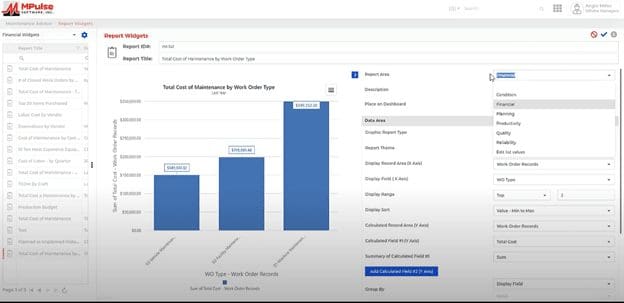
To save your report, simply click the Save button at the top right corner of the screen. Also check the Add to Dashboard box if you want the report to display on your personal dashboard. That’s it! Couldn’t be easier.
How to Customize Your Maintenance Report
Many customers also want custom maintenance report writing, which is also easy to do in the MPulse Report Builder.
- Start by selecting the closest report under Report Widgets. That gives you a good starting point to build your report.
- Edit the report to include the data you need and the time period you want. You also can add custom information to the Description field.
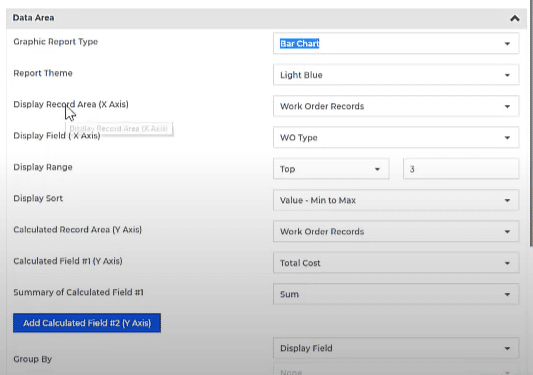
Next, you have several choices for customizing a facility maintenance report, equipment maintenance report, financial report, etc. in the Data Area section.
- Select the Graphic Report Type you want.
- Choose the Record Area and Field you want for the x-axis of your chart.
- Pick the Display Range and Display Sort.
- Enter the Calculated Area and Calculated Field you want for the y-axis of your chart.
- Choose the Summary of Calculated Field #1 for the type of summary data you want.
- If you want a second calculated field, click on Add Calculated Field (#2) and follow the same steps to set the parameters.
Finally, under Options, you can…
- Click Show data labels, if you want to display labels.
- Set the Access Type to control who can access or edit the report.

Creating a report on maintenance management gives you the ability to accurately assess how your department is functioning and where you might make changes to improve. For the full metric set, see the KPIs that matter.
CMMS software also can help reduce operational costs by using detailed tracking tools for financial and business metrics. For example, a maintenance audit report can help you run your maintenance team, as well as measure and use key performance indicators (KPIs).
Contact us to learn more.