A maintenance bill of materials is a service-focused parts list tied to an asset, not the engineering-level BOM used to build it. It exists to get the right part into a technician’s hands fast. Start by building MRO BOMs for your most critical assets, entering them into your CMMS, and assigning a named data owner to each one, because that single move reduces mean time to repair and stops the parts-delay scramble that stalls work orders.
TL;DR:
- Building and maintaining a lean MRO BOM focused on replaceable parts can significantly reduce repair times and prevent parts-related work order delays.
- Essential fields include part name, internal ID, manufacturer part number, quantity, unit measure, reference location, lead time, and lifecycle status to ensure efficient ordering and inventory management.
- Assigning a dedicated owner to each BOM and scheduling regular verification audits keeps data accurate and prevents decay over time.
- Using a CMMS with automation features like bulk import, lifecycle tracking, and automatic updates ensures BOM accuracy propagates across work orders, inventory, and procurement.
- Most BOM mistakes stem from outdated part info, inconsistent naming, and missing alternates; fixing these involves locking critical fields, standardizing naming, and establishing technician feedback loops.
Table of Contents
- What a Maintenance BOM Is (and How It Differs From an OEM BOM)
- Essential Fields Every Maintenance BOM Line Needs
- How to Create a Maintenance BOM Step by Step
- Keeping BOM Accuracy High: Governance, KPIs, and Closed-Loop Updates
- How a Modern CMMS Should Handle BOM Data
- Common BOM Mistakes and How to Fix Them
- Your Quick-Start Checklist and Import Template
- Why Most BOM Advice Misses the Point
- Get Your BOMs Into a System Built to Keep Them Accurate
- Sources
- FAQ
What a Maintenance BOM Is (and How It Differs From an OEM BOM)
A maintenance BOM, sometimes called an MRO or service BOM, lists the parts a technician actually needs to repair or maintain an asset, not every component an engineer used to design it. An OEM BOM might include hundreds of line items down to internal fasteners; a maintenance BOM strips that down to what gets replaced, adjusted, or inspected during service.
That distinction matters because chasing a full OEM structure wastes time your team doesn’t have. Guidance on parts lists for maintenance work management points toward starting with MRO-focused lists rather than trying to replicate an engineering BOM line for line.
- MRO/service BOM: repair parts, consumables, and PM kit contents for one asset
- OEM/engineering BOM: full design structure, useful mainly for warranty or major rebuilds
- Single-level view: flattened list for purchasing and quick lookup
- Multi-level (structured) view: parent-child breakdown for technicians tracing a subassembly failure
Most planning and scheduling only requires the flattened, single-level view. Save the multi-level structure for complex rebuilds where a technician needs to trace a failure through an assembly.
Essential Fields Every Maintenance BOM Line Needs
A BOM line is only as useful as the fields attached to it. Skip a field and you’ve built a list that looks complete but fails the moment someone tries to order a part or find it on a shelf.
At minimum, every line needs:
- Part name and a plain description a technician recognizes on sight
- Internal ID matching your CMMS part record
- Manufacturer part number (MPN) for ordering and cross-referencing
- Quantity per asset, not just quantity on hand
- Unit of measure (each, foot, gallon, box of 10)
- Reference location on the physical asset or drawing
Beyond the minimum, a few operational fields turn a static list into a planning tool: lead time, price class, approved alternates, bin location, and lifecycle state (active, obsolete, or not-recommended-for-new-design). Lifecycle flags matter more than most teams realize. Automated part analysis that surfaces obsolete or low-stock components before they disrupt a work order can save days of scrambling when a part gets discontinued mid-repair.
Pro Tip: Attach a photo and the OEM drawing to every critical-asset BOM line. A technician standing in front of a pump at 2 a.m. trusts a picture far more than a part description written by someone else three years ago.
Round out each line with certificates or compliance documents where regulatory recordkeeping applies. That single attachment can save an audit.
How to Create a Maintenance BOM Step by Step
Building your first maintenance BOM is a data project disguised as a maintenance task. Treat it that way and the rollout goes faster.
- Rank assets by criticality. Start with equipment where downtime hits production hardest, not the easiest asset to document. A conveyor that stops the whole line outranks a rarely used pump.
- Gather source material. Pull OEM parts manuals, take photos of nameplates and part numbers, and walk the floor to verify what’s actually installed. Equipment gets modified over its life; the OEM manual often doesn’t reflect reality anymore.
- Decide your MRO scope. Cut the list to parts your team actually replaces or stocks. Skip internal components nobody touches during a standard repair.
- Map fields to your CMMS schema. Match part name, ID, MPN, quantity, and unit of measure to the exact fields your system expects before you touch an import file.
- Import or enter manually. A CSV import works well for a bulk asset population; an API integration suits ongoing syncing with a procurement or ERP system. Smaller lists can go in by hand, but log the entry date either way.
- Assign an owner. Every BOM needs one named person accountable for its accuracy, not a department.
- Schedule a verification work order. Send a technician to physically confirm the list against the asset within the first maintenance cycle after entry, before problems surface in the field.
Guidance on parts lists for maintenance work management supports mapping BOM fields directly into asset records rather than treating the BOM as a separate spreadsheet exercise. Do it once, correctly, and the record stays useful for years instead of becoming shelfware by the second quarter.
Keeping BOM Accuracy High: Governance, KPIs, and Closed-Loop Updates
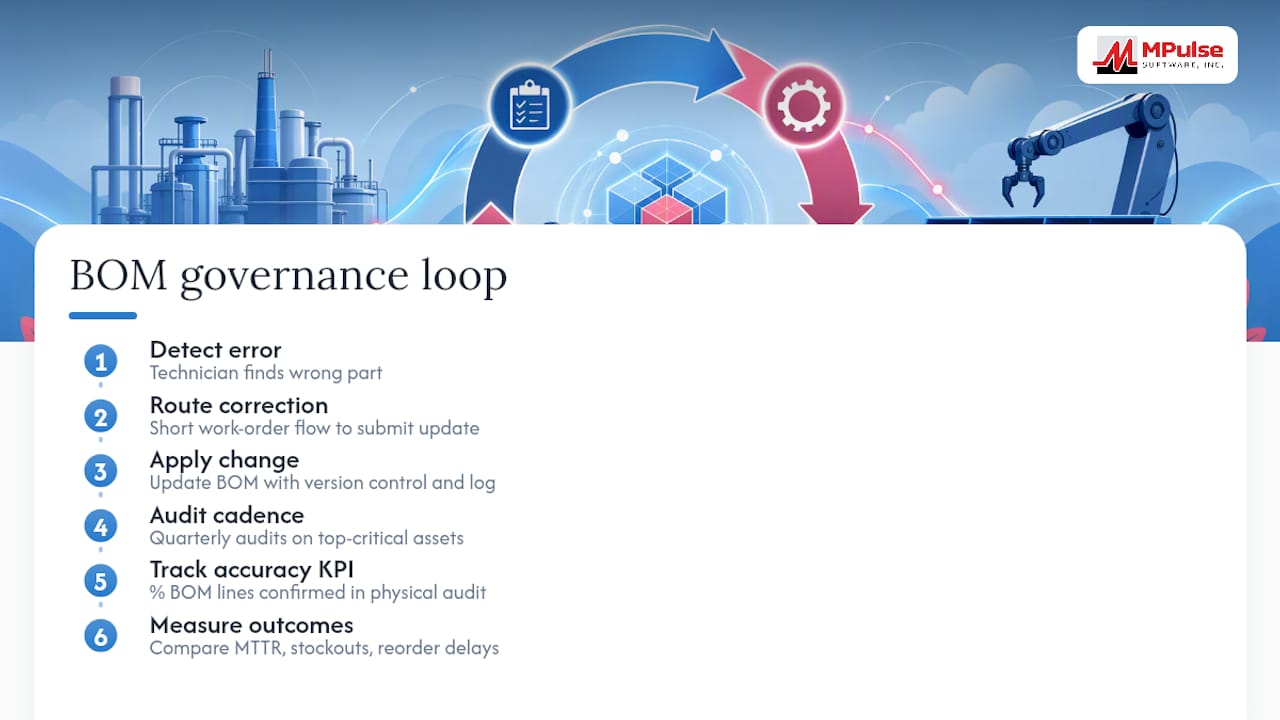
A BOM that isn’t maintained decays the same way an untended asset does. Set a formal review cycle. Quarterly audits on your top-critical assets, paired with a defined BOM accuracy KPI (something as simple as the percentage of BOM lines confirmed correct during a physical audit), give you a number to track instead of a vague sense that “the list is probably fine.”
Technician-found errors deserve priority treatment. If a technician finds a wrong part number in the field, that correction should route through a short work-order flow rather than sit in an email nobody reads. Making that update quick to submit is what actually stops BOM quality from decaying over time. Version control and change logging matter here too, since a BOM correction tied to a management-of-change record gives you a trail when someone asks why a part changed.
Measure results against MTTR, stockout frequency, and reorder delays. If those numbers improve alongside your accuracy KPI, the governance model is working. If they don’t move, the review cycle needs tightening, not abandoning.
How a Modern CMMS Should Handle BOM Data
The strongest BOMs behave as associative data, not static documents. A single change to a part record should propagate automatically to open work orders, inventory counts, and procurement requisitions, rather than requiring someone to update four systems by hand. That kind of closed-loop traceability is where the industry is heading, and it’s worth demanding from any tool you evaluate.
When you’re assessing CMMS capability for BOM upkeep, look for:
- Bulk import support (CSV and API) so you’re not hand-typing hundreds of lines
- A “where used” lookup showing every asset tied to a given part
- Lifecycle flags visible on the part record itself, not buried in a separate system
- Attachment support for photos, drawings, and certificates
- Integration with ERP or sensor systems for automatic inventory sync
MPulse CMMS combines preventive maintenance automation with integration capabilities designed to support exactly this kind of connected part data, and the platform’s manufacturing maintenance tools are built around keeping asset and part records in sync rather than siloed.
Pro Tip: Pilot the whole process on one equipment class, pumps or conveyors, for instance, and measure your accuracy KPI for 90 days before rolling it out fleet-wide. A contained pilot catches schema and workflow problems before they multiply across thousands of assets.
Common BOM Mistakes and How to Fix Them
Most damaged trust in a BOM traces back to a handful of repeat offenders. Outdated part numbers top the list, usually from a supplier substitution nobody logged. Inconsistent naming runs a close second, where the same part shows up under three different descriptions across sites. Missing approved alternates forces technicians into downtime while they wait for an exact-match part that has a perfectly good substitute sitting on the shelf.
Failing to keep BOM data current also drives excess inventory and supply chain friction, since planners order against a list that no longer matches reality.
Fast fixes:
- Lock critical fields (MPN, quantity, unit of measure) so only the assigned owner can edit them
- Standardize naming conventions across every site before your next bulk import, not after
- Link approved alternates with a simple sign-off rule so substitutions don’t require a full re-audit
- Build a feedback loop where technician-reported errors become the first data checked at the next audit
Related fixes for asset data upkeep more broadly are covered in this rundown of common asset management mistakes.
Your Quick-Start Checklist and Import Template
Copy this sequence directly into your rollout plan:
- Select your top 10 to 20 critical assets by downtime impact
- Pull OEM documentation and verify parts on-site
- Populate a spreadsheet with: part name, internal ID, MPN, quantity per asset, unit of measure, reference location, lead time, bin location, lifecycle state
- Map columns to your CMMS import schema
- Import via CSV or API, or enter manually for small batches
- Assign a named owner per asset class
- Schedule a verification work order promptly after import
- Run your first accuracy audit at the 90-day mark
Use the field list from step three as your standing template. Every new asset gets the same nine columns before it goes live, and every verification work order references that exact template so nothing gets skipped between audits.
Why Most BOM Advice Misses the Point
Most articles on this topic treat the BOM like a document you finish once. That framing is backwards. A BOM that isn’t touched after entry starts decaying the moment a supplier substitutes a part or a technician improvises a fix during an emergency repair. The real work isn’t building the list. It’s building the habit of correcting it.
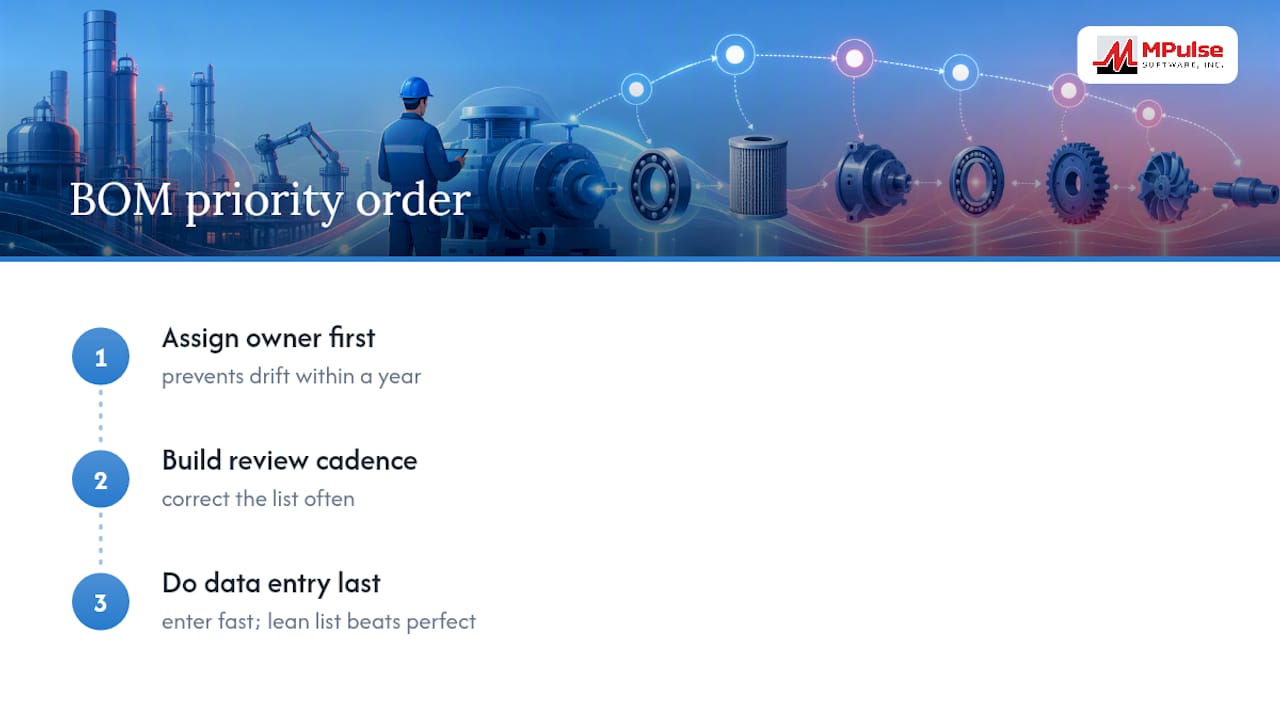
Conventional advice also overweights completeness. Teams spend weeks trying to build an exhaustive OEM-style structure when a lean MRO list, entered fast and corrected often, delivers more operational value in the first month than a “perfect” BOM delivered in month six.
If you take one thing from this, prioritize the ownership assignment over the initial data entry. A BOM with no named owner drifts back to unreliable within a year, no matter how clean the original import was. Assign the owner first, build the review cadence second, and let the data entry follow from there. That order, more than any spreadsheet template, determines whether the BOM still means something a year from now.
— Mark
Get Your BOMs Into a System Built to Keep Them Accurate
A spreadsheet can hold a BOM. It can’t flag an obsolete part, propagate a correction to an open work order, or route a technician’s field fix into the next audit automatically. That’s the gap MPulse Software closes for maintenance teams that have outgrown manual tracking.

MPulse CMMS is built around the workflow this article just walked through: import BOM data by CSV or API, attach photos and lifecycle flags to each part record, and let updates flow into inventory and procurement without a second manual entry. Its preventive maintenance scheduling draws directly from BOM data, so a part flagged for replacement triggers the right PM task automatically. Teams using CMMS software often report significant efficiency gains once asset and parts data are centralized in one system.
If your BOMs currently live in spreadsheets scattered across departments, start with a free trial and pilot one critical asset class before committing to a full rollout.
Sources
- Bill of Materials: Parts to Streamline Maintenance Work | MW
- What Is BOM Management? A Practical Guide to Avoiding Costly Part Mismatches
FAQ
What needs to be included in a bill of materials?
A maintenance BOM line needs the part name, internal ID, manufacturer part number, quantity per asset, unit of measure, and reference location at minimum, plus lead time and lifecycle state for operational planning.
What are common BOM mistakes to avoid?
The most damaging mistakes are outdated part numbers, inconsistent naming across sites, and missing approved alternates, all of which get fixed by locking critical fields, standardizing naming conventions, and building a technician feedback loop.
How do I calculate BOM?
There’s no single formula. Building a BOM means listing every part required for an asset’s repair or preventive maintenance, along with the quantity needed per unit, then verifying that list against the physical equipment on-site.
What is BOM in SAP with an example?
In SAP, a BOM is a structured record listing components and quantities tied to a material or equipment master, similar in concept to how a CMMS like MPulse links a maintenance BOM to an asset record for work order and inventory purposes.
How often should a maintenance BOM be reviewed?
A quarterly audit on your most critical assets, paired with immediate review of any technician-reported error, keeps a BOM’s accuracy KPI from drifting between formal review cycles.