
OPC UA condition signals, including machine health, alarms, runtime hours, and calibration status, can trigger automated CMMS work orders and preventive schedules when mapped and secured correctly. Done right, this connection speeds up fault detection, replaces manual inspection rounds with real-time alerts, and cuts unplanned downtime. Done poorly, it floods technicians with noise or exposes the control network to risk, so mapping and security come first.
TL;DR:
- Pilot three to six maintenance variables on a handful of assets, map each OPC UA NodeId to its asset and CMMS field, and test simulated events.
- Place a gateway or DMZ between the control network and cloud CMMS; add segmentation, certificate authentication, least privilege, logging, and local fail safes.
- Each CMMS condition record should retain asset identity, alarm type, severity, timestamp, historical values, and condition class; raw readings alone lack routing context.
- Allow a few weeks for scoping, several weeks for implementation, and additional weeks for validation, with maintenance, controls, IT, security, and operations involved early.
Table of Contents
- What OPC UA signals and models actually feed a CMMS
- Step-by-step integration: from pilot to scaled rollout
- Safe architecture and security controls for OT-to-CMMS links
- Designing the mapping to preserve semantic context
- Pilot checklist, roles, and realistic timeline
- What a CMMS vendor sees across these integrations
- How we support your OPC UA to CMMS rollout
- FAQ
- Sources
- Standards and practice guides worth consulting next
What OPC UA signals and models actually feed a CMMS
Not every OPC UA tag belongs in a CMMS. The most useful signals describe asset condition and maintenance history rather than raw process values. These include machine state, operating mode, health status, runtime hours, error counts, and estimated remaining life, all of which point toward when an asset needs attention rather than just how it is running right now.
OPC UA’s asset management model gives these signals structure that a CMMS can consume directly. The specification defines maintenance events and retained conditions through constructs like MaintenanceEventType and MaintenanceState, which describe what happened to an asset and what state it is in, though the business logic for turning that into a work order still belongs to your integration layer.
The signals worth prioritizing in a pilot typically include:
- Temperature and vibration trends that flag early mechanical wear.
- Runtime hours and duty cycles that drive time-based preventive triggers.
- Error and fault counters that reveal recurring issues before failure.
- Calibration and service-due flags tied directly to compliance schedules.
- Estimated remaining life values that support condition-based scheduling.
Semantic context matters as much as the values themselves. A temperature reading without a condition class, asset identity, or MaintenanceMethod tag is just a number. With that context attached, it becomes something your CMMS rules can route to the right technician with the right instructions.
Step-by-step integration: from pilot to scaled rollout
A staged rollout beats trying to connect every available tag on day one. The VDMA Industrie 4.0 communication guideline recommends establishing connectivity, identifying the parameters that matter most, mapping them to assets, and expanding only after that foundation holds. The following sequence reflects that approach.
- Scope a small pilot. Choose a handful of assets and three to six maintenance-relevant variables rather than every available OPC UA node.
- Build an asset mapping sheet. Link each OPC UA NodeId to its corresponding CMMS asset ID and field, including units and naming conventions.
- Define thresholds and outcomes. Decide what each retained condition should trigger: a work request, an inspection task, or an immediate shutdown alert.
- Set escalation rules. Assign MaintenanceMethod and MaintenanceSupplier logic so the right team or vendor gets notified automatically.
- Test before going live. Use event replay or simulated data to confirm that retained conditions and history populate correctly in the CMMS.
- Roll out incrementally. Add assets and variables in batches once the pilot proves reliable, rather than scaling all at once.
This incremental method reduces operational disruption and gives your team a chance to catch mapping errors while the stakes are still low.
Pro Tip: Run your pilot on one production line or asset class first. A clean, well-documented small win makes the case for expansion far better than a sprawling rollout with unclear results.
Safe architecture and security controls for OT-to-CMMS links
Connecting a production control network directly to a cloud CMMS creates unnecessary exposure. A DMZ, gateway, or other controlled intermediary should sit between the two environments so the control network never talks directly to the internet. OPC UA’s security model supports this with SecureChannel sessions, application certificates, encryption, and message signatures, though these mechanisms alone are not a complete OT security program.
Site-level controls still matter. Practical safeguards include:
- Network segmentation that isolates control systems from business and cloud networks.
- Certificate-based authentication for every OPC UA client and server connection.
- Least-privilege access so only approved accounts can read condition data.
- Change control and logging for every modification to the integration pathway.
OPC UA security guidance and NIST OT guidance agree that protocol-level encryption is not sufficient on its own. Additional OT-specific controls and a documented risk assessment are needed to protect performance, reliability, and safety.
Approvals should cross maintenance, controls engineering, IT, and security before anything goes live, and local fail-safes need to stay in place so CMMS automation never becomes the only safeguard against a dangerous condition.
Designing the mapping to preserve semantic context
A mapping that sends only raw numbers to the CMMS strips out the context technicians need to act on an alert. Every condition record should carry asset identity, alarm type, severity, timestamp, and a pointer to historical values alongside the number itself.
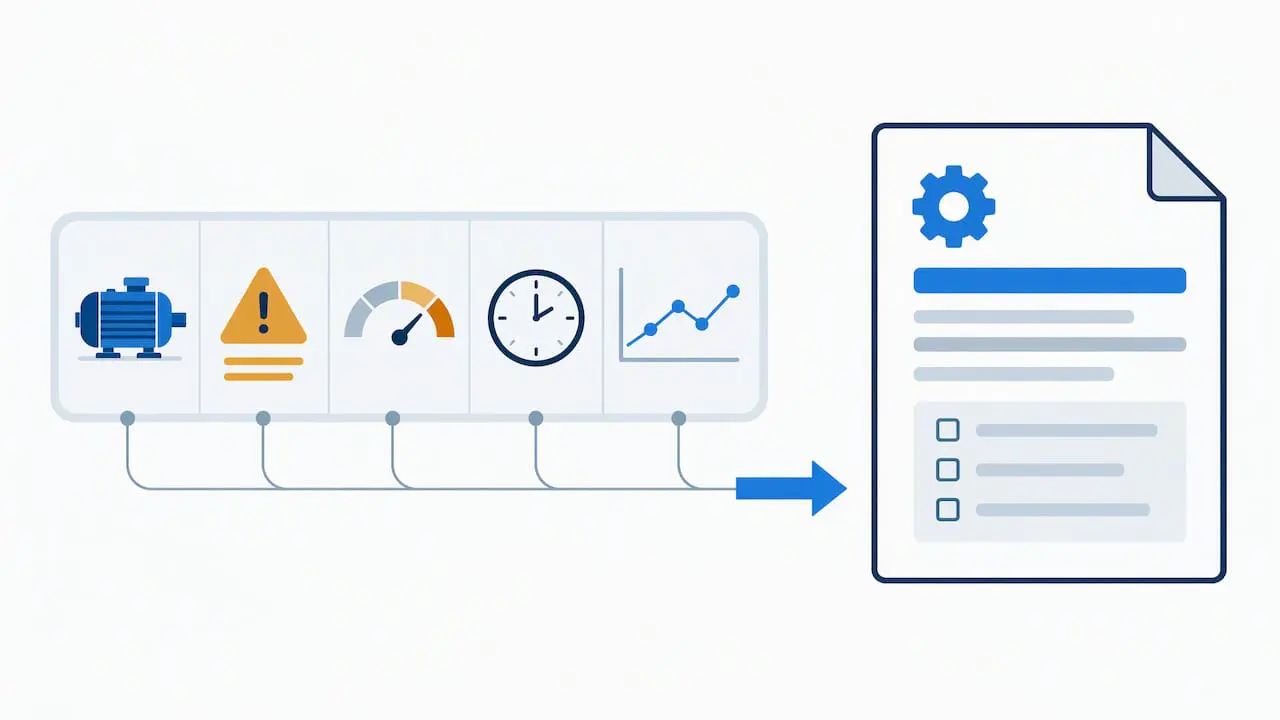
OPC UA’s condition-monitoring models already define much of this structure. Condition class IDs and MaintenanceEvent properties such as MaintenanceState, MaintenanceMethod, and MaintenanceSupplier map cleanly into CMMS fields when you build the connector with those properties in mind rather than bolting them on later.
Field-level mapping works best when you:
- Normalize units and tag names across assets so a “temp_C” tag on one machine matches the convention on another.
- Use companion specifications for your equipment type where they exist, since they define standard condition categories.
- Preserve condition class and severity rather than collapsing every alert into a generic flag.
- Keep an auditable event history linked to the CMMS record for compliance reviews and root cause analysis.
Retrofitting older equipment adds work here. Legacy assets often lack consistent naming or documentation, so budget dedicated time for asset discovery and manual cleanup before the automated mapping can run reliably.
Pro Tip: Treat tag normalization as its own project phase, separate from the OPC UA connection itself. Teams that skip this step usually end up rebuilding the mapping sheet twice.
Thorough mapping also supports audit readiness, since inspectors and auditors can trace a work order back to the exact condition event that triggered it.
Pilot checklist, roles, and realistic timeline
A pilot moves faster when the right people are involved from the start and expectations are set before work begins.
- Assemble stakeholders: maintenance supervisors, controls engineering, IT and security, an integrator or vendor contact, and operations leadership.
- Produce core deliverables: an asset mapping sheet, a finalized OPC UA node list, documented mapping rules, test cases, and a rollback plan.
- Budget realistic time: scoping typically takes a few weeks, pilot implementation several weeks, and validation and adjustment additional weeks.
- Track outcome metrics: the percentage of automatically generated work orders that are correct, the reduction in unplanned downtime, and improvement in mean time to repair.
Common blockers worth anticipating include incomplete asset documentation, mismatched naming conventions between OT and CMMS systems, and approval delays when security review is added late rather than built into the scoping phase. Addressing these early keeps the pilot on its planned timeline instead of stalling in the validation stage.
What a CMMS vendor sees across these integrations
We work with maintenance teams who are moving from manual inspection rounds to condition-based triggers, and the pattern holds across industries: the integration succeeds or fails on mapping discipline, not on the protocol itself. OPC UA gives you the structure. What determines whether a CMMS acts on it correctly is whether asset identity, condition class, and escalation rules were defined before the data started flowing.
Our DataLink Integration Adapter exists because that mapping work is where most pilots stall, and our calendar-based scheduling interface is built to turn condition triggers into visible, assignable preventive tasks rather than buried alerts.
— Mark
How we support your OPC UA to CMMS rollout
Connecting condition data to a CMMS is more mapping work than coding work, and that is where teams most often want a second set of hands. Our CMMS Implementation Services start with a scoping call to review your asset list and signal priorities, move into a pilot build, and close with training and handover so your team owns the system going forward.
What this typically includes:
- Scoping and asset mapping support from our implementation team.
- DataLink Integration Adapter configuration for OPC UA data sources.
- MPulse CMMS Training so your technicians and supervisors can manage the system independently.
- Ongoing support through our Maintenance & Support Program once the pilot moves to full deployment.
Pricing for Professional and Advanced plans is listed by user per month, and our team can walk through which tier fits your asset count and site structure.
FAQ
What OPC UA data points are most useful for a CMMS?
The most useful signals are those that describe asset condition rather than raw process values: temperature trends, runtime hours, error counters, calibration or service-due flags, and estimated remaining life. These map naturally onto preventive schedules and condition-based triggers once connected to asset records.
How do I secure an OPC UA connection to a cloud CMMS?
Keep the control network isolated from the cloud system using a gateway, DMZ, or other intermediary rather than a direct link. OPC UA’s SecureChannel, application certificates, and encryption handle protocol-level security, but site-specific controls like network segmentation and least-privilege access are still necessary.
Should I connect every OPC UA tag at once or start small?
Start small. VDMA’s guideline recommends identifying a handful of key parameters, mapping them to assets, and expanding incrementally, which reduces both implementation risk and the chance of overwhelming technicians with unfiltered alerts.
How does MPulse CMMS handle OPC UA condition data?
MPulse CMMS uses the DataLink Integration Adapter to bring OPC UA condition signals into asset records, where a calendar interface turns qualifying conditions into visible preventive or inspection tasks. Implementation teams typically scope the asset mapping and threshold rules as part of the onboarding process.
What causes OPC UA to CMMS integrations to fail?
Most failures trace back to mapping, not the protocol itself: inconsistent tag naming, missing asset identity context, or thresholds that were never clearly defined before data started flowing. Retrofitting older equipment tends to need extra documentation and naming cleanup before the connection becomes reliable.
Sources
- Use Cases – OPC UA for Machinery – Part 1: Basic Building Blocks
- Industrie 4.0 Communication Guideline (VDMA)
Standards and practice guides worth consulting next
For technical detail beyond this guide, the primary references include the OPC UA for Machinery use cases, the asset management maintenance event specification, the OPC UA security model, and the VDMA communication guideline. Check for a companion specification matching your machine type before finalizing your mapping.