
We recommend connecting SAP PM or S/4HANA to a CMMS through standard SAP APIs paired with middleware or a BTP side by side extension, never through direct core modification. Sync work orders, confirmations, and parts or inventory data first, since those three objects drive the daily maintenance workflow. Before any technical build starts, run a short master data audit so equipment and functional location records match on both sides.
TL;DR:
- Use OData or REST for immediate confirmations and clearer errors; reserve IDocs for nonurgent batch transfers, and validate field lengths before sending records.
- Start with work orders, confirmations, and parts; define one source of truth for equipment identifiers, asset hierarchy, inventory, and financial postings before mapping fields.
- Audit and deduplicate equipment and material records, standardize unit conversions, and stage incoming data so invalid entries cannot flow directly into production.
- Prototype one work order flow, then test volume, failures, record counts, historical backfills, and timestamped audit trails before a documented production cutover.
- API_MAINTENANCEORDER cannot query certain status text fields; use MaintOrdProcessPhaseCode to filter open orders, and handle read only fields through a BTP extension.
Table of Contents
- Common integration approaches: RFC/IDoc, BAPI, and OData/REST
- Which maintenance objects to sync and what fields actually matter
- Master data and mapping best practices before you build
- Middleware and architecture: SAP Integration Suite, BTP side by side, or iPaaS
- Implementation checklist: phases, roles, and acceptance tests
- Data validation, error handling, and common pitfalls to test for
- How MPulse supports SAP CMMS integration and readiness
- Performance optimization strategies for high volume data exchange
- Handling version upgrades and maintaining integration over time
- Use cases across industry scenarios for SAP CMMS integration
- Security considerations and compliance requirements in SAP CMMS integration
- Best practices for real time data synchronization and event driven integration
- SAP APIs and developer tutorials worth bookmarking
- What actually determines success in these projects
- How MPulse supports your SAP integration from here
- FAQ
- Sources
Common integration approaches: RFC/IDoc, BAPI, and OData/REST
SAP systems expose maintenance data through several interface types, and picking the right one depends on your timing needs, your in house skill set, and how much visibility you need into failures.
RFC (Remote Function Call) is the oldest pattern still in active use. It calls ABAP function modules directly and works well for synchronous, low latency transactions, but it offers limited built in monitoring and can silently truncate oversized field values rather than rejecting them outright.
IDocs handle asynchronous, document based messaging, which makes them a reasonable fit for batch style transfers like nightly master data syncs or high volume confirmation postings where near real time delivery is not required.
BAPIs wrap business logic into standardized function modules, giving you more structure than raw RFC calls while still carrying some of the same monitoring limitations.
OData and REST APIs are the current standard for new integrations. They enforce stricter data validation, including rejecting payloads with oversized or malformed fields instead of truncating them, and they integrate more cleanly with modern middleware and logging tools.
Key tradeoffs to weigh:
- Real time needs: use OData/REST or synchronous RFC calls for confirmations and status updates technicians need reflected immediately.
- Batch tolerance: use IDocs for large, non urgent transfers like periodic master data refreshes.
- Observability: OData and REST APIs typically produce clearer error logs and HTTP status codes, while RFC failures can be harder to trace.
- Security posture: OData APIs support OAuth 2.0 and SAP’s standard authentication framework more naturally than legacy RFC connections.
SAP’s own developer tutorials walk through converting RFC receiver and sender communications into SOAP or OData based flows on Cloud Integration, generating service providers from existing function modules and reconfiguring SOAMANAGER logical ports. That modernization path is worth following even if your current integration already works, since it reduces long term maintenance risk as SAP continues shifting investment toward API based protocols.
Which maintenance objects to sync and what fields actually matter
Not every maintenance object needs to move on day one. A prioritized rollout keeps the first phase small enough to test thoroughly while still delivering value to maintenance teams.
- Work orders and maintenance orders: sync order number, status, priority, equipment reference, and planned start and end dates first, since these drive technician scheduling on both systems.
- Notifications: include notification type, functional location, equipment ID, and description so issues raised in the CMMS map cleanly to SAP’s notification workflow.
- Operation confirmations: carry personnel number, actual work quantity, and confirmed start and end dates, since this is the data that closes the loop on labor reporting.
- Equipment and functional location master data: sync equipment ID, functional location hierarchy, and status, treating SAP as the source of truth when PM already governs asset structure.
- Material masters and spare parts: include material number, description, unit of measure, and stock quantity, with inventory levels typically owned by whichever system handles procurement.
- Labor and cost data: sync cost center, activity type, and actual cost allocation, usually with SAP controlling as the system of record for financial postings.
Deciding source of truth early avoids a common failure mode where both systems try to own the same field and overwrite each other on every sync cycle. Our preventive maintenance automation guidance covers how scheduled work orders should flow once this object list is in place.
Master data and mapping best practices before you build
Clean master data determines whether your integration runs smoothly or generates a steady stream of reconciliation tickets. Handle this before writing a single integration flow.
- Establish canonical identifiers: pick one system as the authoritative source for equipment IDs and functional location codes, then map every other system’s identifier to that canonical value.
- Deduplicate before go live: run a one time cleanup pass to merge duplicate equipment and material records that accumulated over years of manual entry.
- Standardize units of measure: build a reference table that converts between SAP’s unit codes and whatever units your CMMS uses natively, rather than hardcoding conversions inside integration logic.
- Reconcile classification schemes: align equipment categories and material groups across systems so reporting and filtering behave consistently after launch.
- Use a staging layer: land incoming records in a staging table first, validate them against your mapping rules, then push to production, which keeps bad records from propagating directly into SAP.
- Design for idempotency: structure your mapping logic so reprocessing the same message twice never creates a duplicate asset or duplicate confirmation.
Pro Tip: Run a reconciliation report weekly during your first month live, comparing record counts and key field values between SAP and your CMMS to catch drift before it compounds.
Our guide on creating CMMS asset records walks through the field level structure worth mirroring when you define your canonical equipment model.
Middleware and architecture: SAP Integration Suite, BTP side by side, or iPaaS
Three architecture paths cover most SAP to CMMS integration projects, and the right choice depends less on preference and more on your team’s existing skills and your compliance requirements.
SAP Integration Suite gives you certified connectors, prebuilt content packages, and monitoring tools designed specifically for SAP landscapes. It tends to fit teams that already run SAP BTP and want integration monitoring consolidated with their broader SAP operations.
Third party iPaaS platforms offer flexibility when your organization runs a mixed landscape with several non SAP systems beyond the CMMS, and your integration team already has experience with a specific iPaaS tool.
BTP side by side extensions solve a specific problem: when a standard SAP API does not expose a field you need, or marks a field as non updatable, building a side by side extension on BTP lets you add that logic without touching S/4HANA core. SAP Community guidance on clean core principles recommends this pattern specifically to preserve upgrade compatibility, since core modifications tend to break or require rework with every SAP release.
Decision factors worth weighing:
- In house ABAP and BASIS skills: limited skills point toward Integration Suite or iPaaS over custom side by side builds.
- SLA requirements: mission critical confirmation flows justify the monitoring depth that SAP Integration Suite provides.
- Budget and licensing: iPaaS platforms sometimes carry lower entry costs but may lack SAP specific connector depth.
- Upgrade frequency: frequent S/4HANA upgrades favor clean core approaches that avoid custom core changes entirely.
Implementation checklist: phases, roles, and acceptance tests
A SAP CMMS integration project moves through predictable phases, and skipping any of them tends to surface as production incidents later.
- Discovery: document current state systems, identify which maintenance objects need to sync, and confirm source of truth for each field.
- Mapping: build the canonical data model and field level mapping table between SAP and the CMMS, including unit conversions and status code translations.
- Prototype: build a narrow proof of concept covering one object, typically work order creation, to validate the chosen API pattern end to end.
- Build: develop full integration flows for the prioritized object list, including error handling and logging.
- Test: run functional, volume, and failure injection tests against a non production SAP environment.
- Cutover: migrate historical data, run a final reconciliation pass, and switch production traffic over with a documented rollback plan.
Core roles to staff before kickoff include a maintenance subject matter expert who understands real world workflow exceptions, a SAP BASIS or ABAP resource for connection and authorization setup, an integration engineer owning the middleware build, a data steward responsible for mapping accuracy, and a test lead coordinating acceptance criteria. Minimum acceptance tests should confirm record counts reconcile between systems, backfilled historical data matches source records, and audit trails capture every create and update event with a timestamp and user or system identifier.
Data validation, error handling, and common pitfalls to test for
Field level mismatches cause most of the production incidents we see in SAP integration projects, and they are also the easiest to prevent with upfront validation.
- Field length mismatches: RFC calls may truncate values longer than the target field length without warning, while OData and SOAP interfaces reject the same oversized payload outright, so validate string lengths at the integration layer before either outcome happens.
- Non updatable fields: some standard APIs mark certain fields as read only; when you hit this limitation, a side by side extension or a documented enhancement request handles the update rather than attempting a workaround inside core.
- Query limitations: SAP’s own knowledge base notes that API_MAINTENANCEORDER does not support querying certain status text fields, recommending alternate fields like MaintOrdProcessPhaseCode instead.
- Idempotency and retries: design every write operation so reprocessing the same message never creates a duplicate record, and route repeated failures to a dead letter queue for manual review rather than silent drops.
A side by side CAP application on SAP BTP can accept updates to non updatable extension fields and reconcile them into S/4HANA without modifying core, a pattern worth building into your architecture from the start rather than retrofitting later.
How MPulse supports SAP CMMS integration and readiness
We built the DataLink Integration Adapter specifically to simplify the connection work between MPulse CMMS and ERP systems like SAP, handling the mapping layer so your team spends less time on custom code. Our implementation services, training, and hosting programs cover the full rollout, from initial discovery through go live support.
When it comes to work orders and confirmations, we follow the same prioritization logic outlined above: work orders and parts data sync first, with labor and cost allocation layered in once the core flow is validated. Readers planning a project can start with our basic implementation program to scope the work before committing to a build.
Performance optimization strategies for high volume data exchange
High volume maintenance environments, think multi site manufacturing or utilities with thousands of assets, generate enough confirmation and work order traffic that naive integration designs slow down or time out under load.
Batching write operations rather than sending one API call per record reduces overhead significantly when confirmations or inventory updates arrive in bursts, such as at shift change. Pagination on read operations keeps individual API responses manageable instead of pulling entire tables in a single call.
Asynchronous processing patterns, where the integration layer acknowledges receipt immediately and processes the payload in the background, prevent a slow downstream system from blocking the next incoming request. Queuing high volume writes through a message broker smooths out traffic spikes instead of hitting SAP’s API rate limits directly.
Indexing your staging tables on the canonical identifiers discussed earlier speeds up reconciliation jobs that compare thousands of records between systems. Scheduling bulk master data syncs during low activity windows, rather than real time, also reduces contention with transactional traffic like work order creation and confirmations happening during normal shifts.
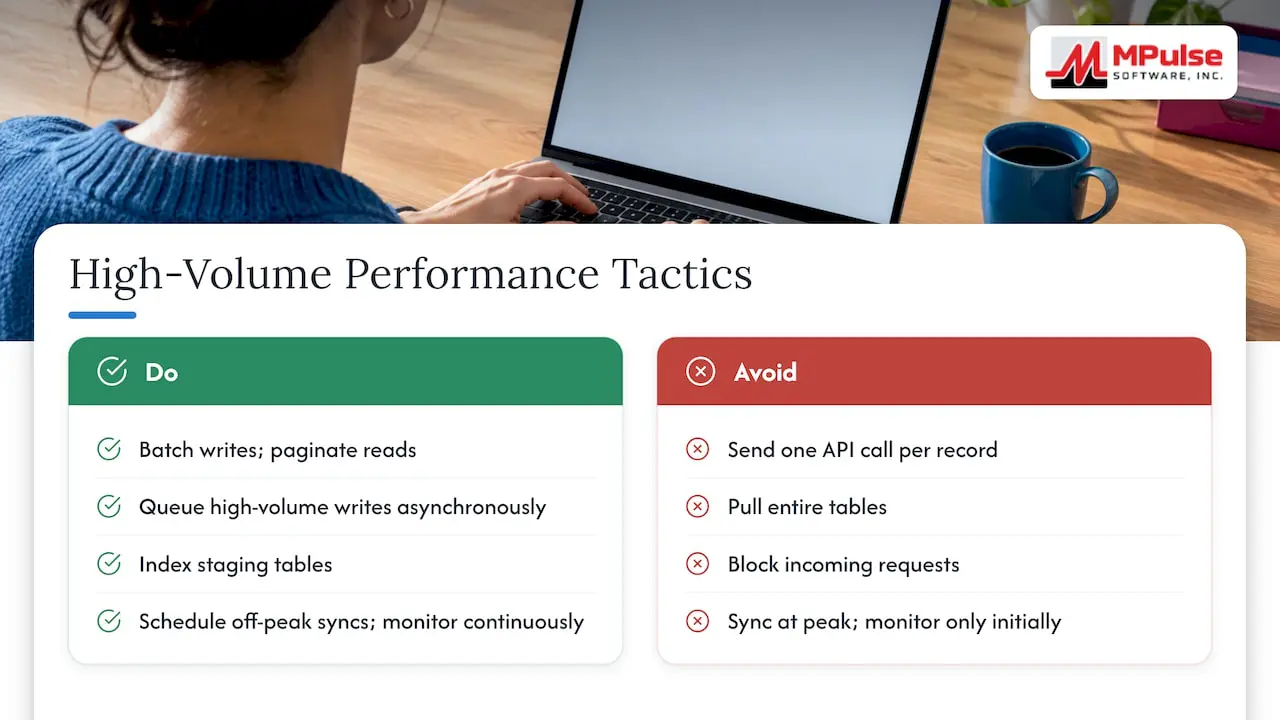
Finally, monitor API response times and error rates continuously rather than only during initial testing, since volume patterns shift as adoption grows and new sites or asset classes come online.
Handling version upgrades and maintaining integration over time
SAP upgrades, whether a routine S/4HANA release or a larger migration, tend to be the moment legacy integrations break. Following the clean core approach discussed earlier is the single best defense: integrations built through standard APIs and side by side BTP extensions survive upgrades far more reliably than those built on custom core modifications.
Maintain a current inventory of every integration touchpoint, including which API each flow calls and which fields it reads or writes, so an upgrade impact assessment does not require archaeology through old documentation. Before any SAP upgrade, run your full acceptance test suite against the upgrade’s test environment, not just production, to catch deprecated fields or changed validation rules early.
Subscribe to SAP’s release notes for the specific APIs your integration depends on, since fields occasionally get deprecated or replaced with newer equivalents ahead of a hard cutoff. Version your integration flows themselves, not just your SAP environment, so you can roll back a middleware change independently of a SAP patch if something breaks.
Treat integration maintenance as an ongoing line item rather than a one time project cost. Our Maintenance & Support Program exists for exactly this reason, covering the ongoing adjustments that keep a CMMS to ERP connection healthy as both systems evolve.
Use cases across industry scenarios for SAP CMMS integration
Manufacturing plants running SAP PM alongside a CMMS typically prioritize syncing work orders and operation confirmations tightly, since production downtime tracking depends on technician confirmations landing in SAP without delay for cost center reporting.
Utilities and energy operators with heavily regulated asset bases tend to weight the master data and functional location mapping work more heavily, since audit readiness depends on equipment hierarchies matching exactly between systems, with every maintenance event traceable to a specific asset and location.
Multi site healthcare facilities maintenance operations often prioritize the parts and inventory sync first, given how critical spare parts availability is for life safety equipment, with work order and confirmation flows following once inventory visibility is solid.
Food and beverage processors, operating under strict compliance recordkeeping requirements, generally need the notification and confirmation objects synced with full audit trail detail from day one, since regulatory inspections may require demonstrating exactly when a piece of equipment was serviced and by whom.
Across these scenarios, the underlying technical pattern stays consistent: standard APIs, a small prioritized object list, and clean core principles. What shifts is which object gets built and tested first, based on where each industry’s operational or compliance risk concentrates.
Security considerations and compliance requirements in SAP CMMS integration
Authentication for modern SAP integrations should run through OAuth 2.0 wherever the API supports it, rather than relying on basic authentication or shared service accounts with broad access. Scope API permissions tightly, granting each integration user or service account access only to the specific maintenance objects it needs to read or write.
Encrypt data in transit using TLS for every API call, and confirm your middleware platform encrypts data at rest in any staging or queue layer where maintenance records sit temporarily between systems.
For compliance heavy industries, audit trail completeness matters as much as the sync itself. Every create, update, and delete operation flowing between SAP and your CMMS should log a timestamp, the acting user or system account, and the before and after field values, since regulators frequently ask for exactly this trail during an inspection.
Role based access control on both sides of the integration should mirror your organization’s segregation of duties policies, particularly for cost and labor data where financial controls apply. Review integration service account permissions periodically rather than only at initial setup, since access tends to creep upward over time as new use cases get bolted onto an existing connection.
Best practices for real time data synchronization and event driven integration
Event driven integration, where a change in one system triggers an immediate push to the other rather than waiting for a scheduled batch job, fits naturally with maintenance workflows where technicians need current status visibility.
Design your event triggers around business events rather than database changes directly, firing a sync when a work order status actually changes to “completed,” for instance, rather than on every underlying field update regardless of business relevance. This keeps sync volume proportional to meaningful activity instead of noise.
Build in deduplication logic on the receiving end, since event driven architectures occasionally deliver the same event more than once, and a well designed consumer should handle a duplicate delivery without creating a duplicate record.
Set reasonable timeout and retry policies for each event type, with shorter retry windows for time sensitive events like safety notifications and more tolerance for less urgent updates like routine inventory counts. Log every event your integration processes, including ones that fail validation, so troubleshooting a missed sync does not require guessing which step dropped the record.
Finally, keep your event driven flows and your batch flows cleanly separated in your monitoring dashboards, since mixing the two makes it harder to spot whether a problem originates in real time processing or in a scheduled job.
SAP APIs and developer tutorials worth bookmarking
A handful of specific SAP APIs come up repeatedly in CMMS integration projects, and knowing their names ahead of time saves discovery time once you start building.
API_MAINTENANCEORDER handles creating and reading maintenance orders, though SAP’s own knowledge base notes it does not support querying certain status text fields directly, recommending MaintOrdProcessPhaseCode as a workaround for filtering open orders.
API_MAINTORDERCONFIRMATION covers posting operation confirmations, and SAP’s help documentation provides a sample JSON payload showing fields like MaintenanceOrder, PersonnelNumber, ActualWorkQuantity, and OperationConfirmedStartDate that a POST request needs to include.
WorkCenterDataService, exposed as OP_API_WORK_CENTERS_0001 in SAP’s Cloud SDK documentation, handles work center and capacity data commonly referenced by scheduling logic in both SAP and the connected CMMS.
For teams still running RFC based connections, SAP’s tutorials on modernizing RFC receiver and RFC sender communications walk through converting those legacy calls into SOAP or OData services step by step, including generating service providers and reconfiguring SOAMANAGER logical ports. Bookmarking these pages before your project starts gives your integration engineer a working reference rather than requiring blind trial and error against SAP’s API layer.
What actually determines success in these projects
In our view, the single biggest predictor of a smooth SAP CMMS integration is how disciplined a team is about canonical IDs and small, testable scope, not which middleware tool they pick. We have seen projects stumble when teams tried to sync a dozen object types in the first release, only to discover functional location mismatches three weeks into testing because no one audited the master data first. The fix was always the same: shrink the scope to work orders and confirmations, fix the mapping, then expand.
— Mark
How MPulse supports your SAP integration from here
We offer the DataLink Integration Adapter to simplify the SAP connection work, backed by implementation services, training, and hosting support for teams that want a structured rollout rather than a from scratch build.
If you are ready to scope a project, our services and implementation page is the right place to start, or check pricing plans to see which edition fits your team’s size and integration needs.
FAQ
What is the most common CMMS software?
There is no single universally dominant CMMS platform, since the right choice depends heavily on company size, industry, and existing ERP landscape. MPulse CMMS is one widely used option, particularly among organizations in compliance heavy industries that need integration with systems like SAP.
What are the four types of SAP?
SAP offers several core product lines, including SAP S/4HANA for enterprise resource planning, SAP SuccessFactors for human capital management, SAP Ariba for procurement, and SAP Business Technology Platform for integration and extension development. Specific maintenance functionality typically lives within SAP PM, a module inside the broader S/4HANA or ECC suite.
Is SAP CPI the same as BTP?
SAP Cloud Platform Integration, now called SAP Integration Suite, is a specific integration service that runs on SAP Business Technology Platform. BTP is the broader platform umbrella, while Integration Suite is one capability offered within it, alongside extension development tools and database services.
What are the stages of a SAP implementation project?
A typical SAP implementation moves through discovery, mapping and design, prototyping, build, testing, and cutover phases, though exact phase names vary by methodology. For a CMMS integration specifically, each phase should include explicit acceptance criteria around data reconciliation and audit trail completeness before moving to the next stage.
Sources
- Learn how to modernize RFC receiver communications into API‑based protocols in Cloud Integration
- Create a single order operation confirmation | SAP Help Portal
- Clean core in SAP S/4HANA — best practices for future‑proof extensions
- How to retrieve open maintenance orders using API in SAP S/4HANA Cloud Public Edition