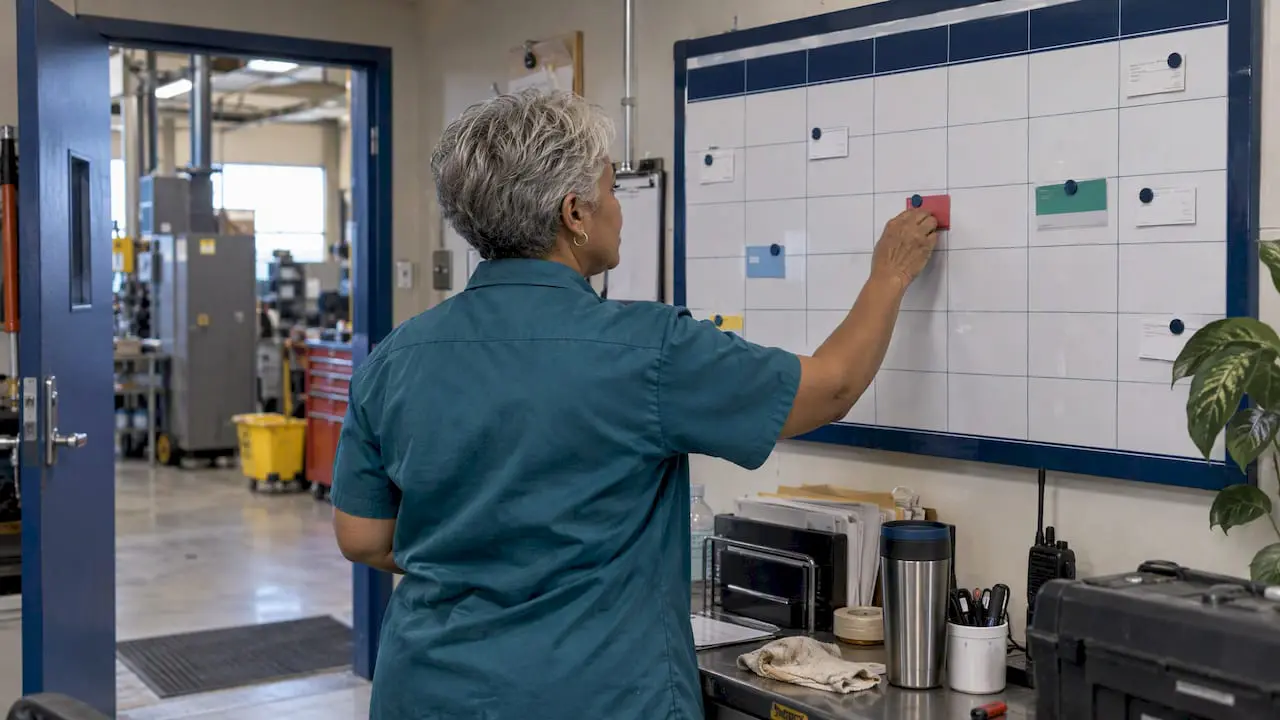
A visual maintenance scheduler shows every preventive maintenance task, work order and crew assignment on a calendar or timeline, so supervisors can see who is doing what, on which asset and on which day. It does not replace planning. It makes a finished plan visible, so conflicts, overloaded technicians and missed PMs show up before the shift starts. This guide explains how the tool works, how to build the schedule behind it, and what to check before you choose software.
TL;DR
- A visual scheduler is the calendar layer of a CMMS: recurring PMs and work orders appear on one view that can be dragged, filtered and reassigned.
- Planning comes first. A job belongs on the calendar only when its work package is complete: steps, parts, tools, safety controls and time estimates.
- Reserve capacity for break-in work. U.S. Department of Energy guidance points to roughly 20% of labor capacity as a contingency buffer.
- Connect the calendar to work orders, inventory and sensors so schedules update themselves instead of relying on spreadsheets.
- Judge results by downtime, backlog health and PM completion, not by how full the calendar looks.
Table of Contents
- What a visual maintenance scheduler does
- Planner or scheduler: two different jobs
- From maintenance plan to visual schedule
- Prioritizing work and coordinating labor, parts and access
- Recurring PMs and urgent break-in work
- Automating schedules and connecting other systems
- What to look for in scheduling software
- Our perspective: a schedule people actually use
- Measuring whether the schedule is working
- Scheduling mistakes to avoid
- Getting started with MPulse
- FAQ
- Sources
What a visual maintenance scheduler does
Most maintenance teams already schedule work somewhere: a whiteboard, a spreadsheet, a shared calendar, or the memory of a veteran supervisor. A visual maintenance scheduler moves that information into the same system that holds assets, work orders and parts, and displays it graphically.
In practice, that means a few things:
- Calendar and timeline views. Work appears by day, week or month, often filtered by site, crew, asset or priority.
- Recurring PM generation. Preventive maintenance tasks are created automatically on a time, meter or condition trigger and placed on the calendar without anyone retyping them.
- Drag-and-drop rescheduling. Moving a job updates the work order, so the schedule and the record never disagree.
- Load visibility. You can see whether Tuesday has 14 hours of work for a crew that has 8 hours available.
- Status at a glance. Open, overdue, waiting on parts and complete are visible without opening each record.
The value is coordination. A list of 300 open work orders tells you what exists. A calendar tells you what will actually happen, and what will not.
Planner or scheduler: two different jobs
The search results for this topic are full of job postings and role definitions, because people often use the two titles interchangeably. They describe different work, and software supports each differently.
Accendo Reliability describes maintenance planning as building a complete work package: the task breakdown and estimated times, procedures, risk controls, required parts, equipment, specialist services, technical information and records. Scheduling, in the same source, is organizing personnel, equipment, materials and access to the asset so the job gets done efficiently on its agreed date.
In short:
| Planner | Scheduler | |
|---|---|---|
| Main question | What needs to be done, and how? | When will it happen, and who will do it? |
| Output | A complete, ready work package | A committed schedule for the week or day |
| Works with | Job plans, parts, procedures, risk controls | Crew availability, equipment access, production windows |
| Software support | Job plan libraries, task lists, inventory links | Calendar, load view, assignments, reschedule tools |
Small teams often combine both roles in one person, and that is fine. The sequence still matters: the planning has to be done before the scheduling can be trusted.
From maintenance plan to visual schedule
The Electric Power Research Institute’s work package guidance treats work package preparation as a core work-management activity and stresses consistent content, technical detail, human-performance considerations and maintenance experience. That discipline applies to any facility, not only power plants. A workable path looks like this.
- Build the asset list. You cannot schedule what is not identified. Record each asset, its location and its criticality.
- Define the tasks. For each asset, write the recurring tasks, such as inspections, lubrication, filter changes and calibrations, with an interval and a trigger (calendar time, meter reading or condition).
- Complete the work package. Add steps, estimated hours, craft or skill needed, parts, tools, permits and safety controls. Accendo’s point is that the package should be complete before the scheduler places it into an executable schedule.
- Generate the work orders. Let the system create PM work orders from the task definitions instead of creating them by hand.
- Place them on the calendar. Assign each to a technician or crew and a date, then check the load against availability.
- Review weekly. Hold a short scheduling meeting to confirm next week’s committed work, then compare it with what was finished.
If you use MPulse, the recurring definitions live in the Scheduled Maintenance task section, and the calendar displays what those definitions generate.
Prioritizing work and coordinating labor, parts and access
A calendar can be full of jobs that cannot start. The most common reason is that a part is missing or the equipment cannot be taken out of service. Coordination is what prevents that.
The DOE’s maintenance management program guide describes prioritizing by the impact on personnel safety, operational reliability and production urgency, using a structured scale where Priority 1 covers emergency safety issues and Priority 4 covers work done as time permits. The same guide describes a “ready” backlog: work orders kitted with the parts, tools and detailed instructions they need before they are assigned to available labor in scheduling meetings.
A simple readiness check before any job goes on the calendar:
- Is the work package complete and approved?
- Are the parts in stock or on a confirmed purchase order?
- Does the assigned technician hold the needed qualification?
- Has operations agreed to an access window for the asset?
- Are permits, lockout steps or contractor visits arranged?
The federal Operations and Maintenance Best Practices Guide adds that first-line supervisors should be able to use the schedule to coordinate critical activities and anticipate needs across crafts. A visual view is what makes that possible: a supervisor can see that the electricians and the millwrights both need the same line on Thursday.
The same logic applies when the people involved are outside your own crew. If contractors or shared equipment are in the mix, a guide to scheduling people, equipment and access shows how dispatch-style thinking handles that kind of coordination.
Recurring PMs and urgent break-in work
Two kinds of work compete for the same calendar. Preventive maintenance is predictable. Breakdowns are not. A schedule that ignores the second kind will be wrong by Tuesday.
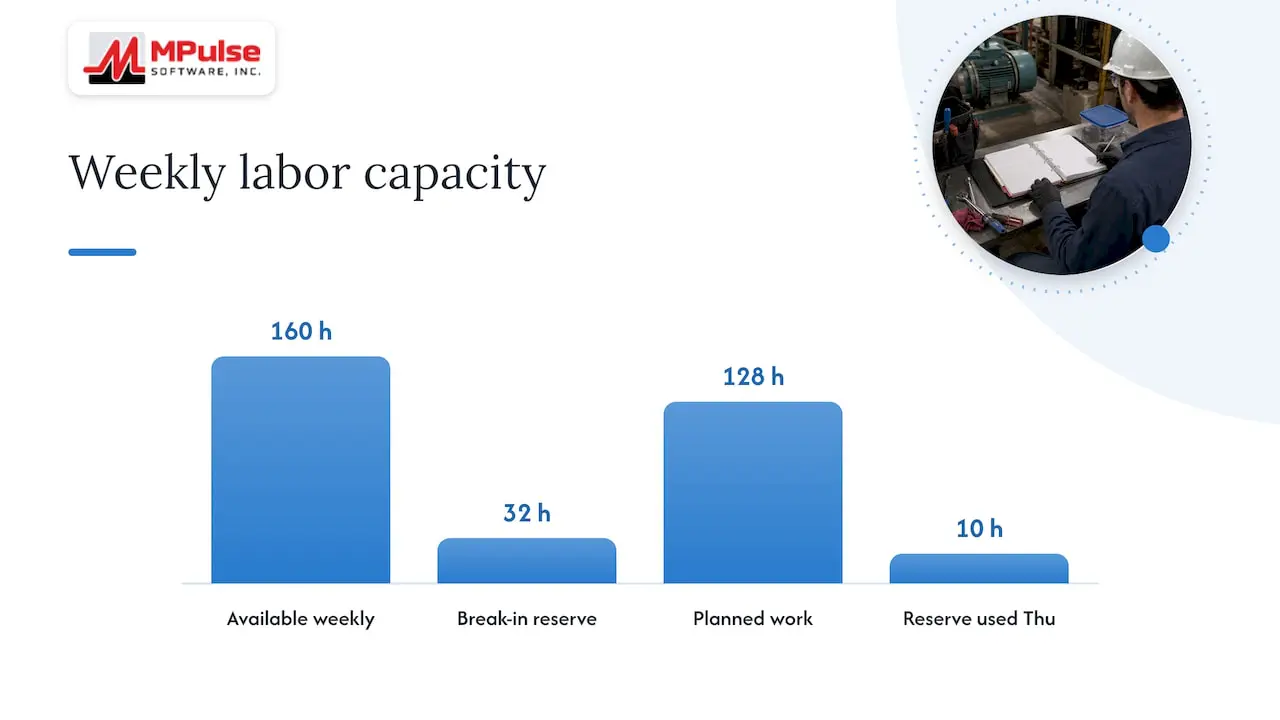
The DOE guide’s answer is to let the system generate PMs from automated triggers and to reserve roughly 20% of total labor capacity as a contingency buffer for emergencies. That lets a team pivot to a failure without abandoning the committed schedule. The guide also notes that daily schedules must stay flexible enough to absorb break-in work while an overall integrated schedule continues to track critical path activities.
Here is a worked example with illustrative numbers, not client data. A four-person crew has 160 available hours in a week.
- Reserve 20%: 32 hours for break-ins.
- Commit up to 128 hours of planned work.
- If only 10 of the 32 reserve hours are used by Thursday, the scheduler can pull ready, lower-priority jobs forward from the backlog.
- If the reserve is exhausted by Wednesday, the lowest-priority committed jobs slide to next week, visibly and on purpose.
The visual calendar makes that second case easy to manage. Jobs are moved, not lost, and the reschedule is recorded against the work order.
Automating schedules and connecting other systems
A calendar maintained by hand is only a nicer whiteboard. The advantage comes from connections.
- Recurring triggers generate PM work orders on their own.
- Inventory links show whether the parts for next week’s jobs are on the shelf.
- Requests from building occupants or production staff arrive as work requests that a supervisor converts into scheduled work.
- Sensor and control system links turn readings into work. The federal O&M guide gives the example of a pressure limit in an energy management and control system that triggers a filter-change notification in the CMMS, which becomes an automatically generated work order scheduled based on need.
- ERP links pass purchasing and cost data between maintenance and finance.
Condition-based triggers are worth understanding if you maintain equipment where fixed intervals either waste effort or miss wear. MPulse documents how it handles them under condition based maintenance, and the DataLink Integration Adapter and related add-ons cover connections to other business systems.
What to look for in scheduling software
Feature lists blur together quickly. These are the criteria that change daily use.
| Criterion | Why it matters | What to ask |
|---|---|---|
| Calendar usability | Supervisors will abandon a view that takes ten clicks to reschedule a job | Can I drag a job to a new date and see the load change immediately? |
| Automated PM generation | Manual entry is where schedules decay | Can intervals be time-, meter- or condition-based? |
| Filtering | Large operations need views by site, craft, asset or priority | Can I save a view for each supervisor? |
| Parts and inventory link | Prevents scheduling jobs that cannot start | Does the work order show stock status? |
| Mobile access | Technicians update status where the work happens | Can they close out and scan barcodes on a phone or tablet? |
| Qualification tracking | Ensures the right person is assigned | Does the system flag expired credentials? |
| Integrations | Keeps maintenance data consistent with ERP and building systems | Is there an API or adapter, and who supports it? |
| Requester access | Wider reporting of problems improves the backlog | Is there a per-seat charge for people who only submit requests? |
| Compliance records | Audits require proof that scheduled work was done | Can I produce a history by asset and date range? |
The requester question is often overlooked. MPulse offers unlimited free requesters, so facilities with many occupants, teachers or line staff can report problems without adding to the license count.
Our perspective: a schedule people actually use
We have watched many maintenance teams buy scheduling capability and then keep running the real schedule on paper. The reasons are almost never technical. The calendar was hard to read, the PM data behind it was incomplete, or no one owned it.
Our view comes down to three points.
Start with the calendar a supervisor will open every morning. That is why MPulse is built around an intuitive calendar interface. If a supervisor can see the week, move a job and trust the result, the data entry that feeds it gets done. If not, it does not.
Do the unglamorous planning first. Accurate asset records, realistic hour estimates and complete task lists matter more than any feature. Our implementation guidance starts with identifying pain points and deciding which features you need, because a scheduler configured for problems you do not have becomes shelfware.
Expect regulated environments to be the hardest test. In healthcare, food, pharmaceutical and similar settings, the schedule is also evidence. The question is not only whether the PM happened but whether you can show it. That is where more than 3,500 customers across industries have shaped how we think about recordkeeping, and why we offer editions and add-ons for compliance-heavy and multi-site operations.
— Mark
Measuring whether the schedule is working
A full calendar proves nothing. These measures show whether scheduling is changing outcomes.
- PM completion rate: completed PMs divided by PMs due in the period.
- Schedule compliance: committed jobs finished in the week, divided by jobs committed.
- Unplanned downtime: hours of equipment stoppage from unexpected failure.
- Backlog age and size: how many ready jobs are waiting, and for how long.
- Emergency share of labor hours: the proportion of hours spent on break-ins, which should fall as PMs take hold.
For context on what is possible, the federal O&M guide cites a survey of 558 companies using a CMMS that reported an average 28.3% increase in maintenance productivity and a 20.1% reduction in equipment downtime. Treat that as a reference point, not a promise: your results depend on data quality and adoption. MPulse reports efficiency improvements of up to 40% among its customers, and the best predictor of reaching them is consistent use.
Record a baseline for each measure before you start, then review quarterly.
Scheduling mistakes to avoid
Scheduling incomplete work. A job placed on the calendar without parts or procedures will be rescheduled. Use the readiness check above.
Skipping the break-in buffer. Planning to 100% of capacity guarantees that planned work gets bumped.
Underinvesting in training and commitment. The federal O&M guide lists inadequate training of administrative staff and a lack of commitment to implementation, continued use and integration among common CMMS pitfalls. The DOE program guide adds that successful installations have a champion who encourages continued use. Name that person early.
Letting the backlog become clutter. Reliabilityweb argues that a healthy backlog reflects proactive control rather than reactive clutter. Review it regularly: close duplicates, cancel obsolete work and rank what remains.
Budgeting only for the license. Data loading, configuration, training and hosting all take effort. Our guide on how to budget realistically walks through the full cost picture.
Getting started with MPulse
MPulse CMMS combines preventive maintenance automation, work order management, asset tracking, inventory, barcode scanning, mobile access and a calendar view in one platform. Published pricing is $29 per month per user for Professional and $79 per month per user for Advanced. Technician licenses and enterprise add-ons are quoted separately.
If you want help loading data and configuring schedules, implementation, training and hosting services are available, and the Maintenance & Support Program keeps the system supported after launch. You can also explore the MPulse Software site to see the platform.
FAQ
What is a visual maintenance scheduler?
It is the calendar or timeline view of a maintenance management system. It displays preventive maintenance tasks and work orders by date, crew and asset, and lets supervisors move work around while the underlying records update. Its purpose is to make workload, conflicts and overdue work visible at a glance.
Is a maintenance scheduler the same as a maintenance planner?
No. The planner defines what work is needed and prepares a complete work package. The scheduler decides when it happens and who does it, based on resource and access availability. In small teams one person may do both.
How much time should I leave for emergency work?
DOE program guidance describes reserving about 20% of labor capacity as a contingency for break-in work. Your own number should come from your history: track emergency hours for a few months and adjust the buffer to match.
Can a schedule be generated automatically?
Recurring PMs can be, from time, meter or condition triggers. Sensor readings can also create work orders: the federal O&M guide describes a control-system limit that generates a work order in the CMMS. A supervisor should still review and commit the weekly schedule.
Sources
- Big Difference Between Maintenance Planner and Scheduler, Accendo Reliability
- Maintenance Work Package Planning Guidance, EPRI
- Nuclear Facility Maintenance Management Program Guide, U.S. Department of Energy
- Operations & Maintenance Best Practices Guide, Release 3.0, U.S. DOE FEMP
- Mastering Work Management for Reliability Excellence, Reliabilityweb