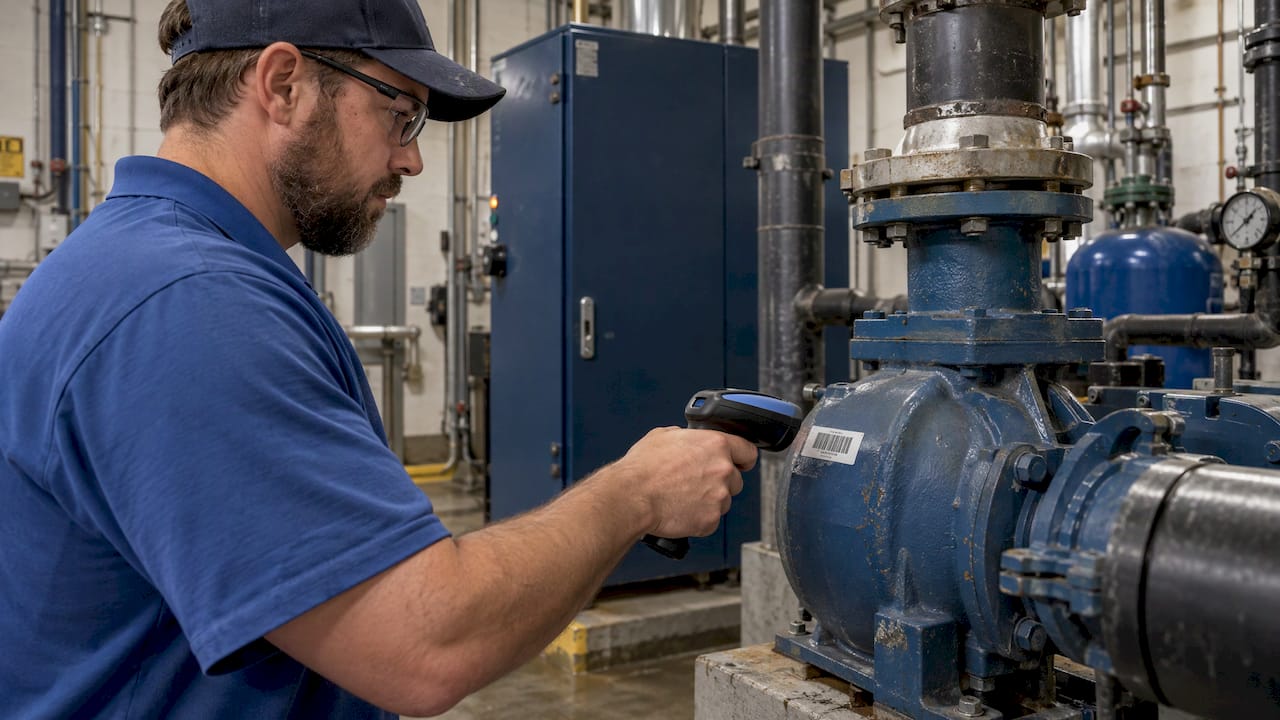
The best asset tagging method is the one your technicians will actually scan, on a tag that survives the environment it lives in, linked to an asset record that drives maintenance. For most facility, manufacturing, healthcare and campus teams that means a durable barcode or QR code tag tied to a record in a computerized maintenance management system (CMMS), with RFID or BLE reserved for the few cases where line-of-sight scanning or location tracking really pays off. The tag itself is only a key. The value sits in the record it opens: work orders, preventive maintenance schedules, parts, and compliance history. MPulse CMMS includes asset tracking, barcode scanning and mobile device compatibility, so a scan in the field lands on the asset’s full maintenance record.
TL;DR
- Tag assets you maintain, repair or must report on. Skip consumables, furniture and parts you replace rather than repair.
- Barcode and QR codes cover most maintenance needs. Passive RFID suits dense inventories scanned in bulk. BLE and active RFID suit live location tracking.
- Match the tag material to the surface and the environment (heat, washdown, outdoors, chemicals) before you match it to a budget.
- Use one short, meaningless-but-unique identifier per asset, and keep serial numbers and other IDs as fields on the record.
- Audit on a schedule and hold data quality high, because technicians stop trusting a register that proves wrong once.
Table of Contents
- What an asset tag actually does
- Decide what to tag first
- What the asset record should capture
- The main asset tagging methods compared
- Match the tag to the environment
- Place and number tags consistently
- A step-by-step tagging rollout
- Connect tags to work orders, parts and compliance
- Audit and maintain the system
- Our perspective
- Where MPulse fits
- FAQ
- Sources
What an asset tag actually does
An asset tag is a physical label that gives one piece of equipment a unique identity, so two identical pumps or air handlers can never be confused. It is only useful when it points to a record. That record should answer four questions the moment someone scans it: what is this, where is it, what has been done to it, and what is due next.
In a maintenance setting the tag therefore does three jobs:
- Identification. The technician confirms they are standing at the right asset before they open a work order.
- Retrieval. One scan pulls up history, manuals, open work orders and assigned parts.
- Reporting. Costs, downtime and compliance tasks roll up to a specific asset rather than to a vague location or a technician’s memory.
That is why tagging and asset records should be planned together. Our guide to creating CMMS asset records walks through the record side of this.
Decide what to tag first
The most common tagging mistake is tagging everything. Every tag creates a record to keep accurate, so the list should be limited to assets that earn their upkeep.
Washington University in St. Louis offers a clear working definition in its asset collection and preventive maintenance initiative. It tags assets that are regularly maintained, fall within regulatory tracking scope, or are repaired rather than replaced. In practice that means items such as hot water pumps, exhaust fans, emergency generators and fan coil units, and not toilets, furniture or replacement parts. Its tags are a QR code plus a 7-digit number, permanently affixed and linked to the asset record in its maintenance system.
A simple filter you can apply to any candidate:
- Does it have a preventive maintenance task, inspection or calibration?
- Is it subject to a code, regulator or accreditation survey?
- Do you repair it, rather than throw it away when it fails?
- Does it carry enough cost or downtime risk that its history matters?
If the answer to at least one is yes, tag it. If all four are no, a location or a parts-inventory entry is usually enough.
Financial thresholds matter too. The University of Arizona’s equipment identification policy requires a property tag number on all purchased capital equipment, and notes that equipment under $5,000 is not tracked in its financial system. Your finance team may run a separate fixed-asset rule alongside your maintenance rule. Decide early which tag serves which purpose, or use a single tag that satisfies both.
What the asset record should capture
A tag is only as useful as the fields behind it. The Arizona policy lists minimum record elements: tag number, description, manufacturer, model and serial number, quantity, in-service and acquisition dates, department, building and room, total cost, and ownership. The Washington University collection record adds building, floor, type, subtype and class, which is the structure maintenance teams need for filtering and reporting.
For a maintenance register, a practical minimum looks like this:
| Field | Why it matters |
|---|---|
| Asset tag ID | The unique key printed on the tag |
| Description, type, class | Grouping for reports and PM templates |
| Manufacturer, model, serial number | Warranty claims and parts lookups |
| Building, floor, room | Fast location for the technician |
| In-service and acquisition dates | Age and replacement planning |
| Department or owner | Cost allocation and accountability |
| Criticality | Prioritizing work orders during a backlog |
Keep other identifiers (a legacy number, an accounting ID, a network address for IT gear) as separate fields. They help with reconciliation, but none should be the tag number, because they change when systems change.
The main asset tagging methods compared
Four technologies cover nearly every case. They differ in how they are read, how much information they carry and how much infrastructure they need.
| Method | How it is read | Strengths | Where it fits |
|---|---|---|---|
| Barcode (1D) | Line-of-sight laser or camera scanner | Cheap, printed on demand, supported almost everywhere | Equipment with a clean, accessible surface |
| QR code (2D) | Any smartphone camera | Holds more data, readable even with some damage, no special reader | Distributed sites, mobile technicians, requester access |
| Passive RFID | Radio reader, no line-of-sight | Reads many tags at once, works on hidden or stacked items | Dense inventories, tool cribs, audits of large areas |
| BLE or active RFID | Battery-powered beacon, continuous signal | Live location | Mobile, high-value or safety-critical items that move |
Barcode tags
Barcodes remain the workhorse. A label printer, a durable stock and a scanner are enough to start. The limits are practical: the code must be visible, clean and facing outward, and each asset is scanned one at a time. For most fixed equipment, which is where maintenance lives, that is perfectly adequate.
QR code tags
QR codes carry the same unique ID but can be read by the phone already in every technician’s pocket. They also open a door for people who are not technicians. A QR code on a rooftop unit or a classroom projector can lead a building occupant straight to a request form that is pre-filled with the right asset. We cover that workflow in QR code maintenance requests.
RFID tags
Passive RFID tags have no battery and are read by a radio reader at a distance, so a handheld can inventory a whole room without anyone aiming at individual labels. That speed is valuable for tool cribs, medical equipment storage and large annual audits. The trade-off is cost per tag and the need for readers, so it is usually applied selectively to high-value or high-volume groups rather than to a full plant or campus.
BLE and active tags
Bluetooth Low Energy beacons and active RFID tags transmit on their own, which allows continuous location visibility. They suit portable assets that go missing, such as infusion pumps, carts or rental equipment. They need batteries and a receiving network, so they are a targeted tool, not a default.
A practical rule of selection
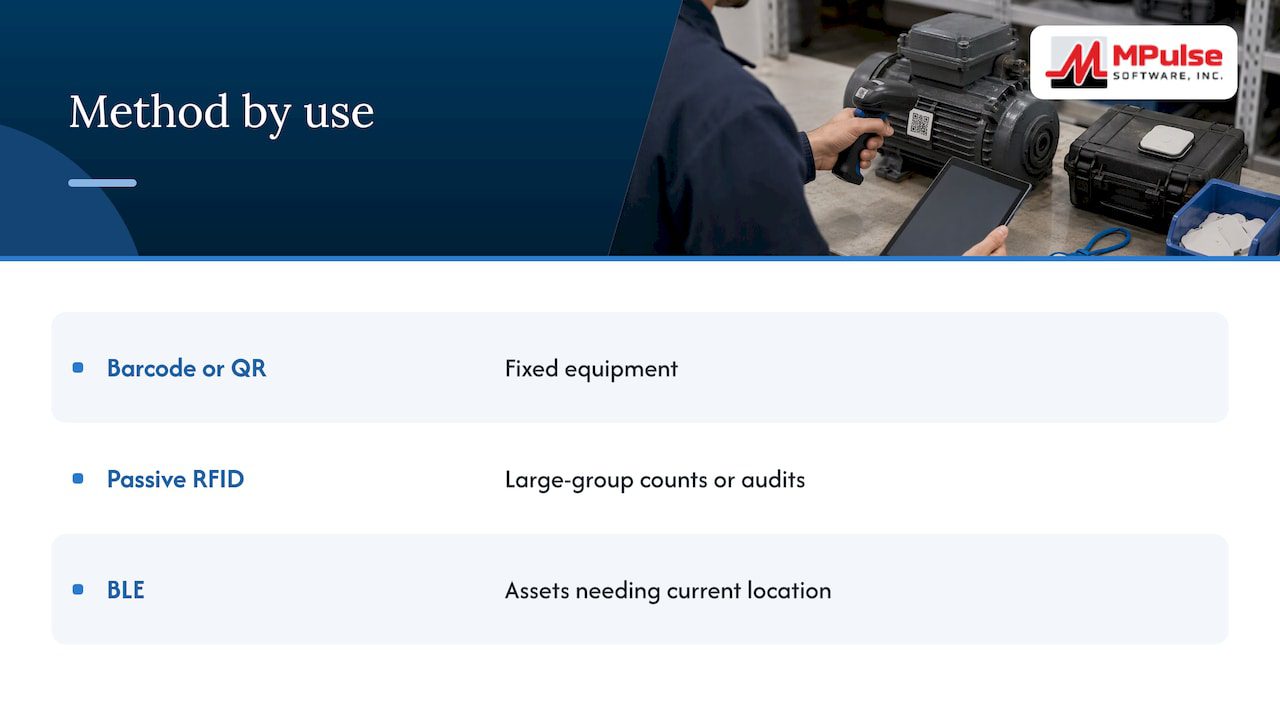
Start with barcode or QR for fixed equipment. Add passive RFID where you count or audit large groups of items. Add BLE only where the question you need answered is “where is it right now?” Many sites run two methods side by side, and that works as long as every tag ID resolves to the same record.
Match the tag to the environment
A tag that peels off in six months costs more than a premium one, because someone must find the asset, re-identify it and re-tag it. Choose the material by looking at where the asset lives:
- Clean indoor equipment (offices, classrooms, patient rooms): polyester or vinyl labels with a permanent adhesive work well.
- Mechanical rooms and plants: look for tags rated for oil, solvents and cleaning agents, and use laminated or overlaminated labels so the printed code resists abrasion.
- Outdoor equipment (rooftop units, generators, lift stations): UV-resistant stock or metal tags, ideally fastened mechanically instead of relying on adhesive alone.
- High-heat or washdown areas: metal or specialty high-temperature tags, mounted away from direct heat sources where possible.
- Curved, rough or powder-coated surfaces: test the adhesive on a sample before ordering in bulk, or use a rivet, zip tie or wire attachment.
- Metal surfaces and RFID: metal interferes with radio signals, so use tags designed for mounting on metal.
Before buying thousands of labels, tag a small sample of each asset type and let them sit through a season. Check scanning after cleaning, sunlight and a few weeks of normal use.
Place and number tags consistently
Placement
Pick one standard location per asset type and write it down: for example, the front-right of the housing at about chest height, never on a removable panel. Technicians should not have to hunt. Avoid spots that are hot, wet, painted over during routine work or hidden behind guards. For assets that are hard to reach, a second tag on the nearest accessible surface, linked to the same record, saves time.
Numbering
Short, unique and sequential beats clever. Smart numbering schemes that embed building, system and year look useful until a department moves or an asset is reassigned, and then every tag is wrong. A plain numeric ID, like the 7-digit number on Washington University’s tags, keeps identity separate from attributes. Put location, type and department in fields where they can be edited.
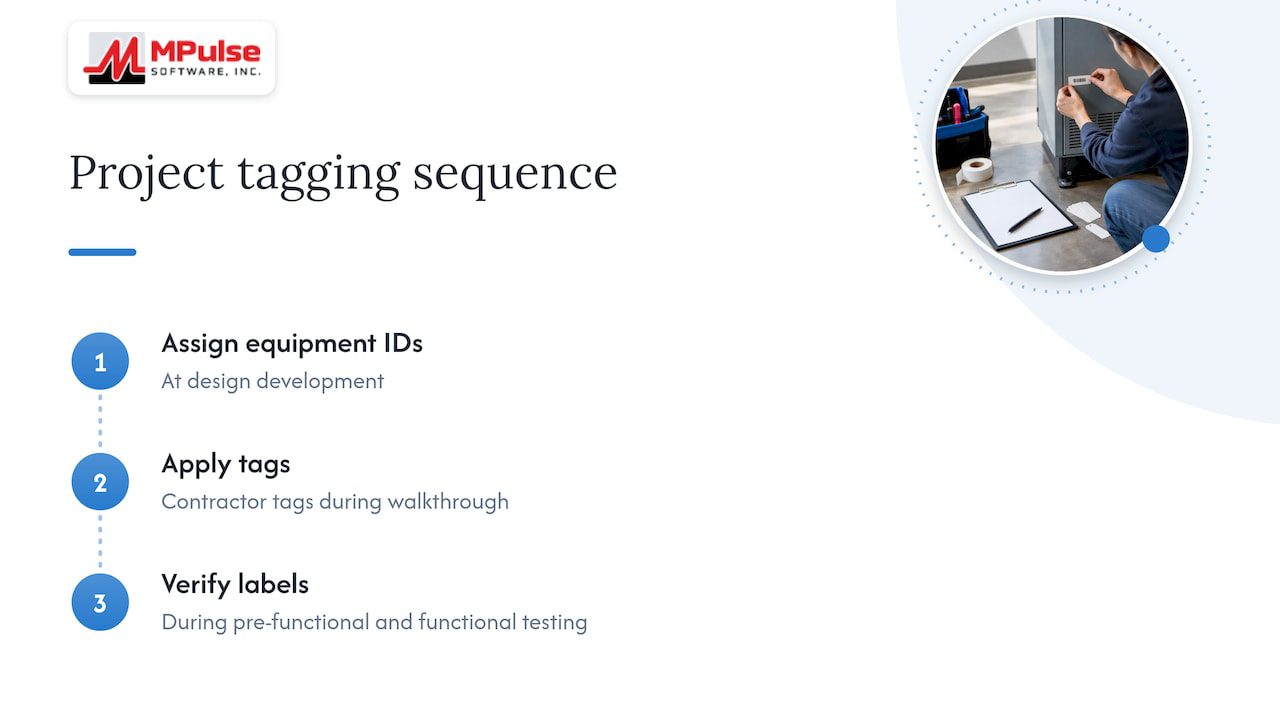
For new construction and major projects, build the numbering into the contract. Columbia University’s asset management protocol has its maintenance system administrator assign equipment identification numbers to all new equipment at design development, the contractor adhere the tags during a walkthrough, and the labeling verified during pre-functional and functional testing. That sequence means new assets arrive in the register already identified, rather than being tagged months later from a spreadsheet.
A step-by-step tagging rollout
- Define the scope. Use the filter above and write down which asset classes are in and out.
- Design the record. Agree on the minimum fields, the numbering rule and the criticality scale before anyone picks up a label.
- Choose method and material by asset class. Barcode or QR for most, RFID or BLE only for named groups, with materials matched to environment.
- Walk the site. Record each asset, photograph the nameplate and confirm location. This is also the best time to capture manufacturer, model and serial number accurately.
- Tag as you go. Apply the tag at the standard position and scan it immediately to confirm it resolves to the right record.
- Attach maintenance. Link preventive maintenance tasks, manuals and parts to each record so the first scan is already useful.
- Train the users. Show technicians and requesters what a scan gives them. Adoption is what keeps the register current.
If your team would rather not carry this alone, CMMS implementation services and training are part of what we offer.
Connect tags to work orders, parts and compliance
A tagged asset pays back when the scan starts something. In a CMMS the useful chain is: scan the tag, view the asset, create or close a work order, record labor and parts, and update the history. Barcode scanning also extends to inventory, so a part issued to an asset is recorded against that asset’s cost.
Three effects tend to follow:
- Fewer misidentified assets. Work lands on the right record, so history and cost reports can be trusted.
- Faster preventive maintenance. Scheduled tasks for an asset are a scan away, and the calendar shows what is due across the site. See how scheduled maintenance tasks are structured.
- Cleaner audit trails. For healthcare, education and other regulated environments, inspection and repair history tied to a unique asset supports recordkeeping.
For teams that pull data from building systems or sensors, integration with ERP and sensor systems extends the same asset record into condition-based maintenance, where readings trigger work. Data centers are a good example, and our article on data center maintenance with a CMMS shows how asset identity supports it.
Audit and maintain the system
Tagging is not a one-time project. Equipment is replaced, moved and renovated, and labels wear. Build a light routine:
- Verify on contact. Every time a technician scans an asset, they confirm the description and location. Corrections take seconds when made on the spot.
- Run cycle counts. Audit a slice of the site each month so the full register is checked across a year, prioritizing critical and regulated assets.
- Reconcile exceptions. Track assets found without tags, tags without assets and duplicates, and resolve them within a set time.
- Gate new assets. No new equipment is commissioned without a tag and a record.
- Replace damaged tags promptly. Reprint the same ID so history remains continuous.
On data quality, the National Rural Electric Cooperative Association’s practical guide to CMMS data quality recommends that converted data be at least 95% free of error for manually validated items and fully accurate for programmatically validated items, and that this level be maintained through the life of the system, since user acceptance is hard to regain after a poor first impression. That is a useful target for any tagging project: the first month of scans shapes whether people believe the register.
Our perspective
We see tagging as the first step of maintenance, not a separate inventory exercise. A tag with nothing behind it is just a sticker; a tag that opens a complete record is the start of a work order, a preventive maintenance schedule and an audit trail.
That is why MPulse CMMS combines asset tracking, barcode scanning, mobile access and a calendar-based view of scheduled work. Our platform is trusted by over 3,500 customers globally, and our approach is to make the scan the shortest path from an asset to the action it needs.
For compliance-heavy sites and multi-site operations, we also offer integration options, add-ons and services so that identifiers and records stay consistent as the operation grows. Unlimited free requesters mean building occupants can report a problem against a tagged asset without adding to your license count.
Mark
Where MPulse fits
MPulse CMMS gives each tagged asset a home: asset records, work orders, preventive maintenance automation, inventory for parts and supplies, barcode scanning and mobile compatibility, with reporting and analytics on top. Published pricing is $29 per month per user for Professional and $79 per month per user for Advanced, with a Technician License, Enterprise Add-Ons, hosting, a Maintenance & Support Program and other services also available. See plans and pricing to compare editions.
If you are planning a tagging project alongside a CMMS rollout, our implementation services and DataLink integration adapter can help connect your asset data to the systems you already run.
FAQ
Which is better for maintenance, barcode or QR code tags?
Both carry a unique ID and work well for fixed equipment. QR codes are read by any smartphone and hold more data, which suits mobile technicians and requester access. Barcodes are a good fit where dedicated scanners are already in use. Either can link to the same CMMS record.
Do I need RFID to run a good asset tagging program?
No. Most fixed maintenance assets are well served by barcode or QR tags. RFID becomes worth considering when you must count or audit large groups of items quickly, or when tags sit where a scanner cannot be aimed.
What information should be on the tag itself?
Keep it minimal: the unique ID as a code and as readable digits, plus an organization name or contact if you wish. Everything else, including model, serial number, location and history, belongs in the asset record, where it can be updated without relabeling.
How often should asset tags be audited?
Tie audits to risk. Verify assets every time they are scanned for work, and run scheduled cycle counts so the whole register is covered over a year, with critical and regulated equipment checked more often.
Should every piece of equipment get a tag?
No. Tag what you maintain, repair, or must track for regulatory or financial reasons. Furniture, consumables and replaceable parts are usually better handled through location records or parts inventory.
Sources
- Asset Collection and Preventative Maintenance Initiative, Washington University in St. Louis
- PMM 3.1.1 Equipment Identification, University of Arizona
- Asset Management Protocol, Columbia University
- A Practical Guide to Ensuring Data Quality, NRECA