
A customizable maintenance workflow is a set of rules a maintenance team configures to fit its own assets, approvals, and reporting needs, rather than following a fixed sequence built by someone else. Customization typically covers triggers, approval routing, and system integrations. It benefits maintenance managers, compliance-heavy operations, and multi-site teams that need one platform to handle different rules for different assets.
TL;DR:
- Custom workflows require accurate asset data, standardized failure codes, and tested integrations to prevent automation errors and ensure reliable performance.
- Building effective workflows involves a pilot phase with clear success criteria, KPI tracking, and adjustments based on technician feedback before wide deployment.
- Approval processes should include delegation, escalation, and detailed audit logs, with deferrals documented to maintain compliance and accountability.
- Mixing trigger types in a single workflow can obscure KPIs, so separating families by trigger improves backlog visibility and KPI accuracy.
- Simplify workflows when rule-based decision logic is minimal, focusing customization on repetitive tasks and leaving judgment calls to technicians.
Table of Contents
- Preventive, predictive, corrective, and reactive workflows explained
- Software features that make workflow customization possible
- How to design, configure, and pilot a new workflow
- Approval patterns that keep programs on schedule and auditable
- Data and integration prerequisites for reliable automation
- KPIs and monitoring that show whether a workflow works
- MPulse’s approach to customizable workflow implementation
- When to keep a workflow simple instead of customizing it
- How MPulse supports flexible maintenance workflows
- Frameworks worth reading next
- Sources
- FAQ
Preventive, predictive, corrective, and reactive workflows explained
Every maintenance program runs on some mix of four workflow families, and each one responds to a different trigger. Preventive workflows fire on a calendar date or a meter reading, such as engine hours or production cycles. Predictive workflows respond to condition data: vibration readings, oil analysis, or temperature drift that signals a developing fault. Corrective workflows open once an inspection or predictive alert confirms a problem that needs planned repair. Reactive workflows handle the unplanned failures and emergency requests that arrive with no warning.
Common triggers across these families include:
- Calendar or meter thresholds that schedule recurring preventive tasks.
- Sensor telemetry that flags abnormal vibration, temperature, or pressure readings.
- Inspection findings logged by a technician during a routine round.
- User-submitted requests from staff who spot a problem outside a scheduled check.
Mixing these families inside one workflow without separating them by trigger type tends to obscure backlog reporting and distort KPIs like interval compliance. Keep each family on its own path even when the same technician handles all four.
Software features that make workflow customization possible
Flexible workflows depend on specific CMMS capabilities, not just configurable fields. A visual workflow or state-machine editor lets a manager map each work order state (requested, approved, scheduled, in progress, closed) without writing code, and adjust that map as procedures change.
Trigger logic needs to handle more than one input type at once: time and meter thresholds, sensor conditions, and form submissions with conditional branching. Approval routing should support delegation, deferral with a documented reason, an audit trail, and electronic signature capture for regulated environments, an approach described in Synesis’s overview of CMMS approval workflows. Job plan templates with checklists and role-based assignment keep execution consistent across shifts and sites, and mobile access lets technicians close work orders from the floor.
Integration endpoints matter just as much as the builder itself:
- IoT and asset performance management (APM) feeds that push condition data into triggers.
- ERP connections for parts procurement and cost tracking.
- Calendar and scheduling systems that sync planned downtime across teams.
MPulse’s customization features and advanced customization add-ons are built around this kind of configurable logic.
Pro Tip: Build one workflow completely, including its exceptions and deferral path, before copying the template to a second asset class.
How to design, configure, and pilot a new workflow
Building a workflow that survives contact with real operations takes a sequence, not a single configuration session.
- Prepare master data. Confirm the asset hierarchy, bill of materials, failure codes, and clear ownership before touching a workflow builder.
- Choose pilot assets and criteria. Pick a small, representative group and write down what success looks like and how long the pilot will run.
- Author the logic. Build job plans, decision rules, and approval tiers inside the visual builder, matching each rule to a real approval level.
- Run a closed pilot. Collect KPI data and technician feedback, then adjust thresholds that trigger too often or too rarely.
- Scale and document. Roll the workflow out to the wider asset base once it performs, and write down the governance model so the next team can maintain it.
This sequence mirrors the case-based approach described in research on customizing maintenance plans with RCM, which found that combining reliability-centered maintenance with historical case data can speed up plan design and reduce manual FMECA effort. A small, well-instrumented pilot on representative assets also tends to surface data gaps before they turn into automation errors at scale.
Approval patterns that keep programs on schedule and auditable
Governance is what keeps a customized workflow from quietly drifting off schedule or leaving a compliance gap. An approval inbox needs delegation rules and escalation timers so a request does not sit unanswered across a shift change.
Deferral needs the same discipline. Every deferred task should carry a documented reason and a required re-review date, not just a postponed due date. Approval gates should scale with cost and criticality: a low-cost lubrication task might clear with one sign-off, while a shutdown-related repair routes through two or three tiers.
- Audit logs should capture who approved what, when, and through which channel.
- Immutable signatures support standards such as FDA 21 CFR Part 11 and ISO 9001 evidence expectations, as Synesis’s compliance mapping describes.
- Linked asset history ties every approval back to the equipment record it affects.
MPulse’s CMMS compliance overview covers how these controls fit regulated environments in more detail.
Data and integration prerequisites for reliable automation
Customization accelerates a maintenance program only when the underlying data is clean. Automation applied to messy asset records just automates the errors faster.
Before configuring triggers, confirm:
- Asset IDs and locations are consistent across every system that touches the workflow.
- Bill of materials and sensor tag mapping are complete enough to support the rules you plan to build.
- Failure codes are standardized so reporting stays comparable across sites.
- Integration health for IoT, APM, ERP, and identity systems has been tested, not assumed.
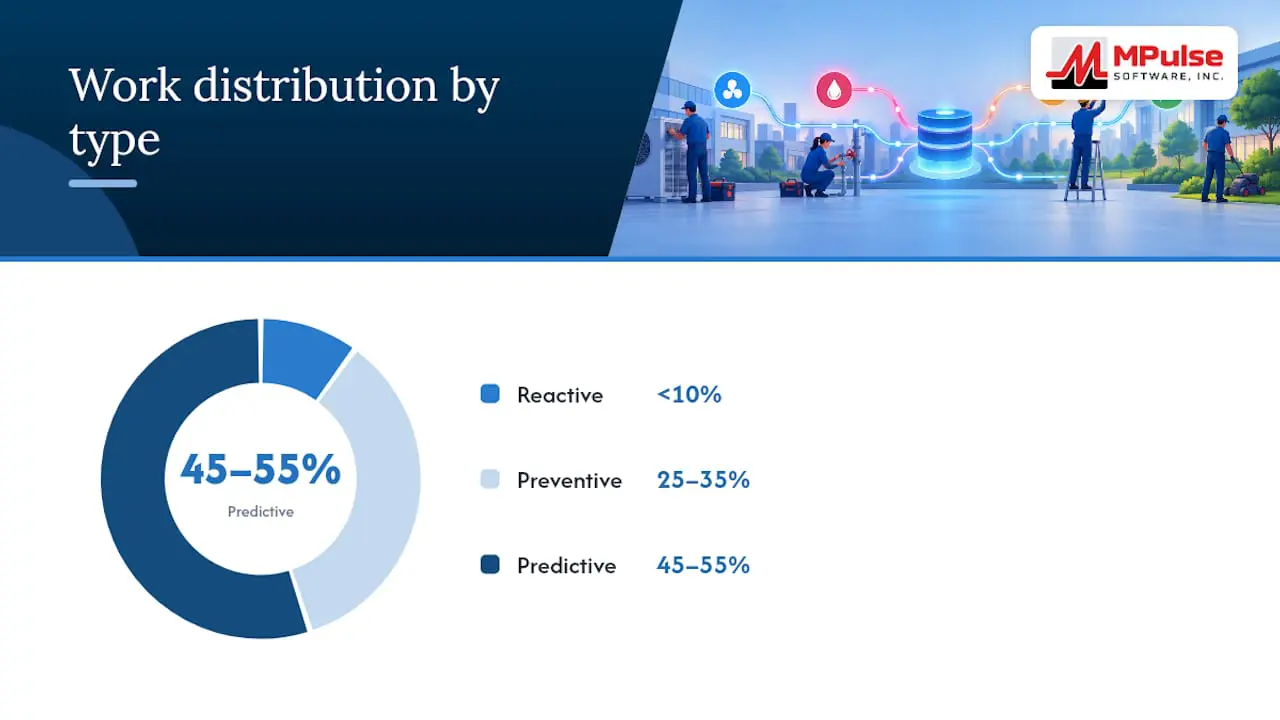
The Operations & Maintenance Best Practices Guide from the U.S. Department of Energy notes that top-performing facilities running reliability-centered programs may see less than 10% of work classified as reactive, with the remainder roughly split between 25% to 35% preventive and 45% to 55% predictive work. That balance only holds when the data behind each trigger is trustworthy. Pilot validation should include checking data accuracy and integration reliability before any workflow moves past a small test group, and MPulse’s components page outlines the integration points a workflow typically depends on.
KPIs and monitoring that show whether a workflow works
A small set of signals tells you whether a customized workflow is actually performing, and where it needs adjustment.
- Interval compliance and PM drift show whether preventive tasks are completing on schedule.
- Backlog by priority and MTTR reveal whether corrective work is keeping pace with demand.
- First-time-fix rate flags whether job plans and parts availability match real conditions.
- Approval latency and deferral rates act as governance health indicators, since a rising deferral rate often means thresholds are set wrong.
- Data-quality metrics, such as the percentage of work orders with correct asset IDs and BOM usage, catch problems before they spread.
Dashboards and alerts close the loop by surfacing these numbers in real time, so a manager adjusts a trigger threshold the same week it starts misfiring rather than a quarter later. MPulse’s resource planning dashboard is built to surface this kind of signal for maintenance teams.
MPulse’s approach to customizable workflow implementation
Certain maintenance platforms structure their systems around similar components: a calendar-based scheduling interface, configurable approval routing, and integration adapters for ERP and sensor systems.
Readers evaluating any vendor’s implementation approach, MPulse included, should check a few things directly:
- Pilot support. Does the vendor offer a structured pilot rather than a full rollout on day one?
- Training depth. Is there a defined training path for the technicians who will use the workflow daily?
- Consulting availability. Can a specialist help configure approval tiers and job plans rather than leaving that work entirely to your team?
MPulse offers CMMS implementation services, training, and expert consulting alongside its software, and its blog post on getting the most out of CMMS customization covers configuration choices in more depth.
When to keep a workflow simple instead of customizing it
Customization earns its cost when a workflow repeats often enough to justify the setup time and when the decision logic is genuinely rule-based. It becomes brittle when teams try to encode judgment calls that a technician should make on the spot.
A short readiness checklist helps: confirm training is in place, name a single process owner, and clean the underlying data before configuring anything. Pilot small, automate the decisions that repeat the same way every time, and leave the edge cases to a person.
— Mark
How MPulse supports flexible maintenance workflows
Certain maintenance software solutions provide calendar interfaces, ERP and sensor integrations, and customization add-ons that enable maintenance teams to build trigger and approval logic without custom software development.
For teams ready to move from planning to configuration:
- Review plan options on the MPulse pricing page, including the Professional and Advanced tiers.
- Request implementation support through MPulse’s services page for a guided pilot.
- Check the Maintenance & Support Program for ongoing help once a workflow is live.
Frameworks worth reading next
For deeper grounding, see the GFMAM Maintenance Framework on maintenance tactics and work management steps.
Sources
- GFMAM Maintenance Framework — 2nd Edition
- Operations & Maintenance Best Practices Guide (DOE / FEMP)
- Synesis CMMS — Approval workflows
FAQ
What is a maintenance workflow?
A maintenance workflow is the defined sequence a work order follows, from request or trigger through approval, execution, and close-out. The GFMAM Maintenance Framework describes these steps as request, planning, scheduling, execution, and close-out.
What are the four types of maintenance workflows?
The four main families are preventive, predictive, corrective, and reactive. Preventive and predictive workflows are planned around calendar, meter, or condition triggers, while corrective and reactive workflows respond to a confirmed or unexpected failure.
What are the three P’s of maintenance?
Definitions vary, but a common version refers to people, processes, and parts as the three factors that determine whether a maintenance program runs well. Strong master data and clear ownership rules support all three.
What are the most popular CMMS platforms?
Popularity varies by industry and company size, and no single source ranks every CMMS platform. Buyers typically compare options based on workflow customization, integration options, and implementation support rather than market share alone.