TL;DR:
- Effective maintenance workload management controls task intake, balances capacity, and tracks performance to prevent staff overload. Using a single request channel, clear prioritization, and weekly KPI reviews helps sustain team productivity and reduce burnout. Implementing a CMMS with mobile access and dashboards enhances real-time visibility and operational efficiency.
Maintenance staff workload management is defined as the structured process of controlling task intake, distributing work fairly, and monitoring team capacity to keep facility operations running without overloading staff. How maintenance staff workload is managed determines whether your team meets service levels or falls behind on critical repairs. The industry term for this practice is workload management, and it sits at the intersection of scheduling, prioritization, and performance tracking. Facilities that apply it consistently report fewer missed deadlines, lower technician burnout, and stronger compliance with preventive maintenance schedules. MPulse Software customers have documented efficiency improvements of up to 40% after formalizing these processes.
How maintenance staff workload is managed: core components
Workload management for maintenance teams rests on four pillars: intake control, prioritization, capacity balancing, and performance reporting. Each pillar addresses a distinct failure point. Ignore any one of them and the others weaken.

Intake control is where most teams lose ground first. Allowing requests through multiple informal channels creates conflicting expectations and overload that makes workload unmanageable. A single intake channel, whether a CMMS work order portal or a dedicated email queue, gives supervisors a complete picture of demand before committing technician time.
Prioritization separates urgent repairs from planned tasks. Without a clear framework, reactive work crowds out preventive maintenance, and PM compliance rates fall. A simple three-tier system works well: safety and compliance issues first, production-critical equipment second, and comfort or cosmetic repairs third.
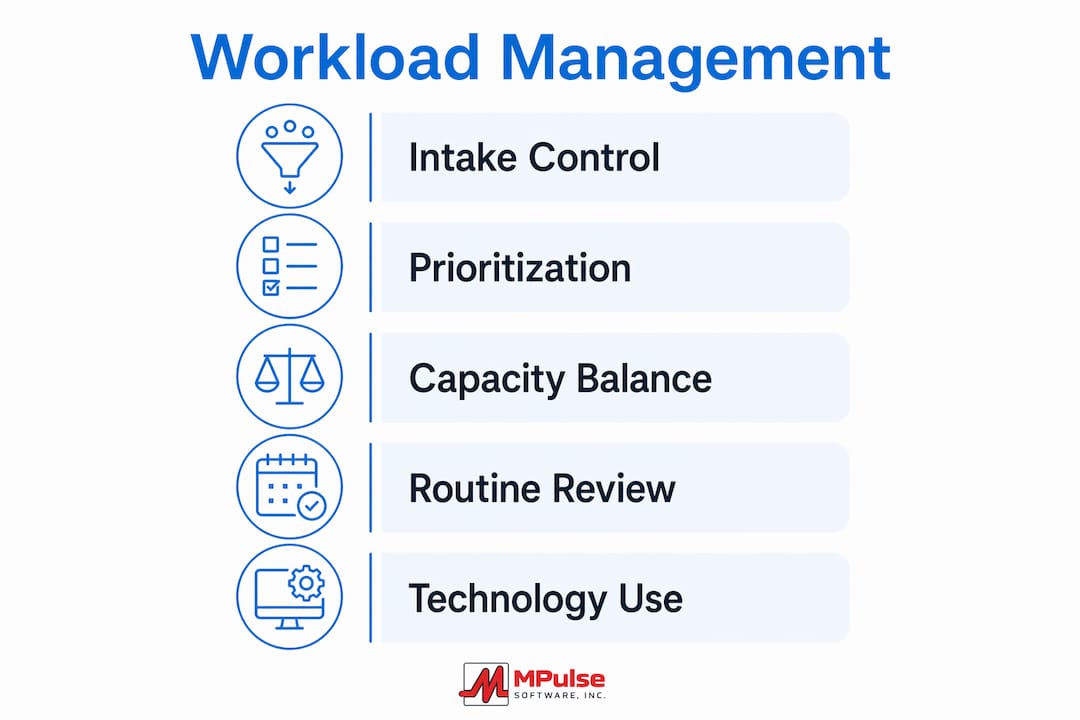
Capacity balancing means matching task volume to available hours. Capacity baselines and gap analysis prevent overloading specific individuals by accounting for meetings, training, and administrative time before assigning field work.
Performance reporting closes the loop. KPIs like PM compliance rate, mean time to repair (MTTR), and work order backlog size tell supervisors where bottlenecks are forming before they become crises.
- Single intake channel for all maintenance requests
- Three-tier prioritization framework (safety, production, comfort)
- Capacity baseline that accounts for non-field time
- Weekly KPI review covering MTTR, PM compliance, and backlog size
Pro Tip: Set a rule that no work order can be assigned without a priority code. This one habit forces prioritization at intake and prevents the “everything is urgent” problem that burns teams out.
How can maintenance supervisors balance workloads to prevent burnout?
Burnout in maintenance teams is a workload visibility problem before it is a staffing problem. Teams with real-time workload data can redistribute tasks proactively and maintain sustainable performance. The goal is to surface overload before a technician hits a wall, not after they call in sick.
A practical balancing process follows these steps:
- Assess true capacity. Calculate available hours per technician after subtracting meetings, safety training, and administrative tasks. A technician scheduled for 40 hours rarely has more than 30 hours of wrench time.
- Run weekly capacity reviews. Weekly team capacity assessments and monthly portfolio reviews let supervisors adjust workload in real time before missed deadlines accumulate.
- Reallocate proactively. When one technician is at 120% capacity and another is at 60%, reassign tasks immediately. Do not wait for the overloaded technician to ask for help.
- Maintain a stop list. Explicit pauses and deferrals on low-priority work are essential planning cycle elements. A stop list keeps the active work queue feasible and focused.
- Hold brief daily check-ins. A 10-minute morning huddle surfaces workload issues before they compound. Technicians who feel heard report problems earlier, which gives supervisors more time to respond.
Pro Tip: Ask each technician to rate their workload on a 1–5 scale at the end of every week. A simple number removes the social pressure to say “I’m fine” and gives you a trend line to act on.
Preventing staffing burnout also requires acknowledging that reactive, operational, project, and administrative tasks all consume capacity. Supervisors who only track field work hours consistently underestimate total load.
What technology tools enhance workload management effectiveness?
A Computerized Maintenance Management System (CMMS) is the single most effective technology investment for managing maintenance team workload. CMMS dashboards improve communication and provide data for repair prioritization and vendor coordination that manual spreadsheets cannot match.
Key CMMS capabilities for workload management
- Work order tracking: Every task has a status, owner, and due date. Supervisors see the full queue at a glance.
- Asset history: Technicians arrive at a job knowing the repair history, which cuts diagnostic time and reduces repeat visits.
- Preventive maintenance scheduling: Automated PM triggers replace manual calendar reminders and reduce missed service intervals.
- Vendor coordination: Approved vendor lists and purchase order workflows live inside the system, removing the back-and-forth that delays repairs.
Mobile access as a force multiplier
Mobile work orders allow technicians to receive, update, and close tasks from the field without returning to a desk. This eliminates the end-of-day data entry backlog that distorts real-time workload visibility. Supervisors see accurate status updates throughout the day, not a batch of updates at 4:30 p.m.
The benefits of mobile maintenance management extend beyond speed. When technicians log parts used and labor hours in real time, asset cost data becomes reliable enough to support capital planning decisions.
Dashboard reporting for leadership decisions
A well-configured CMMS dashboard shows open work orders by priority, technician utilization rates, and PM compliance percentages on a single screen. Maintenance managers use KPIs like PM compliance and MTTR to rebalance tasks and address operational bottlenecks before they affect uptime. That visibility is what separates reactive facilities from planned ones.
Entry-level field apps handle basic task assignment but lack asset history and automated scheduling. Enterprise platforms add compliance tracking, multi-site reporting, and integration with ERP systems. The right choice depends on team size, asset complexity, and compliance requirements.
How do supervisors implement workload management in practice?
Implementation is where good frameworks fail or succeed. The difference is whether supervisors build repeating routines or rely on one-time fixes.
Daily routines form the foundation. A morning dispatch protocol assigns the day’s work orders based on priority and technician availability. A brief end-of-day closeout confirms which tasks are complete, which are in progress, and which need to roll to the next day. Structured team routines like daily huddles and dispatch rules improve workload flow and minimize the compounding effect of small inefficiencies on overall facility performance.
Operating standards remove ambiguity. Define response time targets for each priority tier. Set communication expectations: how technicians report delays, how supervisors acknowledge urgent requests, and how vendors get notified. Transparency in workload data and decision rights empowers maintenance teams to self-regulate assignments and improve morale.
Review rhythms keep the system calibrated. Weekly KPI reviews catch emerging backlogs. Monthly priority checks align the work queue with facility goals. Quarterly vendor management meetings confirm that contractor capacity matches planned maintenance volumes. Contractor scheduling strategies that account for lead times and vendor availability prevent last-minute scrambles that spike technician workload.
Documented plans give new supervisors and technicians a reference point. A one-page work order intake policy, a priority matrix, and a capacity planning template are enough to onboard a new team member without losing consistency.
Pro Tip: Review your work order backlog every Monday morning. Any work order older than 30 days without a status update is either a priority problem or a communication gap. Both are fixable once you can see them.
Key takeaways
Effective maintenance staff workload management requires a single intake channel, a clear priority framework, real-time capacity data, and repeating review routines to keep teams productive and prevent burnout.
| Point | Details |
|---|---|
| Single intake channel | Route all requests through one system to prevent conflicting priorities and hidden workload. |
| Capacity baseline | Subtract meetings and admin time from scheduled hours before assigning field work. |
| Stop list discipline | Explicitly defer low-priority tasks to keep the active work queue feasible. |
| CMMS as the control center | Use work order tracking, asset history, and PM scheduling to manage workload in real time. |
| Weekly review rhythm | Run capacity and KPI reviews every week to catch overload before it causes burnout or missed deadlines. |
What I’ve learned about workload management the hard way
Most supervisors I have worked with treat workload management as a scheduling problem. It is not. It is a demand control problem. The schedule is only as good as the intake process feeding it.
The most common mistake I see is letting requests arrive through text messages, hallway conversations, and emails simultaneously. Each channel creates a parallel queue that the supervisor has to mentally merge. That cognitive load is invisible on any dashboard, but it is exhausting and it causes errors.
The second mistake is treating capacity as a fixed number. Real capacity fluctuates daily based on call-outs, emergency repairs, and vendor delays. Supervisors who build a 15–20% buffer into their weekly plans absorb those fluctuations without cascading delays.
Technology helps, but only after the process is clear. I have seen facilities deploy a CMMS and still struggle because they never defined who approves work orders or what “urgent” means. The tool surfaces the chaos rather than fixing it. Get the intake rules and priority definitions documented first, then configure the software around them.
The teams that manage workload well share one trait: they make the invisible visible. They post open work order counts, they share technician utilization rates, and they talk about capacity in team meetings. When everyone can see the load, everyone helps manage it.
— Mark
MPulse Software and maintenance workload management
Maintenance supervisors who want to move from reactive firefighting to planned operations need a system that connects intake, scheduling, and reporting in one place.

MPulse Software gives maintenance teams facility maintenance tools that cover the full workload management cycle: mobile work orders for real-time field updates, automated preventive maintenance scheduling, asset history tracking, and dashboard reporting that shows utilization and backlog at a glance. Over 3,500 customers trust MPulse Software to manage their maintenance operations, with documented results including up to 40% efficiency gains. Teams that need CMMS software features built for compliance-heavy environments will find the platform’s audit trails and reporting particularly useful. Evaluate whether MPulse Software fits your facility’s workload management needs at mpulsesoftware.com.
FAQ
How is maintenance staff workload typically managed?
Maintenance staff workload is managed through a single intake channel, a priority framework, capacity planning, and regular KPI reviews. A CMMS centralizes these functions and gives supervisors real-time visibility into task status and technician utilization.
What KPIs should maintenance supervisors track for workload balance?
PM compliance rate, mean time to repair (MTTR), and open work order backlog size are the three most useful KPIs. They identify overload, bottlenecks, and scheduling gaps before they affect facility performance.
How do you prevent maintenance technician burnout?
Burnout prevention requires tracking all task types, including reactive, planned, and administrative work, against true available capacity. Weekly workload reviews and a stop list for low-priority tasks keep individual loads sustainable.
What is a stop list in maintenance workload management?
A stop list is a formal record of tasks that have been deferred or de-scoped to keep the active work queue manageable. Explicit deferrals are a standard planning cycle element and prevent low-priority work from crowding out critical repairs.
When should a maintenance team upgrade to a CMMS?
A maintenance team should evaluate a CMMS when manual tracking causes missed PM intervals, work order backlogs exceed one week, or supervisors cannot answer basic questions about technician utilization without pulling multiple spreadsheets.