
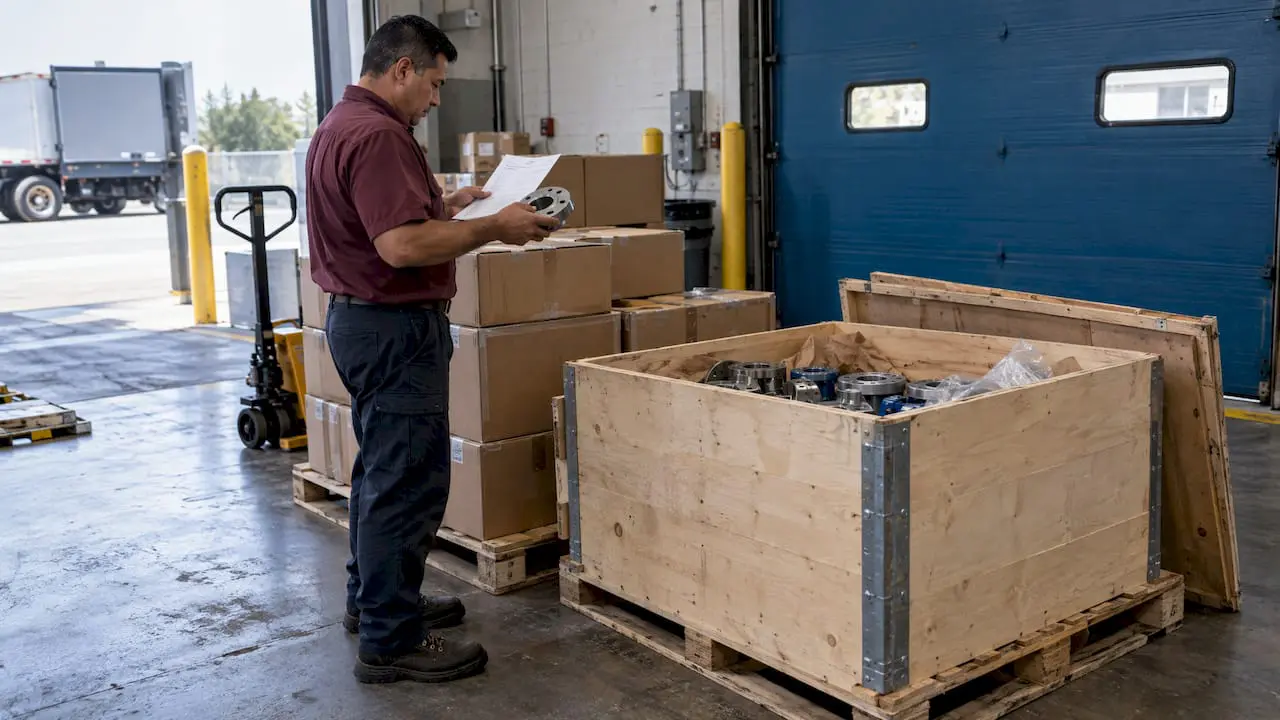
Purchase order receiving is the step where your team confirms that what arrived matches what you ordered, then records the result so inventory, purchasing and accounts payable all see the same facts. In practice, that means comparing the delivery with the PO and the supplier’s packing slip, counting and inspecting the items, entering a receipt for what actually showed up, and flagging anything short, wrong or damaged.
For a maintenance team, the stakes are practical. A part that is on the shelf but not recorded cannot be reserved for a work order. A part that is recorded but never arrived sends a technician to an empty bin. This guide walks through the process, the documentation, partial deliveries, three-way matching and barcode-based receiving.
TL;DR
- Receiving means checking delivered goods against the PO and supplier documents, then recording quantity, condition and any discrepancy in a receiving record.
- Receive only what arrived. A partial receipt updates stock for those items and leaves the PO open for the rest.
- Damaged or short shipments are noted immediately, with the carrier and the buyer told promptly.
- The receipt feeds inventory, costs and accounts payable, and it is the middle document in a three-way match of PO, receipt and invoice.
- Barcode scanning at the dock removes manual entry and keeps bin quantities accurate for maintenance work.
Table of Contents
- What purchase order receiving means
- The receiving process, step by step
- Partial deliveries, damage and discrepancies
- What happens after the PO is received
- Barcoded parts receiving
- How accurate receiving supports maintenance work
- Perspective
- Put receiving inside your CMMS
- FAQ
- Sources
What purchase order receiving means
A purchase order authorizes a purchase. Receiving is the proof that the purchase was fulfilled. The U.S. Postal Service’s supplying principles describe receiving as checking delivered goods against the packing slip, invoices, bill of lading and purchase requirements, then documenting the outcome in a receiving report. Visual inspection covers quantity, quality and condition, and any discrepancy gets recorded.
The same guidance says that when goods are in order and need no further inspection, they go on to the department that ordered them or into inventory. That is the core of the job: verify, record, route.
Receiving sits between two other functions. Purchasing needs to know whether an order is still open. Accounts payable needs evidence before it pays. If the receipt is late, wrong or missing, both teams work from guesses.
The receiving process, step by step
The sequence below works whether you receive at a central storeroom, a plant dock or a facility loading door.
- Pull up the open PO. Before the delivery is unloaded, or as soon as it arrives, find the PO by number, vendor or line. You are comparing the shipment with what you committed to buy, not just with the paperwork the driver hands you.
- Check the outside of the shipment. Look at cartons, pallets and containers for damage. If a container shows damage or pilferage, USPS guidance says to call it to the carrier representative’s attention right away and note it on the bill of lading. Do this before the driver leaves.
- Match documents. Compare the packing slip and bill of lading with the PO: vendor, item descriptions, part numbers, quantities and any special requirements.
- Count and inspect. Count each line physically. Confirm that the item is the one ordered and that its condition is acceptable. For critical spares, this may include a closer quality check against the specification.
- Record the receipt. Enter what was actually received, not what the packing slip claims. Enterprise systems describe this as matching items against the open purchase order and entering an item receipt that shows what was received and what has not yet arrived.
- Put away and label. Move parts to their bin, shelf or the requesting department, and make sure the location in the system matches the physical location.
- Hand off the paperwork. The receiving package, including the packing slip or invoice and the PO, goes to purchasing and accounts payable.
What the receiving record should contain
The California Department of General Services, in its state contracting guidance, says the receiving record should include the actual receipt date, the quantity received and any defects in condition. A practical checklist for a maintenance storeroom adds a few fields:
- PO number and line number
- Vendor and packing slip number
- Part number and description as received
- Quantity ordered, quantity received and quantity outstanding
- Condition notes and photos for any damage
- Receiver’s name and date
- Storage location
None of these fields is exotic. The value is in filling them in every time, so a question from AP six weeks later can be answered from the record rather than from memory.
Partial deliveries, damage and discrepancies
Most receiving problems fall into four types: short shipments, overshipments, wrong items and damaged goods. The handling rule is the same for all of them: record the facts as they are, explain the difference and keep the PO accurate.
Partial shipments
A supplier may ship part of an order now and the rest later. The state guidance above says to record actual quantities and defects, explain partial shipments and keep the contract or PO open until obligations are met. It also says to notify the buyer promptly about delivery problems, and about partial deliveries when the purchase terms do not say whether they are acceptable.
System behavior should follow the same logic. In an ERP, a team can receive an entire PO or only part of it, and a partial receipt updates inventory for the received items while leaving the order partially received for later completion. If your system closes the PO on the first receipt, backorders disappear from view and nobody chases them.
Damaged goods
If goods are damaged, USPS guidance says to hold them and follow loss-and-damage procedures, with the carrier informed and the bill of lading annotated. In a maintenance storeroom, that translates to:
- Do not put damaged parts into stock bins where a technician might pull them.
- Photograph the damage and the packaging.
- Note the exception on the delivery document before signing.
- Notify purchasing so a return, credit or replacement can be arranged.
Wrong items and overshipments
A wrong part number is a discrepancy even when the box looks right. Record it against the PO line, quarantine the item and let purchasing decide whether to return or accept it. For overshipments, record the true count and let the buyer decide before the extra quantity is absorbed into stock at a cost nobody approved.
| Situation | What to record | What to do next |
|---|---|---|
| Short shipment | Quantity actually received, quantity outstanding | Leave the PO line open and tell purchasing |
| Damaged goods | Condition, photos, note on the carrier document | Hold the items out of stock and start a claim |
| Wrong item | Part number received versus ordered | Quarantine and contact purchasing |
| Overshipment | True count received | Hold the excess until the buyer decides |
| Correct delivery | Date, quantity, location | Put away and pass documents to AP |
What happens after the PO is received
Receiving is not the end of the process. It triggers three downstream actions.
Inventory updates. Recording receipt details updates item quantities and costs in inventory management and updates general ledger accounts in an ERP environment. Even where the CMMS and the financial system are separate, the on-hand quantity in the CMMS should rise at the same moment the parts are physically put away.
Accounts payable reconciliation. Receiving documentation supports reconciliation against the purchase document and the supplier invoice, and gives purchasing evidence for follow-up or for closing the purchase.
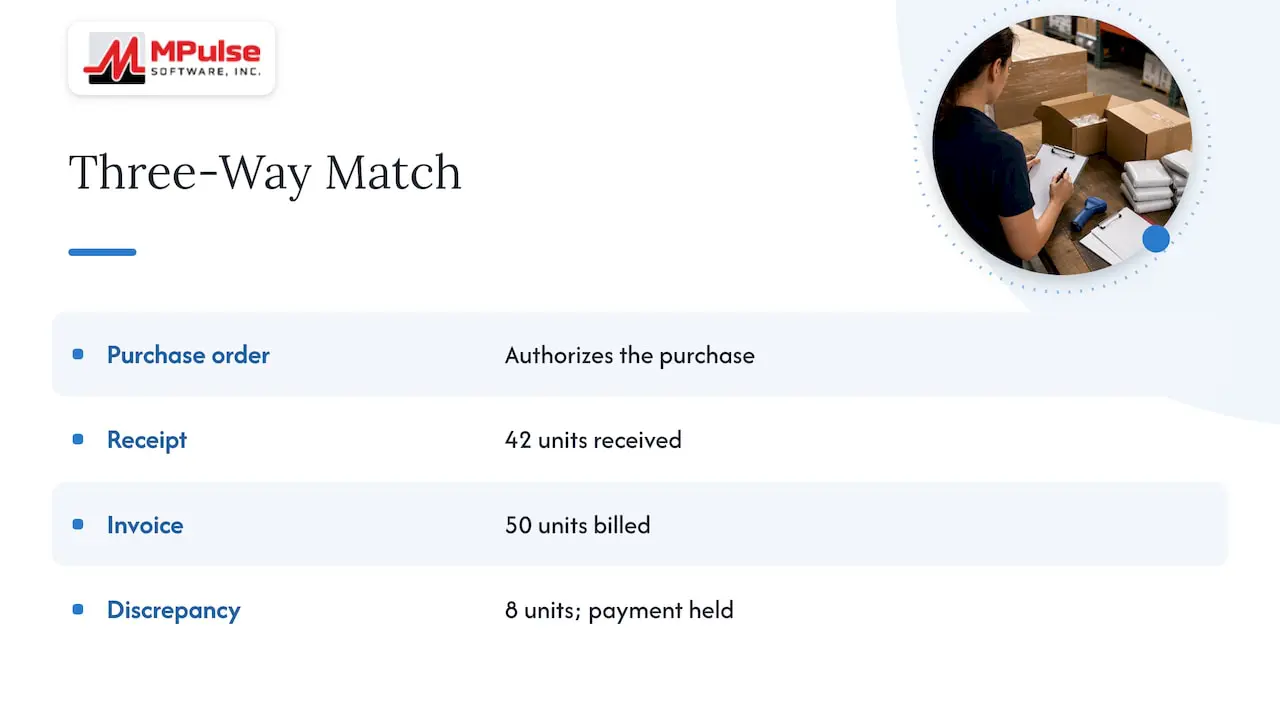
Three-way matching. This control links the PO, the receipt and the invoice. Three-way matching checks that the three agree and surfaces price variances, often called purchase price variance. If the invoice bills for 50 units and the receipt shows 42, AP holds payment until the difference is explained.
A late or inaccurate receipt is therefore not only a storeroom nuisance. It delays payment, creates disputes with suppliers and leaves purchasing unable to say which orders are truly closed. Teams that manage their procurement data carefully find that the receipt is the record that makes everything else in the purchasing history trustworthy.
Barcoded parts receiving
Manual receiving relies on someone reading a part number, typing it and typing a quantity. Each step is a chance for a transposed digit. Barcode scanning removes most of that.
A typical barcode-based receiving flow looks like this:
- The receiver opens the PO on a mobile device or workstation.
- The receiver scans the vendor’s packaging label, which identifies the part.
- The system matches the scan to the PO line and prompts for the quantity.
- The receiver confirms the quantity, and the system updates stock.
- A bin label is printed or scanned, and the part goes to its location.
A chemical inventory procedure published by the U.S. EPA describes this pattern in a CMMS context: at receiving, the clerk scans vendor packaging, the CMMS prints bin labels with QR codes and updates inventory. The same logic applies to spare parts, filters, belts, bearings and consumables.
What should a barcode process capture? At minimum:
- The part number or stock identifier
- The PO and line being received
- The quantity received
- The storage location (bin, shelf, room or site)
- Lot or serial numbers where the part is tracked that way
- Date and the user who scanned
Two practical tips help. First, use your own internal part number on the bin label rather than relying on vendor labels alone, since vendors change packaging. Second, scan at the point of put-away as well as at the dock, so the system knows both that the part arrived and where it went.
Our barcode scanning for CMMS feature page shows how scanning fits into inventory and work order tasks.
How accurate receiving supports maintenance work
A maintenance team feels receiving errors as downtime. A work order is scheduled, the technician goes to the bin and the part is not there, though the system says it is. Or the part is there but not recorded, so a duplicate order goes out.
Inventory audits show the same pattern in the public sector. The City of Houston controller’s audit recommended counts sufficient to complete a warehouse inventory at least monthly, so that quantity differences and missing transactions are identified more quickly and lengthy research is reduced. Receiving errors are among the transactions that count would catch.
Three habits keep receiving data healthy:
- Receive the same day. Parts that sit on the dock unrecorded are invisible to planners.
- Reconcile exceptions weekly. Review open PO lines that are overdue or partially received, and contact the vendor.
- Count a sample regularly. A small, focused count program finds drift before it grows. Our guide to ABC cycle counting for MRO shows how to pilot one on 50 to 200 SKUs. When counts reveal a difference, you can correct it by adjusting inventory quantities with a traceable record.
Receiving also connects to what happens before the PO exists. If requests arrive without structure, you order the wrong parts in the first place. A clear purchase requisition workflow gives purchasing and finance a clean starting point, and the receipt closes the loop at the other end. Where purchasing lives in an ERP, a six-step ERP purchase integration keeps the CMMS and the ERP aligned on what has been ordered and received.
Perspective
Receiving is where maintenance data is most often lost. A PO can be perfectly approved and a part perfectly ordered, and the storeroom still ends up with the wrong count because the delivery was put on a shelf and nobody entered it.
Our view is that receiving should happen inside the same system that runs your work orders and preventive maintenance. When parts, purchase requisitions, barcode scanning and inventory live together, a receipt immediately changes what a planner can promise. The calendar shows work that can be done, not work that is waiting on a part nobody can find.
MPulse is built around that idea: inventory for parts and supplies, purchase requisitions, barcode scanning and integration with ERP systems, with unlimited free requesters so the people who need parts can ask for them without adding license cost. For teams in compliance-heavy settings, the receipt also becomes part of the recordkeeping you show an auditor.
If you are choosing where to start, start with the dock. Standardize the receiving record, scan what arrives and keep partial orders visibly open. Everything downstream improves.
Mark
Put receiving inside your CMMS
If your team still receives parts on paper or in a spreadsheet, the next step is to connect receiving to the inventory that your technicians actually use. MPulse CMMS combines inventory, purchase requisitions, barcode scanning and work order management in one platform. Published pricing starts with the Professional plan at $29 per month per user and the Advanced plan at $79 per month per user, on our pricing page.
If you need to connect receiving to an ERP or another system, the DataLink Integration Adapter and other add-ons are described on our add-on page, and our implementation and training services can help your team set up the process. You can also see how the inventory features fit together in the datasheet.
FAQ
What does “purchase order received” mean?
It means goods or services on a PO have been delivered and recorded in the system. It can describe a full receipt, where every line is complete, or a partial one, where some quantity is still outstanding. Either way, the record tells purchasing and accounts payable what has arrived.
What do I do when I receive a purchase order?
If you are the buyer receiving goods, find the open PO, check the delivery against it and the packing slip, count and inspect the items, and record what actually arrived. Note any damage or shortage on the delivery document and tell purchasing. If you are a supplier receiving a customer’s PO, confirm that you can meet the quantities, price and delivery date before accepting it.
What happens after a PO is received?
Stock quantities and costs are updated, and the receipt becomes evidence for accounts payable. AP compares the PO, the receipt and the supplier invoice, often through three-way matching, before it pays. If everything is delivered and invoiced, the PO is closed. If not, it stays open.
Can I receive only part of a purchase order?
Yes. Record the quantities that arrived, and the system should update stock for those items while leaving the rest of the order open. Tell the buyer about the partial delivery, particularly when the PO terms do not say whether partial shipments are acceptable.
Why scan barcodes when receiving parts?
Scanning identifies the part and ties it to the PO line without retyping, which reduces keying errors and speeds up put-away. When the scan also updates inventory and bin labels, the storeroom count matches the shelf sooner.
Sources
- USPS Supplying Principles and Practices: 4-3.2 Receiving Process
- California Department of General Services: receiving guidance
- NetSuite Applications Suite: Receiving Orders
- NetSuite Applications Suite: Receiving a Purchase Order
- Oracle: Enter Receipts
- iDempiere: Material Receipt and Goods Matching
- U.S. EPA: chemical inventory procedure
- City of Houston Controller: audit report
- Procurement data: what it includes and how to use it