SMS maintenance alerts are short, automated text messages that tell the right people about planned work, equipment faults, outages and restorations, and they work because texts get read fast. At MPulse, we treat them as part of the maintenance workflow, not a marketing channel, and we follow the written-procedure and testing guidance in CISA’s alerting essentials. Compliance and acknowledgement make them dependable.
TL;DR:
- Carrier delivery is best effort: a delivered status confirms network handling, not human receipt, so monitor failures and delays and require acknowledgements.
- U.S. business senders need documented, explicit consent, A2P 10DLC campaign registration, confirmation messages, and clear STOP and HELP instructions, including for staff.
- Choose an API when missed alerts carry high costs or require acknowledgement and escalation logic; an email gateway suits a quick launch with little development.
- Limit texts to triggers requiring human action, deduplicate faults, route messages to the technician currently on duty, and escalate only when nobody acknowledges.
- Keep texts to 10 segments or fewer where possible, include the ticket ID, and switch to voice or email when details or diagrams are needed.
Table of Contents
- How do SMS maintenance alerts travel from an event to a phone?
- Which maintenance events should you text about first?
- Which integration path fits your stack: API, email-to-SMS or a connector?
- What do U.S. senders need to do to stay compliant?
- How do you prevent alert fatigue and make sure someone acts?
- What should an alert say, and how long should it be?
- How do you launch and keep improving an SMS alert program?
- Why we tie SMS alerts to the work order
- How MPulse CMMS supports reliable SMS maintenance alerts
- FAQ
- Sources
How do SMS maintenance alerts travel from an event to a phone?
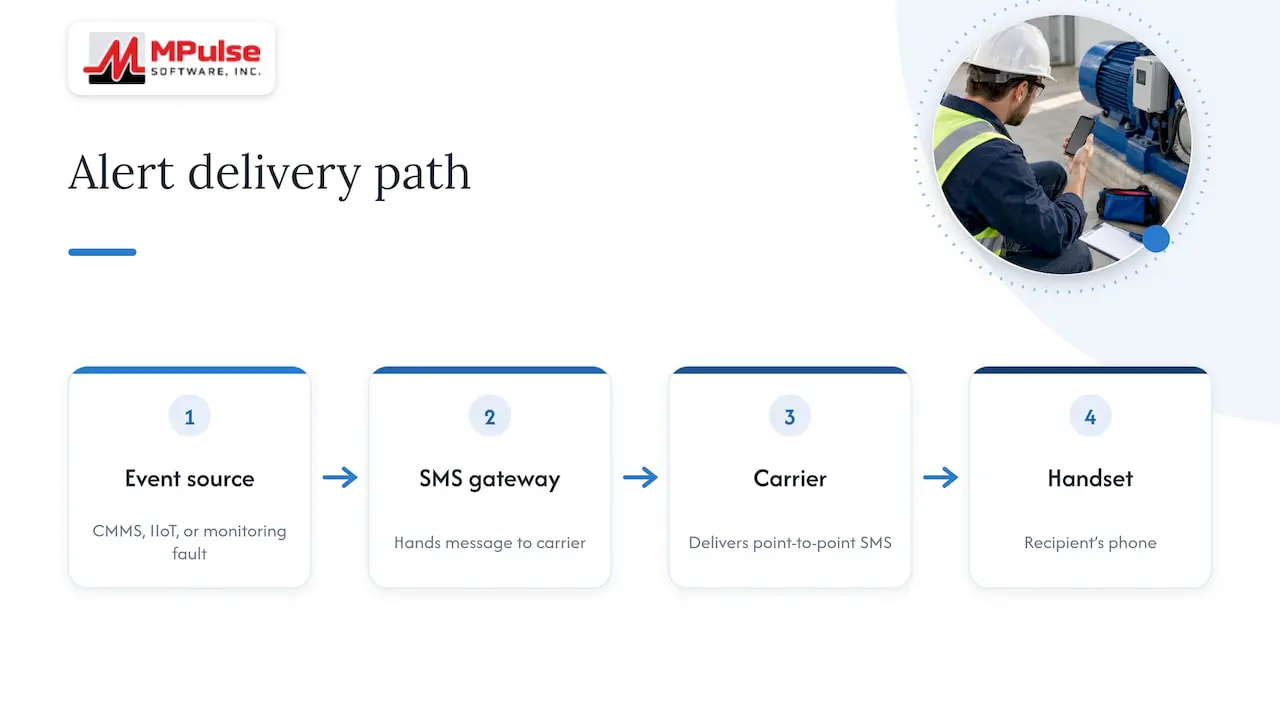
Every alert starts with an event source: a CMMS trigger such as an overdue work order, an IIoT sensor crossing a threshold, or a monitoring tool raising a fault. That event goes to an SMS gateway, which hands the message to a carrier, which delivers it to the recipient’s handset.
This is point-to-point SMS, which is different from cell-broadcast systems such as Wireless Emergency Alerts. Those are run by public authorities and are not available for routine maintenance messaging.
SMS is a best-effort service. CISA’s guidance states that receipt is not guaranteed, so a “delivered” status from the carrier means the message reached the network path, not that a person read it. Plan to watch status callbacks for failures and delays, and pair them with a reply or acknowledgement step.
Which maintenance events should you text about first?
Start with the events where minutes matter or where a missed message costs real money. These are the use cases we see most often:
- Planned maintenance windows: advance notice and a start and end confirmation for occupants, customers or operations staff.
- Unplanned outages: an immediate fault alert to the on-call technician, with a follow-up status text to affected users.
- Service restoration: a short “all clear” so people know when to resume work.
- Equipment fault notifications: asset-level alerts from sensors or work order rules, aimed at technicians and supervisors.
- Predictive and condition-based alerts: a text when a reading drifts toward a limit, so the team can schedule work before failure.
- Task assignments and reminders: a nudge when a preventive maintenance task is due or unacknowledged.
SMS beats email when the recipient is away from a desk, on a plant floor or on call overnight. It beats a phone call when you need a written record and the message is short.
Which integration path fits your stack: API, email-to-SMS or a connector?
An SMS API gives you the most control. You decide the content, the recipients and the timing programmatically, and you receive status callbacks that show what happened to each message. It takes development effort, but it is the right base for acknowledgement and escalation logic.
Email-to-SMS is the low-effort route. Many monitoring tools can already send email, and a gateway converts that email into a text. You can be live quickly, though you get less control over formatting and delivery feedback.
Between the two sit prebuilt connectors and IIoT or SCADA adapters, which map sensor or system events into messages without custom code. If you already run remote monitoring, services like remote security monitoring can also act as an alert source feeding the same workflow.
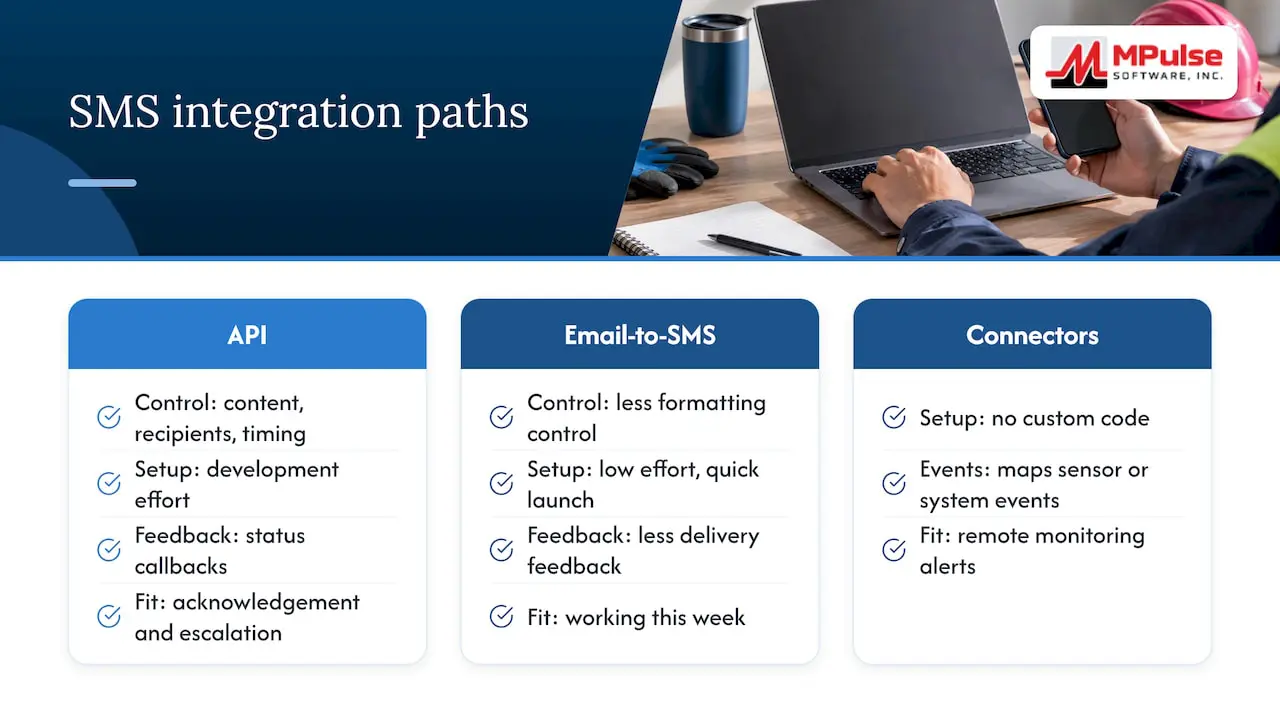
Pick based on timeline and risk. If a missed alert is expensive, invest in the API route. If you need something working this week, start with email-to-SMS and plan the upgrade.
What do U.S. senders need to do to stay compliant?
Business texting in the U.S. runs through carrier rules. Industry guidance from Dialpad says business messaging requires explicit opt-in, a confirmation message with program details, clear STOP and HELP instructions, and documented opt-in records to avoid carrier enforcement. Twilio’s help center covers the technical side of A2P 10DLC registration.
Without documented consent and a registered campaign, carriers can filter or block your maintenance texts.
Your working checklist:
- Register your A2P 10DLC brand and campaign, with sample messages that match what you actually send.
- Capture explicit opt-in from every recipient and keep the record.
- Send an opt-in confirmation naming the program and a support contact.
- Include STOP and HELP instructions, and honor opt-outs immediately.
- Keep messages short and avoid restricted content.
Staff who receive internal alerts still count as recipients, so treat their consent the same way. For broader recordkeeping, our post on CMMS compliance and audit trails shows how to document the paper trail.
How do you prevent alert fatigue and make sure someone acts?
Too many texts train people to ignore all of them. CISA’s Ten Keys to Improving AWNs recommends written procedures, clear triggers, redundant decision trees, and monitoring and correction to reduce delayed or false alerts. Apply the same discipline to maintenance:
- Define clear triggers. Only conditions that need human action should produce a text.
- Deduplicate and flood-control. One fault should produce a single alert, not a flood of duplicates.
- Route by schedule. Send to whoever is on call now, not to a shared inbox.
- Escalate conditionally. If nobody replies within a set window, move to the next person.
- Capture acknowledgement. Ask for a short reply code and log it against the work order.
Pro Tip: Make the acknowledgement reply a single word, such as “OK”, so a technician can confirm with one thumb tap and your system can stop escalating.
What should an alert say, and how long should it be?
A useful alert quickly identifies the asset, the problem, the action needed, the timing, and who to contact or which ticket to reference. For example: “Pump, production line: low pressure fault. Check the seal today. Refer to the relevant ticket. Reply OK to accept.”
- Keep messages to 10 segments or fewer where possible, and avoid special characters that force longer encoding.
- Use a single trusted domain for any link, so carriers and recipients recognize it.
- Include the ticket ID so replies tie back to the work order.
- Move to voice or email when a situation needs detail, a diagram or a decision, and sequence updates: alert, acknowledgement, status, restoration.
How do you launch and keep improving an SMS alert program?
Work through this order, whether you are launching or auditing:
- Register your A2P 10DLC campaign, document opt-in flows and prepare message samples.
- List triggers, recipients, on-call schedules and templates.
- Test end to end: trigger, delivery, acknowledgement and escalation, in a staging environment first.
- Run live drills with a small group and confirm that failures surface.
- Monitor delivery rates, opt-outs and unacknowledged alerts.
- Review thresholds and templates on a regular schedule, and correct what the data shows. Our guide on how maintenance alerts prevent breakdowns is a good companion for this review.
Why we tie SMS alerts to the work order
A text that lives outside your maintenance system is just noise with a timestamp. When the alert comes from the work order and the reply writes back to it, you get a record of who knew, when, and what they did. That is what makes audits and root-cause reviews easier.
The common mistakes are sending to shared numbers, skipping the acknowledgement step, and alerting on everything. The fixes are cheap: route by schedule, require a reply, and cut triggers that never lead to action. Before you go live, test acknowledgement and escalation in staging, because that is where gaps show up.
— Mark
How MPulse CMMS supports reliable SMS maintenance alerts
Our CMMS helps teams manage maintenance tasks. Here is what supports that workflow:
- Condition-based maintenance triggers that fire on asset readings.
- Calendar scheduling that keeps on-call and preventive tasks in one view.
- IIoT and real-time monitoring for sensor-driven events.
- Integration options through our DataLink adapter and add-ons.
- Work order records for managing maintenance tasks.
Ready to evaluate? Start a free trial, review our implementation services for help with deployment, or check pricing, where Professional is listed at 29 $ per month per user.
FAQ
Can you give me some examples of SMS notifications?
Typical maintenance examples include a planned downtime notice, an equipment fault alert to an on-call technician, and a restoration confirmation. Each one is short and names the asset, the issue and the next step.
How do I turn on SMS alerts?
Enable text notifications in the system that sends them, add your mobile number, and complete the opt-in confirmation. Then reply to the confirmation message so your consent is recorded, as Dialpad’s compliance guidance describes.
How do I get SMS alerts for maintenance events?
Connect your event source, such as a CMMS, monitoring tool or sensor platform, to an SMS gateway through an API or email-to-SMS. Then add recipients, templates and a registered campaign before sending.
Why did my phone just send an emergency alert?
Emergency alerts on phones usually come from public authorities through systems like IPAWS and Wireless Emergency Alerts, as CISA explains. They are separate from business text messages and are not sent by maintenance systems.
Sources
- Essentials of Alerts, Warnings, & Notifications, April 2020
- SMS Messaging Compliance: Principles & Best Practices – Dialpad
- Twilio Help Center