
The most reliable contractor compliance documentation workflow runs on four fixed elements: a prioritized document checklist, one accountable owner per document set, automated expiration monitoring, and version control that links every record to its approval history. Skip any one of these and the system degrades into the same spreadsheet chaos it was supposed to replace.
If you manage a construction site or a facilities portfolio with rotating trades, you already know the pain point. A certificate of insurance expires mid-project, nobody catches it for three weeks, and now you’re explaining to legal why an uninsured subcontractor was on-site during a fall. The fix isn’t more paperwork. It’s a workflow that moves documentation through four repeatable stages:
- Intake — collect and screen every required document before a contractor mobilizes.
- Verification — a named role checks each document against defined criteria and records the decision.
- Monitoring and renewal — automated tracking flags expirations before they become gaps.
- Offboarding — closeout documentation and evidence retention happen before final payment, not after.
Pro Tip: Before you build or buy anything, spend one afternoon centralizing whatever compliance records already exist, even if that means pulling them out of five different inboxes. You cannot automate a process you cannot see.
Start this week by assigning a single owner to your compliance documentation process and consolidating your active contractor files into one location, even a shared drive with clear folder naming.
Key Takeaways
A repeatable contractor compliance documentation workflow works because it pairs a prioritized document checklist with a single accountable owner, automated monitoring, and version-controlled evidence trails.
| Point | Details |
|---|---|
| Assign ownership first | Name one accountable owner per document set before automating anything. |
| Automate renewal reminders | Use a 30/14/7/1-day cadence to catch lapses before they become project holds. |
| Tie gates to consequences | Link compliance status to work-order dispatch or pay-application release, not just alerts. |
| Retain evidence by risk period | Match retention length to statute-of-limitations and lien-filing deadlines, not convenience. |
| Track KPIs quarterly | Monitor lapsed-policy rate, verification time, payment holds, and audit findings over time. |
| MPulse CMMS as the integration point | Links contractor profiles, personnel qualifications, and reminders directly to work orders and dispatch. |
Table of Contents
- Essential Contractor Compliance Documents to Track
- What a Compliance Workflow System Needs to Do
- How Do You Run a Contractor Compliance Documentation Workflow?
- Who Owns Compliance Documentation on a Project?
- How Long Should You Retain Compliance Records?
- Preparing for an Audit: What Auditors Actually Ask For
- Moving From Spreadsheets to an Integrated System
- Handling Non-Compliance Events and Remediation
- Legal and Regulatory Considerations You Can’t Skip
- Measuring Whether the Workflow Actually Works
- Getting Document Verification Right the First Time
- Training Your Team to Run This Workflow Well
- How MPulse CMMS Supports a Contractor Compliance Documentation Workflow
- Sources
- FAQ
Essential Contractor Compliance Documents to Track
Every audit finding traces back to one of a small set of documents. Prioritize these, in roughly this order of risk exposure:
- Certificate of Insurance (COI) — the baseline proof of general liability, workers’ compensation, auto, and umbrella coverage.
- Insurance endorsements — additional-insured and waiver-of-subrogation endorsements that actually extend coverage to your project, not just the COI summary page.
- Additional insured status — confirmation that your organization is named, with the correct legal entity and project scope.
- W-9 forms — required for 1099 reporting and often the first document finance will ask for before releasing payment.
- Lien waivers — both conditional (tied to a specific payment) and final unconditional waivers at project closeout.
- Prequalification forms and master service agreements (MSAs) — the contractual backbone that defines scope, rates, and flow-down obligations.
- Safety plans and OSHA documentation — site-specific safety plans, training logs, and incident history.
- Bonding, licenses, and certifications — state contractor licenses, trade certifications, and performance/payment bonds where required.
- Personnel qualifications — individual worker certifications for specialized trades (electrical, confined space, crane operation).
- Warranties — workmanship and materials warranties tied to specific scopes of work, with start dates anchored to substantial completion, not contract signing.
For each document, capture the same core metadata fields: document type, issuing party, policy or license number, effective and expiration dates, endorsement details, state-specific requirements, project scope limits, and the signer’s name and title. Missing even one of these fields is what turns a “verified” document into an audit finding later.
Lapsed insurance coverage during an active project is one of the most common causes of compliance failure, and it happens for a mundane reason: nobody was watching the calendar. COIPulse’s subcontractor compliance playbook identifies automated renewal reminders before expiry as the most effective control against this failure mode.
The most common verification pitfalls aren’t exotic. They’re things like an additional-insured endorsement that names the wrong entity, a COI whose project description doesn’t match the actual job site, or a lien waiver signed as “unconditional” when the payment it references hasn’t actually cleared yet.
Pro Tip: Build a one-page reference card listing the exact endorsement form numbers (CG 20 10, CG 20 37, and similar) your insurance requirements specify. Verification staff who don’t know these numbers by sight will approve a COI that technically doesn’t cover you.
What a Compliance Workflow System Needs to Do
A spreadsheet can list documents. It cannot enforce a workflow. Before you evaluate software or build internal process documentation, define the capabilities that separate a real system from a glorified checklist:
- Centralized contractor profiles — one record per contractor holding every document, historical version, and renewal date, instead of files scattered across project folders.
- Versioned document library — every upload creates a new version with a timestamp and uploader identity, never overwriting the prior file.
- Automated expiration alerts — reminders that fire on a schedule, not when someone remembers to check.
- Role-based access and approval workflows — verification staff see what they need to verify; project managers see status, not underlying policy numbers.
- Audit-ready export — one-click generation of an evidence package rather than a scramble through email threads.
- OCIP/CCIP enrollment tracking — owner-controlled and contractor-controlled insurance program enrollment status, which changes the entire compliance calculus for a given trade.
- Change-order re-verification — a trigger that forces a fresh compliance check whenever scope or contract value changes materially.
- Vendor self-service portals — contractors upload their own renewals instead of your team chasing them by phone.
A compliance document intelligence platform that auto-classifies uploads and flags gaps against specific regulatory citations, as described in FileFlo’s subcontractor compliance checklist, illustrates how far automation has moved beyond simple file storage. The category now includes systems that can generate an audit binder pre-organized around an inspector’s own checklist structure.
| Capability tier | Examples | Risk impact if missing |
|---|---|---|
| Must-have | Centralized profiles, expiration alerts, role-based access | Direct exposure to lapsed coverage and uninsured site access |
| High-value | Change-order re-verification, audit export, vendor self-service | Slower recovery from gaps; heavier manual audit prep |
| Nice-to-have | OCIP/CCIP tracking, advanced AI document classification | Efficiency gains; lower priority for smaller portfolios |
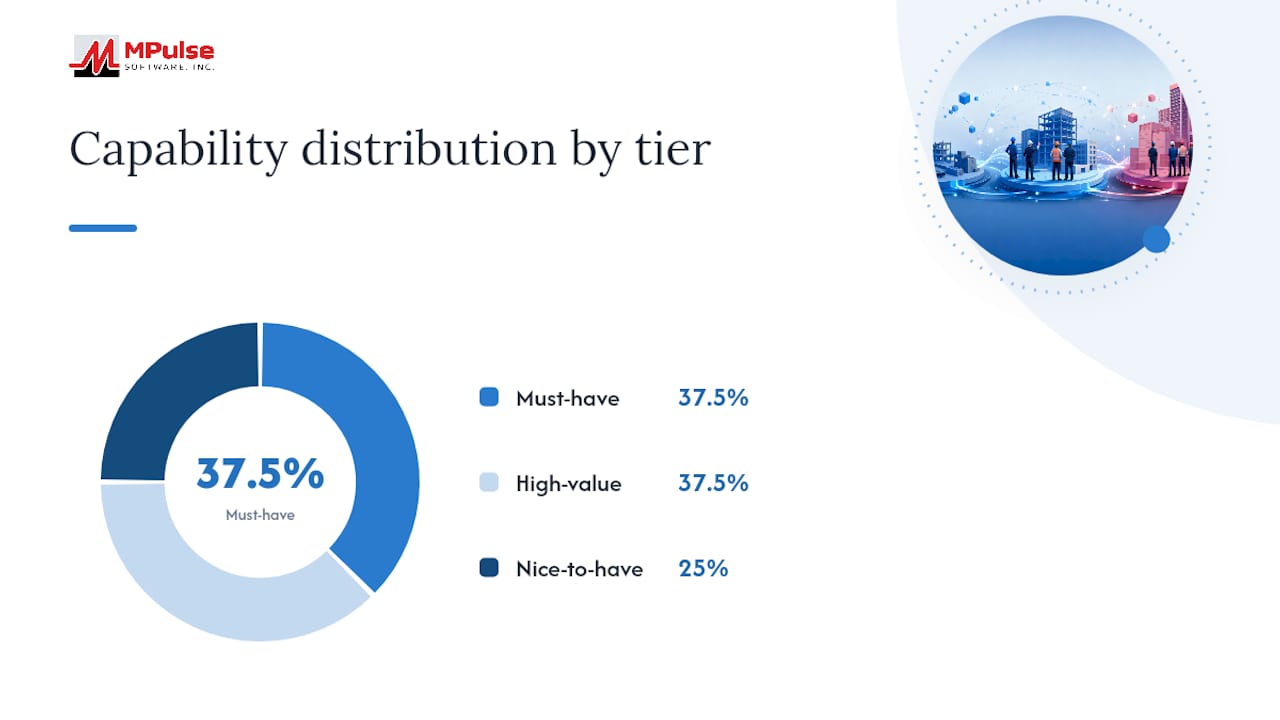
Integration matters as much as the standalone feature list. A compliance record that lives apart from your maintenance and procurement systems creates a second source of truth, and second sources of truth are where gaps hide. Linking contractor compliance status to work orders and asset records means a contractor whose insurance has lapsed can be automatically blocked from new dispatch, not just flagged in a report nobody reads until month-end.
How Do You Run a Contractor Compliance Documentation Workflow?
The workflow itself has five distinct stages, and treating them as genuinely separate steps, each with its own owner and exit criteria, is what keeps documentation from decaying between projects.
- Intake. Define the required document set per trade before any contractor is invited to bid. A gating rule should block mobilization until the minimum document set (COI, endorsements, W-9, license verification, safety plan) clears intake. This is your pre-mobilization checklist, and it should never be optional for the sake of schedule pressure.
- Verification. A named role, typically a compliance coordinator or project administrator, checks each document against defined criteria: correct entity names, adequate coverage limits, matching project scope, valid signatures. The decision gets recorded as accept, conditional accept (with a remediation deadline), or reject, along with the reviewer’s name and the date.
- Monitoring and renewal. Automated reminders fire on a fixed cadence, commonly 30, 14, 7, and 1 day before expiration. Mid-project policy lapses get flagged for immediate remediation, and any contract change order above a defined dollar threshold triggers a re-verification cycle rather than assuming the original documentation still applies.
- Offboarding and closeout. Final unconditional lien waivers, closeout documentation aligned to AIA G706 requirements, and a complete evidence package get assembled before releasing final payment. Retention obligations begin at this point, not when the file gets archived.
| Role | Primary responsibility | Typical timing |
|---|---|---|
| Compliance coordinator | Verifies documents at intake and renewal | Within 48 hours of submission |
| Project manager | Enforces mobilization gates on-site | Before first day of work |
| Procurement/finance | Ties compliance status to pay-application release | Each billing cycle |
| Safety lead | Reviews site-specific safety plans and training logs | Before mobilization, then quarterly |
Pro Tip: Tie your compliance gate directly to pay-application approval. Project managers who ignore documentation deadlines rarely ignore a blocked invoice.
Digital work orders provide a practical enforcement point here: a work-order dispatch system that checks compliance status before releasing a job to a contractor turns your documentation workflow from an advisory process into an operational control.
Who Owns Compliance Documentation on a Project?
Ownership gaps, not document gaps, cause most compliance failures. When three people assume someone else is watching a renewal date, nobody watches it.
Assign clear responsibility by function:
- Compliance owner — accountable for the overall document set, escalation triggers, and audit readiness across all active contractors.
- Project manager — enforces on-site gating and flags scope changes that require re-verification.
- Safety lead — owns safety plans, training records, and incident documentation specific to site conditions.
- Procurement — ties compliance status to purchase orders and vendor onboarding.
- Finance — links compliance verification to pay-application release, refusing payment against unverified or lapsed documentation.
- Legal — reviews contract flow-down language, confirming subcontract requirements trace back explicitly to the owner’s prime contract clause. This traceability is what protects you against lien claims and retention disputes, according to COIPulse’s playbook.
Reasonable service-level targets look like this:
- COI verification completed within 48 hours of submission.
- First reminder for a missing or deficient document sent within 24 hours of a failed verification.
- Escalation to the project manager if no response arrives within 7 days.
- Project-level hold triggered if the deficiency remains unresolved after 14 days.
- Executive escalation for any deficiency that threatens an active mobilization date.
Pro Tip: Build your escalation logic as a deficiency campaign, not a single email. Notice, then reminder, then project hold, then executive escalation, each with its own timestamp, creates the audit trail that proves you acted, not just that you noticed.
How Long Should You Retain Compliance Records?
Retention periods should map to legal exposure windows, not convenience. Insurance-related records generally need to survive the applicable statute-of-limitations period for construction defect or injury claims, which varies by state and by claim type. Lien-waiver history should be retained at least through the state’s lien-filing deadline plus any dispute period. Personnel qualification records tied to safety-sensitive work often need to be kept for the duration of the worker’s engagement plus several years beyond project completion.
| Document type | Suggested minimum retention | Rationale |
|---|---|---|
| Insurance certificates and endorsements | Statute-of-limitations period for the project’s state | Covers potential injury or defect claims filed years later |
| Lien waivers (conditional and final) | Through lien-filing deadline plus dispute window | Protects against retroactive lien claims |
| Personnel qualification records | Duration of engagement plus several years | Supports defense in safety-related claims |
| Contract and prequalification files | Full contract term plus retention period matching insurance records | Establishes flow-down traceability |
Version control discipline matters as much as retention length. “final_v2.pdf” tells an auditor nothing. Every document needs a unique identifier, a change log showing who modified what and when, an approver signature, and a timestamp. According to MetricStream’s compliance documentation guidance, centralization combined with disciplined version control and periodic internal audits is what separates organizations that pass external audits smoothly from those that scramble.
Security controls round out the picture: role-based access limiting who can view sensitive policy details, encryption at rest and in transit, regular backups with a tested disaster-recovery plan, and tamper-evident logs that record every access and edit. A tamper-evident log is what lets you prove, months later, that a document wasn’t altered after approval, which is precisely the kind of evidence an auditor or opposing counsel will ask for first.
Preparing for an Audit: What Auditors Actually Ask For
An audit-ready evidence package has five components: a control statement describing what the control is supposed to accomplish, the procedure describing how it’s executed, sample records proving it happened, the approval chain showing who signed off, and system logs demonstrating the process ran as described. Miss any one of these five, and you have an audit finding even if the underlying compliance was actually fine.
River’s guide to regulatory compliance documents frames this as a “who, what, when, how” test: does the evidence identify who performed the action, what was checked, when it happened, and how the decision was reached? A verification record that just says “approved” fails this test. A record that says “verified by J. Torres on March 4, 2026, confirming $2M general liability coverage matches contract requirement, endorsement CG 20 10 attached” passes it.
Useful export formats to have ready before an audit request arrives:
- An AIA G706-aligned closeout package showing final lien waivers and payment reconciliation.
- An insurance coverage timeline showing continuous coverage across the full project duration, with no gaps.
- A renewal audit log showing every reminder sent, every response received, and every escalation triggered.
An audit-ready evidence chain links the control statement, the procedure, the record, and the supporting artifacts, whether that’s a system log or a signed attestation, by time, so an auditor can see exactly who approved what and when without chasing down a separate explanation.
Auditors tend to ask the same handful of questions regardless of industry: Was this contractor’s coverage active on the specific date work occurred? Who approved this lien waiver, and what documentation supported that approval? Can you show proof that required safety training was completed before this worker was on-site? If your system can answer those three questions in under five minutes, you’re in genuinely good shape. If it takes an afternoon of email archaeology, you have a documentation workflow problem, not an audit problem.
Moving From Spreadsheets to an Integrated System
The migration from manual tracking to an integrated compliance system works best as a phased rollout, not a single cutover weekend that inevitably breaks something mid-project.
- Assess the current state. Inventory every document type currently tracked, where it lives, and who’s supposed to be watching it. This step alone usually surfaces gaps nobody knew existed.
- Prioritize high-risk controls. Insurance lapses and license expirations carry the most exposure, so migrate those first rather than trying to digitize everything simultaneously.
- Build the minimum viable dataset. MakeAutomation’s guidance on compliance documentation recommends starting with a minimum field set, document type, issuing party, policy numbers, effective and expiry dates, endorsements, and signer identity, so you can pilot automation without waiting for perfect metadata across every historical record.
- Run pilot projects. Choose two or three active projects to test the new workflow before rolling it out portfolio-wide.
- Full rollout. Expand to all active contractors once the pilot has proven reminder cadence, escalation logic, and reporting all work as intended.
Your migration checklist should include: assigning a single data owner responsible for cleanup, defining rules for handling incomplete legacy records, mapping every spreadsheet column to a system field before importing, setting up contractor self-service portals so vendors maintain their own renewal submissions, and configuring automated reminder cadences before go-live, not after the first lapse happens.
Pro Tip: Classify your existing documents by function before you migrate anything. Grouping by “insurance evidence,” “contractual evidence,” and “safety evidence” and mapping each group to its regulatory requirement is more useful than simply counting how many PDFs you have.
Track these KPIs from day one of the pilot: number of lapsed policies caught before expiration versus after, average time to verify a submitted document, reduction in payment holds tied to compliance deficiencies, and the trend in audit findings project over project. A pilot that cuts verification time in half but doesn’t reduce lapsed policies hasn’t actually solved your core risk problem.
Handling Non-Compliance Events and Remediation
When a contractor’s documentation lapses mid-project, the response needs to be immediate and procedural, not improvised. The first step is an automatic hold on new work orders for that contractor until the gap is resolved. This isn’t punitive. It’s the same logic as blocking a payment against an unverified invoice: you’re limiting exposure while the issue gets fixed.

A structured deficiency campaign works better than a single stern email. Start with a notice identifying exactly what’s missing or expired, followed by a reminder at a defined interval if there’s no response, then a formal project hold if the deficiency persists, and finally executive escalation if the hold threatens schedule or safety. Document every step, because the campaign itself becomes evidence that your organization acted diligently if a claim or audit ever questions why a contractor was allowed to continue working.
Remediation timelines should be proportional to risk. A missing W-9 can wait a few days without operational impact. A lapsed general liability policy on an active site should trigger same-day action. Build these differentiated timelines into your workflow rather than treating every deficiency with the same 30-day grace period.
Legal and Regulatory Considerations You Can’t Skip
Contractor compliance documentation exists partly to satisfy contractual obligations and partly to satisfy regulatory ones, and the two overlap more than most managers assume. OSHA recordkeeping and safety documentation requirements sit on top of whatever your own contract specifies, and enforcement risk has real financial teeth. OSHA’s 2026 annual adjustments to civil penalties raised the maximum penalty exposure for serious and willful violations, which makes the cost of a documentation gap concrete rather than theoretical.
Contract flow-down is the other legal thread that ties everything together. Every requirement you impose on a subcontractor should trace back explicitly to a clause in your own prime contract with the project owner. Without that traceability, you’re exposed if a dispute arises over lien rights, retention amounts, or scope, because you can’t demonstrate the requirement was contractually justified rather than arbitrary. A project management contract template that includes explicit flow-down language is a reasonable starting point if your current contracts leave this connection implicit.
This article offers general operational guidance, not legal advice. State licensing rules, lien statutes, and retention requirements vary significantly, and you should confirm current thresholds and deadlines with your legal counsel or your state’s contractor licensing board before finalizing your own policy.
Measuring Whether the Workflow Actually Works
A documentation workflow that nobody measures tends to quietly decay back into ad hoc tracking within a year. Four metrics tell you whether it’s holding:
- Lapsed-policy rate — the percentage of active contractors with a coverage gap at any point during the project, trending toward zero.
- Time to verify — the average interval between document submission and a recorded verification decision, targeting well under the 48-hour benchmark referenced earlier.
- Payment holds tied to compliance — the number of pay applications delayed specifically because of unresolved documentation, which should decline as intake gating improves.
- Audit findings per cycle — the count of documentation-related findings in each internal or external audit, tracked over time rather than in isolation.
Review these quarterly, not annually. A quarterly cadence catches a degrading trend, like a slow creep in verification time, before it becomes a full-blown audit finding.
Getting Document Verification Right the First Time
Verification quality at intake determines how much remediation work you’ll do later, so it’s worth being deliberate rather than fast. A useful practice is a two-pass check: the first pass confirms the document exists and looks complete (correct entity name, valid dates, signature present), and the second pass confirms the substance is actually adequate (coverage limits meet contract minimums, endorsement forms match requirements, scope description aligns with the actual project).
Common quality failures worth training reviewers to catch specifically: a COI with coverage limits that meet the state minimum but fall short of your contract’s required minimum, an additional-insured endorsement attached to the wrong policy period, and a signature block where the signer’s title doesn’t match anyone with actual authority at that company. None of these are rare. They’re the routine errors that slip through when verification is treated as a formality instead of an actual check.
Training Your Team to Run This Workflow Well
A workflow is only as good as the people executing it, and compliance verification is exactly the kind of task where inconsistent training produces inconsistent results. New verification staff need hands-on practice reading actual insurance certificates and endorsement forms, not just a policy manual, because the errors that matter (a mismatched entity name, a wrong endorsement form number) are visual pattern-recognition skills built through repetition.
Structure training around the documents your team sees most often: run through a batch of real (redacted) COIs and endorsements, have trainees flag what they think is wrong, then compare against an experienced reviewer’s findings. Refresh this training at least twice a year, since insurance forms and endorsement language do change, and a stale mental model of what a “correct” COI looks like is how gaps slip through.
Support structures matter as much as initial training. A documented escalation path, a quick-reference guide to common endorsement forms, and a standing weekly review of any deficiencies still open past their SLA keep the workflow from relying on any one person’s memory. For teams managing this alongside broader task and project coordination, a lightweight system like Seven can help track deficiency follow-ups and reminders before you’re ready to invest in a full compliance platform.
An Operational View on What Actually Slows This Down
The gap between a well-designed compliance workflow on paper and one that actually holds up under pressure almost always comes down to enforcement, not design. Every organization can write a policy that says “no mobilization without a verified COI.” Far fewer actually enforce it when a project manager is staring down a schedule slip and a contractor swears the paperwork is “in progress.”
The friction usually isn’t malicious. Project managers are measured on schedule, not on compliance hygiene, so a documentation gate that threatens a start date will get worked around unless there’s a harder stop somewhere in the process. The most effective fix isn’t better policy language. It’s tying the compliance gate to something the PM genuinely cannot route around, like pay-application release or work-order dispatch. Once documentation status controls whether a contractor can actually get paid or actually get dispatched, the workaround disappears because there’s nothing left to work around.
The second underestimated factor is ownership clarity at the document level, not just the program level. Plenty of organizations have a “compliance manager.” Far fewer have assigned, by name, who owns COI verification versus who owns lien-waiver tracking versus who owns personnel qualifications. When ownership is diffuse, everyone assumes someone else caught the renewal, and that’s precisely the failure mode that shows up in audit findings.
If there’s one contrarian point worth making here, it’s this: automation without an enforcement point changes nothing. A system that sends a beautifully timed 30-day renewal reminder to an inbox nobody checks is not meaningfully better than a spreadsheet nobody updates. The reminder has to land somewhere with consequence, whether that’s a blocked work order, a held invoice, or an executive escalation, or it’s just noise with a nicer interface.
Cultural enablers that actually move the needle: a leadership sponsor who backs the PM when a mobilization gate delays a start date, at least one hard enforcement point tied to money or dispatch, and a training cadence that doesn’t lapse the moment the initial rollout excitement fades.
How MPulse CMMS Supports a Contractor Compliance Documentation Workflow
Everything in this guide points to the same conclusion: a compliance documentation workflow only holds up when it’s tied to the operational systems that actually control access, dispatch, and payment. That’s the gap MPulse CMMS is built to close.

MPulse centralizes contractor profiles and document libraries in one place, so verification staff aren’t hunting across email threads for the current COI version. Personnel qualification tracking maps directly to the workforce certification requirements covered earlier, flagging expiring credentials before a worker shows up on-site without one. Calendar-based reminders handle the 30/14/7/1-day renewal cadence automatically, and integrations with procurement and maintenance systems mean a lapsed document can actually gate a work order, not just generate an ignored alert.
If you’re weighing a pilot, keep the scope tight: pick two or three active projects, define success as reduced verification time and fewer lapsed policies, and run it for 60 to 90 days before deciding on a full rollout. Come to a demo with a sample of your current spreadsheet export, a list of your three highest-risk projects, and your single biggest recurring compliance pain point. Request a demo and see how the workflow maps to your existing document set before you commit to anything.
Sources
- OSHA — 2026 annual adjustments to OSHA civil penalties
- MetricStream — Compliance documentation process
- Subcontractor Compliance Checklist: 29 Items Every GC Must Collect (2026) | FileFlo
- How to Write Regulatory Compliance Documents That Pass Audits (2026) | River
FAQ
What are examples of compliance documentation?
Examples include certificates of insurance, insurance endorsements, lien waivers, W-9 forms, prequalification forms and master service agreements, safety plans, contractor licenses, personnel qualifications, and project warranties.
What is workflow compliance?
Workflow compliance refers to a repeatable process, intake, verification, monitoring, renewal, and offboarding, that ensures every required contractor document is collected, checked, and tracked through its full lifecycle rather than filed and forgotten.
What are the steps involved in the construction documentation process?
The core steps are intake (collecting required documents before mobilization), verification (a named role checks accuracy and completeness), monitoring and renewal (automated reminders ahead of expiration dates), and offboarding (closeout documentation and evidence retention before final payment).
What are some good contractor compliance platforms?
Effective platforms centralize contractor profiles, automate expiration alerts, enforce role-based access, and integrate with maintenance or procurement systems; MPulse CMMS supports this by linking personnel qualification tracking and document libraries directly to work orders and dispatch controls.