
The fastest path to accurate technician time tracking is job-based digital timers tied to work orders, reconciled automatically across dispatch, time, and invoicing systems. This approach cuts missed billable hours and eliminates the manual reconciliation work that eats into a manager’s week. An integrated CMMS like MPulse CMMS handles this natively by linking time capture directly to work orders and scheduling.
TL;DR:
- Using integrated CMMS systems like MPulse can eliminate manual reconciliation, saving up to 6 to 8 hours weekly by linking scheduling, time tracking, and invoicing.
- The most effective tracking method is job-based digital timers tied directly to work orders, which automatically reconcile data across multiple systems for high accuracy.
- Implementing a pilot with a small technician group and clearly defined categories helps identify workflow issues before scaling system-wide, improving data consistency.
- Proper categorization of hours—including billable, non-billable, travel, downtime, and administrative time—is essential for accurate reporting and payroll compliance.
- Sharing real-time utilization data with technicians encourages honest logging and prevents overload, fostering better morale and workload balance.
Table of Contents
- What Are the Main Approaches to Technician Time Tracking?
- What Should You Actually Track: Categories and Metrics
- How Do You Roll Out Time Tracking Without Micromanaging?
- What Reports Turn Time Data Into Payroll-Ready Numbers?
- Which Integrations Keep Your Time Data Reliable?
- What Causes Bad Time Data, and How Do You Fix It?
- How an Integrated CMMS Reduces Reconciliation Work
- Do You Need to Worry About Privacy When Tracking Time?
- Does Time Tracking Hurt or Help Technician Morale?
- What Do Real Efficiency Gains From Time Tracking Look Like?
- How Do the Main Software Categories Compare?
- Can Time Tracking Adapt to Different Industries and Team Sizes?
- What to Do This Week to Fix Your Time Tracking
- See How MPulse CMMS Handles Time Tracking End to End
- Where to Verify These Numbers and Rules
- Sources
- FAQ
What Are the Main Approaches to Technician Time Tracking?
Most maintenance and field service operations fall into one of five tracking methods, and each one carries a different cost profile once you factor in errors, disputes, and the manager hours spent cleaning up the data.
- Paper timesheets. Cheap to start, but they require manual data entry into payroll and invoicing systems, and error rates climb fast once a crew grows past a handful of technicians.
- Spreadsheets. A step up from paper. Someone still has to transcribe entries, reconcile job codes, and catch duplicate or missing rows before payroll runs.
- Physical time clocks. Solid for shop-based punch in/punch out, but they capture presence, not job-level detail. You know a technician was on-site for eight hours; you don’t know how those hours split across three work orders.
- Standalone mobile timer apps. Better granularity. Technicians start and stop a timer per task, but if the app doesn’t talk to your dispatch or invoicing systems, someone still has to move that data by hand.
- Dispatch-integrated tracking (CMMS or field service platforms). Time starts and stops as the technician moves through a work order in the same system that scheduled the job, which means the data lands directly in reporting and payroll without a second entry step.
Manual methods are acceptable for very small crews, say two or three technicians, where a supervisor can eyeball the numbers each week. Past that scale, hidden costs creep in: unbilled travel time, job codes that don’t match invoices, and payroll disputes that take a manager’s afternoon to untangle. If you’re spending more than an hour a week reconciling timesheets against work orders, that’s your cue to move to an integrated system.
What Should You Actually Track: Categories and Metrics
Accurate reporting depends on consistent categories, not just accurate clocks. Technicians and managers need a shared definition for each bucket, or the data becomes useless the moment two people log the same type of work differently.
- Billable hours — time spent directly on a chargeable work order or service call.
- Non-billable hours — internal tasks, training, equipment maintenance, or warranty work that doesn’t generate revenue.
- Travel time — transit between job sites. The U.S. Department of Labor requires employers to count certain job-related travel as compensable hours worked, so your categories need to reflect that from day one, not after a payroll audit flags it.
- Downtime — waiting on parts, access delays, or equipment failures that stall a job already in progress.
- Administrative time — paperwork, callbacks, and reporting that support the job but aren’t part of the hands-on task.
Split days and multi-job entries are where most tracking systems break down. The fix is simple: require a new time entry every time a technician switches work orders, even mid-day, rather than one daily total split retroactively by guesswork.
Utilization is the metric that ties all of this together according to Right Flow Solutions, which explains how logged technician hours are used to calculate utilization and evaluate resource performance. The standard formula is billable hours divided by total available hours, expressed as a percentage. Benchmarks compiled by Service.works put utilization under 60% in the “too low” range, 60 to 70% as moderate, 70 to 85% as healthy, and anything above 85% as a warning sign for overload and burnout risk.
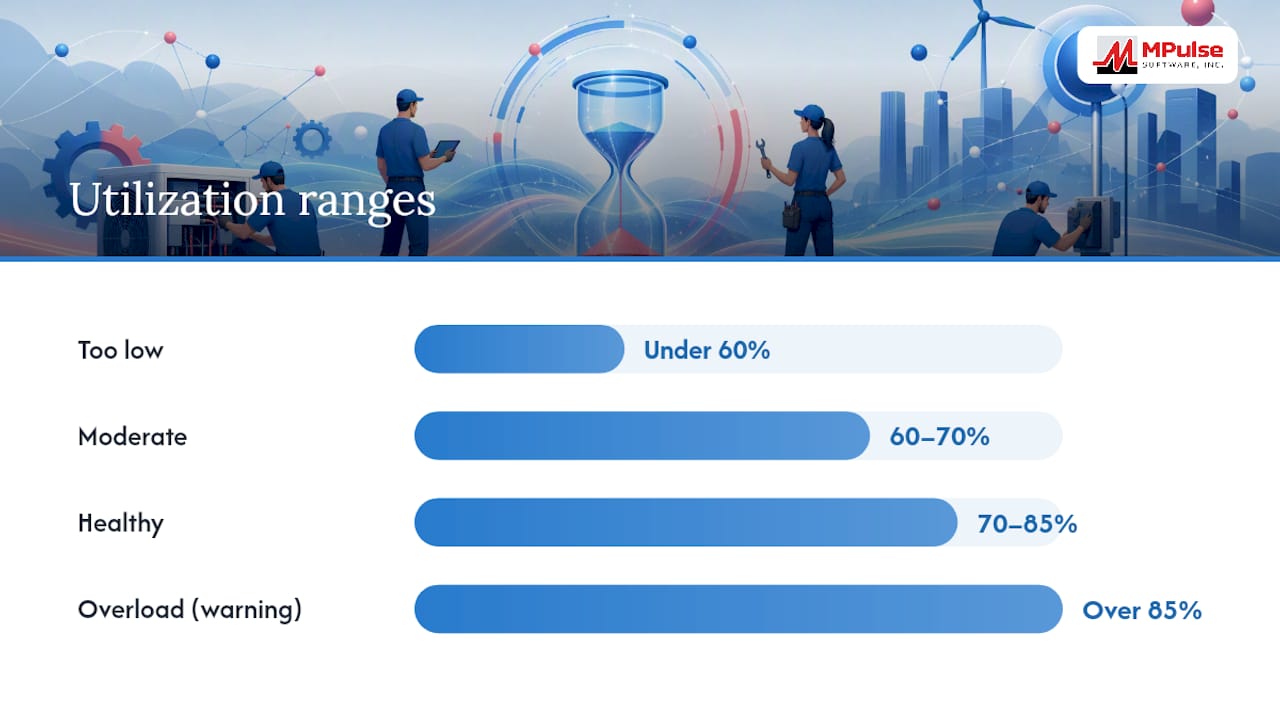
**Utilization below 60% often means routing or scheduling problems, not a lax technician—check dispatch efficiency before you check the individual.
Tools built around this same logic, like the calculator from CrewConductor, also factor in first-time-fix rates and parts availability, since both directly affect how much of a shift converts into billable work.
How Do You Roll Out Time Tracking Without Micromanaging?
The short version: adopt job-based timers, define categories clearly, and make reporting transparent to the team, not just to management. Vendor guidance consistently points to the same conclusion, that focusing on outcomes rather than minute-by-minute monitoring, paired with PSA-integrated timers and standardized categories, reduces friction and improves the accuracy of what technicians actually log.
Start with a pilot rather than a company-wide rollout. A small test group surfaces category problems and workflow friction before they become a full-scale headache.
- Select two to four technicians who represent different job types, not just your most tech-savvy crew members.
- Define your billable, non-billable, travel, and downtime categories in writing before day one.
- Train the pilot group on the mobile app or dispatch interface in a single short session, not a drawn-out onboarding.
- Set a reporting cadence, weekly is standard, so technicians see their own utilization data alongside management.
- Run the pilot for two weeks before expanding, which is enough time to catch configuration issues and build internal champions who can help train the rest of the crew.
Operational controls matter as much as the pilot itself. Build in an approval workflow where supervisors can review and adjust entries, allow bulk entry for supervisors covering multiple technicians on a single job, and give technicians the ability to verify or dispute their own logged hours before payroll locks them in.
Pro Tip: Show technicians their own utilization dashboard before you show it to anyone else. Teams that see their numbers first, rather than hearing about them in a review, tend to self-correct faster than teams that feel watched.
What Reports Turn Time Data Into Payroll-Ready Numbers?
Three data sources have to line up before a report is trustworthy: dispatch records (what was scheduled), time entries (what was actually logged), and invoices (what was billed). When these three disagree, and they will if you’re relying on manual processes, someone has to manually chase down the discrepancy before payroll or billing can proceed.
A useful weekly report includes:
- Technician name and ID
- Job or work order number
- Billable hours logged
- Non-billable hours logged
- Travel time as a percentage of total hours
- Utilization rate for the period
| Report field | Purpose | Update frequency |
|---|---|---|
| Billable vs. non-billable split | Confirms invoicing accuracy | Weekly |
| Travel time percentage | Flags routing inefficiency | Weekly |
| Utilization rate | Signals overload or underuse | Weekly |
| Payroll-ready export | Feeds payroll processing | Before each pay run |
Set alert thresholds so exceptions surface automatically rather than requiring a manager to scan every row. A utilization rate outside the 60 to 85% healthy band, per the benchmarks noted earlier, is a reasonable trigger for a manual review.
Distribute the utilization report weekly to operations leads, and generate a separate payroll-ready export just before each pay cycle so finance isn’t reconciling timesheets against invoices at the last minute. Automating this reconciliation across dispatch, time, and invoicing systems can recover 6 to 8 hours per week that would otherwise go into manually compiling these numbers. Dashboards built in tools like Power BI can visualize logged hours against capacity in the same view, which makes gaps obvious at a glance instead of buried in a spreadsheet.
Which Integrations Keep Your Time Data Reliable?
A single source of truth only exists when dispatch, time tracking, and invoicing actually talk to each other. Otherwise you’re maintaining three versions of the same job and trusting someone to keep them aligned by hand.
The technical patterns that make this work reliably include:
- Webhooks that push a job status change from dispatch straight into the time tracking system the moment a technician is assigned.
- APIs that sync completed time entries into payroll and invoicing without manual export and import.
- Scheduled exports for systems that can’t support real-time sync, run daily rather than weekly to limit the size of any reconciliation gap.
Validate integration quality by checking for unique per-entry IDs that persist across systems, monitoring sync latency, and keeping audit logs that show who edited an entry and when. Solutions like Buildium’s Work Sessions feature this kind of permission and edit-trail structure specifically because auditability matters once payroll disputes arise.
Good integration prevents the three most common failures: double entry when a technician logs time in two systems, mismatched job IDs that break the link between a time entry and its invoice, and missing payroll fields that stall a pay run entirely. Field service platforms built around job-level timesheet capture address this by generating payroll-ready exports directly from the same data used for dispatch and invoicing.
What Causes Bad Time Data, and How Do You Fix It?
Most inaccurate time data traces back to three causes: technicians forgetting to switch timers between jobs, inconsistent category use across the crew, and incentive structures that accidentally punish honest logging.
- Missed entries. Fix this with automated reminders that prompt a timer switch when a technician’s location or job status changes.
- Inconsistent categorization. Standardize category definitions in writing and reinforce them during onboarding and quarterly refreshers, not just at rollout.
- Incentive misalignment. If technicians believe logging downtime or travel honestly will make them look unproductive, they’ll round hours toward billable work instead. Build utilization targets around team performance and job routing quality, not individual minute-counting.
Routine data hygiene closes the remaining gaps. Run a weekly audit comparing dispatch records to logged time, spot-check a handful of entries against invoices monthly, and refresh training whenever you add a new job category or change your reporting cadence. MPulse Software’s guidance on common pitfalls in labor resource management covers several of these failure points in more depth, including how routing errors compound into utilization problems over time.
Pro Tip: Never introduce a new time category the same week you run payroll. Test any category change on a slow week first so you catch confusion before it hits a technician’s paycheck.
How an Integrated CMMS Reduces Reconciliation Work
An integrated CMMS closes the gap between scheduling, time capture, and reporting because all three functions operate inside the same system rather than three disconnected tools stitched together after the fact.
That improvement comes from a few specific capabilities working together. Time logged against a work order in MPulse ties directly to preventive maintenance schedules, so a technician’s hours on a PM task and a reactive repair are captured with the same accuracy, not treated as separate tracking problems. The calendar interface shows planned versus actual time at a glance, which surfaces scheduling conflicts before they turn into overtime. Payroll-ready exports pull straight from logged work order time, skipping the manual transcription step that causes most reconciliation errors.
Every step in the earlier implementation checklist, defining categories, running a pilot, setting reporting cadence, maps directly onto features MPulse already provides: job-based time capture, automated reminders tied to scheduling, and dashboards that show utilization without a manager compiling a spreadsheet by hand.
Do You Need to Worry About Privacy When Tracking Time?
Technician time tracking touches personal data, especially when it includes GPS location during travel or job site check-ins, and that raises real compliance questions managers can’t ignore.
The core principle is straightforward: track what’s necessary for payroll accuracy and job costing, and be transparent with technicians about what’s collected and why. Location tracking tied strictly to job assignments, for example confirming a technician arrived at a scheduled site, is a different privacy exposure than continuous background tracking throughout a shift.

Written policy matters here. Technicians should know, in plain language, what data the system collects, how long it’s retained, and who has access to it. That policy should live in the same onboarding materials that cover time categories and reporting cadence, not as a separate legal document nobody reads.
Compensable time rules add another layer. As the Department of Labor makes clear, certain travel time must count as hours worked, which means your tracking system needs to capture that data accurately, not avoid capturing it to sidestep a privacy conversation. Skipping travel time tracking to reduce data collection can create a wage and hour compliance gap that’s more costly than the privacy concern it was meant to solve.
Give technicians visibility into their own data, including the ability to view and dispute their own entries. That transparency does double duty: it satisfies most reasonable privacy expectations and it improves data accuracy, since technicians catch their own logging errors before a supervisor has to.
Does Time Tracking Hurt or Help Technician Morale?
Done wrong, time tracking reads as surveillance, and technicians disengage or find ways around it. Done right, it reads as a system that protects their pay accuracy and workload balance, and morale tends to hold steady or improve.
The difference comes down to framing and follow-through. Vendor research on this exact tension found that positioning time data as insight for team-level optimization rather than individual oversight reduces resistance and improves the quality of what gets logged. Technicians who believe the data will be used against them log conservatively or inconsistently. Technicians who see the data used to fix routing problems or rebalance an overloaded schedule tend to log honestly, because accurate data now works in their favor.
Utilization visibility can also head off burnout before it becomes a retention problem. A technician running above 85% utilization for several consecutive weeks, per the benchmarks discussed earlier, is a signal to redistribute jobs, not a badge of productivity to celebrate. MPulse Software’s piece on balanced workloads makes the same point: consistent overload shows up in turnover long before it shows up in a formal complaint.
The practical takeaway for managers: share utilization data with technicians directly, use it to adjust routing and staffing rather than to single people out, and make clear that logging downtime or travel honestly won’t be held against anyone. Morale follows the incentive structure, not the tracking tool itself.
What Do Real Efficiency Gains From Time Tracking Look Like?
The efficiency case for time tracking isn’t theoretical.
That kind of gain typically comes from a few compounding effects rather than one single fix. It also tightens the link between preventive maintenance schedules and actual technician availability, so PM tasks stop competing with reactive repairs for the same hours.
Automating the reconciliation between dispatch, time, and invoicing produces a more immediate win: recovering 6 to 8 hours per week that a manager or admin would otherwise spend manually compiling utilization reports from three disconnected sources. For a mid-size operation, that’s close to a full workday returned to higher-value planning instead of spreadsheet reconciliation.
The pattern across these efficiency gains is consistent: teams that move from manual or standalone tracking to integrated, job-based systems close the visibility gap between planned and actual time. That visibility is what turns a vague sense that “things feel behind schedule” into a specific, fixable routing or staffing decision, addressed through tools like resource leveling that match logged hours to planned capacity.
How Do the Main Software Categories Compare?
Technician time tracking software generally falls into three tiers, and the right fit depends on your crew size and how tightly you need time data linked to scheduling and invoicing.
Entry-level standalone timer apps work well for very small teams that just need a mobile clock in/clock out with basic job codes. They’re inexpensive and quick to deploy, but they don’t connect to dispatch or invoicing, which means someone still exports and reconciles data by hand.
Mid-tier field service apps add scheduling and basic reporting on top of time capture, useful for growing teams, though integration with a separate payroll or accounting system often still requires manual export files rather than a live sync.
Enterprise-grade integrated CMMS platforms like MPulse CMMS combine time capture, work order management, preventive maintenance scheduling, and payroll-ready reporting in a single system. This tier fits organizations with compliance recordkeeping requirements, multiple technicians across sites, or enough volume that manual reconciliation has become a real weekly time cost.
The decision point is usually volume and complexity, not budget alone. A three-person crew doing routine service calls may not need a full CMMS. A team managing dozens of technicians across preventive maintenance schedules, compliance documentation, and multiple job sites almost always sees the reconciliation savings outweigh the switching cost within a few months.
Can Time Tracking Adapt to Different Industries and Team Sizes?
Time tracking configurations that work for a five-person HVAC crew look nothing like what a 200-technician industrial maintenance operation needs, and a flexible system should scale between the two without forcing a rebuild.
Small teams typically need simple job categories, a mobile app for clock in/out per work order, and a weekly report a single supervisor can review manually. Complexity here works against adoption. The fewer categories and clicks required, the more likely technicians log time consistently.
Mid-size operations usually add layers: multiple job sites, a mix of preventive and reactive work, and enough technicians that a supervisor can’t manually check every entry. This is where approval workflows, bulk entry for supervisors, and automated reminders start earning their keep.
Larger or compliance-driven operations, manufacturing, healthcare facilities, utilities, need customization that ties time tracking to regulatory recordkeeping, personal qualification tracking for certified technicians, and audit trails that satisfy inspection requirements. A system like MPulse CMMS supports this tier through customizable workflows built specifically for industries with compliance obligations, rather than a generic timer bolted onto a scheduling tool.
The common thread across every company size is the same: the categories, approval rules, and reporting cadence should match how the team actually works, not a rigid template imported from a different industry. A contractor work order tracking checklist built for subcontracted crews, for instance, looks different from an internal maintenance team’s audit trail requirements, even though both are solving the same underlying reconciliation problem.
What to Do This Week to Fix Your Time Tracking
Pick one crew of two to four technicians and run a two-week pilot with clearly written categories before you touch the whole team. Turn on technician self-verification for logged entries before your next pay cycle, and schedule a recurring weekly slot to reconcile dispatch, time, and invoice data rather than letting it pile up.
None of this requires more oversight of individual technicians. It requires better systems around them. If your current setup still relies on manual exports between three separate tools, that’s the fix worth prioritizing before anything else on this list.
— Mark
See How MPulse CMMS Handles Time Tracking End to End
MPulse Software gives you one system where job-based time capture, calendar scheduling, and payroll-ready reporting already talk to each other, so you’re not stitching together a timer app, a dispatch tool, and a spreadsheet just to close out payroll each week.

That connection is what drives the efficiency gains discussed earlier: work order time feeds directly into preventive maintenance schedules and utilization dashboards, without a manual export step in between. For managers evaluating whether their current setup is costing them hours in reconciliation, that single-source structure is the practical difference. It also extends into real-time monitoring for teams that want downtime and condition data feeding the same reports as technician hours. Visit the MPulse CMMS product page to see the scheduling and reporting tools in action, or request a demo to walk through how it would fit your current dispatch and payroll workflow.
Where to Verify These Numbers and Rules
The claims in this guide draw on a mix of federal labor guidance and field service industry benchmarks worth bookmarking on their own.
- The Department of Labor’s travel time guidance spells out exactly when job-related travel counts as compensable hours worked.
- NinjaOne’s guide to tracking technician time covers practical, low-friction methods for reducing pushback during rollout.
- US Tech Automations’ breakdown of reconciliation automation quantifies the weekly time savings from automating dispatch, time, and invoice reconciliation.
Sources
- Travel time — U.S. Department of Labor
- How to track technician time without micromanaging — NinjaOne blog
- Cut 8 Hours/Week: Technician Utilization Reports Automated 2026 — US Tech Automations
FAQ
What Is the Best Method for Technician Time Tracking?
Job-based digital time tracking tied to work orders, reconciled automatically across dispatch, time, and invoicing systems, is the most reliable method for accuracy and payroll readiness. Integrated CMMS platforms like MPulse CMMS handle this natively rather than requiring separate tools stitched together.
How Do You Track Technician Hours Without Micromanaging?
Focus on outcomes and utilization trends rather than minute-by-minute monitoring, and use automated timers with standardized categories so technicians log time consistently without feeling watched. Sharing utilization data with technicians directly, rather than only with management, also reduces resistance.
Does Travel Time Count as Work Hours for Technicians?
Certain job-related travel time must count as compensable hours worked under Department of Labor guidance, so your time categories should capture travel separately rather than folding it into general work time.
How Much Time Does Automated Reconciliation Actually Save?
Automating reconciliation across dispatch, time tracking, and invoicing can recover 6 to 8 hours per week that would otherwise go into manually compiling utilization reports from separate systems.